
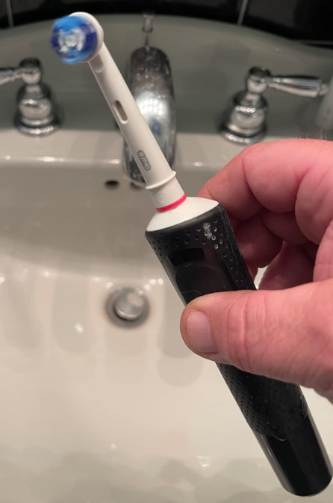
Electric toothbrushes have transformed the way we care for our teeth. A good one feels like a tiny dental hygienist buzzing in your hand, polishing every surface with precision. But when your Oral-B toothbrush suddenly refuses to turn on, the experience can feel frustrating. You press the button… nothing happens. Silence. No vibration, no lights, no signs of life.
If you’re facing the dreaded “Oral B toothbrush not turning on” problem, don’t worry. Most of the time the issue is simple and fixable. In this guide, we’ll walk through every possible cause, from dead batteries to internal faults, and show you how to revive your toothbrush step by step.
Think of this article as a friendly troubleshooting roadmap. We’ll explore quick fixes, deeper diagnostics, maintenance tips, and even signs that it might be time to replace your toothbrush.
Understanding How an Oral-B Electric Toothbrush Works
Before we jump into troubleshooting, it helps to understand what’s happening inside your toothbrush.
Most Oral-B electric toothbrushes contain several key components:
- A rechargeable lithium-ion or NiMH battery
- A small electric motor
- A control board
- A power button and seals
- A charging coil
When everything works correctly, the charger transfers energy to the battery. Pressing the button activates the control board, which powers the motor and creates the signature oscillating brush movement.
If any of these components fail, the toothbrush may stop turning on.
Signs Your Oral-B Toothbrush Has a Power Problem
Sometimes the issue isn’t obvious. Your toothbrush might show subtle symptoms before completely failing.
Common warning signs include:
- The toothbrush won’t turn on at all
- The indicator lights do not illuminate
- The brush briefly turns on and shuts off
- The motor feels weak or slow
- The toothbrush stops working even after charging overnight
Recognizing these early signs can help you diagnose the root cause faster.
Quick Fixes to Try First
Let’s start with the simplest solutions. Often, the problem is surprisingly easy to solve.
1. Charge the Toothbrush Properly
This may sound obvious, but many users accidentally place their toothbrush incorrectly on the charger.
Check the following:
- Ensure the charger is plugged into a working outlet
- Confirm the toothbrush sits firmly on the charging base
- Look for indicator lights or charging signals
If the battery was completely drained, it may take 30 minutes to several hours before it responds.
2. Clean the Charging Contacts
Over time, toothpaste residue, minerals from water, and debris can accumulate around the charging area.
To clean it:
- Remove the brush head.
- Wipe the metal contacts with a dry cloth or cotton swab.
- Avoid using excessive water.
Think of it like cleaning the charging port on your phone. A small obstruction can prevent proper power transfer.
3. Reset the Toothbrush
Some Oral-B models include a soft reset function.
Try this simple trick:
- Press and hold the power button for 10–15 seconds
- Release and press again normally
This can sometimes reset the internal electronics.
Battery Problems: The Most Common Cause
Why Batteries Fail
The battery is the heart of your electric toothbrush. Like all rechargeable batteries, it degrades over time.
Typical causes include:
- Age (2–5 years of use)
- Frequent deep discharging
- Overcharging
- Manufacturing defects
When the battery can no longer hold a charge, the toothbrush simply won’t start.
How to Tell If the Battery Is Dead
Signs of a failing battery include:
- The toothbrush runs only a few seconds
- Charging lights appear but the motor doesn’t start
- It works briefly after charging but quickly dies
If your toothbrush is several years old, the battery is often the culprit.
Charging Base Issues
Sometimes the problem isn’t the toothbrush at all—it’s the charger.
Check the Charger
Look for these clues:
- No charging lights
- Loose power cable
- Charger feels unusually warm or completely cold
Try plugging the charger into a different outlet. If possible, test another Oral-B toothbrush on the same charger.
Using the Wrong Charger
Different Oral-B models sometimes require specific chargers.
Using the wrong base can result in:
- Slow charging
- No charging at all
- Overheating
Always use the charger recommended for your model.
Power Button Malfunction
The power button experiences thousands of presses over the lifespan of a toothbrush.
Eventually, it can wear out.
Symptoms of a Faulty Button
You might notice:
- The button feels loose or stuck
- Pressing harder sometimes works
- The toothbrush activates randomly
If the internal switch fails, the toothbrush won’t respond at all.
Internal Water Damage
Electric toothbrushes are designed to handle water, but seals can degrade over time.
Water entering the body of the toothbrush can damage electronics.
Signs of Water Damage
Watch for:
- Rust around metal components
- Unusual noises
- Weak motor vibrations
- Complete failure
Once water reaches the control board, repairs become difficult.
Motor Failure
The motor is responsible for the rapid oscillation that cleans your teeth.
Although durable, it can fail after years of heavy use.
Symptoms of Motor Problems
Common indicators include:
- Grinding sounds
- Sudden shutdown during brushing
- Weak movement
- No vibration despite power
When the motor fails, replacement is often the only practical solution.
Software or Electronics Failure
Modern Oral-B toothbrushes include microcontrollers and sensors.
If these electronics malfunction, the toothbrush may refuse to start.
Possible triggers include:
- Power surges
- Internal short circuits
- Manufacturing defects
Unfortunately, electronic failures usually require replacement rather than repair.
How to Troubleshoot Step by Step
When your toothbrush won’t turn on, follow this troubleshooting sequence.
Step-by-Step Checklist
- Confirm the charger is plugged in.
- Clean the charging contacts.
- Charge the toothbrush for several hours.
- Attempt a reset.
- Inspect the power button.
- Look for water damage.
- Test another charger if available.
This methodical approach often reveals the issue quickly.
Can You Replace the Battery in an Oral-B Toothbrush?
Technically, yes—but it’s not always simple.
Many Oral-B toothbrushes are sealed units, making battery replacement challenging.
Battery Replacement Considerations
You’ll need:
- A compatible battery
- Soldering tools
- Basic electronics skills
Opening the handle can void warranties and compromise waterproof seals.
For most users, replacement is easier than repair.
When to Replace Your Toothbrush
Electric toothbrushes don’t last forever.
If your toothbrush is more than 4–5 years old, replacement might be the best option.
Consider replacing it if:
- The battery no longer holds charge
- Internal components are damaged
- Repairs cost more than a new brush
Think of it like replacing an old smartphone—the technology simply moves on.
Tips to Prevent Future Power Problems
Proper care can extend the lifespan of your toothbrush dramatically.
Maintenance Tips
- Rinse the brush handle after use
- Keep the charging base dry
- Avoid fully draining the battery frequently
- Store the toothbrush upright
- Replace brush heads regularly
A little maintenance goes a long way.
Comparing Oral-B Battery Lifespans
Different Oral-B models offer varying battery performance.
Typical battery durations:
- Entry-level models: 7–10 days
- Mid-range models: 10–14 days
- Premium models: 2–3 weeks
Battery longevity depends heavily on usage habits.
When Warranty or Support Can Help
If your toothbrush stops working unexpectedly, check the warranty.
Many Oral-B models include two-year warranties.
You may qualify for:
- Free replacement
- Repair service
- Customer support troubleshooting
Keep your purchase receipt if possible.
Conclusion
When your Oral B toothbrush is not turning on, it can feel like a small household mystery. But in most cases, the cause is simple—usually a drained battery, dirty charging contacts, or a worn-out power button.
By working through the troubleshooting steps we explored—charging properly, cleaning contacts, resetting the device, and checking for physical damage—you can often bring your toothbrush back to life.
And if the toothbrush has truly reached the end of its lifespan? Think of it as a good excuse to upgrade. Modern electric toothbrushes are smarter, quieter, and more powerful than ever before.
After all, a healthy smile deserves reliable tools.
FAQs
Why is my Oral-B toothbrush not turning on even after charging?
The most common reasons include a dead battery, faulty charger, dirty charging contacts, or internal electronic failure.
How long should I charge an Oral-B toothbrush before it turns on?
Most models require 12–16 hours for a full charge. However, the toothbrush may power on after 30–60 minutes of charging.
Can an Oral-B toothbrush battery be replaced?
Yes, but it usually requires opening the sealed handle and soldering a new battery, which can be difficult for most users.
Why does my toothbrush turn on and then shut off quickly?
This often indicates a failing battery that can no longer hold sufficient charge.
How long do Oral-B electric toothbrushes last?
Most Oral-B electric toothbrushes last 3–5 years with proper care and maintenance.