
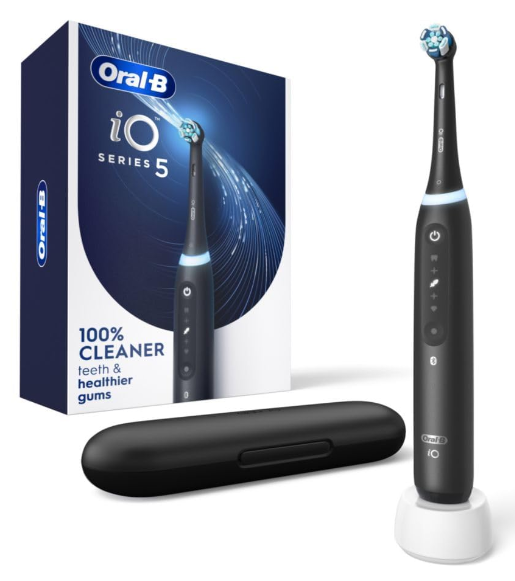
The Oral-B iO5 electric toothbrush is designed to make daily brushing smarter, easier, and more effective. Combining Oral-B’s iconic round brush head with advanced magnetic drive technology, the iO5 delivers a cleaning experience that feels both powerful and gentle. However, like any modern device, getting the best results requires understanding how to use it properly.
Whether you have just unboxed your new toothbrush or want to improve your brushing routine, this guide covers everything you need to know. From charging and setup to brushing modes, maintenance, troubleshooting, and expert tips, we’ll walk through every step in a simple and practical way.
What Is the Oral-B iO5?
The Oral-B iO5 belongs to the premium iO series of electric toothbrushes. Unlike traditional electric toothbrushes, the iO5 uses magnetic energy to transfer power directly to the brush head, creating smooth micro-vibrations that help remove plaque while remaining gentle on teeth and gums.
Its intelligent features include:
- Smart pressure sensor
- Multiple brushing modes
- Bluetooth connectivity
- Built-in timer
- Long-lasting rechargeable battery
- Interactive brushing guidance through the Oral-B app
Think of it as having a personal dental coach sitting on your bathroom counter every day.
What’s Included in the Box?
Before using the toothbrush, make sure all components are present.
Most Oral-B iO5 packages include:
- Oral-B iO5 handle
- One iO brush head
- Magnetic charging base
- Travel case (on selected models)
- User documentation
Always inspect the contents and remove all packaging materials before use.
How to Set Up the Oral-B iO5 for the First Time
Setting up the Oral-B iO5 is quick and straightforward.
Step 1: Remove Protective Packaging
Carefully remove all protective materials, including:
- Plastic wraps
- Cardboard inserts
- Safety stickers
- Transport covers
Ensure the charging contacts are clean and visible.
Step 2: Attach the Brush Head
Take the iO brush head and align it with the metal shaft on the toothbrush handle.
Push it straight down until it is securely attached.
Do not worry if a small gap remains between the brush head and handle. This is completely normal and allows the brush head to move correctly during operation.
Step 3: Charge the Toothbrush
Place the handle on the magnetic charging base.
The charger should be placed on a flat, dry surface near a power outlet.
Allow the toothbrush to charge fully before first use. A full charge helps optimize battery performance and ensures you can begin using the toothbrush without interruption.
Understanding the Oral-B iO5 Buttons
The iO5 is designed with simplicity in mind.
Power Button
The main button is used to:
- Turn the toothbrush on
- Turn the toothbrush off
- Navigate through brushing modes
The controls are intentionally minimal so that daily use remains intuitive.
Mode Indicator
The handle displays the selected cleaning mode through indicator lights, making it easy to identify your preferred setting before brushing.
How to Use the Oral-B iO5 Correctly
Many people assume an electric toothbrush should be used like a manual toothbrush. In reality, that approach can reduce effectiveness.
The Oral-B iO5 is designed to do most of the work for us.
Basic Brushing Steps
Follow this simple routine:
- Wet the brush head.
- Apply a pea-sized amount of toothpaste.
- Place the brush against your teeth before turning it on.
- Start the toothbrush.
- Slowly guide the brush from tooth to tooth.
- Allow the brush head to clean each surface.
- Turn off the brush after brushing is complete.
Avoid aggressive scrubbing motions.
Brushing the Outer Surfaces
Position the brush head against the outside surfaces of your teeth.
Move slowly from one tooth to the next, allowing the brush to spend a few seconds on each area.
Brushing the Inner Surfaces
Tilt the brush vertically when cleaning the inside surfaces of the front teeth.
Follow the gumline carefully and move methodically.
Brushing the Chewing Surfaces
Place the brush directly onto the chewing surfaces.
Allow the micro-vibrations and oscillations to clean the grooves and pits effectively.
Using the Built-In 2-Minute Timer
One of the most valuable features of the Oral-B iO5 is its timer.
How the Timer Works
The timer divides your mouth into four equal sections:
- Upper right
- Upper left
- Lower right
- Lower left
Every 30 seconds, the toothbrush briefly signals that it’s time to move to the next quadrant.
Why This Feature Is Important
Studies consistently show that most people brush for less than the recommended two minutes.
The built-in timer helps ensure that every area of your mouth receives adequate attention.
Understanding the Smart Pressure Sensor
Many users brush harder than necessary, believing that more pressure equals cleaner teeth.
In reality, excessive force can damage gums and enamel.
Green Light
When the sensor glows green, you are applying the ideal amount of pressure.
This is the target zone.
Red Light
A red light indicates excessive pressure.
Immediately reduce the force you are applying.
White Light
A white light generally suggests insufficient pressure.
Apply slightly more contact with the tooth surface.
Oral-B iO5 Brushing Modes Explained
The iO5 offers several cleaning modes designed for different needs.
Daily Clean Mode
This is the standard mode and the best choice for most users.
Benefits include:
- Effective plaque removal
- Balanced cleaning performance
- Everyday oral hygiene support
Sensitive Mode
Sensitive Mode reduces brushing intensity while maintaining effective cleaning.
Ideal for:
- Sensitive teeth
- New electric toothbrush users
- Mild gum irritation
Super Sensitive Mode
This mode provides the gentlest brushing experience available.
It can be especially useful after dental procedures or during periods of gum sensitivity.
Whitening Mode
Whitening Mode focuses on polishing teeth and reducing the appearance of surface stains.
While it does not bleach teeth, it can help maintain a brighter smile.
Intense Mode
Intense Mode provides maximum cleaning power.
It is best suited for experienced electric toothbrush users who prefer a stronger cleaning sensation.
Connecting the Oral-B iO5 to the App
The Oral-B app unlocks additional functionality and personalized coaching.
How to Pair the Toothbrush
Follow these steps:
- Download the Oral-B app.
- Enable Bluetooth on your smartphone.
- Open the app.
- Follow the pairing instructions.
- Select your iO5 toothbrush when prompted.
Pairing usually takes less than a minute.
Benefits of App Connectivity
The app provides:
- Brushing tracking
- Real-time guidance
- Coverage monitoring
- Personalized recommendations
- Progress reports
For many users, these features help build better long-term brushing habits.
How Often Should You Replace the Brush Head?
Brush heads do not last forever.
Recommended Replacement Schedule
Dental professionals generally recommend replacing the brush head every three months.
You may need to replace it sooner if the bristles show visible wear.
Signs a Replacement Is Needed
Look for:
- Frayed bristles
- Bent fibers
- Reduced cleaning performance
- Discoloration of indicator bristles
Fresh brush heads maintain optimal cleaning efficiency.
How to Clean the Oral-B iO5
Routine maintenance helps extend the life of your toothbrush.
Daily Cleaning Routine
After each use:
- Rinse the brush head thoroughly
- Rinse around the metal shaft
- Remove excess water
- Allow the toothbrush to air dry
Weekly Deep Cleaning
Once per week:
- Remove the brush head
- Clean around the connection point
- Wipe the handle with a damp cloth
- Clean the charging base
Never immerse the charger in water.
Traveling With the Oral-B iO5
The iO5 is designed for convenient travel.
Preparing for Travel
Before packing:
- Fully charge the toothbrush
- Clean the brush head
- Dry all components
Using the Travel Case
If your model includes a travel case, store the toothbrush and brush head inside to protect them during transport.
Tips for Maximizing Battery Life
The battery is designed to provide reliable performance, but proper care can help extend its lifespan.
Best Battery Practices
For optimal performance:
- Use the original charger
- Avoid extreme temperatures
- Keep charging contacts clean
- Charge regularly
Storage Recommendations
If you will not use the toothbrush for an extended period, store it in a cool, dry location and recharge it periodically.
Common Oral-B iO5 Problems and Solutions
Even high-quality devices occasionally encounter issues.
The Toothbrush Won’t Turn On
Possible solutions include:
- Fully charging the battery
- Checking charger placement
- Cleaning charging contacts
The Brush Head Feels Loose
A slight gap between the handle and brush head is normal.
If movement seems excessive, remove and reinstall the brush head.
Bluetooth Connection Problems
Try:
- Restarting the app
- Restarting your smartphone
- Re-enabling Bluetooth
- Updating the app
Mistakes to Avoid
Avoiding common mistakes helps maximize cleaning performance.
Common errors include:
- Brushing too aggressively
- Ignoring pressure sensor warnings
- Using worn brush heads
- Skipping the full two-minute timer
- Neglecting regular cleaning
Small adjustments can dramatically improve results.
Expert Tips for Better Brushing Results
To get the most from your Oral-B iO5:
- Move slowly between teeth
- Follow a consistent brushing pattern
- Focus on the gumline
- Use the pressure sensor as a guide
- Take advantage of app feedback
Remember, effective brushing is about technique, not force.
Why the Oral-B iO5 Is Worth Using Properly
Many people invest in advanced oral care technology but never fully utilize its capabilities.
The Oral-B iO5 offers features specifically designed to improve brushing habits and oral health. When used correctly, it can help remove more plaque, encourage healthier gums, and create a more consistent brushing routine.
The secret isn’t brushing harder. It’s brushing smarter.
Conclusion
The Oral-B iO5 electric toothbrush combines intelligent technology with practical design to deliver a superior brushing experience. By understanding proper setup, brushing techniques, pressure sensor guidance, cleaning modes, maintenance routines, and app features, we can unlock the full potential of this impressive device.
Whether you’re new to electric toothbrushes or upgrading from an older model, following these Oral-B iO5 electric toothbrush instructions will help you achieve cleaner teeth, healthier gums, and greater confidence in your daily oral care routine.
Frequently Asked Questions
How long does the Oral-B iO5 battery last?
A full charge typically provides enough power for several days of regular brushing, depending on usage and selected brushing modes.
Can I use regular Oral-B brush heads with the iO5?
No. The iO5 requires specially designed Oral-B iO brush heads.
Is the Oral-B iO5 suitable for sensitive teeth?
Yes. Sensitive and Super Sensitive modes are specifically designed for users with sensitive teeth or gums.
Should I use the Oral-B app every day?
The toothbrush works perfectly without the app, but daily app use can improve brushing habits and coverage.
How often should I replace the brush head?
Most users should replace the brush head every three months or sooner if the bristles become worn.