
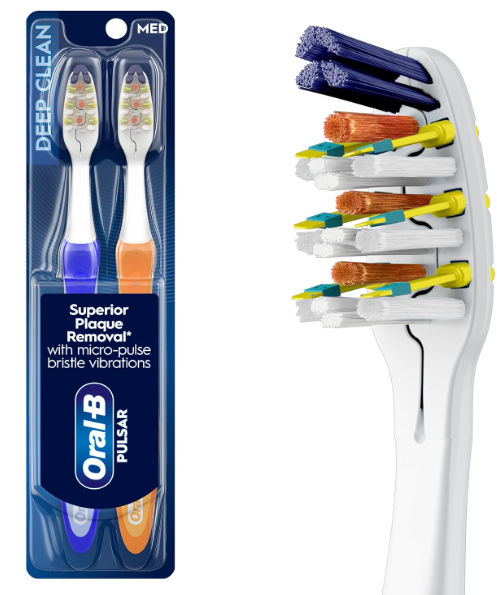
The Oral-B Pulsar toothbrush has earned a loyal following for one simple reason: it bridges the gap between a traditional manual toothbrush and an electric toothbrush. Its built-in battery-powered vibrating bristles provide an enhanced cleaning experience without the cost or complexity of a fully rechargeable model.
But what happens when the battery dies?
Many users wonder whether an Oral-B Pulsar toothbrush battery replacement is possible or if they should simply purchase a new brush. The answer is more nuanced than most people realize. While Oral-B generally designs Pulsar toothbrushes as disposable products, some users successfully replace the battery themselves.
In this comprehensive guide, we’ll explore everything about Oral-B Pulsar toothbrush battery replacement, including battery types, replacement methods, safety concerns, troubleshooting tips, and whether replacing the battery is actually worth the effort.
What Is an Oral-B Pulsar Toothbrush?
The Oral-B Pulsar is a battery-powered manual toothbrush that combines traditional brushing with gentle vibrations.
Unlike premium electric toothbrushes, the Pulsar does not feature:
- Rechargeable batteries
- Charging docks
- Smart sensors
- Bluetooth connectivity
- Multiple brushing modes
Instead, it uses a small battery sealed inside the handle to power vibrating bristles.
This design offers:
- Better plaque removal than standard manual brushes
- Improved reach between teeth
- Enhanced cleaning sensation
- Lower cost compared to electric toothbrushes
Think of it as a bicycle with a small electric assist motor rather than a full electric vehicle.
Why Do People Want to Replace the Battery?
When the vibration suddenly stops, many users feel frustrated because the brush head itself often remains in good condition.
Common reasons for replacing the battery include:
- Saving money
- Reducing waste
- Extending product life
- Environmental concerns
- DIY curiosity
Rather than discarding the toothbrush immediately, some people prefer exploring whether the battery can be replaced.
How Long Does an Oral-B Pulsar Battery Last?
Battery life varies depending on brushing habits.
Several factors influence longevity:
Frequency of Use
Using the toothbrush twice daily naturally drains the battery faster than occasional use.
Brushing Duration
Long brushing sessions consume more power.
Storage Conditions
Heat, humidity, and improper storage can shorten battery life.
Battery Quality
Manufacturing variations affect lifespan.
Most Oral-B Pulsar toothbrushes last between:
- 2 to 4 months for regular users
- Up to 6 months for lighter use
The battery generally reaches the end of its life around the same time the bristles begin wearing out.
Signs Your Pulsar Battery Is Dying
Recognizing battery failure early can help determine whether replacement is worthwhile.
Weaker Vibrations
The brush may still vibrate but with noticeably reduced intensity.
Intermittent Operation
The vibrations may start and stop unexpectedly.
Complete Loss of Vibration
The most obvious symptom is when the brush stops vibrating entirely.
Unusual Sounds
Weak batteries can sometimes cause inconsistent buzzing noises.
Can You Replace the Battery in an Oral-B Pulsar Toothbrush?
Technically, yes.
Practically, it depends.
Oral-B does not market the Pulsar as a user-serviceable toothbrush. The battery compartment is sealed rather than designed for easy access.
However, many DIY enthusiasts have successfully replaced batteries using household tools.
The process requires:
- Opening the handle
- Removing the old battery
- Installing a compatible replacement
- Resealing the handle
The challenge lies in opening the toothbrush without damaging internal components.
Understanding the Battery Inside the Pulsar
Before attempting replacement, we need to understand what powers the toothbrush.
Common Battery Types
Different Pulsar models may contain:
- AAAA batteries
- LR44 button cells
- Specialized miniature batteries
Battery type varies depending on model generation and manufacturing year.
Because designs change over time, checking the specific battery inside your toothbrush is essential before purchasing replacements.
Tools You May Need
Successful battery replacement usually requires a few basic tools.
Essential Tools
- Small flathead screwdriver
- Needle-nose pliers
- Precision knife
- Protective gloves
Optional Tools
- Multimeter
- Adhesive sealant
- Tweezers
- Small work light
Having the right tools dramatically reduces the risk of damaging the toothbrush.
Step-by-Step Oral-B Pulsar Toothbrush Battery Replacement
Step 1: Inspect the Handle
Examine the handle carefully.
Look for:
- Seams
- Snap-fit sections
- Battery access points
Some models hide access areas beneath labels or rubber grips.
Step 2: Open the Handle Carefully
Using a small flathead screwdriver, gently pry apart the handle.
Work slowly.
Excessive force can crack the plastic housing.
Step 3: Locate the Battery
Once opened, identify:
- Battery placement
- Positive terminal
- Negative terminal
Taking a photo before removal can prevent installation mistakes later.
Step 4: Remove the Old Battery
Carefully extract the battery without damaging wiring or contacts.
Inspect for:
- Corrosion
- Leakage
- Broken connections
Step 5: Install the Replacement Battery
Insert the new battery using the same orientation as the original.
Double-check polarity before proceeding.
Incorrect installation may prevent operation.
Step 6: Test Functionality
Before sealing the handle:
- Activate the toothbrush
- Confirm vibration strength
- Verify consistent operation
Testing now avoids reopening the handle later.
Step 7: Reseal the Handle
Reassemble the housing.
Depending on the design, you may need:
- Snap-fit closure
- Waterproof adhesive
- Silicone sealant
A secure seal helps protect the internal electronics from moisture.
Potential Risks of Replacing the Battery
Battery replacement isn’t without risks.
Loss of Water Resistance
The original factory seal helps prevent moisture intrusion.
Opening the handle compromises this protection.
Internal Damage
Fragile electronic components may break during disassembly.
Battery Leakage
Improper installation can increase leakage risk.
Reduced Reliability
The toothbrush may never regain its original durability after being opened.
When Battery Replacement Makes Sense
Not every toothbrush deserves repair.
Battery replacement may be worthwhile if:
- The brush is relatively new
- Bristles remain in excellent condition
- You enjoy DIY projects
- Replacement batteries are inexpensive
For hobbyists, the process can be rewarding.
When Buying a New Toothbrush Is Smarter
Sometimes replacement simply isn’t practical.
Consider purchasing a new toothbrush when:
- Bristles are worn out
- The handle is damaged
- Moisture has entered the housing
- Replacement parts are difficult to find
Since dentists generally recommend replacing toothbrushes every three months, a new brush often makes more sense.
Environmental Benefits of Battery Replacement
One compelling reason to replace the battery is reducing waste.
Less Plastic in Landfills
Extending product life delays disposal.
Reduced Resource Consumption
Fewer replacements mean fewer manufacturing resources.
Lower Carbon Footprint
Using products longer generally decreases environmental impact.
Small actions add up over time.
Common Problems After Battery Replacement
Even successful replacements can introduce new challenges.
No Vibration
Possible causes include:
- Incorrect polarity
- Loose connections
- Defective replacement battery
Weak Performance
This may result from:
- Low-quality batteries
- Contact resistance
- Damaged motor components
Intermittent Operation
Often caused by poor electrical contact inside the handle.
Tips for Extending Battery Life
If you’ve successfully replaced the battery, you’ll want to maximize its lifespan.
Store in a Dry Area
Humidity accelerates component degradation.
Avoid Excessive Pressure
Heavy brushing can place extra stress on the motor.
Keep the Handle Clean
Prevent toothpaste buildup around seams and openings.
Use Proper Brushing Time
Two minutes is sufficient for effective cleaning.
DIY Battery Replacement vs Professional Solutions
Some consumers wonder whether professional repair services exist.
The reality is that most repair shops do not service disposable battery-powered toothbrushes.
Reasons include:
- Low product value
- High labor costs
- Limited parts availability
For this reason, battery replacement is typically a DIY project.
Alternative Oral-B Toothbrushes With Replaceable or Rechargeable Batteries
If battery replacement appeals to you, consider upgrading to a more serviceable model.
Benefits of Rechargeable Models
- Longer lifespan
- Better cleaning performance
- Less battery waste
- Improved brushing technology
Many users eventually transition from Pulsar brushes to rechargeable electric toothbrushes for these reasons.
The Cost Comparison: Replace or Replace the Brush?
Let’s compare typical costs.
Battery Replacement
- Replacement battery: low cost
- Tools: possibly already owned
- Time investment: moderate
New Pulsar Toothbrush
- Simple purchase
- No repair effort
- Factory-fresh bristles
Financially, the difference is often small.
The decision usually comes down to convenience versus sustainability.
What Most Users Don’t Realize About Pulsar Batteries
Here’s an interesting observation.
The Pulsar’s battery life was intentionally designed to roughly match the useful life of the bristles.
This means many users experience battery failure around the same time dental professionals recommend replacing the toothbrush anyway.
In other words, the product’s lifecycle was engineered around both oral hygiene and convenience.
It’s a clever design philosophy—even if it frustrates DIY enthusiasts.
Conclusion
Oral-B Pulsar toothbrush battery replacement is possible, but it isn’t always practical. While the toothbrush was not designed for easy battery access, determined users can often open the handle, replace the battery, and restore vibration functionality.
Whether the process is worthwhile depends on the condition of the brush, your comfort with DIY repairs, and your desire to reduce waste. For some, replacing the battery is a satisfying project that extends the life of a useful product. For others, purchasing a new toothbrush may be the more efficient solution.
Ultimately, understanding how the Pulsar works empowers us to make informed choices about maintenance, sustainability, and oral health. Like giving an old watch a new spring, a battery replacement can breathe fresh life into a familiar tool—provided we’re willing to put in the effort.
Frequently Asked Questions
1. Can every Oral-B Pulsar toothbrush battery be replaced?
Not necessarily. Most models can be opened with effort, but some designs are more difficult to access than others.
2. What battery does an Oral-B Pulsar toothbrush use?
Battery type varies by model and manufacturing year. Always inspect the existing battery before purchasing a replacement.
3. Is replacing the battery safe?
It can be safe when performed carefully, but opening the handle may compromise water resistance and damage internal components.
4. Why did my Pulsar stop vibrating even with a new battery?
Possible causes include damaged wiring, incorrect battery orientation, moisture intrusion, or motor failure.
5. Is battery replacement cheaper than buying a new Pulsar toothbrush?
Usually yes, but the savings are often modest. The decision depends on convenience, sustainability goals, and the condition of the toothbrush.