
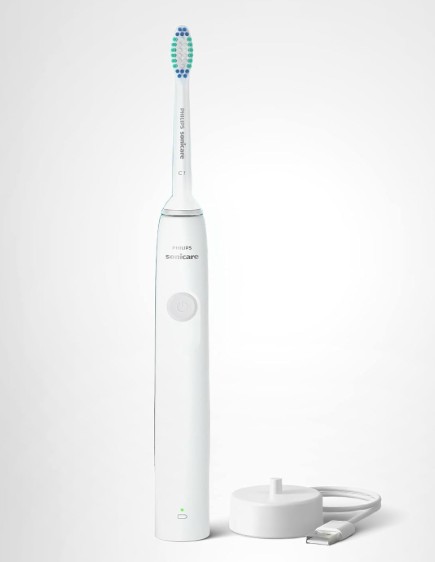
A Philips Sonicare toothbrush is designed to be one of the most reliable tools in your oral care routine. It hums to life every morning, glides across your teeth, and helps keep your smile healthy. So when it suddenly stops working, it can feel like your trusted co-pilot has abandoned ship.
If you’ve found yourself asking, “Why did my Philips Sonicare toothbrush stop working?”, you’re not alone. Whether the toothbrush refuses to turn on, won’t hold a charge, vibrates weakly, or shuts off unexpectedly, there are several possible explanations.
In this comprehensive guide, we’ll explore the most common reasons a Philips Sonicare toothbrush stops working, how to troubleshoot the issue, and what you can do to prevent it from happening again.
Understanding How a Philips Sonicare Toothbrush Works
Before diving into troubleshooting, it’s helpful to understand the basics.
Philips Sonicare toothbrushes use high-frequency sonic vibrations to clean teeth. Depending on the model, they can generate tens of thousands of brush strokes per minute. Behind that smooth operation are several key components:
- Rechargeable battery
- Charging base
- Motor assembly
- Electronic control board
- Power button
- Brush head connection
When any of these components fail or experience a disruption, performance problems can occur.
The Most Common Reasons a Philips Sonicare Toothbrush Stops Working
Not every malfunction means the toothbrush is dead. In many cases, the problem is surprisingly simple.
Battery Failure
The rechargeable battery is often the first component to wear out.
Like a smartphone battery, a Sonicare battery gradually loses capacity over time. After years of daily charging and discharging, it may no longer store enough power to operate properly.
Common signs include:
- Short battery life
- Random shutdowns
- Failure to charge fully
- No response when pressing the power button
Older toothbrushes are particularly susceptible to battery degradation.
Charging Problems
Sometimes the toothbrush itself isn’t the issue.
The charger may be malfunctioning.
Check for:
- Damaged power cord
- Dirty charging contacts
- Loose electrical connections
- Faulty charging base
A defective charger can make a healthy toothbrush appear completely dead.
Power Button Issues
The power button experiences thousands of presses throughout the toothbrush’s lifespan.
Over time:
- Moisture may seep inside
- Debris can accumulate
- Internal contacts may wear out
If pressing the button feels unusual or requires extra force, the switch could be failing.
Water Damage
Although Sonicare toothbrushes are designed to handle water, they’re not indestructible.
Excessive exposure can eventually compromise internal components.
Potential causes include:
- Cracked housing
- Damaged seals
- Long-term moisture intrusion
Water damage often causes intermittent performance issues before complete failure occurs.
Signs Your Philips Sonicare Battery Has Reached the End
Rapid Battery Drain
A toothbrush that once lasted weeks but now lasts only a day or two is often signaling battery wear.
Battery aging happens gradually, making it easy to overlook until performance becomes frustrating.
Flashing Lights Without Operation
Many Sonicare models display blinking LEDs when battery problems develop.
The indicator may:
- Flash continuously
- Fail to change color
- Show charging status incorrectly
These symptoms frequently point toward battery-related issues.
Failure to Hold a Charge
If you place the toothbrush on the charger overnight and it dies shortly afterward, the battery likely can no longer store energy effectively.
How to Determine if the Charger Is the Problem
Inspect the Charging Base
Start with a visual inspection.
Look for:
- Cracks
- Burn marks
- Frayed cables
- Corrosion
Even minor physical damage can affect charging performance.
Test Another Outlet
Sometimes the simplest explanation is the correct one.
Try plugging the charger into:
- Another wall outlet
- Another room
- A known working power source
This eliminates household electrical issues as a possible cause.
Check for Indicator Lights
Many Sonicare models display charging indicators when properly seated.
If no lights appear:
- Reposition the handle
- Clean the charging contacts
- Verify power is reaching the charger
When the Toothbrush Vibrates Weakly
A Sonicare toothbrush should feel powerful and consistent.
Weak vibration may indicate:
- Low battery charge
- Internal motor wear
- Mechanical obstruction
- Electronic failure
Brush Head Problems
Believe it or not, the brush head itself can contribute to poor performance.
Replace the brush head if:
- Bristles are worn
- The connection feels loose
- The head rattles excessively
A fresh brush head often restores optimal cleaning effectiveness.
The Hidden Enemy: Toothpaste and Residue Buildup
Many users underestimate the effects of residue accumulation.
Over months or years:
- Toothpaste hardens
- Minerals accumulate
- Debris gathers around moving parts
This buildup can interfere with proper operation.
How to Clean the Handle Properly
Follow these steps:
- Remove the brush head.
- Rinse thoroughly under warm water.
- Wipe the metal shaft.
- Remove visible residue.
- Dry completely before charging.
Regular cleaning helps prevent unnecessary performance issues.
Why a New Philips Sonicare Might Not Turn On
A brand-new toothbrush that won’t start can be alarming.
Fortunately, the solution is often simple.
Shipping Mode Activation
Many Sonicare models ship in a battery-saving mode.
The toothbrush may require:
- Extended charging
- Holding the power button
- Specific startup procedures
Consulting the included manual can often resolve the issue quickly.
Incomplete Initial Charge
Some units require several hours of charging before first use.
Patience may be all that’s needed.
Software and Electronics Can Fail Too
Modern Sonicare toothbrushes are surprisingly sophisticated.
Premium models include:
- Pressure sensors
- Bluetooth connectivity
- Smart timers
- Multiple cleaning modes
As with any electronic device, internal circuitry can malfunction.
Symptoms of Electronic Failure
Watch for:
- Random mode switching
- Unresponsive buttons
- Inconsistent operation
- Sudden shutdowns
These issues may indicate deeper electronic problems.
How to Reset a Philips Sonicare Toothbrush
In some cases, a reset can restore normal function.
Basic Reset Procedure
Although procedures vary by model:
- Place the handle on the charger.
- Hold the power button for several seconds.
- Wait for indicator lights.
- Remove and test operation.
This process can clear minor software glitches.
When the Motor Stops Working
Motor Wear Over Time
Every Sonicare toothbrush contains a motor that works incredibly hard.
Think of it as the engine in a car.
After years of operation:
- Bearings wear
- Components loosen
- Performance declines
Eventually, the motor may stop functioning entirely.
Signs of Motor Failure
Typical indicators include:
- Loud noises
- Grinding sounds
- Weak movement
- No vibration despite charging
At that stage, replacement may be the most practical solution.
Can a Philips Sonicare Be Repaired?
The answer depends on the problem.
Repairable Issues
Some problems are relatively easy to address:
- Dirty charging contacts
- Worn brush heads
- Faulty chargers
- Minor residue buildup
Difficult Repairs
Other failures are more complex:
- Internal battery replacement
- Circuit board damage
- Motor failure
- Water damage
Many Sonicare models are not designed for easy disassembly, making repairs challenging.
How Long Should a Philips Sonicare Toothbrush Last?
The lifespan varies based on:
- Model quality
- Usage habits
- Charging practices
- Maintenance routines
Generally, many users enjoy several years of reliable service before major issues emerge.
Factors That Shorten Lifespan
These habits can accelerate wear:
- Constant charging
- Dropping the toothbrush
- Poor cleaning habits
- Exposure to extreme temperatures
Preventing Future Sonicare Problems
Prevention is often easier than troubleshooting.
Keep It Clean
Regular maintenance helps avoid buildup and mechanical issues.
Recommended routine:
- Weekly handle cleaning
- Monthly deep cleaning
- Regular brush head replacement
Avoid Excessive Moisture
While water-resistant, prolonged moisture exposure can still create problems.
Dry the handle after use whenever possible.
Charge Responsibly
Avoid leaving the toothbrush on the charger continuously if your model doesn’t require it.
Moderate charging habits may help preserve battery health.
When to Contact Philips Support
If troubleshooting doesn’t solve the problem, reaching out to Philips may be worthwhile.
Consider contacting support if:
- The toothbrush is under warranty
- Charging issues persist
- The handle won’t power on
- Internal components appear damaged
Warranty coverage can sometimes result in repair or replacement.
Comparing Temporary Problems vs. Permanent Failure
Temporary Issues
These are usually fixable:
- Dirty contacts
- Battery calibration issues
- Software glitches
- Brush head problems
Permanent Issues
These often require replacement:
- Dead motor
- Severe water damage
- Failed circuit board
- Irreparable battery degradation
Recognizing the difference can save time and frustration.
Should You Repair or Replace Your Sonicare?
The decision often comes down to age and cost.
Repair may make sense if:
- The toothbrush is relatively new
- The issue is minor
- Warranty coverage exists
Replacement may be better if:
- The toothbrush is several years old
- Multiple components are failing
- Repair costs approach replacement costs
Sometimes replacing the unit provides better long-term value.
Warning Signs You Shouldn’t Ignore
Pay attention to these symptoms:
- Burning smells
- Excessive heat
- Unusual noises
- Swelling near the battery area
- Frequent shutdowns
Addressing problems early can prevent further damage.
Final Thoughts: Why Your Philips Sonicare Toothbrush Stopped Working
A Philips Sonicare toothbrush rarely stops working without warning. More often than not, subtle clues appear first: shorter battery life, weaker vibrations, inconsistent charging, or strange noises. Like a lighthouse flickering before a storm, these signals often point toward the underlying problem.
The most common culprits include battery deterioration, charging issues, residue buildup, power button wear, motor failure, and water intrusion. Fortunately, many of these problems can be diagnosed and sometimes fixed with a little patience and maintenance.
Before assuming your toothbrush has reached the end of its life, take a systematic approach. Inspect the charger, clean the handle, check the brush head, and try a reset. You might discover that the solution is simpler than expected.
A Sonicare toothbrush is an investment in oral health, and with proper care, it can continue delivering reliable performance for years to come.
Frequently Asked Questions
1. Why did my Philips Sonicare toothbrush suddenly stop turning on?
The most common causes include a depleted battery, charging problems, a faulty power button, or internal electronic issues.
2. How do I know if my Sonicare battery is dead?
Signs include rapid battery drain, failure to hold a charge, flashing lights, and complete inability to power on.
3. Can water damage a Philips Sonicare toothbrush?
Yes. Although water-resistant, damaged seals or cracks can allow moisture to enter and affect internal components.
4. Is it worth replacing the battery in a Sonicare toothbrush?
In some cases, yes. However, many models are difficult to open, making battery replacement impractical compared to buying a new unit.
5. How long should a Philips Sonicare toothbrush last?
With proper care and maintenance, many Sonicare toothbrushes provide several years of dependable performance before significant wear develops.