
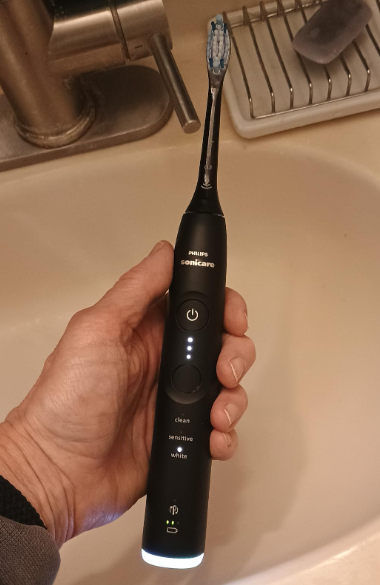
Have you ever looked at your Philips Sonicare toothbrush and wondered, “What Philips Sonicare toothbrush do I have?” You’re not alone. Many of us receive a Sonicare as a gift, inherit one from a family member, or simply forget which model we purchased years ago. Then comes the moment when we need a replacement brush head, troubleshooting help, or accessories—and suddenly knowing the exact model becomes essential.
Fortunately, identifying your Philips Sonicare toothbrush is much easier than it seems. Whether you’re holding an older entry-level model or a premium smart toothbrush packed with advanced features, there are several clues that can reveal its identity.
In this comprehensive guide, we’ll walk through everything you need to know to determine exactly which Philips Sonicare toothbrush you own.
Why Knowing Your Philips Sonicare Model Matters
Before we dive into identification methods, let’s answer an important question: why does it matter?
Knowing your Sonicare model helps you:
- Purchase compatible replacement brush heads
- Find the correct charger
- Access the proper user manual
- Troubleshoot problems effectively
- Determine warranty eligibility
- Understand available brushing modes
- Compare features with newer models
Think of your toothbrush model as its fingerprint. Once you know it, every other question becomes easier to answer.
Understanding Philips Sonicare Model Numbers
Philips Sonicare toothbrushes typically have model numbers beginning with:
- HX3XXX
- HX5XXX
- HX6XXX
- HX9XXX
The letters “HX” indicate a Sonicare product, while the following digits identify the specific series.
Examples include:
- HX3211
- HX3671
- HX6850
- HX9911
Each number tells a story about the toothbrush’s features, generation, and intended market segment.
Where to Find the Model Number on Your Sonicare
Check the Bottom of the Handle
The easiest method is inspecting the base of the toothbrush handle.
Most Philips Sonicare toothbrushes display:
- Model number
- Serial number
- Manufacturing information
Turn the toothbrush upside down and look carefully around the bottom section.
You may see something like:
HX6857/11
or
HX9913
That’s the information you need.
Look Beneath the Charger Connection
Sometimes the model number is printed near the charging contact area.
If the text appears faded, use:
- A flashlight
- Your smartphone camera zoom
- A magnifying glass
Years of bathroom humidity can make labels harder to read.
Using Physical Features to Identify Your Sonicare
What if the model number has worn away?
No problem.
The physical design often reveals the model family.
Identifying Entry-Level Sonicare Models
Philips Sonicare 1100 Series
The 1100 Series is simple and straightforward.
Features include:
- One brushing mode
- Slim handle
- Single power button
- No pressure sensor
If your toothbrush feels minimalist, it may belong to this category.
Philips Sonicare 2100 Series
The 2100 Series adds a few enhancements.
Typical characteristics:
- Better battery life
- BrushSync compatibility on some versions
- Improved ergonomics
These models still maintain a clean, uncomplicated appearance.
Recognizing Mid-Range Sonicare Models
ProtectiveClean Series
ProtectiveClean models became incredibly popular.
Common features:
- Pressure sensor
- Multiple cleaning modes
- BrushSync technology
- LED indicators
Popular examples include:
- ProtectiveClean 4100
- ProtectiveClean 5100
- ProtectiveClean 6100
These toothbrushes strike a balance between affordability and advanced functionality.
How BrushSync Helps Identification
BrushSync-enabled toothbrushes often have:
- Smart brush head recognition
- Brush replacement reminders
- Enhanced indicator lights
If your toothbrush reminds you when to replace the brush head, it likely belongs to a newer generation.
Identifying Premium Sonicare Toothbrushes
DiamondClean Series
DiamondClean models are among Sonicare’s most recognizable products.
Key indicators:
- Premium finish
- Glass charging cup
- Multiple brushing modes
- Elegant design
The DiamondClean feels like the luxury sedan of electric toothbrushes.
DiamondClean Smart Models
These premium models often include:
- Bluetooth connectivity
- Smartphone app integration
- Position tracking
- Advanced coaching features
If your toothbrush pairs with a mobile app, you’re likely using a DiamondClean Smart model.
How to Tell if You Have a Sonicare ExpertClean
The ExpertClean series sits between premium and luxury categories.
Look for:
- Pressure sensors
- BrushSync
- Bluetooth support
- Several cleaning modes
Many ExpertClean models feature a modern matte finish and sleek control layout.
Examining the Buttons and Display
Single Button Models
Generally indicate:
- Entry-level Sonicare toothbrushes
- Basic functionality
- One brushing mode
These models prioritize simplicity.
Multiple Button Models
Usually indicate:
- Several brushing modes
- Intensity adjustments
- More advanced features
Additional buttons often signal a higher-tier toothbrush.
Identifying Sonicare by Brushing Modes
Different Sonicare models offer varying cleaning modes.
Common options include:
- Clean
- White
- Gum Care
- Deep Clean
- Sensitive
- Tongue Care
The more modes available, the more premium the toothbrush typically is.
One Mode
Likely:
- 1100 Series
- 2100 Series
- Basic DailyClean models
Three or More Modes
Possibly:
- ProtectiveClean
- ExpertClean
- DiamondClean
Using the Charger to Help Identify the Model
The charger itself can reveal valuable clues.
Standard Plastic Charger
Usually paired with:
- Entry-level models
- Mid-range Sonicare toothbrushes
Glass Charging Cup
Typically associated with:
- DiamondClean
- DiamondClean Smart
This feature is almost iconic within the Sonicare lineup.
Travel Charging Case
Premium models often include:
- USB charging cases
- Travel-friendly designs
- High-end accessories
These extras can narrow your search significantly.
Matching Your Toothbrush Head Type
Your current brush head may help identify the handle.
Popular Sonicare brush heads include:
- C1 ProResults
- C2 Optimal Plaque Control
- G2 Optimal Gum Care
- W2 Optimal White
- A3 Premium All-in-One
Although most Sonicare heads are interchangeable, certain premium features work best when paired with compatible handles.
Using the Philips Sonicare App
Check Bluetooth Connectivity
If your toothbrush connects to the Sonicare app, identification becomes much easier.
The app often displays:
- Product name
- Model number
- Serial information
- Firmware version
It’s like asking the toothbrush to introduce itself.
Searching Online with Your Serial Number
Another effective approach involves searching your model or serial number online.
Simply enter:
“Philips Sonicare HXxxxx”
into a search engine.
Results frequently reveal:
- Product photos
- Manuals
- Specifications
- Accessories
Comparing images can confirm your toothbrush model within minutes.
Common Sonicare Series and Their Features
DailyClean
Features:
- Affordable
- Basic functionality
- Reliable cleaning
Best for users who want simplicity.
ProtectiveClean
Features:
- Pressure sensor
- BrushSync
- Multiple modes
Excellent balance of performance and value.
ExpertClean
Features:
- Bluetooth
- Personalized coaching
- Smart sensors
Ideal for technology enthusiasts.
DiamondClean
Features:
- Premium design
- Luxury charging options
- Advanced cleaning modes
Designed for users seeking a top-tier brushing experience.
Visual Clues That Reveal Your Sonicare Generation
Several visual details help identify generations.
LED Indicators
Older models:
- Basic charging light
Newer models:
- Multiple LEDs
- Mode indicators
- Pressure alerts
Handle Texture
Older handles often feature:
- Glossy plastic
Newer handles commonly include:
- Matte finishes
- Premium materials
- Enhanced grip patterns
When Your Sonicare Model Number Is Missing
Sometimes the label is completely unreadable.
In that case:
- Photograph the handle.
- Photograph the charger.
- Count the brushing modes.
- Note any Bluetooth features.
- Compare images on Philips product pages.
This process usually narrows the possibilities quickly.
How Old Is My Philips Sonicare Toothbrush?
Model identification often reveals age.
General timeline:
- Early Sonicare models: basic controls
- Mid-generation models: pressure sensors
- Recent models: Bluetooth and smart tracking
Technology evolves quickly, and toothbrushes are no exception.
Should You Upgrade Once You Identify Your Model?
After discovering your toothbrush model, you may wonder whether an upgrade makes sense.
Consider upgrading if:
- Battery life has declined significantly
- Replacement parts are difficult to find
- You want pressure sensing
- You prefer app connectivity
- Your handle is more than five years old
However, many older Sonicare toothbrushes still provide outstanding cleaning performance.
Tips for Future Reference
Once you identify your toothbrush:
- Save the model number in your phone
- Photograph the base label
- Keep the original receipt
- Download the manual
These simple steps can save time later.
Conclusion
Figuring out what Philips Sonicare toothbrush you have is easier than most people think. The quickest method is checking the model number printed on the bottom of the handle. If that information is missing, physical characteristics such as brush modes, buttons, charger style, Bluetooth capability, and overall design can provide strong clues.
Whether you own a simple 1100 Series, a feature-rich ProtectiveClean, a smart ExpertClean, or a luxurious DiamondClean, knowing your model unlocks the information you need for replacement parts, troubleshooting, maintenance, and upgrades. Think of your Sonicare model as the key that opens the door to everything else about your toothbrush.
The next time someone asks, “What Philips Sonicare toothbrush do I have?” you’ll know exactly how to find the answer.
Frequently Asked Questions
FAQ 1: Where is the model number on a Philips Sonicare toothbrush?
The model number is usually printed on the bottom of the toothbrush handle and begins with “HX” followed by several digits.
FAQ 2: Can I identify my Sonicare without the model number?
Yes. You can use physical features such as brushing modes, charger type, buttons, Bluetooth functionality, and overall design.
FAQ 3: Do all Philips Sonicare brush heads fit every handle?
Most modern Sonicare brush heads are compatible across multiple handles, although smart features may require specific combinations.
FAQ 4: How do I know if my Sonicare has Bluetooth?
Look for app connectivity, Bluetooth indicators, or pairing instructions in the user manual.
FAQ 5: Is it worth upgrading an older Sonicare toothbrush?
If your battery is weakening, replacement parts are scarce, or you want smart features like pressure sensing and app tracking, upgrading may be worthwhile.