
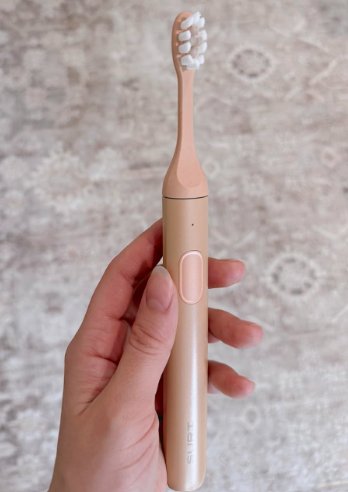
The SURI toothbrush is designed to make daily oral care feel refreshingly uncomplicated. Its slim body, long-lasting battery, and minimalist charger remove much of the clutter associated with traditional electric toothbrushes. Still, that simplicity can raise a few questions when we first open the box.
How do we place the toothbrush on the charger? Which power adapter should we use? What do the charging lights mean? Can we charge it inside the travel case? And what should we do when the toothbrush appears not to charge at all?
In this guide, we will explain how to charge a SURI toothbrush correctly, covering both the original SURI model and the newer SURI 2.0. We will also look at charging indicators, compatible power sources, battery-care habits, travel charging, troubleshooting, and common mistakes.
The basic process is easy: connect the supplied charging stand to an appropriate USB power source, place the toothbrush upright on the stand, and wait for the indicator to show that charging is complete. Depending on the SURI model and accessories you own, you may also be able to charge the brush through its travel case.
Let us walk through the process carefully.
How Does a SURI Toothbrush Charge?
SURI toothbrushes use a rechargeable internal battery. Rather than plugging a charging cable directly into the toothbrush handle, we normally place the brush on a dedicated wireless charging stand.
The stand transfers power to the toothbrush while supporting it in an upright position. This setup keeps the handle sealed and helps preserve the clean, streamlined design.
SURI’s current quick-start instructions recommend connecting the charging stand to a 5-volt USB charger with the supplied cable. The company notes that many ordinary phone chargers are suitable, provided they meet the required power specification.
The charging system may differ slightly depending on whether we own:
- The original SURI toothbrush
- The SURI 2.0 toothbrush
- A standard charging stand
- A compatible UV charging travel case
- A newer clean-and-charge case
The overall principle remains the same: the toothbrush must be positioned correctly on a powered SURI charging accessory.
How to Charge a SURI Toothbrush Step by Step
Charging the toothbrush for the first time should take only a few moments to set up.
Step 1: Find the Charging Stand and Cable
Remove the charging stand and charging cable from the packaging.
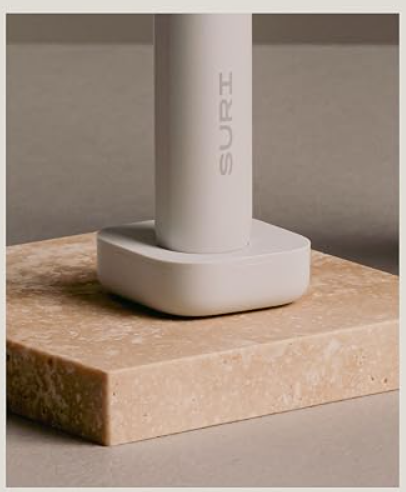
The charger may look like a small pebble or weighted base rather than the tall charging docks supplied with some other electric toothbrushes. Do not mistake the magnetic mirror mount for the charger. The mirror mount stores the toothbrush but does not normally recharge it.
Check that the cable is not damaged, bent sharply, or loose at either end.
Step 2: Connect the Cable to the Charging Stand
Insert the supplied cable into the connection port on the charging stand.
On newer SURI 2.0 charging stands, the stand uses a USB-C connection. SURI describes the current stand as a weighted wireless charging stand with convenient USB-C charging.
Make sure the connector is fully inserted. A cable that appears connected but is sitting loosely in the port can cause intermittent charging.
Step 3: Connect the Charger to a Power Source
Connect the other end of the cable to a suitable USB power adapter or powered USB port.
SURI recommends using a 5V USB charger. For the original charging stand, the company’s guidance specifically refers to a 5V USB 2.0 charger and states that most phone chargers work well.
Possible power sources include:
- A compatible phone charging adapter
- A powered USB port on a laptop
- A suitable USB wall plug
- A USB travel adapter
- A reputable power bank
- A hotel or airport USB charging outlet
Avoid using damaged, unbranded, or unstable power adapters. A charger may fit physically while still delivering power in a way the accessory was not designed to use.
Step 4: Place the Toothbrush on the Stand
Set the SURI toothbrush upright on the center of the charging stand.
The bottom of the handle should sit evenly against the charging surface. Do not force it into place. A correctly positioned toothbrush should rest naturally on the stand, like a pen standing in a perfectly shaped holder.
If it leans sharply, rocks excessively, or does not trigger the charging indicator, lift it and reposition it.
Step 5: Check the Charging Light
Once charging begins, observe the toothbrush indicator.
SURI’s quick-start guidance says the light blinks blue during charging and becomes solid white once the battery is fully charged.
If no light appears immediately, wait briefly. Then check the cable, adapter, outlet, and brush position before assuming that the battery or charger has failed.
Step 6: Allow the Battery to Charge
Leave the toothbrush on the stand until the indicator shows a full charge.
SURI has previously stated that approximately four hours of charging can provide several weeks of use, although exact battery performance can vary by model, battery age, brushing frequency, brushing mode, and temperature.
Once the light becomes solid white, the toothbrush is ready.
What Do the SURI Charging Lights Mean?
The indicator light acts like a tiny dashboard for the battery. It tells us whether the toothbrush is receiving power and whether charging has finished.
Blinking Blue Light
A blinking blue light generally means that the toothbrush is charging.
This is the response we want to see after placing the handle on the powered charging stand. It confirms that the charger, power source, and toothbrush are communicating properly.
Solid White Light
A solid white light indicates that the battery is fully charged, according to SURI’s official quick-start instructions.
At this point, we can remove the toothbrush from the stand and continue using it normally.
No Charging Light
No light may mean:
- The power outlet is off
- The USB adapter is not working
- The cable is loose
- The charging stand is not receiving power
- The toothbrush is positioned incorrectly
- Moisture or debris is interfering with the setup
- The battery is deeply discharged
- The cable, stand, adapter, or toothbrush has developed a fault
Before contacting support, test each part of the charging chain individually.
How Long Does a SURI Toothbrush Take to Charge?
SURI has stated that its toothbrush can be recharged in roughly four hours, with that charge providing several weeks of brushing.
However, charging time is not always identical. A nearly empty battery will naturally take longer to fill than a battery that still has half its capacity. Charging from a low-powered computer port may also feel slower than charging from a suitable wall adapter.
Factors that may affect charging time include:
- Remaining battery level
- Power output of the USB source
- Cable condition
- Charging-stand condition
- Ambient temperature
- Battery age
- Toothbrush model
- Whether charging is interrupted
For practical purposes, placing the toothbrush on its charger for several hours should be enough to restore a substantial amount of power.
Should We Fully Charge a New SURI Toothbrush?
Yes. SURI recommends charging the toothbrush before its first use.
The brush may arrive with some battery power because rechargeable products are often shipped partially charged. Still, completing an initial charge gives us a dependable starting point.
A full first charge also makes it easier to understand normal battery life. Rather than wondering whether the toothbrush arrived at 20%, 50%, or 80%, we begin with a known full battery.
For the first charge:
- Connect the stand to a compatible 5V USB power source.
- Place the toothbrush upright on the stand.
- Confirm that the light indicates charging.
- Leave it until the full-charge indicator appears.
- Remove it and begin normal use.
We do not need to perform old-fashioned battery rituals such as charging for 24 hours or repeatedly draining the battery to zero. Those practices came from older battery technologies and are generally unnecessary for modern rechargeable lithium-ion products.
How Long Does a Fully Charged SURI Toothbrush Last?
Battery longevity is one of SURI’s most notable features.
The company currently describes the SURI 2.0 as providing more than four weeks or about one month of use from a charge. Earlier official SURI guidance referred to more than 40 days under expected conditions.
Actual runtime depends on how we use the toothbrush.
A person brushing twice daily for the standard two-minute cycle may experience different battery life from someone who:
- Brushes three times per day
- Repeats part of the cycle
- Shares the handle
- Frequently turns the brush on accidentally
- Uses a higher-intensity setting
- Stores the toothbrush in very cold conditions
- Owns an older unit with a well-used battery
The key point is that SURI is intended to go weeks, not merely days, between charges.
How Often Should We Charge a SURI Toothbrush?
We should charge it when its battery is becoming low rather than automatically returning it to the charger after every brushing session.
SURI’s quick-start guide says the brush normally needs charging about once per month and suggests that charging less frequently can help preserve battery life.
That recommendation makes sense because rechargeable batteries have a finite number of charge cycles. SURI also notes that the brush’s long runtime reduces the number of times it must be recharged over its lifespan.
A convenient routine might look like this:
- Use the toothbrush normally for several weeks.
- Recharge it when the battery becomes low.
- Allow it to reach a full or near-full charge.
- Remove it from the stand.
- Repeat only when needed.
There is no need to hover over the battery percentage like a nervous pilot watching a fuel gauge. The long battery life is designed to let us forget about charging for most of the month.
Can We Leave a SURI Toothbrush on the Charger?
Briefly leaving the toothbrush on its stand after it reaches full charge is unlikely to cause immediate harm. Modern charging electronics are designed to control the flow of power.
However, SURI specifically encourages less-frequent charging to support long-term battery preservation.
For that reason, we do not need to store the toothbrush permanently on an active charger.
A sensible approach is to:
- Charge it fully.
- Remove it from the powered stand.
- Store it on the mirror mount, in a dry area, or on an unplugged stand.
- Recharge it when necessary.
This also keeps the charger away from constant bathroom moisture and frees up the electrical outlet.
Can We Charge a SURI Toothbrush in the Travel Case?
Some SURI travel cases can charge the toothbrush, while others may primarily provide storage and battery-powered UV cleaning. The exact function depends on the case generation.
Charging with a Compatible SURI Case
SURI’s quick-start guidance for its charge-capable UV case says the brush can be charged by connecting the supplied cable to a 5V USB-C charger.
The basic process is:
- Place the toothbrush correctly inside the compatible case.
- Connect the supplied cable to the case.
- Connect the other end to a suitable 5V USB-C power source.
- Close the case if required by the product instructions.
- Check that the brush or case indicates charging.
- Leave it connected until sufficient power has been restored.
SURI 1.0 and SURI 2.0 Case Differences
The original SURI travel case was promoted as a slimline case capable of UV cleaning while connected and, in some versions, charging the brush through contact points.
The redesigned SURI 2.0 travel case uses a built-in battery for its UV-C cleaning function, meaning UV cleaning itself does not always require the case to be plugged in. SURI also describes its current travel case as offering USB-C charging, but owners should confirm the exact instructions supplied with their particular case because accessories and regional bundles may vary.
Do not assume that every case that looks similar supports the same charging method.
How to Charge a SURI Toothbrush While Traveling
One of the pleasures of a long-battery-life toothbrush is that we may not need to pack a charger at all for a short trip.
If the brush is fully charged before departure, SURI’s advertised month-long battery life should comfortably cover many holidays and business trips.
For longer travel, pack:
- The SURI charging stand or charge-capable case
- The original or compatible USB cable
- A suitable 5V USB power adapter
- A destination-specific plug adapter, when required
- A small dry pouch for the cable and stand
Charging from a Power Bank
A reputable power bank with a standard USB output can be useful on camping trips, long flights, train journeys, or visits to places with limited wall outlets.
Connect the SURI cable to the power bank and charge the toothbrush through the stand or compatible case as usual.
Charging from a Laptop
A powered laptop USB port may charge the toothbrush. However, the laptop may stop supplying power when it sleeps or shuts down.
If the brush is still empty several hours later, the problem may be the laptop’s power-management settings rather than the toothbrush.
Charging Abroad
USB charging makes international travel easier because the charging accessory is not tied to a single country’s bathroom socket format.
We still need a power adapter that accepts the local electrical supply and provides a suitable USB output. Never force a plug into an incompatible outlet or use a damaged travel converter.
Can We Use a Phone Charger for a SURI Toothbrush?
In many cases, yes.
SURI says that most phone chargers work well with the charging stand, provided the charger supplies the specified 5V USB power.
Before connecting one, check the label on the adapter. It should be made by a reputable manufacturer and be in good physical condition.
Avoid adapters that:
- Become unusually hot
- Have exposed wiring
- Make buzzing or crackling sounds
- Fit loosely in the wall socket
- Show burn marks
- Have no recognizable electrical certification
- Have been damaged by water
Even though the toothbrush is a small device, the power adapter remains connected to household electricity. Treat it with the same care we would give any other charger.
Does the SURI Toothbrush Use USB-C?
The answer depends partly on the model.
The SURI 2.0 charging stand uses USB-C connectivity, and SURI markets both the stand and compatible travel accessories around simple, globally convenient USB-C charging.
Older SURI accessories may use a different cable arrangement or USB connector on the power-source end.
The cable connects to the charging accessory—not directly into the toothbrush handle. Always inspect the actual port before inserting a connector. USB-C is reversible, but it should still slide in smoothly without force.
Where Should We Place the Charger?
Bathroom chargers live a difficult life. They face steam, splashes, toothpaste foam, damp counters, and tangled cables.
Place the charging stand on a stable, dry, level surface away from the sink basin, bathtub, and shower.
A good charging location should be:
- Dry
- Well ventilated
- Close enough to a suitable outlet
- Away from standing water
- Out of reach of small children
- Protected from being knocked onto the floor
The toothbrush handle may be designed for wet bathroom use, but that does not mean the USB adapter, cable connector, and electrical outlet should be exposed to water.
Should the Toothbrush Be Dry Before Charging?
It is wise to rinse the handle after brushing and wipe away excess water before placing it on the stand.
The toothbrush does not need to be polished like a museum exhibit. We simply want to prevent water and toothpaste residue from collecting around the base.
A quick routine helps:
- Rinse the brush head.
- Shake off excess water.
- Wipe the lower handle if wet.
- Check that the charging stand is dry.
- Place the brush on the stand.
This keeps the charging area cleaner and makes faults caused by residue less likely.
Why Is My SURI Toothbrush Not Charging?
A SURI toothbrush that does not charge is frustrating, but the cause is often simple.
Think of the charging setup as a chain. Electricity must travel from the wall outlet to the adapter, through the cable, into the charging stand, and finally into the toothbrush. A break anywhere along that chain stops the process.
Check the Wall Outlet
Plug another working device into the same outlet.
Some bathroom outlets are controlled by a wall switch, shaver circuit, ground-fault safety device, or hotel master switch. The charger may be perfectly healthy while the outlet is inactive.
Check the USB Adapter
Try another compatible 5V USB adapter.
A phone adapter can fail without showing visible damage. Testing a second adapter is one of the fastest ways to isolate the problem.
Reconnect the Cable
Disconnect the cable from both ends and reconnect it firmly.
Inspect the connectors for:
- Bent metal
- Lint
- Corrosion
- Moisture
- Cracks
- Loose housing
Do not insert metal objects into the charging port.
Reposition the Toothbrush
Lift the brush from the stand and place it back in the center.
A toothbrush sitting slightly off-axis may fail to initiate charging. Make sure the handle is stable and that no object is trapped between the brush and stand.
Clean the Base and Stand
Unplug the charger first.
Use a soft, dry cloth to remove toothpaste residue and moisture. Allow the components to dry fully before reconnecting them.
Never immerse the charging stand, cable, or power adapter in water.
Allow Time for a Deeply Discharged Battery
If the toothbrush has been unused for a long period, the battery may be deeply depleted.
Leave it connected to a confirmed working charger for a while before checking again. The light may not respond as quickly as it does during an ordinary top-up.
Test the Alternative Charging Accessory
If we own both a charging stand and a compatible charging case, try the other accessory.
For example:
- If the brush charges in the case but not on the stand, the stand or its cable may be faulty.
- If it charges on the stand but not in the case, the issue may involve the case, case cable, or internal contact points.
- If it charges through neither accessory, the toothbrush itself may require inspection.
Why Does My SURI Toothbrush Stop Charging?
Intermittent charging can be caused by:
- A loose cable
- A worn USB port
- An unstable power bank
- A laptop entering sleep mode
- The brush moving on the stand
- Moisture near a connector
- A damaged charging accessory
- Excessive heat
- A battery-protection response
Try charging from a stable wall adapter on a dry surface. Avoid moving the brush during the test.
If the light repeatedly starts and stops despite a secure setup, record what happens and contact SURI support with the model, purchase information, and troubleshooting steps already attempted.
Common SURI Charging Mistakes to Avoid
The charging system is simple, but a few habits can make it less reliable.
Using the Mirror Mount as a Charger
The magnetic mirror mount is primarily a storage accessory. It holds the toothbrush vertically and helps keep the countertop clear, but it should not be confused with the powered charging stand.
Using an Unknown Power Adapter
A cheap adapter may produce unstable power, excessive heat, or electrical noise. Use a reputable adapter that meets the charging requirements.
Charging Beside Standing Water
Do not place the USB adapter or cable connector on a wet counter. Electricity and puddles are terrible roommates.
Forcing the Connector
If a cable does not fit, stop. Confirm that it is the correct cable and that the connector is oriented properly.
Packing the Charger While Wet
When traveling, allow the stand and toothbrush to dry before sealing them in a case or washbag.
Waiting Until Every Charge Is Completely Empty
We do not need to deliberately drain a modern rechargeable toothbrush to absolute zero. Recharge it when it becomes low or when an upcoming trip makes a full battery useful.
Leaving Residue Around the Stand
Toothpaste can dry into a chalky ring and stop the handle from sitting evenly. Regular wiping takes seconds and prevents an ugly miniature geology project from forming on the bathroom counter.
How to Extend the SURI Battery’s Lifespan
Rechargeable batteries naturally lose some capacity over time. We cannot freeze the ageing process, but we can make everyday choices that reduce unnecessary stress.
Charge Only When Needed
Because SURI offers several weeks of battery life, daily charging is unnecessary. The company has explicitly connected less-frequent charging with battery preservation.
Avoid Extreme Temperatures
Do not leave the toothbrush or charger in:
- A hot car
- Direct sunlight
- Freezing luggage
- A damp windowsill
- A bathroom area exposed to constant steam
Moderate room temperatures are kinder to rechargeable batteries.
Use the Correct Charging Accessories
The original or officially compatible SURI charger provides the safest reference point for fit and performance.
Third-party accessories may look similar without necessarily matching the electrical design.
Do Not Store It Empty for Months
If the toothbrush will not be used for an extended period, charge it before storage and inspect it periodically.
A battery left completely discharged for a very long time may struggle to recover.
Keep the Charging Area Clean
A clean, dry stand allows the toothbrush to sit correctly and reduces the chance of corrosion or residue-related problems.
How Can We Tell When the Battery Is Wearing Out?
A rechargeable battery may be ageing when:
- Runtime becomes dramatically shorter
- The brush needs charging every few days
- Charging takes unusually long
- The indicator behaves inconsistently
- The brush switches off during normal brushing
- A full charge no longer lasts through a short trip
Before concluding that the battery has failed, test a different cable, adapter, outlet, and compatible charging accessory.
Battery duration gradually declining after years of use is different from a new toothbrush suddenly losing power overnight. A sharp change may indicate a fault rather than ordinary ageing.
SURI emphasizes repairability and aims to reduce electronic waste, so contacting the manufacturer is preferable to immediately discarding a malfunctioning brush.
SURI Charging Safety Tips
Safe charging does not require complicated rituals. A few sensible precautions are enough.
- Use a compatible 5V USB power source.
- Keep the adapter and cable away from water.
- Unplug damaged equipment.
- Do not use a charger that overheats.
- Do not open or modify the toothbrush handle.
- Do not attempt to replace the internal battery without authorized guidance.
- Keep charging accessories away from young children.
- Allow wet accessories to dry before connecting power.
- Stop using the charger if it smells burnt or behaves abnormally.
- Follow the instructions supplied with the exact SURI model.
If the toothbrush becomes unusually hot, swells, leaks, produces an odor, or shows visible damage, stop charging it immediately and contact the manufacturer.
A Simple Monthly SURI Charging Routine
We can make charging almost effortless by building it into a monthly routine.
For example:
- Notice that the battery is becoming low.
- Wipe the toothbrush handle and charging stand.
- Connect the stand to a compatible 5V adapter.
- Place the brush upright on the stand.
- Check for the blinking blue charging light.
- Leave it until the indicator becomes solid white.
- Disconnect the charger when convenient.
- Store the brush normally until the next recharge.
This routine is less demanding than charging a phone. The toothbrush becomes the quiet marathon runner of the bathroom shelf: it works every morning and evening, then asks for attention only occasionally.
Final Thoughts on How to Charge a SURI Toothbrush
Learning how to charge a SURI toothbrush is straightforward once we identify the correct charging accessory.
Connect the SURI charging stand to a compatible 5V USB power source, place the toothbrush upright on the stand, and confirm that the light indicates charging. On supported models, the light blinks blue while charging and becomes solid white when the battery is full.
The SURI 2.0 adds modern USB-C convenience, while certain travel cases can also charge the brush. Because different case generations have different features, we should always follow the instructions for the exact accessory we own.
Most importantly, we do not need to charge the brush every day. SURI is designed to operate for several weeks per charge, making it ideal for uncluttered bathrooms and light travel. A dry charging area, a reliable adapter, clean accessories, and sensible battery habits should keep the brush ready whenever our morning routine calls.
Frequently Asked Questions
1. How do I know whether my SURI toothbrush is charging?
The toothbrush should display a blinking blue light while charging. According to SURI’s quick-start guidance, the light becomes solid white when the battery is fully charged.
2. How long should I charge my SURI toothbrush?
A full charge has been described by SURI as taking roughly four hours, although the actual time may depend on the model, remaining battery level, cable, and power source.
3. Can I charge my SURI toothbrush with a phone adapter?
Yes, many phone adapters can work. SURI recommends a suitable 5V USB charger and says that most phone chargers work well. Always use a reputable adapter in good condition.
4. Can the SURI travel case charge the toothbrush?
Certain SURI travel cases support toothbrush charging when connected to a compatible 5V USB-C power source. Features vary between SURI 1.0 and SURI 2.0 cases, so check the instructions for your specific case.
5. Why is my SURI toothbrush not charging?
The most common causes are an inactive outlet, loose cable, faulty USB adapter, incorrect positioning, moisture, residue, or a deeply discharged battery. Test another outlet and compatible adapter, reconnect the cable, clean and dry the stand, and reposition the toothbrush. Contact SURI support if it still does not charge.