
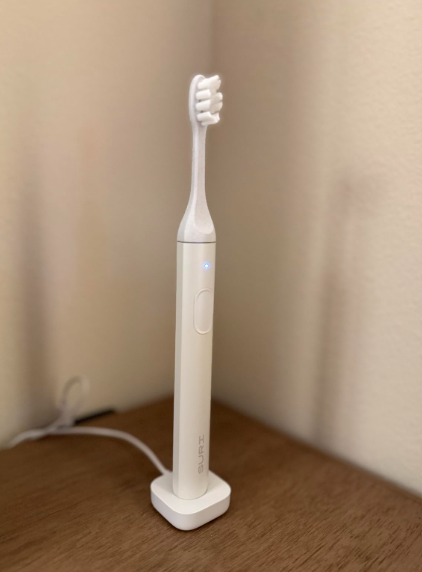
A SURI toothbrush is designed to make electric brushing feel refreshingly simple. There is one button, two cleaning modes, a slim aluminum handle, long battery life, and none of the app notifications that can make some premium toothbrushes feel like miniature smartphones.
Yet simplicity does not mean a toothbrush can never misbehave.
Perhaps your SURI toothbrush will not charge. Maybe it suddenly stops during brushing, feels weaker than it did when new, makes an unfamiliar noise, or refuses to switch modes. Some owners also encounter trouble with the brush head, magnetic mirror mount, charging stand, pressure sensor, or UV travel case.
Before we assume the handle has reached the end of the road, we should slow down and examine the symptoms. Many apparent SURI toothbrush problems come from an unsuitable power adapter, moisture around the charging area, toothpaste buildup, an incorrectly fitted head, or confusion about the brush’s timer and indicator lights.
This guide walks through the most likely causes, practical fixes, maintenance habits, and warning signs that tell us when it is time to contact SURI.
Are SURI Toothbrush Problems Common?
SURI toothbrushes are generally praised for their minimalist construction, quiet sonic motor, long-lasting charge, plant-based replacement heads, and relatively uncomplicated controls. The current SURI 2.0 adds features such as a pressure sensor, improved charging hardware, and an optional UV-C charging travel case.
That does not mean every unit will perform flawlessly forever.
An electric toothbrush combines several components inside a narrow waterproof body:
- A rechargeable battery
- A sonic motor
- Electronic charging controls
- A power button
- Internal seals
- A metal drive shaft
- Indicator lights
- A charging stand or case
A problem with any one of those components can affect the entire brushing experience. At the same time, a symptom does not automatically prove that the toothbrush is defective.
For example, the brush turning off after two minutes is normal. A brief pause every 30 seconds is also intentional. SURI uses these pulses to help divide the mouth into four brushing zones, while the automatic shutoff marks the end of the recommended two-minute session.
The challenge is separating normal behavior from a genuine fault.
Quick SURI Toothbrush Troubleshooting Checklist
Before investigating individual symptoms, work through this basic checklist:
- Charge the toothbrush using the supplied SURI cable.
- Connect the charging stand or case to a compatible 5V USB power source.
- Try a different wall adapter and electrical outlet.
- Wipe the toothbrush handle and charger completely dry.
- Remove the brush head and clean around the metal shaft.
- Refit the head with its bristles facing the power button.
- Leave the toothbrush charging for several hours.
- Test the handle without the brush head attached.
- Avoid opening or dismantling the sealed handle.
- Contact SURI if the fault continues.
SURI currently instructs users to connect the charging stand to a 5V USB 2.0 charger with the provided cable. During normal charging, the handle light should blink blue and become solid white when the battery is full.
That detail matters. A powerful laptop charger may physically fit, but using the recommended charging equipment removes an important variable from our troubleshooting.
SURI Toothbrush Not Turning On
Few things are more irritating than pressing the button during the morning rush and getting nothing but silence.
A SURI toothbrush that will not switch on usually points to one of four possibilities:
- The battery is completely depleted.
- The toothbrush has not been making proper contact with the charger.
- The power source or cable is faulty.
- The handle has developed an internal electrical problem.
Charge a Completely Flat Battery
A deeply discharged battery may not wake up immediately. Place the handle on its charging stand and leave it connected for several hours, even when no light appears at first.
Check that the handle sits upright and centrally. A toothbrush that is leaning, blocked by debris, or not fully seated may fail to charge consistently.
Avoid repeatedly pressing the button every few seconds. Give the battery time to accept a charge.
Test the Electrical Supply
The problem may be upstream from the toothbrush.
Try:
- A different wall outlet
- Another compatible USB adapter
- The supplied cable rather than a third-party cable
- The charging stand instead of the travel case, when both are available
- The travel case instead of the stand, when appropriate
SURI’s return policy specifically notes that damage associated with misuse or third-party charging accessories may affect return eligibility. Using the supplied equipment is therefore sensible for both technical and warranty reasons.
Clean and Dry the Handle
Toothpaste creates a surprisingly stubborn film. Over time, moisture and residue can settle around the bottom of the handle or charging area like limescale around a tap.
Disconnect the charger, then wipe:
- The bottom of the toothbrush
- The upper surface of the charging stand
- The USB connector
- The cable ends
Use a soft, slightly damp cloth followed by a dry cloth. Do not push metal objects into openings or pour cleaner over the charger.
When the Handle May Be Faulty
The handle may need professional support when:
- It remains completely unresponsive after an extended charge.
- Several known-working outlets and adapters make no difference.
- No charging light appears.
- The handle becomes unusually warm.
- The button feels physically stuck or loose.
- The toothbrush was dropped shortly before the problem began.
At that point, more aggressive home repair can create a bigger problem than the original fault.
SURI Toothbrush Not Charging
A toothbrush that still works but refuses to charge gives us a useful clue: the motor and internal electronics are at least partly alive.
The charging system becomes the main suspect.
Check the Charger Requirements
SURI recommends a 5V USB 2.0 power supply for its charging stand. The company says most ordinary phone chargers should work when paired with the supplied cable.
Make sure the USB adapter is not:
- Damaged
- Loose in the outlet
- Controlled by a switched socket
- Connected through an unreliable extension lead
- Shared with a malfunctioning USB hub
A charging stand can appear perfectly normal while receiving no electricity.
Reseat the Toothbrush
Remove the handle and place it back on the stand carefully. Rotate or reposition it slightly to make sure it is centered.
Look for anything preventing proper placement, including:
- Dried toothpaste
- Water droplets
- Hair
- Dust
- A folded bathroom cloth
- A warped or unstable surface
The charger should sit flat. Think of it like parking a car in a narrow space: being almost aligned is not always enough.
Try the UV Charging Case Correctly
The SURI 2.0 travel case can clean the brush head with UV-C light, but charging the toothbrush through the case requires the case to be connected to power. Simply placing the brush inside an unplugged case will not recharge the handle.
Connect the provided cable to a compatible 5V USB-C power source and confirm that the case closes correctly.
Do not confuse the one-minute UV cleaning cycle with the longer battery-charging process. They are separate functions.
Inspect the Cable
Charging cables endure more abuse than we notice. They are bent, pulled, packed into bags, trapped beneath toiletries, and sometimes left in humid bathrooms.
Inspect the cable for:
- Frayed insulation
- Bent connectors
- Loose ends
- Corrosion
- Intermittent power when moved
Do not continue using a visibly damaged cable.
SURI Toothbrush Charging Light Not Working
The absence of a charging light can indicate a power problem, but not always.
Start by checking the expected behavior. According to SURI’s quick-start guidance, the light should blink blue during charging and turn solid white when fully charged.
If the light does not appear:
- Confirm the outlet works with another device.
- Reconnect the cable at both ends.
- Try another suitable USB power adapter.
- Remove and reseat the handle.
- Clean and dry the charger.
- Leave the brush connected for several hours.
- Test whether the toothbrush runs despite the missing light.
If the toothbrush charges and works normally but the light never illuminates, the indicator itself may be faulty. The brush may remain usable, but it becomes difficult to judge charging status, so contacting support is still worthwhile.
SURI Toothbrush Battery Draining Quickly
SURI promotes battery life of more than 40 days under typical use, although real-world endurance varies according to brushing frequency, cleaning mode, pressure-sensor activity, battery age, temperature, and whether more than one person is using the handle.
A charge lasting slightly less than advertised is not automatically evidence of a fault. A battery dropping from several weeks to a few days, however, deserves attention.
Track Actual Battery Performance
We often estimate battery life from memory, and memory is a slippery measuring cup.
Record:
- The date of a complete charge
- The number of brushing sessions per day
- The mode used
- The date the battery runs out
Because a standard session lasts two minutes, two daily sessions should equal roughly four minutes of motor use per person per day.
Possible Causes of Short Battery Life
Fast battery drain may result from:
- The battery never reaching a complete charge
- An unreliable charging cable
- Frequent use of the stronger mode
- Multiple users sharing the toothbrush
- Long-term battery degradation
- Storage in very hot or cold conditions
- An internal electrical fault
Rechargeable batteries naturally lose capacity with age. A gradual decline is expected; a dramatic overnight change is not.
Avoid Constant Charging
SURI recommends charging about once a month rather than leaving the brush permanently connected, stating that less frequent charging can help preserve battery life.
We do not need to treat the toothbrush like a nervous pet that must remain beside its charger every minute. Let it run through normal use, then recharge it when needed.
SURI Toothbrush Stops While Brushing
A toothbrush stopping during use can feel like a breakdown, but timing is everything.
Normal Two-Minute Shutoff
SURI toothbrushes automatically turn off after two minutes. They also pulse at 30-second intervals to signal that it is time to move to another area of the mouth.
Therefore:
- A short pulse every 30 seconds is normal.
- Automatic shutdown at two minutes is normal.
- Random shutdown after a few seconds is not normal.
- Repeated cutting out at inconsistent times may indicate a fault.
Low Battery Interruption
A weak battery can allow the toothbrush to start and then stop when the motor demands more power.
Charge it fully and test again. When the problem disappears after charging, the issue was likely a depleted battery rather than a failed motor.
Power-Button Problems
Water, toothpaste, or dried residue may interfere with the button area. Wipe around the button with a damp cloth while the toothbrush is off, then dry it thoroughly.
Do not scrape the button with a blade or pin.
A button that remains depressed, feels unusually soft, or activates only from certain angles may require support.
SURI Toothbrush Feels Weak or Loses Power
Sonic toothbrushes create a different sensation from oscillating round-head models. SURI uses approximately 33,000 sonic vibrations per minute, but the movement may feel smoother and less aggressive than the hammering sensation of some powerful electric brushes.
That gentleness can be mistaken for weakness, especially during the first few days.
Confirm the Cleaning Mode
Current SURI guidance describes two modes:
- Everyday Clean: shown by a white light and intended as the gentler setting.
- Polish Mode: shown by a blue light and designed to provide higher intensity.
Press the button briefly to switch modes. The handle remembers the last mode used.
You may simply be using Everyday Clean when expecting the stronger Polish setting.
Remove Toothpaste Buildup
A dirty connection between the handle shaft and brush head can absorb movement. Remove the head and rinse it separately. Gently clean the metal shaft and the opening inside the head.
Allow both pieces to dry before refitting.
Test Without the Brush Head
Briefly switch on the handle with the head removed.
If the shaft vibrates strongly without the head but feels weak once the head is fitted, the head may be worn, obstructed, or improperly installed.
If the bare shaft also vibrates weakly after a complete charge, the motor or battery may be deteriorating.
SURI Toothbrush Making a Loud or Rattling Noise
A sonic toothbrush will never be silent, but its sound should be relatively smooth and consistent.
A new rattle, buzz, knock, or metallic chatter may come from the brush head rather than the motor.
Refit the Brush Head
SURI instructs users to slide the head onto the handle with the bristles facing the power button, pushing it down as far as intended.
Remove the head, inspect it, and refit it carefully.
A small visible gap may be part of the design, so do not force the head downward with excessive pressure. Forcing it can damage the internal connection.
Replace a Worn Head
A cracked, distorted, or heavily worn head can become noisy. Dentists generally recommend replacing a toothbrush head about every three months, and SURI repeats that guidance because frayed bristles provide a less effective clean.
Replace the head sooner when:
- The bristles spread outward.
- The neck is cracked.
- The head rocks excessively.
- The noise disappears with another head.
- The brush has been dropped.
Internal Rattling
Switch off the toothbrush and gently move the handle by hand. If something seems loose inside, stop using it and contact SURI.
A sealed powered device should not sound like a small screw is rolling around inside.
SURI Brush Head Does Not Fit Properly
An incorrectly fitted head can cause noise, reduced movement, poor cleaning, or difficulty removing it later.
Correct Head Alignment
Position the head so the bristles face the same direction as the power button. Slide it down until securely seated.
Do not twist aggressively while installing it.
Head Is Difficult to Remove
Grip the head near its base and pull it upward in a straight line. Avoid bending it from side to side because that can place stress on the metal shaft.
When it feels stuck:
- Rinse the connection with warm water.
- Wipe away visible toothpaste.
- Dry your hands for a better grip.
- Pull steadily rather than jerking.
- Avoid using pliers.
Pliers may scratch the handle, crush the head, or bend the drive shaft.
Head Feels Loose
Try another genuine SURI replacement head. If the second head also wobbles excessively, the shaft or attachment mechanism may be damaged.
Third-party heads may not match the original tolerances and can complicate both performance and warranty discussions.
SURI Toothbrush Pressure Sensor Problems
The pressure sensor is primarily associated with the newer SURI 2.0 rather than the original generation. Reviews of the updated model identify the pressure sensor as one of its major improvements.
Pressure Sensor Activates Too Often
When the warning appears frequently, we may simply be pressing too hard.
A sonic toothbrush should glide. We do not need to scrub as though removing paint from a wall. Hold the handle lightly and guide the bristles along the gumline.
SURI recommends angling the bristles approximately 45 degrees toward the gums and moving slowly in small circles while allowing the sonic vibration to perform the cleaning.
Pressure Sensor Never Activates
Test it gently during brushing by gradually increasing pressure for a moment. Do not press hard enough to hurt the gums.
When no response appears:
- Confirm that the model is SURI 2.0.
- Charge the handle fully.
- Test both cleaning modes.
- Clean around the brush head and shaft.
- Contact SURI when the feature remains inactive.
Do not repeatedly force the brush against the teeth merely to provoke the sensor.
SURI Toothbrush Mode Will Not Change
The single-button design is elegant, but it can create confusion because the same control starts the motor and changes the cleaning mode.
SURI says users can switch between Everyday Clean and Polish by pressing the button quickly. The brush then remembers the most recently selected mode.
Try changing the mode immediately after switching the toothbrush on. Use a brief press rather than holding the button down.
When the setting still will not change:
- Charge the battery.
- Dry and clean around the button.
- Restart the toothbrush.
- Check whether the indicator color changes.
- Contact support if the button responds inconsistently.
A physically damaged button should not be forced.
SURI UV Travel Case Not Working
The SURI 2.0 UV case has two jobs: cleaning the brush head with UV-C light and charging the handle while connected to power.
Those functions are related, but not identical.
UV Light Does Not Start
Close the case fully and press the button on top. SURI says a blue indicator should appear during the one-minute UV-C cleaning sequence and switch off when the cycle ends.
Check that:
- The case is correctly closed.
- The brush is positioned properly.
- The case has sufficient electrical power.
- The cable and adapter work.
- Nothing is blocking the lid.
Case Does Not Charge the Toothbrush
The case must be plugged in to charge the handle. It is not described as a large portable battery pack that recharges the brush while disconnected.
Connect it using the supplied cable and a compatible 5V USB-C charger.
UV Safety Precautions
Do not open the case during the active cleaning cycle. SURI warns that UV-C light can be harmful to the eyes.
When the light stays on unexpectedly, the lid is damaged, or the safety mechanism appears unreliable, disconnect the case and contact support.
SURI Magnetic Mirror Mount Keeps Falling Off
The magnetic wall mount is convenient until gravity wins.
The adhesive may fail when applied to:
- A wet mirror
- A dusty surface
- Textured tile
- Grout
- A recently cleaned surface with oily residue
- A location exposed to constant steam
How to Install the Mount Correctly
Clean the mirror thoroughly, dry it completely, and choose the location before removing the adhesive cover.
SURI notes that the mount is not intended to be repositioned using the original adhesive once installed, so placement should be chosen carefully.
Press the mount firmly against the mirror and allow the adhesive time to bond before hanging the toothbrush.
When the Adhesive Has Failed
Replace the adhesive pad with a suitable bathroom-safe mounting strip rather than repeatedly pressing a contaminated pad back onto the wall.
Do not hang the toothbrush over a toilet, hard stone sink, or any location where a fall could damage the handle.
SURI Toothbrush Smells Bad or Develops Residue
An unpleasant smell usually comes from trapped moisture and toothpaste around the head connection, not from the aluminum handle itself.
Clean the Toothbrush Properly
After brushing:
- Remove the brush head.
- Rinse the head thoroughly.
- Rinse or wipe the metal shaft.
- Shake away excess water.
- Allow the components to air-dry.
- Avoid sealing a wet head inside the travel case for long periods.
Clean the underside of the head regularly because toothpaste can hide there like sediment beneath a river stone.
Use the UV Case as Intended
SURI suggests using the UV-C cleaning function approximately weekly to keep the head fresh. The cycle is designed to run for one minute.
UV treatment does not replace physical rinsing. Light cannot remove a visible layer of toothpaste, so we still need to wash the head first.
SURI Toothbrush Leaking or Showing Water Damage
SURI 2.0 has been described as IPX7-rated in independent testing, but water resistance should not be treated as permission to abuse the handle or charger.
Water resistance can weaken after impact, seal damage, or long-term wear.
Stop using the toothbrush when you notice:
- Water inside the indicator area
- Rust or corrosion
- Unusual heat
- Intermittent operation after getting wet
- Visible cracks
- A swollen or separated casing
- A burning smell
Never place the charging stand or connected cable under running water.
Even when the handle is designed for bathroom use, the powered charger should be handled like any electrical accessory.
SURI Toothbrush Gets Hot While Charging
A slight temperature increase during charging may occur, but the handle and charger should not become painfully hot.
Disconnect the charger immediately when:
- The handle is too hot to hold comfortably.
- There is a chemical or burning odor.
- The casing changes shape.
- The cable becomes hot.
- The charger makes a buzzing sound.
- Smoke or discoloration appears.
Move the equipment away from water and flammable materials. Do not attempt another charging cycle until SURI has advised you.
Battery heat is not a symptom to “watch for a few more days.”
How to Reset a SURI Toothbrush
SURI does not emphasize a complicated consumer reset sequence in its current quick-start instructions. The toothbrush has intentionally simple controls, with two modes and automatic timing rather than an app-based operating system.
We can still perform a basic power-cycle routine:
- Remove the toothbrush from the charger.
- Remove the brush head.
- Wipe and dry the handle.
- Leave it unused for several minutes.
- Charge it fully.
- Refit a clean brush head.
- Switch it on and test both modes.
Avoid copying reset instructions intended for Oral-B or Philips Sonicare models. Their button combinations and electronics are different.
Should We Repair a SURI Toothbrush Ourselves?
Opening a rechargeable toothbrush is rarely a casual weekend project. The casing contains a battery, wiring, motor, charging system, and moisture seals.
Disassembling the handle may:
- Damage the waterproof seal
- Create a battery hazard
- Bend the motor shaft
- Void warranty coverage
- Make professional repair impossible
- Expose internal components to moisture
SURI has promoted repairability and battery-replacement support as part of its sustainability positioning, while reviews of SURI 2.0 also highlight replaceable components and repair-oriented design.
That does not mean we should pry open the handle with a screwdriver. Contact SURI first and use its authorized process.
When to Contact SURI Customer Support
Contact SURI when:
- The toothbrush will not turn on after a full charging attempt.
- It will not charge with known-working compatible equipment.
- The battery suddenly lasts only a few sessions.
- The handle becomes hot.
- The motor rattles internally.
- The casing is cracked or separating.
- Water appears inside the handle.
- The pressure sensor fails consistently.
- The UV case does not operate safely.
- A new genuine head will not fit.
- Troubleshooting has not solved the problem.
Prepare the following details:
- Order number
- Purchase date
- Toothbrush model
- Serial or product information
- Description of the fault
- Date the problem began
- Charging equipment used
- Photos or a short video
- Troubleshooting steps already attempted
Clear evidence helps support teams diagnose problems without sending us through the same basic checklist three times.
SURI Warranty and Return Considerations
SURI currently advertises a 100-day money-back guarantee for eligible electric toothbrushes purchased directly from its website. The published return terms say products should not have physical damage caused by misuse, improper care, accidental drops, or inappropriate third-party charging accessories. SURI also asks customers to contact support before returning an item and to use the supplied return label.
Policies may vary by country, seller, purchase date, and retailer.
A toothbrush purchased through Amazon or another store may need to be returned through that seller rather than directly through SURI. Keep the receipt, original packaging, charger, and accessories until we are confident the product works correctly.
How to Prevent Future SURI Toothbrush Problems
Good maintenance does not require a laboratory. Small habits make the biggest difference.
Daily Care
- Rinse the head after every use.
- Wipe toothpaste from the shaft.
- Let the head air-dry.
- Keep the charging area dry.
- Avoid dropping the handle into the sink.
- Do not press excessively while brushing.
Weekly Care
- Remove and clean the brush head connection.
- Wipe the charging stand.
- Inspect the cable.
- Clean the travel case.
- Run the UV-C cycle when applicable.
Every Three Months
Replace the brush head, or change it sooner when the bristles become frayed, splayed, damaged, or unhygienic. SURI’s own instructions repeat the common three-month replacement interval.
Travel Care
Dry the toothbrush before packing it. Keep the cable loosely coiled rather than sharply folded. Do not leave the handle in a hot vehicle or pack it where heavy objects can press against the power button.
SURI Toothbrush Problems: Final Thoughts
Most SURI toothbrush problems fall into a few predictable groups: charging trouble, battery decline, head-fit issues, residue buildup, confusing timer behavior, or accessory problems.
Our first step should not be panic—or a toolbox.
We should begin with the basics: use the supplied cable, confirm the 5V power source, clean and dry the contact areas, fit the head correctly, charge the battery fully, and remember that the brush intentionally pulses every 30 seconds and stops after two minutes.
When the handle overheats, rattles internally, shows water damage, refuses to charge, or remains completely unresponsive, home troubleshooting has reached its limit. Contacting SURI is safer than opening a sealed rechargeable device and turning a small fault into an expensive metal paperweight.
A well-maintained electric toothbrush should quietly disappear into our routine. When it starts demanding more attention than our teeth, this guide can help us identify whether the solution is a quick clean, a different charger, a replacement head, or professional support.
Frequently Asked Questions
1. Why is my SURI toothbrush not turning on?
The battery may be completely discharged, the charging stand may not be receiving power, or the handle may not be properly seated. Charge it for several hours using the supplied cable and a compatible 5V USB power source. Try another outlet and adapter before assuming the handle has failed.
2. How do I know whether my SURI toothbrush is charging?
SURI says the indicator should blink blue while charging and turn solid white when the battery is fully charged. When no light appears, reconnect the cable, test the outlet, clean the charger, and reseat the handle.
3. Why does my SURI toothbrush stop after two minutes?
That is normal. SURI automatically shuts off after the recommended two-minute brushing period. It also produces a pulse every 30 seconds to remind us to move to another section of the mouth.
4. Why is my SURI toothbrush suddenly noisy?
The brush head may be loose, worn, cracked, dirty, or fitted incorrectly. Remove it, clean the shaft and head connection, then reinstall it with the bristles facing the power button. Test a new genuine head when the noise continues.
5. Can I leave my SURI toothbrush charging all the time?
It is better to charge it when needed rather than keeping it permanently connected. SURI states that the battery can last more than 40 days and suggests that less frequent charging may help preserve battery health.