
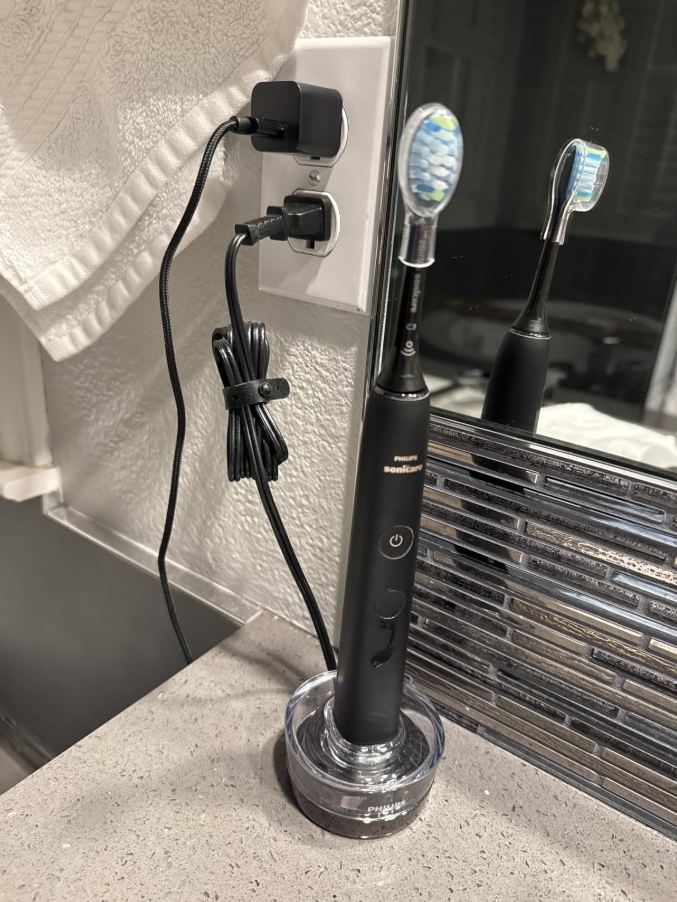
Is your Philips Sonicare 9500 not charging, even though you’ve placed it in the charging glass or connected the USB travel case? A toothbrush that suddenly refuses to recharge can be frustrating, especially when it has worked perfectly for months or years.
The Philips Sonicare DiamondClean Smart 9500 is a premium electric toothbrush designed to deliver powerful cleaning performance, multiple brushing modes, and convenient rechargeable operation. However, like other electronic devices, it can occasionally experience charging problems.
Sometimes, the toothbrush doesn’t display any charging lights. In other situations, the battery indicator flashes, but the handle won’t turn on. You might also notice that your Sonicare 9500 charges normally but loses power after only a few brushing sessions.
Fortunately, a Philips Sonicare 9500 that won’t charge isn’t necessarily broken.
In many cases, we can solve the problem by checking the electrical outlet, repositioning the handle, cleaning the charging accessories, or trying another compatible charger.
In this troubleshooting guide, we’ll explain why your Philips Sonicare 9500 isn’t charging, how to identify the possible cause, and what steps we can take before considering a replacement.
Why Is My Philips Sonicare 9500 Not Charging?
Several problems can prevent the Philips Sonicare DiamondClean Smart 9500 from receiving or storing electrical power correctly.
The most common causes include:
- A faulty electrical outlet.
- Incorrect positioning inside the charging glass.
- A damaged charging base.
- A defective USB power adapter.
- A loose or damaged charging cable.
- Moisture around charging components.
- A malfunctioning USB travel charging case.
- An incompatible replacement charger.
- A completely discharged battery.
- An aging rechargeable battery.
- An internal electronic malfunction.
The most effective way to troubleshoot the problem is to start with the external charging components before assuming that the toothbrush battery has failed.
This approach can help us avoid unnecessary expenses.
Philips Sonicare 9500 Not Charging: Quick Troubleshooting
Before examining each possible problem, let’s try a basic troubleshooting procedure.
- Remove the toothbrush from its charging glass.
- Disconnect the charger from the power source.
- Inspect the cable and charging base for visible damage.
- Clean and dry the charging glass.
- Connect the charger to a working electrical outlet.
- Place the toothbrush upright in the center of the glass.
- Check whether the battery indicator responds.
- Allow sufficient charging time.
- Test the USB charging travel case if your model includes one.
- Contact Philips if the toothbrush remains completely unresponsive.
If the toothbrush charges through its travel case but not through the charging glass, the original charging setup is a likely source of the problem.
If neither charging method works, the issue may involve the toothbrush handle, although we should still verify that the power sources are functioning correctly.
1. Check the Electrical Outlet
The first thing we should investigate is the electrical outlet.
Although this might sound obvious, power problems are among the easiest charging issues to overlook.
A charging base can appear perfectly normal even when it isn’t receiving electricity.
How to Test the Power Outlet
Unplug your Philips Sonicare charger and connect another electrical device to the same outlet.
For example, we can use a lamp or another small household appliance.
If the second device doesn’t work, the outlet may not be supplying electricity.
Try another electrical outlet, preferably in a different room.
Some bathroom outlets are protected by ground-fault circuit interrupters, which can disconnect electricity when they detect an electrical fault.
If a protected outlet has tripped, it may need to be reset, provided it is safe to do so.
We should also avoid using questionable extension cords or overloaded power strips while diagnosing the problem.
Quick tip: Testing the charger with a known working outlet helps us eliminate one of the simplest possible causes.
2. Position the Toothbrush Correctly in the Charging Glass
The Philips Sonicare DiamondClean Smart 9500 uses a distinctive charging glass rather than the conventional charging stand found on many electric toothbrushes.
The glass rests on a powered charging base, allowing the compatible toothbrush handle to recharge through an inductive charging system.
However, positioning is important.
If the handle isn’t sitting correctly inside the glass, charging may not begin.
How to Position the Sonicare 9500
Follow these steps:
- Place the charging base on a flat, stable surface.
- Make sure the glass is correctly positioned on the base.
- Connect the charging equipment to its power source.
- Insert the toothbrush handle vertically into the glass.
- Allow the handle to rest naturally in the center.
- Check the battery indicator for charging activity.
The toothbrush may produce short confirmation beeps when it begins charging.
If the handle needs to be held at an unusual angle for charging to start, we should inspect the charging glass and its base.
A properly functioning charger shouldn’t require constant repositioning or pressure.
3. Clean the Charging Glass and Charging Base
If your Philips Sonicare 9500 charging glass is not working, accumulated toothpaste residue, soap deposits, or moisture may be contributing to the problem.
Although the charging system doesn’t rely on exposed metal contacts inside the glass, keeping the accessories clean helps ensure that everything sits correctly.
Over time, dried water spots and toothpaste residue can collect at the bottom of the glass.
How to Clean the Charging Glass
Start by unplugging the charger.
Remove the toothbrush handle and lift the glass away from the electrical base.
Wash the glass separately using warm water and mild dish soap.
Use a soft cloth or sponge to remove residue.
Rinse the glass thoroughly and dry it completely before replacing it on the charging base.
For the electrical charging base, use a soft, slightly damp cloth to clean the exterior.
Never immerse the powered charging base in water.
Avoid pouring cleaning products directly onto electrical components.
Once everything is clean and dry, reconnect the charger and test the toothbrush again.
We recommend cleaning the charging accessories regularly to prevent the accumulation of residue.
4. Inspect the Charging Cable and Power Adapter
A damaged cable or power adapter can prevent your Sonicare 9500 from charging.
Charging cables may deteriorate after years of bending, pulling, or being stored improperly.
Although the cable can look normal from a distance, physical damage may interrupt the electrical connection.
Signs of a Damaged Charger
Look for the following:
- Cracked or exposed cable insulation.
- Bent connectors.
- Loose USB connections.
- Discoloration around the adapter.
- Unusual heat.
- Visible damage to the charging base.
- Intermittent charging.
If you discover physical damage, disconnect the accessory and stop using it.
Never attempt to repair a damaged electrical cable with ordinary tape.
If the charging adapter is defective, replace it with an appropriate compatible accessory.
Keep in mind that not every Philips Sonicare charging accessory works with every Sonicare toothbrush.
We should verify compatibility with the DiamondClean Smart 9500 before purchasing a replacement.
5. Try Charging With the USB Travel Case
One useful feature included with many Philips Sonicare DiamondClean Smart 9500 configurations is a USB charging travel case.
This accessory allows us to recharge the toothbrush while traveling.
More importantly, it can help determine whether the problem involves the charging glass or the toothbrush itself.
How to Charge the Sonicare 9500 Travel Case
If your model includes a compatible charging case:
- Open the travel case.
- Place the toothbrush handle inside its designated compartment.
- Connect the case using its supplied charging connection.
- Connect it to a compatible USB power source.
- Check whether the toothbrush displays charging activity.
- Allow enough time for the battery to recharge.
If your toothbrush successfully charges inside the travel case, the battery and internal charging system are at least capable of accepting a charge.
This makes the charging glass, base, power cable, or adapter more likely causes of the original problem.
However, if the toothbrush doesn’t charge through either accessory, we should investigate the handle and verify both power supplies.
What If the Travel Case Works but the Charging Glass Doesn’t?
This is an important troubleshooting result.
It suggests that the toothbrush itself may still function properly.
Instead of immediately replacing the entire electric toothbrush, we should focus on the charging glass setup.
A compatible replacement charging base may be all that’s needed.
6. Understand the Sonicare 9500 Battery Indicator Lights
Sometimes, the Philips Sonicare 9500 appears not to be charging because the battery indicator behaves differently than expected.
Understanding its lights can help us avoid confusing normal charging behavior with a malfunction.
Philips Sonicare 9500 Charging Light Meanings
| Battery indicator | Possible meaning |
|---|---|
| Flashing charging indicator | The toothbrush is receiving a charge |
| Solid battery indicator | The battery may be fully charged |
| Flashing amber indicator | The battery is low |
| Amber light with warning beeps | The battery requires charging |
| No light immediately after placement | Charging may not have started |
| No light after an extended charge | The indicator may have entered sleep mode |
| Charging light works but battery drains quickly | Possible incomplete charging or battery deterioration |
Exact indicator behavior can vary by handle version and battery state.
An important detail is that some Philips Sonicare toothbrushes turn off their charging lights after reaching a full charge and entering sleep mode.
Therefore, a charging indicator that switches off doesn’t automatically mean something is wrong.
We should also check whether the toothbrush operates normally after being removed from the charger.
7. Leave Your Philips Sonicare 9500 Charging for 24 Hours
One question many owners ask is: how long does the Philips Sonicare 9500 take to charge?
A complete charge using the DiamondClean charging glass can take up to 24 hours.
This might seem surprisingly long compared with a smartphone or another rechargeable electronic device.
However, electric toothbrushes use charging systems optimized for their battery size and intended operation.
What Happens If the Battery Is Completely Dead?
If your toothbrush hasn’t been used for several weeks or months, its rechargeable battery may be deeply discharged.
In some situations, the toothbrush might not immediately respond when connected to a charger.
We recommend the following procedure:
- Connect the original charging equipment.
- Position the toothbrush correctly.
- Check for any charging indication.
- Leave the handle charging for up to 24 hours.
- Remove the toothbrush and test the power button.
If the toothbrush starts working again, the issue may have involved a discharged battery.
However, if it remains completely unresponsive despite using a verified working charger, another problem may be responsible.
An extended charging period won’t repair a physically damaged battery or defective electronic circuitry.
8. Remove Nearby Metal Objects
Certain charging environments can interfere with proper operation.
Philips Sonicare charging accessories should be used according to the manufacturer’s positioning and surface recommendations.
Metal objects or unsuitable surfaces can sometimes contribute to charging interference.
For example, problems may occur if the charging system is positioned directly on certain metallic surfaces or very close to other inductive charging equipment.
How to Reduce Charging Interference
Move the charging base to a stable, dry, nonmetallic surface.
Keep nearby electronics and metallic objects away from the charger.
Make sure the charging glass sits flat and isn’t being displaced by objects underneath it.
Then reconnect the charger and check whether the toothbrush responds.
Although charging interference isn’t necessarily the most common cause, this test is simple and doesn’t require replacement parts.
9. Check for Moisture Around Charging Accessories
The Philips Sonicare 9500 toothbrush handle is designed for bathroom use, but its electrical charging accessories still need appropriate care.
Excessive moisture around electrical connections may create charging problems or safety risks.
For example, water entering a power adapter or USB connection can cause damage.
What to Do If Your Charger Gets Wet
If the charging accessories become wet, disconnect them from electricity when it is safe to do so.
Remove the toothbrush and charging glass.
Dry the exterior surfaces using a soft cloth.
Allow the equipment to dry thoroughly in a ventilated area.
Do not use a hair dryer, oven, heater, or another intense heat source.
Never attempt to charge the toothbrush through a visibly wet or damaged electrical connection.
If water has entered the electrical charging base or adapter, contact Philips for assistance instead of attempting to repair it yourself.
10. Test Another Compatible Philips Sonicare Charger
If your Philips Sonicare DiamondClean 9500 is not charging, testing another compatible charging accessory can provide valuable information.
For example, suppose the toothbrush doesn’t respond when placed in its original charging glass.
You borrow or obtain another charger specifically confirmed to be compatible with your model.
If the toothbrush starts charging normally, the original charging equipment may be defective.
If it still doesn’t respond, an internal handle problem becomes more likely.
Are Philips Sonicare Chargers Universal?
No. Philips Sonicare chargers aren’t universally interchangeable.
Different toothbrush families use different charging designs and accessories.
Some models use conventional charging stands, while DiamondClean models may use charging glasses and specialized travel cases.
A charger that fits one Sonicare toothbrush might not work with another.
Before purchasing a replacement charger, check your toothbrush’s exact HX model number and the accessory’s compatibility information.
Using an incompatible charger may prevent charging altogether.
11. Check Whether the Battery Holds a Charge
Sometimes the Sonicare 9500 charges normally but loses power much faster than expected.
This can indicate a different type of problem.
For example, you may leave the toothbrush charging overnight and see its battery indicator respond normally.
However, after just one or two brushing sessions, the toothbrush stops working.
Possible explanations include:
- Battery deterioration.
- Incomplete charging.
- An intermittent charging connection.
- A malfunctioning battery indicator.
- Internal electrical problems.
How Long Should the Sonicare 9500 Battery Last?
The Philips Sonicare DiamondClean Smart 9500 is designed to provide approximately two weeks of regular brushing on a full charge.
Actual battery life depends on brushing duration, selected settings, usage frequency, and battery condition.
If you brush twice daily for approximately two minutes per session, the toothbrush should generally last much longer than one or two sessions.
How to Test Battery Performance
Complete a full charging cycle using a verified working charger.
Remove the toothbrush and use it normally.
Keep track of how many brushing sessions it completes before displaying a low-battery warning.
If the handle repeatedly loses power almost immediately after charging, it may require professional inspection.
Rechargeable batteries gradually deteriorate over time, particularly after years of use.
12. Investigate Internal Toothbrush Problems
If none of the previous troubleshooting methods works, the problem may be inside the Sonicare 9500 handle.
Potential internal problems include:
- A worn rechargeable battery.
- Faulty charging circuitry.
- A damaged control board.
- Internal moisture damage.
- A defective power button.
- Loose or damaged internal electrical connections.
These issues can create different symptoms.
For example, a defective charging circuit may prevent the toothbrush from receiving electricity even when the charging base works correctly.
An aging battery may accept a partial charge but fail to provide enough power for normal brushing.
A damaged power button could also make a fully charged toothbrush appear dead.
Should You Open the Philips Sonicare 9500?
We don’t recommend opening the sealed toothbrush handle as a routine troubleshooting procedure.
Disassembling the unit can compromise its water resistance and potentially damage internal components.
Handling rechargeable batteries also presents safety risks.
If you suspect an internal failure, professional service or an authorized replacement is generally the safer option.
Philips Sonicare 9500 Not Charging: Common Symptoms
The following table summarizes some common charging problems and their potential solutions.
| Problem | Possible cause | Recommended solution |
|---|---|---|
| No charging light | Faulty outlet or charging setup | Test outlet and reposition handle |
| Charging glass doesn’t work | Damaged base or cable | Try compatible USB travel case |
| USB travel case doesn’t charge | Faulty USB connection | Check cable and power source |
| Battery indicator keeps flashing | Charging is still in progress | Allow sufficient charging time |
| Toothbrush dies quickly | Incomplete charge or worn battery | Complete a full charge |
| Toothbrush won’t turn on | Battery or internal problem | Test charger and seek support |
| Charges only in travel case | Charging glass setup may be defective | Inspect or replace compatible accessories |
| No response from either charger | Handle or power-source issue | Test verified working equipment |
| Charger becomes excessively hot | Electrical malfunction | Disconnect and stop using it |
The most useful troubleshooting approach is to compare how the toothbrush responds to different verified compatible charging methods.
Philips Sonicare 9500 Charging Glass Not Working
The charging glass is one of the most recognizable features of the DiamondClean series.
However, the glass itself isn’t the entire electrical charging system.
The powered base beneath the glass provides the inductive charging function.
This distinction matters when diagnosing a malfunction.
If the toothbrush doesn’t charge, the problem could involve the base even if the glass looks completely normal.
How to Identify a Faulty Charging Base
First, confirm that the electrical outlet works.
Next, inspect the charging base for visible damage and verify that its power connection is secure.
Place the glass correctly on the base and insert the toothbrush.
If charging doesn’t begin, test the toothbrush using a compatible travel charging case.
A toothbrush that charges successfully in the travel case but not in the glass setup suggests a problem with the original charging equipment.
However, we shouldn’t replace the base before confirming that the cable and power supply are functioning.
Philips Sonicare 9500 USB Travel Case Not Charging
The USB charging travel case is useful when you’re away from home, but it can develop problems of its own.
Potential causes include damaged connectors, incompatible power supplies, faulty cables, and internal case malfunctions.
How to Fix the Travel Case Charging Problem
Start by inspecting the USB connection.
Make sure the connector is clean and free of visible damage.
Reconnect the cable securely.
Try another compatible USB power source that meets the accessory’s electrical requirements.
Check that the toothbrush handle is properly positioned inside the case.
If the toothbrush charges normally using the glass charger but not the travel case, the problem is more likely to involve the travel charging system.
Replacing the compatible case or its cable may resolve the issue.
Never insert metallic objects into charging ports or attempt to modify electrical connectors.
Philips Sonicare 9500 Charging but Not Turning On
What if your toothbrush displays a normal charging indicator but refuses to switch on?
In this situation, the charging system might not be the primary problem.
A faulty power button, incomplete battery charge, or internal electronic malfunction could be responsible.
How to Troubleshoot the Power Button
Remove the toothbrush from the charger.
Inspect the power button for visible dirt, toothpaste residue, or damage.
Gently clean the exterior using a soft, slightly damp cloth.
Allow the handle to dry.
Then press the power button normally.
If the toothbrush still doesn’t respond after a verified full charge, contact Philips for further assistance.
We recommend avoiding unofficial reset procedures intended for other Sonicare models.
Button combinations and software functions may vary between different toothbrush families.
Philips Sonicare 9500 Flashing Lights but Not Charging
A flashing battery indicator commonly appears during charging.
However, what happens if the light keeps flashing and the toothbrush never seems to gain enough battery power?
There are several possible explanations.
First, the battery may not have completed its charging cycle.
Second, the charger could be supplying power intermittently.
Third, an aging battery may be unable to store sufficient energy.
How to Identify the Cause
Place the toothbrush on a verified compatible charger.
Allow the charging cycle to complete, which may take up to 24 hours.
Remove the handle and attempt to use it normally.
If the toothbrush operates properly, the flashing light may simply have represented normal charging activity.
If it turns off almost immediately, despite adequate charging time, the battery or internal electronics may need attention.
Can You Replace the Philips Sonicare 9500 Battery?
The Philips Sonicare DiamondClean Smart 9500 contains an internal rechargeable battery.
Unlike a traditional battery-powered toothbrush, it isn’t designed for simple user battery replacement.
The battery is enclosed inside the toothbrush handle, which helps protect the electronics during normal bathroom use.
Opening the handle can damage its seals and water-resistant construction.
Is Battery Replacement Worth It?
That depends on several factors:
- The toothbrush’s age.
- Whether the warranty remains valid.
- The availability of professional repair services.
- The cost of repair compared with replacement.
- The condition of other internal components.
If your Sonicare 9500 is relatively new, contact Philips before considering any repair.
For an older toothbrush, professional battery replacement may be possible through an independent service provider, but the quality and safety of the repair are important.
We recommend avoiding DIY battery modifications.
How to Prevent Philips Sonicare 9500 Charging Problems
Once your toothbrush is charging normally again, proper maintenance can help reduce future problems.
Keep the Charging Glass Clean
Wash the glass periodically to remove toothpaste residue and water deposits.
Always dry it before placing it back on the charging base.
Protect the Electrical Components
Keep the charging base and power connections away from excessive moisture.
Avoid using damaged cables or adapters.
Use Compatible Charging Accessories
Check compatibility before purchasing replacement chargers, travel cases, or charging bases.
The Philips Sonicare brand name alone doesn’t guarantee that an accessory will work with your toothbrush.
Avoid Unnecessary Cable Damage
Don’t bend charging cables sharply or pull them by the cord when disconnecting them.
Store travel charging accessories carefully.
Allow Enough Charging Time
Remember that a complete charging cycle can require up to 24 hours.
Don’t assume the charger is defective simply because the toothbrush hasn’t reached a full charge after a short period.
Monitor Battery Runtime
Pay attention to how long the toothbrush operates after charging.
If its battery life gradually becomes much shorter, investigate the problem before the battery becomes unusable.
When Should You Contact Philips Support?
Although many charging issues are relatively simple, some require professional assistance.
We recommend contacting Philips when:
- The toothbrush won’t charge using verified compatible accessories.
- Both the charging glass and travel charging case fail to charge the handle.
- The battery loses power immediately after charging.
- The handle has visible physical damage.
- Electrical charging components overheat.
- Water has entered the charging base or adapter.
- The toothbrush is still covered by an applicable warranty.
Philips Sonicare toothbrushes commonly include a two-year limited warranty in certain markets, although coverage depends on the region, purchase details, and warranty terms.
Before requesting service, locate your toothbrush’s exact model number and proof of purchase.
It can also help to explain which charging accessories you’ve already tested.
Frequently Asked Questions
1. Why Is My Philips Sonicare 9500 Not Charging?
Your Philips Sonicare 9500 may not charge because of a faulty electrical outlet, incorrectly positioned handle, damaged charging base, defective USB cable, or battery problem.
Start by checking the power source and positioning the toothbrush correctly in its charging glass.
If possible, try charging it with a compatible USB travel case to determine whether the glass charging system is responsible.
2. Why Is There No Charging Light on My Philips Sonicare 9500?
A missing charging light may indicate that the toothbrush isn’t receiving electricity.
However, some Sonicare toothbrushes switch off their charging indicators after reaching a full charge and entering sleep mode.
Remove the toothbrush from the charger and test whether it works normally.
If the handle is completely unresponsive, check the power source and charging accessories.
3. How Long Does the Philips Sonicare 9500 Take to Charge?
The Philips Sonicare DiamondClean Smart 9500 can take up to 24 hours to charge fully using its compatible charging glass.
If the battery is completely discharged, allow adequate charging time before concluding that the toothbrush is defective.
4. Why Does My Philips Sonicare 9500 Die After Charging?
If your Sonicare 9500 turns off shortly after being charged, the battery may not be receiving a complete charge or may have deteriorated.
A faulty charging connection can also produce similar symptoms.
Complete a full charge using verified compatible equipment and monitor battery runtime.
If the problem continues, seek professional assistance.
5. Can I Fix a Philips Sonicare 9500 That Won’t Charge?
Yes, many charging problems can be resolved without replacing the toothbrush.
Checking the electrical outlet, cleaning the charging glass, repositioning the handle, and testing another compatible charger are useful first steps.
However, internal battery failures and electronic malfunctions generally require professional service or replacement.
Final Verdict: How to Fix a Philips Sonicare 9500 That Won’t Charge
If your Philips Sonicare 9500 is not charging, there’s no need to assume immediately that the toothbrush has reached the end of its useful life.
Many charging issues involve simple problems such as an unpowered outlet, incorrect handle positioning, damaged cables, or a defective charging base.
We recommend starting with these external components before considering a battery or internal electronic failure.
Testing the USB charging travel case can be particularly helpful because it provides an alternative charging method for compatible DiamondClean Smart 9500 models.
If the toothbrush works with one charger but not another, we can narrow down the problem and potentially avoid purchasing an entirely new toothbrush.
Also, remember that a full charge can require up to 24 hours, and a charging light that switches off doesn’t always indicate a malfunction.
However, if your toothbrush remains completely unresponsive after testing verified compatible charging equipment, contacting Philips is the next sensible step.
The best approach is to identify the actual cause of the charging problem before spending money on replacement accessories or a new Philips Sonicare toothbrush.