
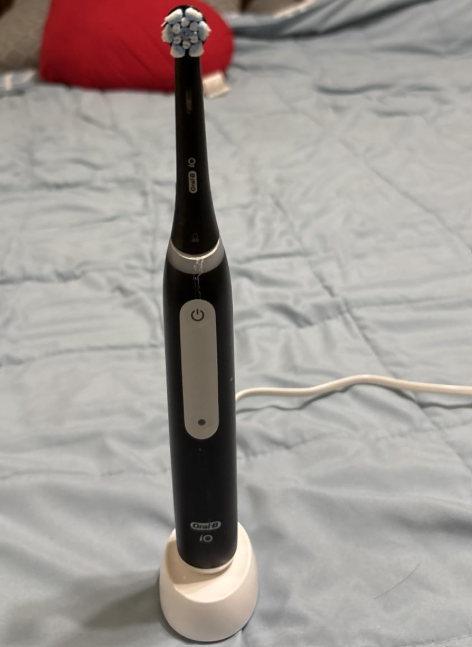
If your Oral-B iO Deep Clean is not charging, you’re probably wondering whether the problem comes from the toothbrush, the charging base, or the battery itself. We understand how frustrating this can be, especially when your electric toothbrush suddenly stops working or refuses to show its charging light.
Fortunately, a charging problem doesn’t always mean your Oral-B iO is permanently damaged. In many situations, the explanation is surprisingly simple: an inactive electrical outlet, incorrect charger placement, a completely drained battery, or moisture and residue around the charging area.
Before considering a replacement, we can perform several straightforward troubleshooting checks at home.
In this guide, we’ll explain why your Oral-B iO Deep Clean may not charge, how to identify the problem, and which solutions are worth trying first. We’ll also cover charging times, indicator lights, battery performance, and situations where professional support is the safest option.
Why Is My Oral-B iO Deep Clean Not Charging?
There are several possible explanations for an Oral-B iO toothbrush that won’t charge.
Some problems involve external components, while others relate to the rechargeable battery or internal electronics.
The most common causes include:
- The electrical outlet isn’t supplying power.
- The toothbrush isn’t positioned correctly on its charging base.
- The battery has become completely discharged.
- Toothpaste residue or moisture is affecting the charging setup.
- The charging base or power cord is damaged.
- The charger isn’t compatible with the particular iO model.
- The toothbrush has been exposed to extreme temperatures.
- The rechargeable battery has deteriorated.
- The handle has developed an internal electrical fault.
Importantly, Oral-B iO Deep Clean is a product name used for different iO configurations, rather than one universal charging system. An iO3 Deep Clean bundle and an iO7 Deep Clean configuration, for example, may have different chargers and charging times.
That means we should identify the exact iO Series model before deciding how long to charge it or whether a replacement charger will work.
Quick Diagnosis: What Is Your Toothbrush Doing?
We can often narrow down the problem by observing how the toothbrush behaves when placed on its charger.
| Symptom | Possible explanation | First thing to try |
|---|---|---|
| No charging light | No power, drained battery, or charging fault | Check outlet and wait 30 minutes |
| Charging light flashes | Charging may be working normally | Allow a complete charge |
| Light appears but battery stays empty | Interrupted charging or battery issue | Reseat handle and check charger |
| Toothbrush won’t turn on | Completely discharged battery or internal fault | Charge for the recommended period |
| Battery drains very quickly | Aging battery or incomplete charging | Complete a full charging cycle |
| Charger works intermittently | Loose connection or defective equipment | Test another outlet |
| Toothbrush stops charging unexpectedly | Charge completed or power interrupted | Check actual battery performance |
This table provides an initial diagnosis, but it doesn’t replace testing the toothbrush and charger.
Let’s work through the solutions in a logical order.
1. Check That the Electrical Outlet Works
The first thing we should examine is the electrical outlet.
It might sound obvious, but a disconnected or inactive socket is one of the easiest charging problems to overlook.
This is particularly relevant when using bathroom outlets connected to lighting circuits or mirror cabinets.
How to Test the Outlet
Follow these steps:
- Remove the Oral-B charging base from the outlet.
- Plug in another small electrical device that you know works.
- Confirm whether the device receives power.
- If it doesn’t, try another outlet.
- Reconnect the toothbrush charger to a confirmed working outlet.
We should also examine whether a wall switch controls power to the outlet.
Some bathroom cabinets only activate their integrated sockets when a particular switch is turned on.
If the toothbrush starts charging after changing outlets, we’ve likely identified the cause without needing any repairs.
2. Make Sure the Toothbrush Is Positioned Correctly
Incorrect placement can prevent an Oral-B iO toothbrush from receiving power.
The exact charging design depends on the model. Some iO toothbrushes use a conventional charging stand, while others use a specialized magnetic charging base.
Although these systems are designed for convenient daily use, the handle must sit correctly.
How to Position Your Oral-B iO
We recommend the following procedure:
- Switch off the toothbrush.
- Lift the handle away from its charger.
- Examine the bottom of the handle for visible debris.
- Place the toothbrush upright on the appropriate charging base.
- Make sure it rests securely without tilting.
- Observe whether its charging indicator activates.
Avoid forcing the handle into position.
A properly compatible charger should accommodate the toothbrush naturally.
If the handle sits incorrectly or wobbles significantly, check that you’re using the correct charging accessory.
3. Wait if the Battery Is Completely Dead
A completely discharged battery can make an electric toothbrush appear broken.
When the rechargeable battery reaches a very low charge level, its electronics may not immediately activate the charging indicator.
This means that placing the toothbrush on the charger for only a few seconds isn’t always enough to determine whether charging works.
How Long Should We Wait?
Oral-B indicates that charging lights on some rechargeable toothbrushes may take approximately 10–15 minutes to appear after the battery has been fully depleted.
For a practical test, we recommend leaving the handle on a verified working charger for at least 30 minutes.
During this period:
- Keep the toothbrush switched off.
- Avoid repeatedly removing it from the charger.
- Make sure the charging base remains connected.
- Check whether a battery light appears.
- Try the power button after the initial charging period.
If the light appears, leave the toothbrush connected until it reaches a complete charge.
If nothing happens, continue with the next troubleshooting steps.
4. Clean the Charging Base and Handle
Toothpaste, saliva, mineral deposits, and bathroom residue can accumulate around an electric toothbrush.
Although Oral-B iO toothbrushes are designed for use in wet bathroom environments, keeping the charging area clean is still important.
Residue may prevent the handle from sitting properly, while excessive moisture around electrical equipment can create additional problems.
How to Clean the Charging Area Safely
We can follow this routine:
- Disconnect the charger from the electrical outlet.
- Remove the toothbrush from the charging base.
- Inspect the bottom of the toothbrush handle.
- Wipe away visible dirt using a soft, slightly damp cloth.
- Clean the accessible surface of the charging base.
- Dry the base and the bottom of the handle thoroughly.
- Reconnect the charger only when everything is dry.
Never immerse the charger in water or wash its electrical plug under a tap.
We should also avoid abrasive cleaning tools that could damage the charger’s finish.
Once the components are dry, try charging again.
Can Toothpaste Residue Prevent Charging?
It can contribute to charging problems when buildup prevents the toothbrush from resting correctly on the base.
However, because Oral-B charging systems transfer energy inductively, toothpaste residue shouldn’t be described as blocking exposed charging contacts on models that don’t have them.
The main objective is to maintain correct positioning and safe operating conditions.
5. Keep the Charger Away From Metal Surfaces
One frequently overlooked detail is the location of the charging base.
Oral-B recommends avoiding charging on or near metal surfaces because metal can interfere with electromagnetic charging.
This doesn’t mean every metal bathroom accessory will cause a problem.
However, placing the charger directly on a large metallic surface may introduce unnecessary interference.
What Should We Do?
Move the charger onto a stable, dry, nonmetallic surface.
For example, we can use:
- A wooden shelf.
- A suitable plastic countertop organizer.
- A ceramic bathroom surface.
- Another stable nonmetallic surface away from water.
After repositioning the charger, connect it to a working outlet and place the toothbrush on top.
If charging resumes, the previous location may have contributed to the problem.
6. Turn Off the Toothbrush Before Charging
Before placing the Oral-B iO Deep Clean on its charging base, make sure the toothbrush is switched off.
Oral-B includes this recommendation in its general charging troubleshooting guidance.
If the toothbrush is vibrating or running unexpectedly, press the power button to turn it off.
Then position the handle on its charger and observe the charging indicator.
What if the Power Button Doesn’t Respond?
If the battery is entirely depleted, the power button may not activate the toothbrush immediately.
This doesn’t automatically mean the button is defective.
Allow the toothbrush some charging time before testing it again.
If the button remains unresponsive after the recommended full charge, the issue may involve the battery, control electronics, or power button itself.
7. Give Your Oral-B iO a Complete Charge
An important question is how long an Oral-B iO Deep Clean should take to charge.
The answer depends on the exact model and charger.
Some Oral-B iO models support relatively fast charging, while others require considerably longer.
Oral-B iO Charging Time by Series
| Oral-B iO model | General charging guidance |
|---|---|
| iO Series 2 | Can require an extended charging period; consult its manual |
| iO Series 3 | Approximately 12–16 hours, depending on model guidance |
| iO Series 4 | Approximately 12 hours |
| iO Series 5 | Approximately 12 hours |
| iO Series 6 | Approximately 12 hours |
| iO Series 7–10 | Approximately 3 hours with the appropriate fast magnetic charging system |
These figures are guidance, not guaranteed charging times for every regional variation or bundle. The supplied charger and the manufacturer’s manual take priority.
Why Is Charging Time Important?
Suppose we have an Oral-B iO3 Deep Clean.
If we charge it for only two hours and expect a full battery, we may incorrectly conclude that the battery is defective.
A standard-charging iO3 generally takes much longer than a fast-charging higher-end model.
Before purchasing replacement equipment, identify the exact series and allow the recommended charging period.
If the battery remains empty after a complete charge on a confirmed working charger, the problem deserves further investigation.
8. Check the Charging Cable and Base for Damage
A defective charging base can prevent the toothbrush from charging even when the handle itself works perfectly.
Physical damage may develop through repeated handling, accidental drops, moisture exposure, or ordinary wear.
Signs of a Faulty Charger
Look for:
- Cracks in the charging base.
- A damaged power cable.
- Bent or damaged plug components.
- Exposed wiring.
- Unusual discoloration.
- Intermittent charging when equipment is moved.
- Unusual heat, odors, or buzzing.
If you notice exposed wiring, burning smells, melting, or other signs of electrical damage, stop using the charger immediately.
Don’t attempt to repair damaged electrical wiring with tape.
How to Confirm a Charger Problem
If possible, test the toothbrush using another genuine or manufacturer-approved charging base confirmed to be compatible with your exact Oral-B iO model.
If the toothbrush charges normally with the second base, the original charger is the likely problem.
If it fails with both, attention should shift toward the toothbrush handle or battery.
9. Verify Charger Compatibility
One common assumption is that every Oral-B charger works with every Oral-B electric toothbrush.
Unfortunately, this isn’t the case.
The manufacturer produces different charging systems for different toothbrush ranges and models.
Even within the iO family, charging accessories vary.
Can We Use an Old Oral-B Charger?
We shouldn’t assume compatibility based on appearance alone.
A charger supplied with an older Oral-B Pro or Genius toothbrush may not be appropriate for an Oral-B iO handle.
Likewise, a charger intended for one iO series shouldn’t automatically be considered interchangeable with another.
We recommend checking:
- The exact iO Series number.
- The charger model or part number.
- The manufacturer’s compatibility information.
- The regional electrical specifications.
- Whether the charger is an original or approved replacement.
Using incompatible equipment can produce unreliable charging or create safety risks.
The safest option is to use the charger specifically intended for your toothbrush.
10. Check the Temperature Around Your Toothbrush
Rechargeable lithium-ion batteries have operating temperature limits.
Excessive heat or cold can interfere with normal charging behavior and may accelerate battery deterioration.
For example, leaving an electric toothbrush in a hot vehicle or near a heating appliance isn’t ideal.
How to Avoid Temperature-Related Problems
We suggest:
- Charging indoors in normal room conditions.
- Keeping the toothbrush away from direct heat.
- Avoiding prolonged exposure to freezing temperatures.
- Keeping the charging base away from radiators.
- Allowing a toothbrush exposed to extreme temperatures to return naturally to room temperature before charging.
Don’t use a hair dryer, heater, or other external heat source to warm the battery.
If the toothbrush is excessively hot, swollen, leaking, or visibly damaged, stop charging and seek professional assistance.
11. Investigate a Battery That Won’t Hold a Charge
Sometimes an Oral-B iO Deep Clean appears to charge normally but stops working after only one or two brushing sessions.
This is different from a toothbrush that never charges at all.
A battery that loses its charge unusually quickly may have deteriorated, although incomplete charging and heavy usage can produce similar symptoms.
Signs of Battery Deterioration
Potential warning signs include:
- The toothbrush runs for much less time than it used to.
- The battery indicator drops rapidly.
- The toothbrush shuts off unexpectedly.
- A full charging cycle provides very little runtime.
- Battery performance continues declining over time.
- The toothbrush only operates briefly after leaving the charger.
Battery performance naturally changes with age and charging cycles.
However, we should rule out external charging problems before assuming the battery needs replacement.
How to Evaluate Battery Performance
Start by completing a full charging cycle using the appropriate charger.
Then use the toothbrush normally and observe how long it operates.
For a more consistent comparison, keep your routine similar over several brushing sessions.
Consider how long you brush, how often you use the toothbrush, and whether your chosen modes or habits have changed.
If battery runtime remains dramatically below its previous performance, professional diagnosis may be necessary.
12. Contact Oral-B Support if Nothing Works
If we’ve already checked the outlet, cleaned the charging components, confirmed charger compatibility, and allowed a complete charging cycle, the problem may involve internal hardware.
Possible faults include:
- A failed rechargeable battery.
- Internal power-management circuitry.
- A damaged charging receiver.
- Moisture-related internal damage.
- A defective power button.
- Other electronic component failures.
These problems generally aren’t suitable for basic home troubleshooting.
Should We Open the Toothbrush?
We don’t recommend opening the sealed handle as a routine troubleshooting step.
Attempting to disassemble the toothbrush may damage waterproof seals, expose electrical components, or complicate warranty coverage.
Instead, contact Oral-B customer service or an authorized repair provider.
Keep your proof of purchase, model identification, and a brief description of the charging problem available.
Oral-B iO Deep Clean Charging Light Not Working
A charging light that doesn’t illuminate can be confusing.
But a dark indicator doesn’t always mean that the toothbrush is defective.
The indicator may be off because charging is complete, the battery is deeply discharged, or the toothbrush isn’t receiving power.
What Does a Flashing Light Mean?
On many Oral-B iO models, a flashing or animated charging indicator means that the battery is receiving power.
The exact visual behavior depends on the model.
Some toothbrushes have simple LED indicators, while more advanced models include an interactive screen showing battery information.
A flashing charging light is generally reassuring, but it doesn’t prove the battery will eventually reach a full charge.
We should still confirm actual battery performance.
Why Does the Charging Light Turn Off?
On many Oral-B models, the charging indicator stops flashing or switches off after charging is complete.
This can be entirely normal.
For example, some iO models briefly illuminate their charge indicator after reaching full capacity before turning it off.
Rather than judging charging performance solely by the light, we should check whether the toothbrush operates normally after removal from the charging base.
What Does a Red Light Mean?
A red light doesn’t always indicate the same problem.
Depending on the model and when the light appears, red can indicate a low battery or excessive brushing pressure.
If the red pressure sensor activates while you’re brushing, it isn’t necessarily reporting a charging fault.
Check the location and behavior of the indicator before deciding what it means.
Oral-B iO Deep Clean Not Charging After a Long Time
If your toothbrush has been unused for several months, its battery may have become deeply discharged.
Rechargeable batteries lose some charge while stored, even when they’re not powering a device.
The longer a toothbrush remains unused, the greater the possibility that its battery will be at a very low charge level.
Can We Recover a Deeply Discharged Battery?
Sometimes, yes.
If the battery and charging electronics remain healthy, normal charging may restore operation.
We recommend placing the toothbrush on a verified working charger and waiting at least 30 minutes before checking for a response.
If the charging indicator appears, continue charging for the recommended full period.
However, a battery that has fallen below its safe operating threshold may not recover.
Don’t attempt improvised battery recovery techniques, external electrical connections, or unauthorized charging modifications.
If the toothbrush shows no response after proper charging, professional service is the safer approach.
Oral-B iO Charging but Not Turning On
A toothbrush can sometimes display charging activity while failing to start when the power button is pressed.
This presents a slightly different diagnostic situation.
If the charging indicator works, we have evidence that at least part of the charging electronics is receiving power.
However, we cannot conclude that the battery, motor, and control electronics are all functioning correctly.
What Should We Check?
First, allow the complete recommended charging time.
Remove the toothbrush from the charging base and press the power button normally.
If nothing happens, examine the handle for obvious physical damage.
We can also remove the brush head and check whether dried toothpaste has accumulated around the shaft. Clean the accessible area according to the manufacturer’s care instructions.
A jammed or damaged mechanical component is different from a charging failure.
If the power button remains unresponsive, avoid repeatedly pressing it or attempting an undocumented reset procedure.
Not every iO model has the same controls, so a reset method intended for another model may not apply.
At this point, contacting Oral-B support is appropriate.
Oral-B iO Deep Clean Charging but Dying Quickly
Another frustrating problem occurs when the battery appears to reach full charge but runs out much sooner than expected.
Several explanations are possible.
Incomplete Charging
The charging indicator may activate even though the charging cycle has been interrupted.
An unstable outlet, damaged charger, or incorrect placement can prevent the battery from reaching its expected capacity.
Frequent or Extended Brushing
If we use the toothbrush more frequently than twice per day, or regularly exceed the standard two-minute brushing session, battery runtime may be shorter.
This doesn’t automatically indicate a defective battery.
Battery Aging
Rechargeable batteries gradually lose usable capacity.
An older toothbrush may require charging more frequently than when it was new.
Internal Fault
If the toothbrush suddenly begins losing charge dramatically faster without any change in usage, an internal issue is possible.
When proper charging doesn’t restore satisfactory runtime, professional inspection may be justified.
Can We Replace the Oral-B iO Deep Clean Battery?
The Oral-B iO uses an internal rechargeable battery.
Unlike an ordinary household battery, it isn’t designed to be removed and replaced through a simple consumer-access battery compartment.
Battery replacement may require specialized tools, disassembly, and restoration of the handle’s protective seals.
Is DIY Battery Replacement Worth It?
For most users, we wouldn’t recommend it.
Potential disadvantages include:
- Damage to internal electronic components.
- Loss of water resistance.
- Battery puncture or electrical hazards.
- Unreliable performance after reassembly.
- Potential warranty complications.
If the toothbrush is still under warranty, authorized support should be our first option.
If it’s outside warranty, compare the cost and availability of professional repair with a replacement handle.
How to Prevent Future Charging Problems
Once our Oral-B iO is charging normally again, good maintenance habits can reduce the likelihood of recurring issues.
Keep the Charging Area Clean
Remove accumulated toothpaste and residue before it becomes difficult to clean.
Wipe the charger carefully after disconnecting it, and avoid leaving standing water around its electrical components.
Use the Correct Charger
Stick with the supplied or manufacturer-approved charger for the exact iO model.
This helps prevent compatibility problems and unnecessary troubleshooting.
Avoid Extreme Temperatures
Store and charge the toothbrush under normal indoor conditions.
Don’t leave it exposed to intense sunlight, excessive heat, or freezing temperatures for extended periods.
Charge According to the Manual
There is no benefit in repeatedly interrupting the charging cycle when we’re trying to establish whether a battery works properly.
Allow the recommended charging time, especially after a complete discharge.
Store the Toothbrush Properly
If you won’t use your toothbrush for an extended period, follow its manual’s storage recommendations.
Avoid storing it in excessively hot or humid conditions.
Periodically checking the battery during long storage can help prevent unexpected deep discharge.
Mistakes to Avoid When Your Oral-B iO Won’t Charge
A few common troubleshooting mistakes can make the situation worse.
| Mistake | Why we should avoid it |
|---|---|
| Using an incompatible charger | May prevent reliable charging |
| Opening the sealed handle | Risks damage and loss of water resistance |
| Charging on a wet or damaged base | Creates unnecessary electrical hazards |
| Assuming no light means total failure | Deeply discharged batteries can respond slowly |
| Expecting every iO to charge in three hours | Charging times differ by model |
| Using external heat to warm the battery | Can damage the battery and electronics |
| Ignoring visible electrical damage | May create a safety risk |
| Replacing the toothbrush immediately | Simple charger or outlet issues may be repairable |
The most effective approach is to begin with safe external checks before assuming that an expensive component has failed.
When Should We Replace the Toothbrush?
Not every Oral-B iO charging problem requires a completely new toothbrush.
A defective charging base might be replaceable, while a battery or internal electronics problem could make replacement more reasonable.
Before buying a new device, consider three questions.
Is the Toothbrush Still Under Warranty?
Check the manufacturer’s warranty terms for your country and model.
A qualifying charging fault may be covered, subject to the applicable conditions.
Is the Charger Defective?
If the handle charges successfully on another confirmed compatible charging base, replacing the faulty charger may be more economical than purchasing an entirely new toothbrush.
Is the Battery or Internal Electronics Failing?
A toothbrush with a severely deteriorated battery or damaged internal electronics may require professional repair or replacement.
Compare the estimated repair cost against the price of an appropriate replacement handle.
Frequently Asked Questions
1. Why Is My Oral-B iO Deep Clean Not Charging or Lighting Up?
The most common possibilities include an inactive outlet, incorrect placement on the charger, a deeply discharged battery, or a faulty charging base.
We recommend checking the outlet, repositioning the toothbrush, and leaving it on a compatible charger for at least 30 minutes.
If the toothbrush still doesn’t respond after a full charging cycle, contact Oral-B support.
2. How Long Does the Oral-B iO Deep Clean Take to Charge?
Charging time depends on the underlying iO Series model and the charger supplied.
Some standard-charging models can require approximately 12–16 hours, while compatible higher-end iO models with fast magnetic charging can reach a full charge in approximately three hours.
Check your exact model’s user manual for the correct figure.
3. Why Is My Oral-B iO Flashing but Not Charging?
A flashing charging indicator usually suggests that the toothbrush recognizes a charging process.
However, the battery may not be reaching full capacity because of interrupted charging, a problem with the charger, or battery deterioration.
Allow the complete recommended charging time and check how the toothbrush performs afterward.
4. Can I Charge My Oral-B iO Deep Clean With Another Oral-B Charger?
Only if that charger is confirmed compatible with your particular iO model.
Different Oral-B toothbrush ranges and iO configurations use different charging accessories.
We shouldn’t assume that a charger will work merely because the toothbrush appears to fit.
5. What Should I Do if My Oral-B iO Still Won’t Charge?
If you’ve already tested the electrical outlet, cleaned and dried the charging area, checked compatibility, and completed the recommended charging period, the problem may involve the charger, battery, or internal electronics.
We recommend contacting Oral-B customer service or an authorized repair provider.
Avoid opening the handle or attempting unauthorized battery repairs.
Conclusion: Fixing an Oral-B iO Deep Clean That Won’t Charge
If your Oral-B iO Deep Clean is not charging, there’s no need to assume immediately that your toothbrush needs replacing.
We should begin with the simplest possibilities: verify that the electrical outlet works, position the handle correctly, clean the charging area, and allow enough time for a deeply discharged battery to respond.
It’s also essential to identify the exact iO model because charging systems and charging times vary throughout the range.
If these checks don’t help, testing with a confirmed compatible charger may reveal whether the charging base is defective.
Ultimately, a toothbrush that still won’t charge after proper troubleshooting may have a failing rechargeable battery or an internal electrical problem.
Our recommendation is to exhaust the safe, simple checks first, then seek authorized support before attempting any internal repairs. This approach gives us the best chance of restoring normal charging without unnecessary expense or damage.