
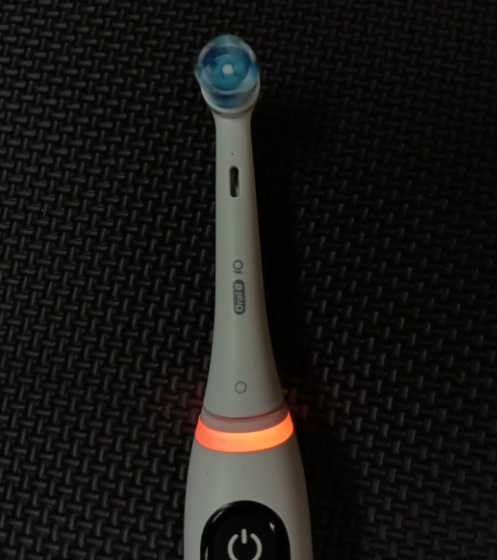
If you’ve noticed a yellow light appearing on your Oral-B iO Deep Clean electric toothbrush, you’re probably wondering whether something is wrong. Perhaps the toothbrush still works normally, but an unfamiliar yellow or orange indicator has suddenly appeared near the buttons.
Fortunately, the Oral-B iO Deep Clean yellow light usually indicates that it’s time to replace your toothbrush head. In most cases, it isn’t a malfunction, a battery problem, or a warning that your toothbrush is damaged.
Oral-B uses different lights to communicate information about brushing pressure, battery status, charging, and brush head replacement. Understanding where the yellow light appears is the key to identifying its meaning.
In this guide, we’ll explain why the yellow light appears, how to reset the brush head replacement reminder, what to do when the light refuses to disappear, and how to distinguish a normal notification from a genuine toothbrush problem.
What Does the Yellow Light Mean on Oral-B iO Deep Clean?
On Oral-B iO models equipped with a brush head replacement reminder, a yellow or orange light inside the mode selection button means the toothbrush is reminding you to change the brush head.
This feature is designed to help maintain effective cleaning performance by notifying you when your brush head has reached its recommended replacement interval.
The reminder generally activates after approximately three months of regular use, based on brushing twice per day.
You may notice several symptoms:
- A yellow light appears on the lower mode button.
- The yellow indicator occasionally looks orange.
- The toothbrush vibrates when the reminder activates.
- The toothbrush continues operating normally.
- The light appears even though the battery is charged.
- The indicator returns during subsequent brushing sessions.
These behaviors are usually consistent with a routine maintenance reminder rather than a technical fault.
Why Does Oral-B Use a Yellow Warning Light?
Electric toothbrush heads gradually wear down as we brush our teeth.
Even when the bristles appear reasonably clean, repeated brushing can change their shape, flexibility, and effectiveness.
Over time, worn bristles may become less effective at reaching the gumline and removing plaque.
Oral-B includes a replacement reminder on supported iO toothbrushes to help users maintain a consistent brush head replacement schedule.
The yellow indicator is particularly useful because many people forget exactly when they installed their current brush head.
Is the Yellow Light a Sign of a Broken Toothbrush?
Usually, no.
If your toothbrush turns on, operates normally, and displays a yellow light near the mode button, there is generally no reason to assume the motor or battery has failed.
The light is designed to communicate maintenance information.
However, if your toothbrush also stops working, fails to charge, becomes unusually hot, or displays abnormal lighting patterns, a separate issue could be present.
Oral-B iO Yellow Light vs Other Light Colors
The Oral-B iO toothbrush family uses several light colors, and their meanings can vary according to the location of the indicator and the specific model.
Understanding these differences can help us avoid unnecessary troubleshooting.
| Light color | Typical meaning | Recommended action |
|---|---|---|
| Yellow or orange on mode button | Brush head replacement reminder | Replace the brush head and reset the reminder |
| Green on pressure sensor ring | Appropriate brushing pressure | Continue brushing |
| Red on pressure sensor ring | Excessive brushing pressure | Reduce pressure |
| White on pressure sensor ring | Light pressure or default ring color | Gently adjust brushing pressure |
| Red flashing battery indicator | Battery running low | Recharge the toothbrush |
| Yellow on customizable light ring | May be a selected ring color | Check the color settings |
| Blue light during pairing | Bluetooth pairing or connection activity | Follow the pairing instructions |
The most important distinction is that a yellow light on the mode button is not necessarily the same as a yellow light around the top of the toothbrush handle.
On models with customizable lighting, the light ring can display a selected color during normal operation.
Consequently, we should identify the exact location of the yellow light before attempting to fix anything.
How to Reset the Oral-B iO Deep Clean Yellow Light
If the yellow indicator is caused by the brush head replacement reminder, resetting it is normally straightforward.
For supported Oral-B iO models, the replacement reminder can be cleared by holding the mode selection button for approximately two seconds.
Step 1: Turn Off Your Oral-B iO Toothbrush
Start by switching off your toothbrush.
Make sure the motor has stopped operating before removing the brush head.
If you’ve just finished brushing, rinse away any remaining toothpaste before continuing.
Step 2: Remove the Existing Brush Head
Hold the toothbrush handle firmly and pull the brush head straight upward.
Oral-B iO brush heads are designed to be removable without special tools.
Avoid twisting the attachment excessively or forcing it sideways.
Inspect the existing brush head for signs of wear, including:
- Flattened or spread-out bristles.
- Faded indicator bristles.
- Bent or damaged bristles.
- A loose or damaged attachment.
- Visible deterioration around the head.
Even if the bristles appear acceptable, replacement is generally recommended after three months of regular use.
Step 3: Install a New Oral-B iO Brush Head
Choose a compatible Oral-B iO replacement brush head.
Depending on your brushing needs, compatible options may include Oral-B iO Ultimate Clean, Gentle Care, or other genuine iO replacement heads.
Align the replacement head with the metal shaft at the top of the toothbrush handle.
Push it into place until it is securely seated.
Remember that standard Oral-B Pro, Genius, and Vitality replacement heads are not interchangeable with Oral-B iO brush heads.
Step 4: Press and Hold the Mode Button
Locate the mode selection button, which is typically positioned below the power button on supported models.
Press and hold this button for approximately two seconds.
The toothbrush should produce a vibration and light signal confirming that the replacement reminder has been reset.
This action resets the reminder timer; it does not replace the brush head automatically or detect whether a new one has been installed.
Step 5: Check Whether the Yellow Light Disappears
Once the reset is complete, switch on the toothbrush and check the indicator.
If the reset was successful, the yellow replacement reminder should no longer appear as an active alert.
You can now continue using the toothbrush normally.
If the yellow light remains active, move on to the troubleshooting steps below.
Why Is My Oral-B iO Yellow Light Still On?
Sometimes, the yellow light remains visible even after installing a replacement brush head.
This can be confusing, particularly when the toothbrush is otherwise functioning correctly.
Fortunately, there are several possible explanations.
1. The Brush Head Reminder Was Not Reset
Replacing the brush head does not necessarily clear the reminder automatically.
Many Oral-B iO toothbrushes use a timer-based reminder system rather than a sensor that physically recognizes a newly installed head.
Therefore, you may need to reset the reminder manually.
Solution: Press and hold the mode selection button for approximately two seconds and look for the confirmation signal.
2. You Pressed the Wrong Button
Oral-B iO toothbrushes may have separate buttons for switching the toothbrush on and selecting cleaning modes.
Pressing the power button instead of the mode button may not clear the replacement reminder.
Solution: Identify the mode selection button on your particular toothbrush and follow the correct reset procedure.
3. The Light Is Part of Your Custom Settings
Certain Oral-B iO models allow us to customize the light ring color through the toothbrush settings or the Oral-B app.
If you’ve selected yellow as your preferred light ring color, the toothbrush may illuminate yellow during normal operation.
This is different from the brush head replacement reminder.
Solution: Check the customizable light ring settings and temporarily select another color to see whether the yellow illumination changes.
4. The Brush Head Is Not Properly Installed
An incorrectly fitted brush head may cause unusual noise, vibration, or brushing performance.
Although an improperly installed brush head is not normally the reason for the yellow replacement indicator, checking the attachment is still worthwhile.
Solution: Remove the brush head, inspect the connector, and carefully reinstall the compatible replacement.
A small gap between the brush head and handle can be normal on Oral-B iO toothbrushes.
5. The Toothbrush May Have a Software Issue
If the yellow light behaves unexpectedly and the standard reset doesn’t work, the toothbrush may require additional troubleshooting.
Depending on the model, a restart or handle reset may help resolve unusual electronic behavior.
However, resetting the entire toothbrush is different from resetting the brush head replacement reminder.
We should always try the normal two-second reminder reset before considering a more extensive reset.
How to Troubleshoot a Persistent Yellow Light
If your Oral-B iO Deep Clean yellow light won’t turn off, follow this troubleshooting sequence.
| Problem | Possible explanation | What to try |
|---|---|---|
| Yellow light after three months | Brush head replacement reminder | Replace head and reset reminder |
| Yellow light after installing a new head | Reminder timer wasn’t reset | Hold mode button for two seconds |
| Yellow ring while brushing | Custom light color | Check light ring settings |
| Yellow light with vibration | Scheduled replacement alert | Inspect and replace brush head |
| Yellow light returns immediately | Reset unsuccessful or different indicator | Repeat reset and check model instructions |
| Yellow light with charging problems | Possibly separate issues | Inspect charger and battery indicators |
| Yellow light with abnormal operation | Possible electronic problem | Consult manufacturer support |
Check the Battery and Charging System
Although the yellow mode-button light normally isn’t a low-battery warning, charging problems can occur independently.
If your toothbrush also seems to be losing power, check the charging system.
We recommend the following:
- Place the toothbrush on its compatible charging base.
- Make sure the charger is connected to a working electrical outlet.
- Observe whether the normal charging indicator activates.
- Allow sufficient charging time according to your specific model.
- Check whether the toothbrush operates normally afterward.
Charging times vary across the Oral-B iO range, so we shouldn’t assume every model requires the same number of hours.
Clean the Toothbrush Handle and Connector
Toothpaste residue and moisture can accumulate around the connection between the brush head and the handle.
Regular cleaning helps keep the attachment area in good condition.
After brushing, remove the brush head and rinse the brush head and handle separately according to the manufacturer’s instructions.
Allow both components to dry before reassembling them.
Never immerse the charger or power supply in water.
Consider a Full Toothbrush Reset
Some Oral-B iO models support a handle reset by holding the power button for approximately ten seconds.
This is not the same as the two-second brush head reminder reset.
A full reset may affect certain toothbrush settings, and the procedure can vary by model.
We recommend consulting the instructions for your exact iO version before performing it.
Does Deep Clean Mode Cause the Yellow Light?
No. Using a more intensive cleaning setting does not normally cause the yellow brush head replacement reminder to activate.
There’s an important distinction between the name of a toothbrush package and its available cleaning modes.
Some products are marketed under names such as Oral-B iO Deep Clean, Deep Clean + Protect, or Deep Clean + Whiten.
However, the cleaning modes available on the handle depend on the particular iO series.
Daily Clean vs Intense Cleaning
Daily Clean is intended for regular, everyday brushing.
Intense, when available, provides a more vigorous cleaning sensation.
Sensitive and Super Sensitive modes are designed for gentler brushing.
Regardless of which cleaning mode we choose, the brush head replacement reminder is based on the toothbrush’s maintenance system, not simply on selecting a more intensive setting.
How Often Should You Replace an Oral-B iO Brush Head?
Oral-B generally recommends replacing toothbrush heads every three months, or sooner if the bristles show significant wear.
This recommendation applies even when the toothbrush itself remains in excellent working condition.
Signs Your Brush Head Needs Replacing
The yellow indicator isn’t the only way to determine whether a brush head should be replaced.
We can also examine the bristles directly.
Common signs include:
- Indicator bristles becoming noticeably faded.
- Bristles spreading outward instead of maintaining their shape.
- Bristles becoming bent or damaged.
- Reduced comfort during brushing.
- Visible deterioration of the replacement head.
If the bristles become worn significantly earlier than expected, excessive brushing pressure could be a contributing factor.
Can You Keep Using the Toothbrush With a Yellow Light?
In many situations, yes.
The yellow brush head replacement reminder doesn’t normally disable the toothbrush.
You may find that it continues to turn on and brush your teeth without any obvious mechanical problem.
However, continuing to use an excessively worn brush head isn’t recommended.
Replacing the head helps maintain effective brushing and ensures that the bristles remain in suitable condition.
Which Replacement Heads Work With Oral-B iO?
The Oral-B iO range uses specially designed replacement brush heads that are different from those used by many older Oral-B electric toothbrushes.
Choosing the correct replacement is important.
| Brush head | Intended use |
|---|---|
| Oral-B iO Ultimate Clean | Everyday plaque removal and thorough cleaning |
| Oral-B iO Gentle Care | Gentler brushing for sensitive teeth and gums |
| Oral-B iO Radiant White | Cleaning with a focus on surface-stain polishing |
| Other compatible iO heads | Specialized cleaning needs, depending on availability |
The selection varies by market.
Before buying, check that the packaging specifically identifies the replacement as compatible with the Oral-B iO series.
A standard Oral-B CrossAction or Precision Clean head designed for older toothbrush handles should not be assumed to fit an iO toothbrush.
Oral-B iO Yellow Light Blinking: Is It Normal?
A yellow indicator may appear briefly rather than remain continuously illuminated.
This doesn’t automatically mean the toothbrush has a fault.
On supported models, the replacement reminder is accompanied by a vibration and may be displayed during particular stages of operation.
The important factors are where the light appears, whether a vibration accompanies it, and whether the toothbrush is otherwise working normally.
If the yellow indicator is located inside the mode button and the brush head is approximately three months old, the replacement reminder is the most likely explanation.
If a different indicator is flashing, check the instructions for your exact model.
Oral-B iO Yellow Light vs Orange Light
Many owners describe the same indicator as yellow, orange, or amber.
This variation is normal.
Oral-B’s iO documentation notes that the yellow brush replacement indicator may appear orange.
Therefore, there usually isn’t a separate troubleshooting procedure simply because the light looks more orange than yellow.
The position of the indicator is more useful than the precise shade.
A yellow-orange mode-button light with a vibration is commonly associated with brush head replacement.
However, a colored light ring near the brush head can communicate a different function.
How to Prevent the Yellow Light From Returning Too Soon
We can’t permanently prevent a functioning replacement reminder from appearing because it is designed to encourage routine maintenance.
However, we can avoid confusion and improve the overall toothbrush maintenance routine.
Replace Your Brush Head on Schedule
Consider recording the date whenever you install a new brush head.
For example:
| Replacement date | Next approximate replacement |
|---|---|
| January 1 | April 1 |
| April 1 | July 1 |
| July 1 | October 1 |
| October 1 | January 1 |
These dates are illustrative. Replace a head sooner if its bristles become worn.
Use the Correct Brushing Pressure
Applying excessive pressure can make toothbrush bristles deteriorate sooner.
On iO models with the three-color smart pressure sensor, green indicates appropriate pressure, while red warns that we are pressing too hard.
We should guide the brush along our teeth rather than scrub aggressively.
This helps make effective use of the toothbrush’s powered movements.
Keep Your Toothbrush Clean and Dry
After each brushing session, rinse the brush head and handle as directed by Oral-B.
Remove accumulated toothpaste and let the components dry separately.
This simple habit helps reduce residue around the brush head connection.
Review Your App Settings
If your Oral-B iO model supports the Oral-B app, you may be able to adjust several toothbrush preferences.
Depending on the model, these may include:
- Preferred light ring color.
- Cleaning mode sequence.
- Brushing timer settings.
- Brush head replacement reminder preferences.
- Brushing activity information.
Remember that features vary between different Oral-B iO generations.
Can You Turn Off the Yellow Light Permanently?
The answer depends on what is causing the illumination.
If it’s a customizable yellow light ring, selecting another color may change its appearance during normal operation.
If it’s the brush head replacement reminder, resetting the maintenance timer should clear the current alert.
Certain app-connected models also allow adjustment of reminder-related settings.
However, disabling or resetting a reminder does not change the physical condition of the brush head.
We recommend maintaining the manufacturer’s replacement schedule rather than routinely dismissing the notification without inspecting the bristles.
When Should You Contact Oral-B Support?
Most cases of an Oral-B iO Deep Clean yellow light can be resolved without professional assistance.
However, contacting the manufacturer may be appropriate when normal troubleshooting fails.
Consider asking for support if:
- The toothbrush doesn’t respond to its buttons.
- The replacement reminder cannot be reset using the correct procedure.
- The toothbrush fails to charge with its compatible charger.
- The light behavior is inconsistent with the instructions for your model.
- The motor makes unusual noises or stops unexpectedly.
- The handle or charging accessories show physical damage.
Don’t attempt to open a sealed toothbrush handle or repair its internal battery yourself.
For an electric toothbrush that’s still under warranty, manufacturer support is generally the safest first step.
Frequently Asked Questions
1. Why Is My Oral-B iO Deep Clean Showing a Yellow Light?
The most common reason is the brush head replacement reminder.
On supported models, a yellow or orange indicator in the mode button signals that it’s approximately time to install a fresh brush head.
This usually occurs after around three months of regular brushing.
2. How Do I Turn Off the Yellow Light on My Oral-B iO?
Replace the worn brush head, then press and hold the mode selection button for approximately two seconds on models using this reminder system.
A vibration and light signal should confirm that the reminder has been reset.
If the light remains visible, check whether you’re looking at the customizable light ring instead.
3. Does the Oral-B iO Yellow Light Mean Low Battery?
Usually not when the light appears in the mode selection button.
Oral-B iO toothbrushes typically use a separate battery indicator, often with a red low-charge warning.
A yellow mode-button indicator normally relates to brush head replacement, although the exact signals depend on the model.
4. Why Is My Oral-B iO Still Yellow After Changing the Head?
The replacement reminder may not have been reset.
Installing a fresh brush head doesn’t necessarily restart the maintenance timer automatically.
Try holding the mode button for two seconds and checking for a confirmation signal.
If that doesn’t resolve the issue, verify the indicator’s location and consult your model’s instructions.
5. Can I Use My Oral-B iO Deep Clean With the Yellow Light On?
Yes, if the yellow light is simply the brush head replacement reminder and the toothbrush otherwise operates normally.
However, the notification indicates that the brush head may be due for replacement.
We recommend installing a fresh, compatible Oral-B iO brush head rather than repeatedly dismissing the alert.
Conclusion
The Oral-B iO Deep Clean yellow light is usually a normal maintenance notification rather than a sign that your electric toothbrush is damaged.
When the yellow or orange indicator appears in the mode selection button, it commonly means the brush head has reached its recommended replacement interval.
The solution is simple: inspect and replace the brush head, then hold the mode button for approximately two seconds to reset the reminder on supported models.
It’s also important to distinguish the yellow mode-button indicator from the customizable light ring, since these can communicate different information.
By changing our brush heads regularly, brushing with appropriate pressure, and keeping the handle clean, we can maintain reliable toothbrush performance and avoid unnecessary confusion about warning lights.