
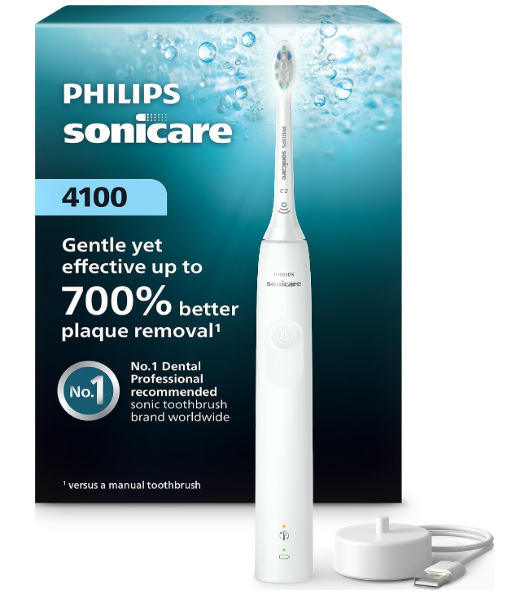
The easiest way to tell when your Philips Sonicare 4100 is fully charged is to check the battery indicator near the bottom of the handle while it is on the charger. A flashing green light means the toothbrush is charging. When the battery is full, the light stays solid green for about 30 seconds and then turns off.
So, if the indicator stops flashing and you saw it remain solid green, your Sonicare 4100 has reached a full charge. The light turning off afterward is normal: the toothbrush switches off the indicator to save energy.


What the Philips Sonicare 4100 Charging Lights Mean
The battery indicator uses different signals depending on whether the toothbrush is charging or being used.
| Indicator | What it means |
|---|---|
| Flashing green while on the charger | The toothbrush is charging |
| Solid green for about 30 seconds while on the charger | The battery is fully charged |
| Light turns off after the solid green signal | Normal; the indicator has switched off to save energy |
| Flashing amber after brushing | The battery is low and needs charging |
The most useful sign is the solid green light while the handle is on the charger. A light that is off does not necessarily mean the toothbrush has stopped charging or that something is wrong. The indicator may simply have switched off after showing that the battery is full.
How to Check That Your Sonicare 4100 Is Charging
To confirm that the toothbrush is charging, make sure the charger is plugged into a working outlet and place the handle correctly on the charging base. The battery indicator should flash green. Some versions may also give two short beeps when the handle is positioned properly.
If the indicator does not light up right away, leave the handle on the charger for a few minutes. The light may take a little time to appear, especially if the battery is very low or the toothbrush has not been used for a while.
How Long Does It Take to Fully Charge a Philips Sonicare 4100?
A full charge can take up to 24 hours, particularly before the toothbrush’s first use or when the battery has been drained. You can use the Sonicare 4100 before it is fully charged, but charging it completely first gives you the longest time between charges.
A fully charged battery is designed to provide about 28 two-minute brushing sessions, or roughly 14 days when you brush twice a day. Actual battery life can vary with use and the toothbrush’s condition.
Why Does the Charging Light Turn Off?
The charging light turning off after the solid green signal is normal. The Sonicare 4100 shows the full-charge signal for about 30 seconds, then switches off the indicator to conserve energy.
If you did not see the light change, check again after the toothbrush has been on the charger for several hours. You can also lift the handle and place it back on the base to see whether the indicator responds. Avoid repeatedly moving it if it is already charging properly.
How to Check the Battery After Removing the Toothbrush
When the handle is off the charger, the battery indicator can show the remaining charge when the toothbrush is awake, such as after brushing or when you pause it.
A solid green light indicates a full battery. A flashing green light can indicate that the battery is partly charged. A flashing amber light signals that the battery is low. If the battery is empty, the toothbrush may switch off and need to be placed on the charger before it can be used again.
The light may disappear when the toothbrush is not in use. That is also normal and does not mean the battery is empty.
What to Do If Your Sonicare 4100 Does Not Show a Charging Light
If the indicator does not flash green, try these steps:
- Check the outlet. Plug another device into the same outlet to confirm it is providing power.
- Reposition the handle. Make sure it is seated correctly on the charging base.
- Inspect the charger and handle. Check for moisture, toothpaste, or debris where the handle meets the charger. Wipe the surfaces dry with a soft cloth.
- Try another suitable outlet. Some bathroom outlets may be switched off or controlled by a safety switch.
- Leave it on the charger. If the battery is completely drained, allow it to charge for a while before checking the indicator again.
If the light never appears after these checks, or the toothbrush still will not work after an extended charge, the charger, battery, or handle may need inspection.
Can You Leave the Sonicare 4100 on the Charger?
Yes. The Sonicare 4100 can remain on a plugged-in charger between brushing sessions. Keeping it on the base helps ensure that it is ready to use, and the indicator will switch off when it is no longer needed.
Does Every Sonicare 4100 Have the Same Indicator?
Philips has sold different Sonicare 4100 models over time, and the exact light behavior can vary by model. Newer versions commonly use a flashing green light while charging and a solid green light for about 30 seconds when the battery is full. Older 4100 or ProtectiveClean 4100 models may have a different indicator layout or charging signal.
If your toothbrush behaves differently, check the model number printed on the handle or packaging and use the manual for that specific version.
Frequently Asked Questions
How can I tell if my Philips Sonicare 4100 is fully charged?
When the toothbrush is on the charger, the battery indicator stays solid green for about 30 seconds once the battery is full. It then turns off to save energy.
Does a flashing green light mean the battery is full?
No. A flashing green light while the handle is on the charger means the toothbrush is charging. The full-charge signal is a solid green light.
Why is the light off even though my toothbrush is on the charger?
The indicator switches off after displaying the full-charge signal. If you did not see that signal, make sure the charger is plugged in and the handle is seated correctly.
How long should I charge the Sonicare 4100?
A full charge can take up to 24 hours, especially before first use or after the battery has run down completely.
Can I use my Sonicare 4100 while it is not fully charged?
Yes. You can use the toothbrush before it reaches a full charge, although a full charge provides the longest time between charging sessions.
Conclusion
To know when your Philips Sonicare 4100 is fully charged, look for the battery indicator to change from flashing green to solid green while the handle is on the charger. The solid green light lasts about 30 seconds and then turns off. That is normal, and it confirms that the toothbrush has finished charging.