
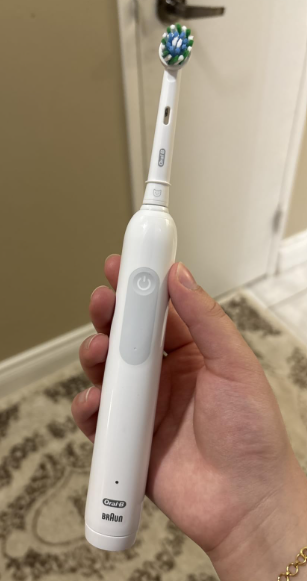
If your Oral-B Pro 1000 is flashing red, you might be wondering whether your electric toothbrush is malfunctioning, running out of battery, or warning you about something else.
Fortunately, a blinking red light doesn’t necessarily mean your toothbrush is broken. In most cases, it is simply the low-battery indicator telling you that the handle needs to be recharged.
However, the meaning can change depending on where the light appears, when it flashes, and which version of the Oral-B Pro 1000 you own.
For example, a red light near the bottom of the handle usually indicates a low battery, while a red light near the brush head on models equipped with a visible pressure sensor can mean you’re brushing too hard.
In this guide, we’ll explain why your Oral-B Pro 1000 flashes red, how to identify the cause, and what you can do to fix it. We’ll also cover charging problems, battery deterioration, and the warning signs that suggest it’s time to replace your toothbrush.
What Does a Flashing Red Light on the Oral-B Pro 1000 Mean?
The most common reason for an Oral-B Pro 1000 flashing red is a low battery.
When the rechargeable battery reaches a low level, the toothbrush activates its red battery indicator to remind you that it needs charging.
Depending on the model generation, this light may blink briefly when you turn the toothbrush on or off.
Sometimes, you’ll also notice that the motor feels weaker than usual. This happens because the battery no longer has enough energy to maintain normal performance.
The good news is that this behavior is normally part of the toothbrush’s built-in battery warning system.
Oral-B Pro 1000 Red Light Meanings
| Red light behavior | Possible meaning | Recommended action |
|---|---|---|
| Red light flashes after brushing | Low battery | Recharge the toothbrush |
| Red light blinks when turning it on | Battery running low | Place it on the charger |
| Red light appears near the brush head | Excessive brushing pressure, on models with a visible sensor | Reduce pressure |
| Red light continues after a full charging session | Battery or charging problem | Check the charger and battery |
| Red light flashes and motor stops | Battery critically low or unable to hold charge | Recharge and test |
| Red light appears intermittently | Low battery or inconsistent charging | Monitor battery performance |
It’s important to remember that Oral-B has produced different Pro 1000 versions over the years. Some include a visible pressure warning light, while others use a pressure sensor that changes the brushing action without displaying a red warning.
Therefore, identifying exactly where the red light appears is the first step toward understanding the problem.


1. Oral-B Pro 1000 Flashing Red Because of a Low Battery
A low battery is by far the most likely explanation when the red light appears near the bottom of the toothbrush handle.
The Oral-B Pro 1000 uses a rechargeable battery that powers its oscillating and rotating brushing movements.
As the battery loses charge through regular use, the toothbrush eventually activates its low-battery warning.
How to Recognize a Low-Battery Warning
You may notice several symptoms:
- The red light flashes for a few seconds after you finish brushing.
- The toothbrush blinks red when you press the power button.
- The motor begins running more slowly.
- The toothbrush stops before completing a two-minute brushing session.
- The handle has noticeably less power than usual.
In many cases, the toothbrush will continue working for another brushing session or two after the red indicator first appears.
However, we recommend charging it rather than waiting until the battery is completely depleted.
How to Fix It
The solution is straightforward:
- Turn off your Oral-B Pro 1000.
- Connect the charging base to a working electrical outlet.
- Place the toothbrush handle correctly on the charging stand.
- Check whether the charging indicator activates.
- Allow enough time for the battery to recharge fully.
- Remove the toothbrush and test it during a normal brushing session.
Depending on the Pro 1000 version, a complete charge may take approximately 15–22 hours, although some newer versions have different charging specifications.
Check the manual for your particular handle to confirm its charging time.
Important: A flashing red battery indicator is not automatically a sign that the battery needs replacing. It usually means the battery simply needs recharging.
2. Oral-B Pro 1000 Flashing Red While Brushing
What happens if the red light appears while you’re actively brushing your teeth?
There are two possible explanations, depending on the toothbrush version and the position of the light.
Low Battery During Operation
Some Pro 1000 variants activate the red warning light when battery power becomes very low.
You may also notice the brushing action getting weaker.
If this happens, the most practical solution is to place the toothbrush on its charger after brushing.
A properly functioning battery should recover its normal performance following a complete charge.
Excessive Brushing Pressure
Certain Oral-B Pro models include a visible pressure sensor that illuminates red when you push too hard against your teeth and gums.
This feature helps prevent excessive brushing pressure.
However, not every Oral-B Pro 1000 has a visible red pressure indicator. Many versions rely on an automatic pressure sensor that reduces or stops pulsations instead.
If your particular model has a visible pressure light, a red warning near the brush head may indicate that you are applying too much force.
How to Correct Excessive Pressure
We recommend adjusting your technique:
- Hold the toothbrush gently rather than gripping it tightly.
- Position the brush head against your teeth without pushing forcefully.
- Move slowly from one tooth to another.
- Allow the rotating brush head to perform the cleaning.
- Avoid scrubbing aggressively along the gumline.
Electric toothbrushes don’t require the same brushing pressure that people sometimes apply with manual toothbrushes.
Using excessive force can irritate your gums and contribute to tooth abrasion over time.
If the pressure light disappears when you reduce force, the warning is operating as intended.
3. Oral-B Pro 1000 Flashing Red After Charging
One of the more frustrating situations occurs when your Oral-B Pro 1000 keeps flashing red even after you’ve charged it.
If you’ve left the toothbrush on its charging stand for the recommended amount of time and it still displays the low-battery warning, something may be preventing it from charging properly.
Several problems could explain this behavior.
The Toothbrush Wasn’t Properly Positioned
The Oral-B Pro 1000 uses an inductive charging system.
Unlike devices that charge through a conventional USB cable inserted directly into the handle, the toothbrush receives power through its charging base.
If the handle isn’t positioned properly, charging may not occur as expected.
Try removing the toothbrush and placing it back on the charging stand.
Make sure the handle is sitting securely and that nothing is obstructing its position.
The Electrical Outlet Isn’t Working
Sometimes, the toothbrush itself isn’t the problem.
The charging base may simply not be receiving electricity.
You can check this by:
- Unplugging the charger.
- Testing the outlet with another working appliance.
- Connecting the charger to a different suitable outlet.
- Placing the toothbrush back on the charging stand.
- Observing whether its charging indicator activates.
If the toothbrush begins charging normally from another outlet, you’ve probably identified the cause.
The Battery Is Aging
Rechargeable batteries gradually lose capacity as they age.
If you’ve used your Oral-B Pro 1000 for several years, the battery may no longer store as much energy as it did when the toothbrush was new.
Typical warning signs include:
- The red light appears shortly after a full charge.
- Battery life has decreased significantly.
- The toothbrush requires charging almost every day.
- The motor stops unexpectedly.
- A full charging session provides only one or two brushing sessions.
When these symptoms become persistent, battery deterioration becomes a more likely explanation.
4. Oral-B Pro 1000 Flashing Red and Not Charging
If your toothbrush flashes red but doesn’t seem to charge, we recommend following a structured troubleshooting process before considering a replacement.
Step 1: Check the Charging Base
Start by examining the charger.
Look for obvious damage, such as a frayed cable, cracked housing, or discolored electrical plug.
If you notice visible damage, stop using the charger.
A damaged electrical accessory should not be repaired casually or used near water.
Step 2: Clean the Bottom of the Handle
Toothpaste residue and mineral deposits can accumulate around the base of an electric toothbrush.
Although the Pro 1000 charges inductively and doesn’t need exposed electrical contacts, heavy buildup can prevent the handle from sitting correctly on the charging stand.
To clean it:
- Remove the toothbrush from the charger.
- Unplug the charging base.
- Wipe the bottom of the handle with a damp cloth.
- Remove any visible toothpaste deposits.
- Clean the charging stand with a slightly damp cloth.
- Dry both components thoroughly before reconnecting the charger.
Never immerse the charging base or its electrical plug in water.
Step 3: Allow Enough Charging Time
A deeply discharged battery may not activate its charging indicator immediately.
Some Oral-B Pro 1000 manuals explain that the charging light can take approximately 10–30 minutes to appear after the battery has been completely drained.
Therefore, an initially unlit charging indicator doesn’t automatically indicate a defective toothbrush.
Leave the handle on a functioning charger for the appropriate period before evaluating its condition.
Step 4: Test Another Compatible Charger
If you have access to another genuine or approved compatible Oral-B charging base, you can use it to help identify the problem.
If your toothbrush charges with the replacement base, the original charger may be faulty.
If neither charger works, the problem may be inside the toothbrush handle.
Make sure the replacement charger is compatible with your exact Pro 1000 version.
Step 5: Evaluate Battery Performance
After completing a full charge, test the toothbrush.
Pay attention to how long it operates before the red low-battery indicator returns.
If the toothbrush runs normally for several days, the problem may have been a temporary charging interruption.
However, if it loses power after only one brushing session, the rechargeable battery may have deteriorated.
5. Oral-B Pro 1000 Red Light Flashing but Toothbrush Still Works
Another common question is whether it’s safe to continue using the toothbrush when the red indicator is blinking.
Generally, yes.
If the red light is simply warning you about a low battery, you can usually continue brushing until the remaining power runs out.
The warning isn’t necessarily connected to a mechanical or electrical failure.
However, you should consider three things.
Reduced Cleaning Performance
When the battery is nearly empty, some versions may reduce motor speed.
This can affect the normal brushing action.
Recharging the toothbrush will help restore its intended performance.
Unexpected Shutdowns
If you ignore the low-battery warning, the toothbrush may stop in the middle of your brushing routine.
This is inconvenient, especially when traveling.
Frequent Charging Warnings
If the red warning appears after nearly every brushing session, even when the toothbrush has recently been fully charged, the issue may be more serious than normal battery depletion.
In that case, follow the charging troubleshooting steps and evaluate whether the battery is still functioning properly.
6. How Long Does the Oral-B Pro 1000 Take to Charge?
Charging time depends on the specific Oral-B Pro 1000 version.
Some older models require approximately 22 hours for a full charge, while other Pro 1000 generations specify around 15 hours.
The manufacturer’s instructions for your particular model provide the most reliable figure.
Oral-B Pro 1000 Charging Light Colors
| Indicator | Typical meaning |
|---|---|
| Flashing green light | Battery is charging on models with a green charging indicator |
| Green light turns off after charging | Battery has completed charging on many versions |
| Flashing red light near the bottom | Battery is running low |
| Red pressure warning near the top | Excessive brushing pressure on models equipped with this light |
| No charging light immediately after deep discharge | Battery may need more time before the indicator activates |
Some models briefly display a steady charging light before it turns off, while other versions simply stop flashing when charging is complete.
Also, the red low-battery indicator isn’t the normal charging indicator on most traditional Pro 1000 models.
If you’re unsure which indicator your toothbrush uses, check its model-specific instructions.
7. Why Does My Oral-B Pro 1000 Battery Drain So Quickly?
If your toothbrush frequently flashes red, short battery life may be the underlying problem.
Several factors can influence how long a charge lasts.
Battery Age
Rechargeable batteries have a limited service life.
After many charging cycles and years of use, their capacity gradually decreases.
A toothbrush that originally lasted several days between charges might eventually struggle to complete a few brushing sessions.
Incomplete Charging
If you regularly remove the toothbrush from its charger before it has accumulated enough energy, you may notice the red warning appearing sooner.
Because many older Pro 1000 models charge relatively slowly, a brief charging session may not provide as much battery life as expected.
Charging Base Problems
An unreliable charger can lead to inconsistent battery performance.
If the toothbrush receives power intermittently, it may never reach a full charge.
Extreme Temperatures
Rechargeable batteries generally perform best when stored and charged at moderate temperatures.
Very hot or cold environments can affect charging behavior and battery performance.
Avoid leaving your toothbrush in direct sunlight, inside a hot car, or near a strong heat source.
Internal Battery Wear
Eventually, the rechargeable battery may lose enough capacity that it can no longer support normal daily use.
When this happens, repeatedly charging it may not solve the problem.
8. How to Stop Your Oral-B Pro 1000 From Flashing Red
If you want to prevent recurring low-battery warnings, a few simple maintenance habits can help.
Recharge Before the Battery Is Completely Empty
You don’t need to wait until your toothbrush shuts down.
When the low-battery warning appears, recharge it according to the manufacturer’s instructions.
This helps ensure your toothbrush is ready for your next brushing session.
Keep the Handle and Charger Clean
Regular cleaning prevents toothpaste residue from accumulating around the handle and charging stand.
Remove the brush head after brushing, rinse the appropriate parts, and allow them to dry.
A clean charging area also makes it easier to position the handle correctly.
Use a Compatible Charger
Always use a charger suitable for your specific Oral-B Pro 1000.
An incompatible charging accessory may fail to charge the battery correctly.
Avoid Excessive Heat
Store the toothbrush in a cool, dry location away from direct heat.
High temperatures can accelerate battery degradation.
Monitor Changes in Battery Life
If the toothbrush begins requiring much more frequent charging than before, take note.
A noticeable reduction in battery life is often one of the earliest signs of an aging rechargeable battery.
9. Can You Reset an Oral-B Pro 1000 That Is Flashing Red?
Many people search for an Oral-B Pro 1000 reset procedure when the red light won’t stop blinking.
However, the traditional Oral-B Pro 1000 doesn’t generally provide a dedicated user reset function that clears a low-battery warning or restores battery capacity.
The indicator is controlled by the toothbrush’s internal electronics and battery condition.
If the light appears because the battery is low, charging the toothbrush is the correct solution.
If it continues flashing after a complete charge, a reset is unlikely to solve an actual battery or charger problem.
What You Can Try Instead
We recommend this basic procedure:
- Turn the toothbrush off.
- Remove it from the charging stand.
- Check the charging base and power outlet.
- Clean and dry the bottom of the handle.
- Reconnect the charger.
- Charge the toothbrush for the time specified in its manual.
- Test it during normal operation.
If the red battery warning returns immediately, investigate the battery condition rather than repeatedly attempting a reset.
10. When Should You Replace Your Oral-B Pro 1000?
A flashing red light alone doesn’t mean you need a new toothbrush.
However, certain symptoms suggest that replacement may be the most practical option.
Signs That Replacement May Be Necessary
Consider replacing your Pro 1000 if:
- The battery no longer holds a useful charge.
- The toothbrush shuts down after only a short period of brushing.
- The red low-battery light returns immediately following a verified full charge.
- The charging base works with another compatible toothbrush, but your handle won’t charge.
- The handle has visible cracks or signs of internal water damage.
- The motor no longer operates consistently.
Before buying a new toothbrush, check whether your existing model is still covered by its warranty.
An eligible malfunction may qualify for manufacturer service or replacement.
Can You Replace the Battery?
The Oral-B Pro 1000 contains an internal rechargeable battery.
It isn’t designed for routine consumer battery replacement in the same way as a device powered by removable AA batteries.
Opening the sealed handle can damage its water-resistant construction and create electrical or battery-related risks.
For this reason, we recommend contacting an authorized service provider rather than attempting an improvised battery replacement.
If the toothbrush is several years old and the battery has severely deteriorated, replacing the handle or buying a new toothbrush may be more practical.
11. Oral-B Pro 1000 Flashing Red: Quick Troubleshooting Checklist
If you’re still unsure what’s happening, use this quick guide.
| Problem | First thing to try | What to check next |
|---|---|---|
| Red light flashes after brushing | Fully recharge the toothbrush | Battery life after charging |
| Red light appears while brushing | Check the location of the light | Battery level or brushing pressure |
| Red light flashes after a full charge | Confirm adequate charging time | Charger and battery condition |
| Toothbrush won’t turn on | Charge it for at least 30 minutes | Electrical outlet and charging base |
| Motor feels weak | Recharge the battery | Battery deterioration |
| Battery lasts only one or two sessions | Perform one verified full charge | Possible battery replacement or handle replacement |
| Red pressure light stays illuminated | Reduce pressure and clean around the brush-head connection | Pressure sensor malfunction |
Most red-light problems can be investigated without taking the toothbrush apart.
Start with the simplest explanation—low battery—and move to charger and battery troubleshooting only when necessary.
Frequently Asked Questions About the Oral-B Pro 1000 Flashing Red
1. Why Is My Oral-B Pro 1000 Flashing Red After I Brush?
The most common explanation is that the rechargeable battery is running low.
Many Oral-B Pro 1000 versions blink red briefly after you turn the toothbrush off to indicate that charging is needed.
Place the handle on its charging stand and allow it to recharge fully.
If the red warning keeps appearing immediately after a verified full charge, there may be a battery or charger problem.
2. Why Is My Oral-B Pro 1000 Flashing Red While Charging?
The traditional Pro 1000 typically uses a separate charging indicator, often green, rather than flashing red to show normal charging progress.
If you see a red light while the handle is on the charger, it may be the remaining low-battery warning.
Check that the toothbrush is properly positioned and leave it charging for the recommended period.
If the red warning persists after charging and the toothbrush operates only briefly, inspect the charger and consider possible battery deterioration.
3. How Do I Know When My Oral-B Pro 1000 Is Fully Charged?
On many Pro 1000 versions, a green charging light flashes while the battery is charging and stops flashing or turns off when charging is complete.
The exact indicator behavior varies by model generation.
A full charge can take approximately 15–22 hours on various Pro 1000 versions, so refer to the instructions for your particular model.
4. Does a Flashing Red Light Mean My Oral-B Pro 1000 Is Broken?
No. A flashing red light near the bottom of the handle normally indicates a low battery rather than a malfunction.
You should first recharge the toothbrush.
If the warning disappears and battery life returns to normal, there’s usually nothing to worry about.
A persistent red warning after a confirmed full charge may indicate a charging problem or an aging battery.
5. Can I Still Use My Oral-B Pro 1000 When the Red Light Is Flashing?
Yes, provided the toothbrush is functioning normally and the warning is simply indicating a low battery.
However, the remaining power may be enough for only a limited number of brushing sessions.
The motor may also slow down as the battery approaches complete discharge.
We recommend recharging the toothbrush as soon as practical rather than allowing it to shut down unexpectedly.
Conclusion: How to Fix an Oral-B Pro 1000 Flashing Red
If your Oral-B Pro 1000 is flashing red, the first thing to check is the battery level.
On most traditional Pro 1000 models, a blinking red light near the bottom of the handle means the rechargeable battery is running low. The solution is usually as simple as placing the toothbrush on its charging stand and allowing it to charge fully.
If your version has a visible pressure sensor and the red light appears near the brush head during brushing, it may instead be warning you that you’re applying too much pressure.
Problems become more concerning when the red low-battery indicator continues appearing after a full charge, the motor stops unexpectedly, or battery life becomes extremely short.
In those situations, check the electrical outlet, charging base, and battery condition before deciding whether replacement is necessary.
The main takeaway is simple: a flashing red light is usually a normal warning, not a sign that your Oral-B Pro 1000 has failed. Identifying the light’s location and when it appears will help you determine the correct solution without unnecessary repairs or replacement costs.