
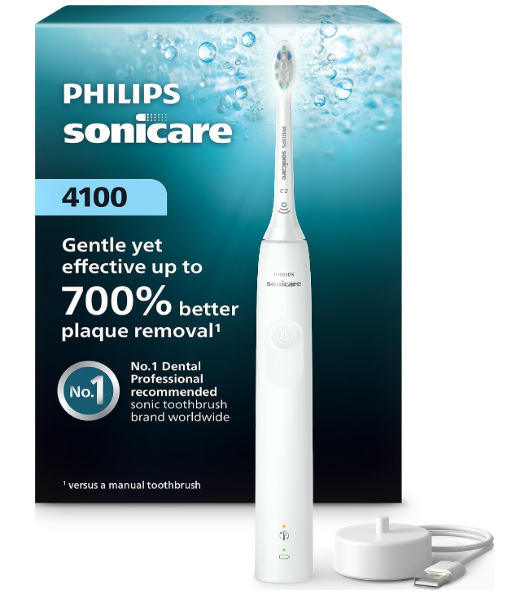
The lights on a Philips Sonicare 4100 show battery status and, on models with BrushSync, when it may be time to replace the brush head. Some alerts can also include beeps or changes in vibration. The exact layout can vary by model, so check the model number printed on the bottom of the handle if your lights look different.
Here’s a quick guide to the most common indicators:
| Light or alert | What it usually means |
|---|---|
| Steady green battery light | The battery is fully charged or has a high charge |
| Flashing green battery light | The battery has a partial charge or is charging |
| Flashing orange battery light with beeps | The battery is low and needs charging |
| BrushSync reminder light | The brush head may need replacing |
| Handle pulses or changes vibration | The pressure sensor is warning you to ease up |


Where Are the Lights on the Sonicare 4100?
On the current Sonicare 4100 models, the battery indicator is near the bottom of the handle. Models with BrushSync also have a brush head replacement reminder light. These indicators are separate, so check which one is lit before deciding what to do.
The pressure sensor generally alerts you through the handle’s vibration rather than a dedicated warning light. A change in vibration during brushing is usually a cue to reduce pressure.
What the Sonicare 4100 Battery Light Means
The battery indicator shows how much charge remains. It may light up after a brushing session, when you pause or switch off the handle, and while the toothbrush is on its charger. The light may turn off after a short time to conserve power.
Steady green light
A steady green battery light generally means the battery is full or has a high charge. You can continue using the toothbrush as usual.
Flashing green light
A flashing green battery light can indicate a partial battery charge. While the toothbrush is on the charger, a flashing light usually means it is charging. Let it remain on the charger until it has charged fully.
Flashing orange light with three beeps
A flashing orange battery light accompanied by three beeps indicates a low battery. Place the handle on its charger and allow it to charge before your next brushing session.
Flashing orange light with five beeps
Some 4100 models use five beeps with a flashing orange light to signal a very low battery. The toothbrush may stop working soon, so recharge it before trying to use it again.
No light while charging
The light may switch off after a while to save energy, even if the handle is still charging. Check that the charger is plugged in, the handle is seated correctly, and the outlet works. If the indicator does not come on after these checks, see the troubleshooting section below.
What the Brush Head Reminder Light Means
Some Sonicare 4100 models include a BrushSync replacement reminder. The reminder tracks use of a compatible smart brush head and lights up when the head may need replacing. On certain versions, the alert is amber or orange and may be accompanied by a short beep.
A new smart brush head may also cause the reminder light to blink briefly when you attach it. That can be a normal recognition signal rather than a warning.
If the reminder stays on, inspect the brush head and replace it if the bristles are worn or the handle indicates it is due. If you use a brush head without BrushSync, the reminder may not work the same way. Check your model’s manual for its specific behavior.
Does a Flashing Light Mean the Brush Head Is Worn Out?
Not always. Look at which indicator is flashing:
- A light near the battery indicator, especially with beeps, is likely a battery alert.
- A light beside the brush head reminder symbol may mean the head is due for replacement.
- A brief flash after attaching a new head can be a normal BrushSync signal.
Because the placement and display can differ between versions, use the model number on the bottom of the handle to identify your exact 4100.
What the Pressure Sensor Alert Means
The pressure sensor helps alert you when you are pressing too hard. On Sonicare 4100 models, this feedback is typically a change in vibration or a pulsing sensation from the handle. Ease your grip and guide the brush gently over each tooth rather than scrubbing.
A pressure alert is not the same as the battery light. If the handle pulses only while brushing and returns to normal when you reduce pressure, the sensor is likely doing its job.
Why Is My Sonicare 4100 Light Flashing?
A flashing light is not automatically a sign that the toothbrush is faulty. It can indicate charging, a partial battery charge, a low battery, or a brush head reminder.
Try these steps to identify the cause:
- Take the handle off the charger. See whether the light changes after a brushing session or when you pause the handle.
- Check which symbol is lit. Battery and BrushSync reminders have different meanings.
- Listen for beeps. A flashing orange battery light with beeps usually points to a low charge.
- Check the brush head. Make sure it is attached securely and replace it if it is worn or the reminder indicates it is due.
- Recharge the handle. Use the charger supplied with the toothbrush and confirm it is plugged into a working outlet.
What to Do If the Battery Light Does Not Come On
If the toothbrush seems to work but the battery indicator does not light, try charging it for a while and then check the indicator after a brushing session. The light may not stay on continuously, because it switches off to save power.
If the toothbrush does not run, check that the charger is connected correctly and that the handle sits properly on it. Test the outlet with another device. If the handle still will not charge or the battery light behaves unusually after these steps, consult Philips support or the instructions for your model.
Sonicare 4100 Lights Compared With Older 4100 Models
“4100” can refer to more than one Philips toothbrush. The newer Sonicare 4100 models commonly have model numbers beginning with HX3681. An older product called ProtectiveClean 4100 may have a different model number and indicator layout.
The basic idea is similar: the battery indicator reports charge, and some versions have a brush head replacement reminder. However, light placement, colors, and alert patterns may differ. Check the handle’s model number before relying on a description for a particular version.
How to Keep the Lights and Alerts Working Normally
Keep the handle and charger clean and dry, especially around the charging base. Attach the brush head firmly and use compatible replacement heads. Recharge the toothbrush when the battery indicator shows it is low, rather than waiting until the handle stops working.
The lights are simple status signals, not a detailed diagnostic display. If a light stays on unexpectedly, the toothbrush stops charging, or the alerts do not match the behavior described for your model, check its manual or contact Philips support with the model number.
Frequently Asked Questions
What does a flashing green light mean on the Philips Sonicare 4100?
A flashing green battery light can indicate a partial charge. If the handle is on the charger, it usually means the battery is charging.
What does an orange light mean on the Sonicare 4100?
A flashing orange battery light with beeps usually means the battery is low. An orange or amber BrushSync reminder light can indicate that the brush head may need replacing. Check the symbol next to the light to tell them apart.
Why does my Sonicare 4100 beep and flash orange?
Three beeps with a flashing orange battery light generally mean the battery is low. Some models use five beeps to signal a very low battery. Recharge the handle.
Does the Sonicare 4100 have a light for brushing too hard?
The pressure sensor typically alerts you with a change or pulse in the handle’s vibration, rather than a separate warning light. Ease up when you feel the alert.
Should the battery light stay on while the toothbrush is charging?
Not necessarily. The indicator may switch off after a while to save energy. Make sure the handle is seated correctly on a working charger, then check its status after charging.
Conclusion
The Philips Sonicare 4100’s lights mainly tell you about battery charge and, on BrushSync models, brush head replacement. Green generally indicates charge, while a flashing orange battery light with beeps means it is time to recharge. Pressure feedback usually comes through the handle’s vibration. If your toothbrush has a different light pattern, check its model number and consult the instructions for that specific version.