
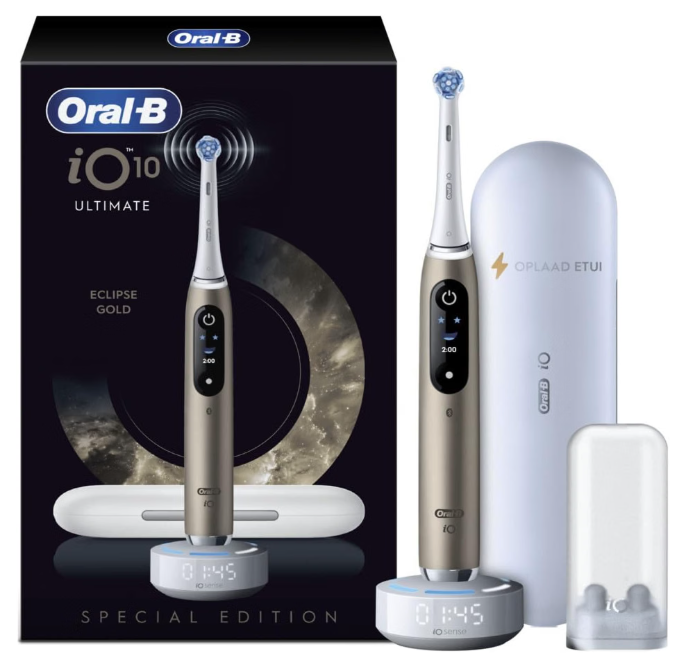
The Oral-B iO Series 10 is one of the most advanced electric toothbrushes in Oral-B’s lineup. With its intelligent pressure sensor, interactive display, multiple brushing modes, and iO Sense smart charger, it offers an impressive range of features designed to improve our daily oral hygiene routine.
However, even a premium electric toothbrush can occasionally display warning lights that leave us wondering what is happening.
One of the most common concerns is Oral-B iO 10 red flashes. Whether the toothbrush flashes red while brushing, blinks red before switching on, or displays a red warning when the battery is running low, understanding these signals helps us determine whether the toothbrush is operating normally or requires attention.
Fortunately, a flashing red light does not automatically mean that our Oral-B iO 10 is broken.
In most situations, the red indicator is simply communicating important information about brushing pressure or battery status.
In this comprehensive guide, we will explain exactly what the red flashes mean, how to identify their causes, and what steps we can take to solve common problems.
What Do Red Flashes Mean on the Oral-B iO 10?
The Oral-B iO 10 flashing red light usually indicates one of two conditions: excessive brushing pressure or a low battery.
The key to identifying the correct explanation is paying attention to when the red light appears and how the toothbrush behaves.
| Red light behavior | Possible meaning | Recommended action |
|---|---|---|
| Red light during brushing | Excessive brushing pressure | Reduce the pressure against your teeth |
| Rapid red flashes when the battery is low | Battery needs charging | Place the toothbrush on its charger |
| Red light remains on despite gentle brushing | Possible pressure sensor obstruction | Clean the brush head connection |
| Red flashes and toothbrush stops working | Battery may be depleted | Recharge the toothbrush |
| Red flashes despite a full charge | Possible sensor or electrical issue | Check the display and troubleshoot |
| Red light disappears when brushing pressure decreases | Normal pressure sensor operation | Continue brushing with gentle pressure |
The important distinction is that red illumination during brushing is generally associated with pressure, while rapid red blinking can indicate a low battery.
The iO 10 also uses other indicator colors, including green for recommended brushing pressure, blue for Bluetooth pairing, and orange for certain error conditions.
Understanding these differences makes troubleshooting considerably easier.

1. Oral-B iO 10 Flashing Red While Brushing
One of the most common reasons for a red light on the Oral-B iO 10 is the built-in Smart Pressure Sensor.
This feature helps protect our gums and teeth by monitoring how much pressure we apply while brushing.
How the Smart Pressure Sensor Works
The Oral-B iO 10 uses a colored light ring to provide instant feedback about brushing pressure.
The indicator works as follows:
- White light: Brushing pressure is lower than recommended.
- Green light: We are applying the recommended brushing pressure.
- Red light: We are pressing too hard against our teeth or gums.
If the toothbrush turns red during brushing, it is usually doing exactly what it was designed to do.
The red warning reminds us to reduce pressure rather than scrub harder.
How to Fix the Red Pressure Warning
If our Oral-B iO 10 repeatedly turns red while brushing, we can correct the problem by adjusting our technique.
- Hold the toothbrush with a relaxed grip.
- Position the brush head against the teeth without pressing forcefully.
- Allow the electric motor to perform the cleaning movement.
- Move the brush slowly from one tooth to another.
- Watch the pressure indicator and aim for a green light.
We should notice that the red light disappears once the pressure returns to the recommended range.
The toothbrush also reduces brush head movement under excessive pressure in certain cleaning modes, including Daily Clean, Intense, and Sensitive.
This is a protective feature rather than a malfunction.
2. Oral-B iO 10 Red Flashes Due to Low Battery
Another common explanation for Oral-B iO 10 red flashes is a low battery.
Unlike the pressure warning, which normally appears during brushing, the battery warning may occur when we activate the handle or attempt to start brushing.
According to the iO 10 operating instructions, the light ring blinks rapidly in red when the battery is running low.
Signs That the Battery Is Almost Empty
We may notice several symptoms:
- The light ring flashes red rapidly.
- The interactive display indicates a low battery level.
- The toothbrush stops operating after the battery is depleted.
- The handle does not start until it has received sufficient charge.
These symptoms do not necessarily indicate a defective toothbrush.
In most cases, the solution is simply to recharge the battery.
How to Charge the Oral-B iO 10 Correctly
The iO 10 includes an iO Sense charger designed specifically for the toothbrush.
To recharge the battery:
- Connect the supplied charging equipment to a suitable power outlet.
- Place the Oral-B iO 10 handle correctly on the charging base.
- Confirm that the display or light ring responds.
- Allow the battery to charge.
- Check the battery status on the interactive display.
A complete charge typically takes approximately three hours under normal conditions.
If the battery is completely empty and the display remains off, Oral-B recommends charging for at least 30 minutes.
Once charging is complete, the normal charging light indication should stop.
3. Oral-B iO 10 Red Light Stays On
Sometimes the red light remains illuminated even when we believe we are brushing gently.
This situation can be confusing because the pressure indicator should normally respond when we adjust the force applied to our teeth.
There are several possible explanations.
Toothpaste Residue Around the Brush Head
Over time, toothpaste, saliva, and other residues can accumulate around the connection between the brush head and toothbrush handle.
This buildup may interfere with normal mechanical movement or pressure sensing.
Oral-B identifies toothpaste accumulation around the connector as a possible cause of persistent pressure sensor activation.
How to Clean the Brush Head Connection
We can perform a simple cleaning procedure:
- Turn off the toothbrush.
- Remove the brush head carefully.
- Rinse the exposed metal connector and the top of the handle under warm running water.
- Clean away any visible toothpaste residue.
- Rinse the brush head separately.
- Allow the components to dry before reassembling them.
Avoid sharp tools, abrasive cleaners, and attempts to force the connection.
After cleaning, test the toothbrush again.
If the red pressure warning disappears when we use normal brushing pressure, residue may have contributed to the problem.
Worn or Damaged Brush Head
A worn brush head can also affect our brushing experience.
We should inspect the brush head for damaged bristles, an unusually loose connection, or visible deterioration.
Oral-B generally recommends replacing iO brush heads approximately every three months, or sooner if they become worn.
If the head is damaged, replacing it is more appropriate than attempting to repair it.
4. Oral-B iO 10 Flashing Red and Not Working
If our Oral-B iO 10 flashes red but refuses to operate, the first possibility to investigate is battery depletion.
When the battery becomes completely empty, the toothbrush motor stops.
However, charging problems can sometimes make the situation more complicated.
Step 1: Check the Battery Level
Activate the display and look for the battery status indicator.
If the display shows that the battery is empty or nearly empty, recharge the toothbrush.
An entirely depleted battery may require several minutes on the charger before the display becomes responsive.
Step 2: Check the Charging Base
If the toothbrush does not appear to charge, inspect the charging setup.
Make sure that:
- The power outlet works correctly.
- The charging cable is connected securely.
- The toothbrush is positioned properly on its charger.
- The charging base is clean and dry.
- The charger and cable show no visible damage.
We can test the electrical outlet with another suitable device to rule out a power supply issue.
Do not attempt to open or repair a damaged charger.
Step 3: Allow Enough Charging Time
If the toothbrush has been unused for a long period, its battery may be deeply discharged.
In this situation, placing the handle on the charger for only a minute or two may not be enough.
Allow at least 30 minutes of charging if the battery is completely empty, then check the display again.
Step 4: Check the Temperature
The Oral-B iO 10 may not charge normally when the surrounding temperature is outside its supported range.
The manufacturer’s troubleshooting information recommends an ambient charging temperature of approximately 5°C to 35°C (41°F to 95°F).
If the toothbrush has been stored in an unusually hot or cold environment, allow it to return to normal room temperature before charging.
5. Why Does My Oral-B iO 10 Keep Flashing Red After Charging?
If the red light continues flashing even after the toothbrush has been on its charger, we need to determine whether the battery actually received a charge.
A flashing red light after charging is not automatically evidence of a defective battery.
Possible Cause: The Charger Is Not Working Properly
A loose power connection or faulty charging accessory may prevent the toothbrush from charging.
Check the outlet and inspect the charger for visible damage.
If the charger is damaged, stop using it and contact Oral-B support.
Possible Cause: The Battery Did Not Charge Completely
The toothbrush may have been removed from the charger before it accumulated enough energy.
Check its battery percentage using the handle display instead of assuming that time spent on the charger guarantees a full battery.
Possible Cause: A Battery or Internal Fault
If the toothbrush repeatedly reports a low battery despite a confirmed full charge, an internal problem becomes more plausible.
Possible issues include battery deterioration, charging circuitry problems, or another electrical fault.
We should not attempt to replace the internal battery ourselves.
The iO 10 is not designed for routine user battery replacement, and opening the handle can damage the appliance.
6. Oral-B iO 10 Red Flashes on the iO Sense Charger
The Oral-B iO 10 differs from many traditional electric toothbrushes because it includes the advanced iO Sense charging system.
This charger provides brushing guidance and works together with the toothbrush’s intelligent features.
It is important to distinguish between the lights on the toothbrush handle and any indications appearing on the charger.
Toothbrush Light Ring vs. Charger Indicators
The light ring on the handle communicates information about pressure, battery status, and other toothbrush functions.
The iO Sense charger provides additional guidance associated with brushing.
Therefore, when we notice unusual lights, we should identify their exact location before attempting a fix.
If the toothbrush handle flashes red, check the battery level and brushing pressure first.
If a warning appears specifically on the iO Sense charger, examine its display or indicator behavior and consult the charger instructions. We should not automatically assume that every charger light has the same meaning as the toothbrush’s red pressure warning.
7. How to Reset the Oral-B iO 10
Occasionally, the toothbrush may behave unexpectedly because of a temporary software or settings issue.
If normal troubleshooting does not resolve the problem, a factory reset may be worth considering.
However, resetting the toothbrush should not be our first response to a red light.
A reset cannot correct excessive brushing pressure, repair a damaged charger, or restore a physically defective battery.
Oral-B iO 10 Factory Reset Instructions
The iO 10 provides a factory reset option through its interactive display.
To access it:
- Wake up the toothbrush display.
- Use the mode button to navigate through the available options.
- Open the Settings menu.
- Locate the factory reset option.
- Follow the instructions displayed on the toothbrush.
- Allow the reset process to finish.
A factory reset can remove personalized settings, so it is best to use this option only when necessary.
Afterward, configure the toothbrush again and check whether the unusual behavior continues.
If the red flashes still appear with a charged battery and no excessive pressure, contact Oral-B customer support.
8. Oral-B iO 10 Light Colors Explained
The Oral-B iO 10 uses several colors to communicate different operating conditions.
Knowing what each color represents helps us avoid unnecessary troubleshooting.
| Indicator color | Meaning | What we should do |
|---|---|---|
| White | Low brushing pressure or normal operating indication | Adjust pressure if necessary |
| Green | Recommended brushing pressure | Continue brushing normally |
| Red | Excessive brushing pressure or low battery | Reduce pressure or recharge |
| Blue | Bluetooth pairing activity | Follow pairing instructions |
| Orange | Error indication | Read the display message |
Some normal operating colors can be customized through the Oral-B app.
For this reason, the appearance of the light ring may vary depending on our selected settings.
Nevertheless, the key pressure warning colors remain important for interpreting brushing feedback.
Is the Red Light Always an Error?
No.
This is one of the most important things to understand about the Oral-B iO 10.
Red illumination is not necessarily an error code.
When the pressure sensor turns red, the toothbrush is providing protective feedback.
Similarly, a rapid red battery warning is an expected operating function.
A genuine malfunction becomes more likely when the warning does not respond to normal corrections or is accompanied by repeated charging or operating failures.
9. How to Prevent Oral-B iO 10 Red Flashes
Although some red indicators are part of normal operation, we can reduce unnecessary warnings by following a few simple maintenance habits.
Use Gentle Brushing Pressure
The iO 10 is designed to clean effectively without aggressive scrubbing.
We should allow its motorized brush head to perform the cleaning while guiding it gently across our teeth.
Watching for the green pressure indicator can help us develop better brushing habits.
Keep the Battery Charged
Regular charging can prevent interruptions caused by a depleted battery.
We do not need to wait until the toothbrush stops working before placing it on the charger.
The iO 10 includes battery charging protection, and the manufacturer allows the handle to remain on its compatible charger to maintain its charge.
Clean the Toothbrush Regularly
After each brushing session, rinse the brush head and the upper portion of the handle according to the manufacturer’s cleaning instructions.
Periodically remove the brush head to check for accumulated toothpaste.
Keeping the connection clean can help prevent avoidable problems.
Replace the Brush Head When Necessary
Using a heavily worn brush head is not ideal for comfortable, effective brushing.
We should replace it around every three months or sooner if the bristles become damaged or visibly worn.
Store the Toothbrush Correctly
Extreme temperatures, unnecessary impacts, and improper storage can affect electronic devices.
Keep the toothbrush in a clean, dry environment when it is not being used, and avoid leaving it exposed to excessive heat.
10. When Should We Contact Oral-B Support?
Most cases of Oral-B iO 10 red flashes can be resolved by changing brushing pressure, charging the battery, or cleaning the toothbrush.
However, professional assistance may be necessary when the problem continues.
Consider contacting Oral-B support if:
- The toothbrush flashes red despite showing a full battery.
- The pressure indicator remains red with no pressure applied.
- The toothbrush will not charge using a properly functioning compatible charger.
- The handle repeatedly turns off unexpectedly.
- The display shows persistent error messages.
- The toothbrush or charging equipment has visible damage.
Before contacting support, it helps to have the product model, purchase information, and a description of the exact flashing pattern.
If the toothbrush is still covered by a valid warranty, Oral-B may be able to provide repair or replacement options according to the applicable warranty terms.
11. Oral-B iO 10 Red Flashes: Quick Troubleshooting Checklist
If we want to diagnose the problem quickly, the following checklist provides a practical starting point.
| Problem | First action | Next step if unresolved |
|---|---|---|
| Red light while brushing | Reduce brushing pressure | Clean the connector and test again |
| Rapid red blinking before use | Recharge the battery | Check the charger and battery display |
| Red flashing with empty display | Charge for at least 30 minutes | Check the power supply |
| Red light stays on | Remove residue around the brush head | Contact support if it persists |
| Red flashing after a full charge | Verify the actual battery level | Investigate a possible charging fault |
| Unusual red-light behavior with other errors | Check the interactive display | Try a factory reset where appropriate |
We recommend starting with the simplest explanations before assuming that the toothbrush needs replacement.
In particular, a low battery and excessive brushing pressure account for the main normal red-light indications on the iO 10.
12. Frequently Asked Questions About Oral-B iO 10 Red Flashes
1. Why is my Oral-B iO 10 flashing red?
The Oral-B iO 10 typically flashes red when its battery is running low. The light ring also turns red during brushing when excessive pressure is applied. Check when the red light appears to identify the most likely cause. If it flashes rapidly while the battery is depleted, charging is the appropriate first step.
2. How do I stop the red light on my Oral-B iO 10?
If the red light appears during brushing, reduce the pressure until the indicator turns green. If the light flashes rapidly because the battery is low, place the toothbrush on its charger. If the warning continues, clean the brush head connection and check for charging or operating problems.
3. Why does my Oral-B iO 10 flash red even when fully charged?
A red light during brushing may simply indicate excessive pressure, regardless of battery level. If the handle rapidly flashes red while idle despite displaying a full charge, the behavior is less typical. Check the charging status, clean the toothbrush, and contact Oral-B support if the issue persists.
4. Can I use my Oral-B iO 10 when the red light is flashing?
It depends on the warning. If the red light indicates excessive pressure, we can continue brushing after reducing the force applied. If it indicates a low battery, the toothbrush may continue working briefly, but it should be charged. Stop using the appliance if it shows signs of physical damage, overheating, or another serious malfunction.
5. How long does it take to charge an Oral-B iO 10 after the red battery warning?
A full charge typically takes approximately three hours. If the battery has completely discharged and the display is off, allow at least 30 minutes of charging before troubleshooting further. Charging time and recovery may vary depending on battery condition and environmental factors.
Conclusion: What Should We Do When the Oral-B iO 10 Flashes Red?
Seeing Oral-B iO 10 red flashes can initially be concerning, particularly when we are unsure whether the toothbrush is warning us about brushing technique or signaling a technical problem.
Fortunately, most red-light situations have straightforward explanations.
The Smart Pressure Sensor turns red when we brush too aggressively, encouraging us to use gentler pressure. A rapidly blinking red light, on the other hand, generally indicates that the battery is running low and needs charging.
By checking the display, maintaining the toothbrush properly, cleaning the brush head connection, and ensuring that the charging system works correctly, we can resolve many common issues without professional assistance.
If the red flashes continue despite these troubleshooting steps, contacting Oral-B support is the safest next step.
Ultimately, the Oral-B iO 10’s warning lights are designed to help us maintain both our toothbrush and our oral hygiene habits. Once we understand what they mean, we can use the device more confidently and enjoy its advanced brushing technology every day.