
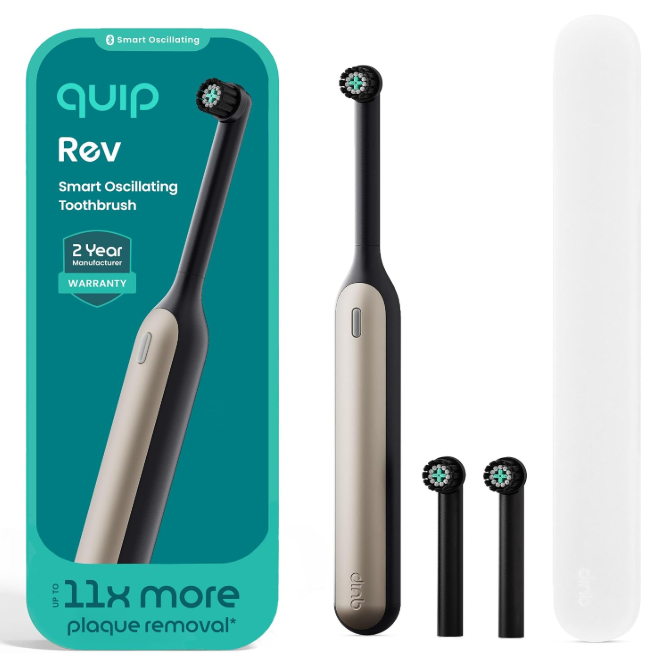
When a quip Rev oscillating toothbrush is not working, it can feel weirdly personal. One night it is buzzing along, polishing your teeth like a tiny bathroom power tool, and the next morning it sits there silent, stubborn, and completely unimpressed by your panic pressing.
We have all had that moment with an electric toothbrush: press the button, wait for the familiar motion, and… nothing. Or maybe it turns on for two seconds, flashes a light, cuts out, refuses to charge, or makes a faint sound but the brush head does not move properly. The good news? A non-working quip Rev does not always mean the toothbrush is dead. Sometimes it is a charging issue, a moisture problem, a brush head fit issue, a pressure sensor reaction, or simply a device that needs a proper reset-style routine.
The quip Rev Oscillating Toothbrush is designed with an oscillating brush head that rotates and pulsates, three cleaning intensities, a two-minute timer, 30-second pulses, auto shutoff, a pressure sensor light, and up to a 30-day charge according to quip’s product information. That means when something goes wrong, there are several possible points to check before we assume the motor has failed.
Let’s walk through this like a calm human, not a panicked instruction manual. We will diagnose the symptoms, explain what each one may mean, and help you decide when it is time to contact quip support.
Why Your Quip Rev Oscillating Toothbrush May Stop Working
A toothbrush like the quip Rev looks simple from the outside, but inside that slim handle is a small system of parts working together: battery, motor, button, charging contacts, brush head connection, pressure sensor, and internal electronics. When one link in that chain misbehaves, the whole brush can act like it has given up on life.
The most common reasons a quip Rev oscillating toothbrush stops working include:
- Low or fully drained battery
- Incomplete charging
- Moisture inside the handle or around charging parts
- Toothpaste buildup near the brush head connection
- Brush head not seated correctly
- Faulty charging cable or power source
- Internal button issue
- Motor or electronic failure
- Damage from drops, water intrusion, or improper cleaning
Quip’s own troubleshooting guidance notes that a full, uninterrupted charge of 8+ hours is typically recommended when the Rev is not powering on. So before we declare the brush broken, charging is the first hill we climb.
First Step: Give It a Full 8+ Hour Charge
If your quip Rev will not turn on at all, start with the obvious but often ignored fix: charge it properly.
Not a quick 10-minute “please revive” charge. Not a half-hearted plug-in while you shower. We mean a full, uninterrupted overnight charge.
How to Charge It Properly
Use the charging cable that came with the brush, plug it into a reliable USB power source, and let the toothbrush sit undisturbed for at least 8 hours. Quip recommends charging and checking again in the morning when the brush is not powering on.
We should also be honest: USB outlets can be sneaky villains. A weak adapter, loose cable, laptop sleep mode, bathroom outlet issue, or dirty charging contact can all make it look like the brush is charging when it really is not.
Quick Charging Checklist
Before assuming the battery has failed, check:
- Is the cable fully connected?
- Is the power source active?
- Have you tried a different USB wall adapter?
- Are the charging contacts clean and dry?
- Is the brush positioned correctly while charging?
- Did it charge for 8+ uninterrupted hours?
Small detail, big difference. A toothbrush that has been fully drained may need patience before it wakes up.
Quip Rev Not Turning On After Charging
If the brush still does not turn on after an overnight charge, we move deeper.
A quip Rev that does not respond after charging may have one of three problems: it did not actually charge, the power button is not registering, or the internal electronics are failing.
Try a Different Power Setup
Use a different wall adapter and outlet. Avoid charging from a laptop, car USB port, or low-power hub during testing. We want a stable power source, not a maybe.
Think of it like jump-starting a car. We do not want to diagnose the engine while using a questionable jumper cable.
Inspect the Charging Area
Look closely for moisture, grime, toothpaste film, or corrosion. Electric toothbrushes live in a wet, foamy environment, so gunk buildup is not rare. If the charging contact area is dirty, clean it gently with a dry cloth or cotton swab. Do not flood it with water.
Quip’s general toothbrush FAQ warns that moisture left inside brush parts after cleaning can damage the motor and battery. That matters because bathroom products often fail slowly after repeated moisture exposure.
Quip Rev Turns On Then Stops Quickly
A toothbrush that starts and dies after a few seconds is giving us a clue. It is not completely dead. It is trying. That usually points to battery weakness, internal resistance, moisture, or a brush head connection issue.
Possible Causes
The most likely reasons include:
- Battery is not holding charge
- Brush head is jammed or misaligned
- Motor is struggling under resistance
- Water or toothpaste buildup is interfering
- Internal electronics are cutting power
- The pressure sensor may be reacting if the brush is pressed too hard
The Rev has a guiding pressure sensor with light and alerts, according to quip’s product details. If you are testing the brush by pressing the head hard against your hand or sink, ease up. Let the brush run freely in the air first.
Quip Rev Brush Head Not Oscillating Properly
Sometimes the handle turns on, but the brush head barely moves, rattles, feels weak, or does not oscillate the way it should. This can happen after replacing the brush head, dropping the brush, or letting toothpaste dry around the connection.
Remove and Reattach the Brush Head
Take the brush head off and inspect the connection point. Look for dried toothpaste, hairline cracks, trapped water, or anything blocking the head from seating correctly.
Then reattach it firmly. Not violently. Just firmly.
Some user reviews on quip’s product pages mention problems after changing the brush head, including cases where the brush stopped working or needed the head adjusted to work again. Reviews are not official troubleshooting proof, but they do reflect a real-world pattern worth checking.
Clean Around the Neck of the Brush
Use a dry or slightly damp cloth to clean around the top of the handle and inside the brush head opening. Then dry everything before reassembling.
This is not glamorous. It is bathroom archaeology. But dried toothpaste can behave like cement in tiny spaces.
Quip Rev Not Charging
A quip Rev that does not charge can be frustrating because there may be no obvious sign of what is wrong. The problem could be the cable, adapter, outlet, charging contact, battery, or internal charging circuit.
Test the Charging Cable and Adapter
Try a different USB adapter first. Then try a different outlet. If possible, test the cable with another compatible device or try another compatible cable if you have one that safely fits.
The goal is to separate a toothbrush problem from a charging equipment problem.
Clean and Dry Before Charging
Before charging, make sure the brush and charging area are dry. Water and charging do not mix well. Even if the outside looks dry, moisture can hide around seams and contact points.
Quip specifically notes that moisture left inside brush parts after cleaning can damage the motor and battery. So drying is not just neatness; it is prevention.
Quip Rev Button Not Working
If your brush does nothing when you press the button, but you suspect the battery is charged, the button itself may be the issue.
Button problems can feel strange because the toothbrush may appear perfectly fine. No cracks. No obvious damage. Yet the press does not register.
Signs of a Button Problem
You may be dealing with a button issue if:
- The button feels stuck or mushy
- You need to press very hard to activate it
- It works randomly
- It turns on only at certain angles
- The brush has power but does not respond consistently
A button problem is not always something we can safely fix at home. Opening the handle can damage seals, void coverage, or expose electronics to moisture. If the brush is still under warranty, support is usually the smarter route.
Quip Rev Randomly Turns On by Itself
A toothbrush that turns on by itself is not haunted, even if it feels like it at 2 a.m.
Random activation may happen because of moisture, a stuck button, internal contact issues, or electronic malfunction. Some quip product reviews mention brushes turning on randomly after a short period of use. Again, reviews are individual reports, but they match the kind of behavior we would expect from moisture or switch-related issues.
What to Do
First, clean and dry the brush thoroughly. Remove the brush head, wipe around the button area, dry the handle, and leave it in a dry space for several hours.
If it keeps turning on by itself, stop using it and contact quip support. A device that activates randomly may drain the battery, overwork the motor, or signal an internal fault.
Quip Rev Light Flashing or Pressure Sensor Acting Weird
The quip Rev includes a pressure sensor light and alerts designed to guide brushing pressure. If the light behaves unexpectedly, think about how the brush is being used.
Are you pressing too hard? Are you testing it against a hard surface? Is the brush head jammed? Is toothpaste packed around the head connection?
Pressure Sensor Troubleshooting
Try this:
- Remove the brush from your mouth.
- Turn it on in open air.
- Let it run without pressure.
- Gently touch the bristles to your palm.
- Avoid pressing hard.
- Watch whether the light or motor response changes.
If the brush works normally in the air but struggles during brushing, pressure may be part of the issue. Let the oscillating head do the work. We do not need to scrub like we are sanding an old table.
Quip Rev Stops After Two Minutes
This one may not be a problem at all.
The Rev has a two-minute timer and auto shutoff. It also uses 30-second pulses to help guide brushing sections. So if your brush runs for two minutes and stops, it is likely doing exactly what it was designed to do.
Normal vs Abnormal Shutoff
Normal behavior:
- Runs for around two minutes
- Pulses every 30 seconds
- Stops automatically
- Turns on again when pressed
Abnormal behavior:
- Stops after 2–10 seconds
- Will not restart
- Shuts off randomly
- Loses power mid-brush
- Motor sound fades quickly
This distinction matters because many electric toothbrushes are built to stop automatically. Not every shutdown is a failure.
Quip Rev Feels Weak or Slower Than Before
A weak quip Rev can still technically “work,” but brushing feels less effective. The motor may sound tired, the head may move lazily, or the clean may feel less crisp.
Common Reasons for Weak Power
Weak performance may come from:
- Low battery
- Worn brush head
- Gunk around the head connection
- Brush head not fully attached
- Internal motor wear
- Charging issue
- Moisture damage
Quip recommends replacing electric toothbrush heads every 3 months, in line with dentist-recommended timing shown on its refill product page. A worn head can make the brush feel less effective even when the handle is still working.
How to Clean a Quip Rev That Is Not Working
Cleaning is not a magic spell, but it can solve more toothbrush problems than people expect.
Safe Cleaning Routine
Here is a simple cleaning process:
- Turn the toothbrush off.
- Remove the brush head.
- Wipe the handle with a damp cloth.
- Clean around the neck and connection point.
- Remove visible toothpaste buildup.
- Dry all parts thoroughly.
- Leave parts separated for a while before reassembly.
- Reattach the head and test again.
Avoid soaking the handle. Avoid forcing water into openings. Avoid harsh chemicals. We are cleaning a small electronic device, not washing a coffee mug.
What Not to Do When Your Quip Rev Stops Working
When a toothbrush stops working, the temptation is to shake it, bang it, overcharge it, pry it open, or rinse it aggressively. Let’s not.
Avoid These Mistakes
Do not:
- Submerge the handle in water
- Charge it while visibly wet
- Use sharp tools around the button
- Force the brush head at an angle
- Keep pressing the button aggressively
- Use non-compatible parts
- Ignore random activation
- Open the handle if warranty support is available
The toothbrush is small, but the electronics inside are delicate. Treat it like a phone that happens to brush teeth.
When the Problem Started After Replacing the Brush Head
If your quip Rev stopped working after changing the brush head, focus on fit and alignment.
A new brush head should attach securely. If it sits too high, too low, crooked, or loose, the motor may not transfer motion correctly. The brush may sound like it is running, but the head may not oscillate properly.
Fix the Brush Head Fit
Remove the head and inspect both the head and handle. Clean away any residue. Reattach the head straight and firm. Then turn the brush on before putting it in your mouth.
If the old head works but the new one does not, the new head may be defective or incompatible. Make sure you are using the correct quip Rev oscillating brush head, not a brush head for a different quip model.
Quip Rev vs Regular Quip Sonic: Don’t Mix Up the Parts
This is an important detail. Quip sells different toothbrush types, and the Rev is not the same as the classic quip sonic toothbrush.
The Rev is an oscillating toothbrush, while other quip models use sonic vibration. Quip’s Rev product page says Rev is not a Smart Toothbrush with Bluetooth and does not automatically sync or connect to the quip app. That means troubleshooting should focus on charging, power, brush head movement, and mechanical function, not app pairing.
Why Compatibility Matters
Using the wrong head, refill, charger, or expectations from another model can create confusion. If you searched “quip toothbrush not working” and landed on advice for a battery-powered sonic model, some of that advice may not apply to Rev.
The Rev is rechargeable and uses a specific oscillating head design. Start with Rev-specific guidance whenever possible.
Is Your Quip Rev Still Under Warranty?
Quip’s product page states that the Rev Oscillating Toothbrush has a limited 2-year warranty. If your brush is within that window and basic troubleshooting does not work, contacting quip support is the practical next move.
Before Contacting Support
Prepare:
- Purchase date
- Order number if available
- Exact model/color
- Description of the problem
- What troubleshooting you tried
- Photos or video if the issue is visible
- Whether it charges or shows any light
- Whether the issue began after a refill or drop
Support teams can usually help faster when we bring receipts, symptoms, and a calm explanation.
Troubleshooting by Symptom
Let’s make this easier. Here is a symptom-by-symptom guide.
The Brush Is Completely Dead
Try:
- Full 8+ hour charge
- Different outlet
- Different adapter
- Clean charging contacts
- Dry the brush fully
- Contact support if still dead
The Brush Turns On but the Head Does Not Move
Try:
- Remove and reattach brush head
- Clean the connection
- Check for cracked or loose head
- Test without pressure
- Try another compatible Rev head
The Brush Stops After a Few Seconds
Try:
- Full charge
- Test without brush head
- Check for head resistance
- Clean and dry the handle
- Contact support if repeated
The Brush Turns On Randomly
Try:
- Clean around button
- Dry thoroughly
- Stop using if it continues
- Contact quip support
The Brush Feels Weak
Try:
- Full charge
- Replace old brush head
- Clean the head connection
- Avoid pressing too hard
- Check for motor fade
How to Prevent Quip Rev Problems in the Future
Prevention is the boring hero of electric toothbrush ownership. It does not get applause, but it saves money.
Simple Maintenance Habits
After brushing:
- Rinse the brush head, not the whole handle aggressively
- Wipe the handle dry
- Remove toothpaste buildup weekly
- Store it upright
- Let it air dry
- Replace the brush head every 3 months
- Charge before the battery fully dies
- Keep charging areas clean and dry
The bathroom is basically a humidity jungle. A little drying routine can make a real difference.
Should You Repair or Replace a Quip Rev?
Here is the honest answer: most users should not attempt internal repair unless they know exactly what they are doing and do not care about warranty coverage.
Electric toothbrushes are compact, sealed devices. Once we pry them open, we may create more problems than we solve. If the issue is external—charging, cleaning, brush head fit—we can troubleshoot it. If it is internal—motor, circuit board, button assembly, battery failure—replacement or warranty support is usually the cleaner path.
Repair Makes Sense When
- The issue is brush head fit
- The charger or adapter is the problem
- The device needs cleaning
- The battery was simply drained
- The brush is out of warranty and you are comfortable with electronics
Replacement Makes Sense When
- It will not charge after multiple attempts
- It randomly turns on
- The motor is dead
- The button fails
- Water got inside
- It is under warranty
- The repair cost or effort is not worth it
Sometimes replacing the brush is not defeat. It is just choosing peace.
Quip Rev Not Working After Getting Wet
Electric toothbrushes are water-resistant by design, but that does not mean they enjoy being soaked, submerged, or left wet internally.
If the brush stopped working after heavy rinsing, shower use, sink submersion, or being stored wet, moisture may be the culprit.
What to Do After Water Exposure
Turn it off. Remove the brush head. Dry the exterior. Leave it separated in a dry, ventilated area. Do not charge it while wet. Give it time.
If it still does not work after drying, contact support, especially if the brush is still under warranty.
Is the Quip Rev Worth Keeping If It Has Problems?
A working quip Rev offers a clean, compact, travel-friendly brushing routine with oscillation, pressure guidance, and multiple intensities. But if your specific unit repeatedly stops, cuts out, or refuses to charge, we should judge the actual brush in our hand—not the marketing page.
A toothbrush should not become a daily negotiation.
If basic troubleshooting fixes it, great. If the same issue returns, document it and reach out to quip. A reliable electric toothbrush should be boring in the best way: press button, brush teeth, done.
Final Troubleshooting Checklist
Before giving up on your quip Rev oscillating toothbrush, run through this final list:
- Charge it for 8+ uninterrupted hours
- Try another outlet and USB adapter
- Clean and dry the charging area
- Remove and reattach the brush head
- Clean the brush head connection
- Test the brush without pressure
- Check whether auto shutoff is normal two-minute behavior
- Replace a worn or loose brush head
- Let the brush dry fully if moisture may be involved
- Contact quip support if the issue continues
This checklist solves the simple stuff and helps prove when the problem is bigger.
Closing Thoughts: Don’t Panic, Diagnose
When a quip Rev oscillating toothbrush is not working, the answer is not always “it is broken.” Sometimes it is tired, wet, dirty, undercharged, misaligned, or using a brush head that is not sitting right.
Start with the full charge. Then clean and dry it. Then check the brush head. Then test the button, pressure behavior, and charging setup. If none of that works, warranty support is not just a backup plan—it is probably the right plan.
A toothbrush should make mornings easier, not turn them into detective work. So we troubleshoot the easy things first, protect the device from moisture, and know when to stop poking at it and ask for help.
FAQs About Quip Rev Oscillating Toothbrush Not Working
Why is my quip Rev oscillating toothbrush not turning on?
Your quip Rev may not be turning on because the battery is fully drained, the charging cable or adapter is not working, the charging contacts are dirty, or the internal button or motor has failed. Start with a full 8+ hour charge, then test a different power source and clean the charging area.
How long should I charge my quip Rev if it is dead?
Quip recommends a full, uninterrupted 8+ hour charge when the Rev is not powering on. Charging it overnight is usually the easiest way to test whether the issue is simply a drained battery.
Why does my quip Rev turn on but stop quickly?
If your quip Rev turns on and stops quickly, the battery may be weak, the brush head may be misaligned, the motor may be under resistance, or moisture may be interfering with internal electronics. Remove the brush head, clean and dry the connection, fully charge the brush, and test again.
Why is my quip Rev brush head not spinning?
The brush head may not be attached correctly, or toothpaste buildup may be blocking the connection between the handle and head. Remove the head, clean the connection area, dry it fully, and reattach the head straight and firmly.
Does the quip Rev have a warranty?
Yes. Quip’s product page states that the Rev Oscillating Toothbrush has a limited 2-year warranty. If charging, cleaning, drying, and brush head checks do not solve the issue, contact quip support with your order details and a clear description of the problem.