
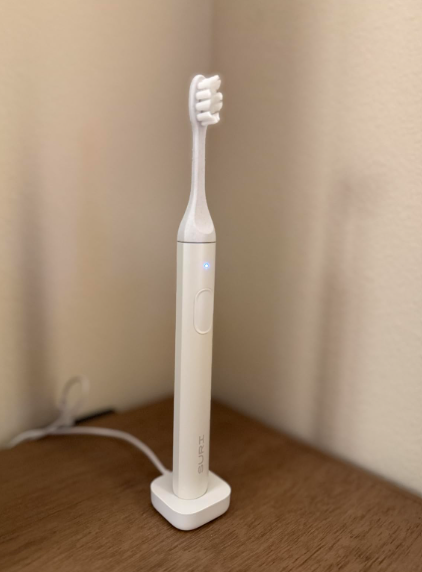
A SURI toothbrush turning on by itself can feel surprisingly unsettling. One moment, the bathroom is quiet; the next, the toothbrush begins vibrating on the counter like a tiny machine with a mind of its own. Although it may seem like a minor annoyance, spontaneous activation usually points to an electrical, moisture-related, or mechanical problem inside the handle.
We should not treat this behavior as a normal feature. A properly functioning SURI toothbrush should activate only when we press its power button. Troubleshooting guidance published by Electric Teeth states that a SURI toothbrush switching itself on without user interaction indicates a handle fault that requires repair.
In this guide, we will examine the most likely causes, explain which simple checks are worth trying, and clarify when it is safer to stop using the toothbrush and contact SURI support.
Why Does a SURI Toothbrush Turn On by Itself?
A rechargeable toothbrush combines a battery, motor, circuit board, button, seals, charging contacts, and firmware inside a slim handle. If any part begins sending the wrong electrical signal, the motor may start unexpectedly.
The most common possibilities include:
- Moisture around or beneath the power button
- A stuck or overly sensitive button
- An internal circuit fault
- Corrosion near electrical contacts
- Physical damage after a fall
- Battery or power-management problems
- Residue trapped around the control area
- A defective toothbrush handle
Sometimes, the toothbrush activates once and never does it again. In other cases, it turns on repeatedly, changes modes, refuses to switch off, or begins vibrating while charging. The pattern can help us narrow down the likely cause, but repeated self-activation usually needs professional attention.
Is Random Activation Normal?
No. SURI toothbrushes are not designed to start automatically while sitting unused.
Features such as timers, cleaning modes, charging indicators, and pressure feedback operate only after the toothbrush has been intentionally activated. None of these features should cause the handle to wake up and run on its own.
Electric Teeth specifically advises that a SURI toothbrush turning itself on is evidence of a fault with the handle and recommends arranging a repair.
Could It Be a Software Glitch?
It is possible that a temporary control or power-management error could produce unusual behavior. However, unlike a phone or computer, a toothbrush generally does not offer users a detailed software reset menu.
We can attempt a basic power cycle by allowing the battery to discharge and then recharging it, but we should not assume that this permanently repairs the underlying issue. If the toothbrush starts by itself again, the fault is likely still present.
Moisture Around the Power Button
Moisture is one of the first suspects because electric toothbrushes operate in wet environments every day.
Water, toothpaste foam, and condensation can collect around the button. Even when the outer handle looks dry, moisture may remain in a narrow seam or beneath the button’s flexible surface. If liquid interferes with the electrical contact, the toothbrush may interpret it as a button press.
A Reddit user discussing SURI toothbrush problems suspected that wet metal contacts were contributing to charging and power issues. This is anecdotal rather than an official diagnosis, but it illustrates why keeping electrical contact areas clean and dry matters.
How to Dry the Toothbrush Safely
We can try the following:
- Remove the brush head.
- Wipe the handle with a clean, dry cloth.
- Pay special attention to the power button and charging area.
- Leave the toothbrush upright in a dry, ventilated room.
- Keep it away from the charger for at least several hours.
- Test it again only after the exterior is completely dry.
Avoid placing the toothbrush on a radiator, using a hair dryer, putting it in an oven, or exposing it to intense direct heat. High temperatures can damage the battery, seals, plastic housing, or internal electronics.
Should We Put It in Rice?
Rice is unlikely to solve an internal electrical fault and may introduce dust or starch into openings. Air circulation and patience are safer than burying the toothbrush in food.
A Stuck or Sensitive Power Button
The power button may be physically stuck, partially depressed, or contaminated with dried toothpaste.
Toothpaste residue can harden like chalk around the edges of a button. As the residue expands, softens, or shifts, it may apply enough pressure to trigger the switch.
How to Check the Button
With the toothbrush disconnected from its charger:
- Press the button gently several times.
- Notice whether it clicks or moves normally.
- Check whether one side feels lower than the other.
- Look for visible toothpaste or debris around the edge.
- Wipe the area using a slightly damp cloth.
- Dry the handle thoroughly afterward.
Do not insert needles, knives, pins, or metal tools around the button. Doing so could damage the waterproof seal, scratch the casing, or short an internal component.
Problems Caused by Toothpaste Residue
Toothpaste does not stay soft forever. Once dried, it can form a crust around the brush-head connection, button, or upper handle.
That residue may not directly power the motor, but it can interfere with button movement or trap moisture against the casing. Cleaning the handle regularly is therefore more than a cosmetic habit.
A Simple Cleaning Routine
After brushing:
- Rinse the brush head separately.
- Wipe the handle rather than soaking it.
- Remove foam from the power-button area.
- Dry the base before returning it to the charger.
- Store the toothbrush where air can circulate.
Think of the handle as water-resistant electronic equipment, not as a solid piece of plastic that can remain wet indefinitely.
Could the Charger Be Responsible?
If the SURI toothbrush activates only while it is charging, the charging setup deserves attention.
A faulty power adapter, damaged cable, unstable outlet, dirty charging contacts, or moisture near the charging point could create irregular electrical behavior. We should disconnect the toothbrush and observe whether the random activation continues.
Try these basic checks:
- Use the original or approved charging equipment.
- Inspect the cable for cuts, bends, or exposed wiring.
- Make sure the charging surface is dry.
- Try a different safe electrical outlet.
- Avoid charging beside a wet sink.
- Remove any metal objects near the charging base.
If the toothbrush behaves normally off the charger but turns on whenever charging begins, stop using that charging arrangement and contact support.
Internal Circuit or Handle Failure
When cleaning, drying, and checking the charger do not help, the most likely explanation is an internal handle fault.
Inside the toothbrush, the control board decides when the motor should run. If moisture, corrosion, a damaged switch, or a failed electronic component sends a false signal, the motor can activate without a real button press.
Randomly activating electric toothbrushes are not unique to SURI. Users of other brands have reported similar “haunted toothbrush” behavior when switches or internal electronics malfunction. [3]
Why We Should Not Open the Handle
Opening a rechargeable toothbrush may seem tempting, especially if we enjoy repairing electronics. However, dismantling the handle can compromise waterproofing and expose the rechargeable battery.
An iFixit report examining SURI’s repairability noted that the toothbrush is not designed for straightforward user battery replacement and raised concerns about how accessible self-repair truly is. [4]
Unless we have appropriate electronics experience and accept the risks, opening the handle is usually not worth it. It may also affect warranty or repair eligibility.
Could a Damaged Battery Cause It?
Battery deterioration more commonly causes reduced runtime, inconsistent charging, failure to start, or sudden shutdown. Still, unstable battery voltage or a faulty power-management circuit could contribute to unpredictable operation.
Warning signs include:
- The handle becomes unusually warm.
- Battery life drops suddenly.
- The toothbrush activates and stops repeatedly.
- Charging lights behave unpredictably.
- The casing bulges or separates.
- There is an unusual chemical smell.
- The toothbrush runs even when the button does nothing.
If the handle becomes hot, swollen, cracked, or emits an unusual smell, stop charging and using it immediately. Place it away from flammable materials and seek guidance from the manufacturer regarding safe return or disposal.
What If the Toothbrush Will Not Turn Off?
If the toothbrush starts by itself and continues running, first press the power button once normally. Avoid repeatedly striking or shaking the handle.
If it does not stop:
- Remove it from the charger.
- Place it on a dry, nonflammable surface.
- Keep it away from water.
- Allow the battery to run down.
- Contact SURI support before charging it again.
Letting the battery discharge may stop the motor temporarily, but it is not necessarily a repair. The same fault may return as soon as the toothbrush receives power.
Can We Keep Using It?
We should avoid continuing normal use if the toothbrush repeatedly switches itself on.
Even if it still cleans properly, spontaneous operation suggests that the controls are not functioning as intended. The problem could worsen, drain the battery, activate inside luggage, disturb sleep, or create additional stress on the motor and battery.
A one-time event after heavy splashing may disappear once the handle dries. Nevertheless, repeated activation means the safest choice is to stop using the toothbrush until it is inspected or replaced.
How to Contact SURI Support
When contacting customer service, include clear evidence and practical details. This can speed up diagnosis and reduce back-and-forth messages.
Provide:
- The toothbrush model and color
- Approximate purchase date
- Order number or proof of purchase
- When the problem began
- How often it turns on by itself
- Whether it happens while charging
- Whether the button feels stuck
- Whether the handle was dropped
- A short video showing the behavior
Do not exaggerate or speculate. A simple description such as “the toothbrush begins vibrating while untouched and disconnected from the charger” is more useful than saying it is completely broken.
Repair or Replacement?
The available troubleshooting guidance indicates that spontaneous activation requires repair of the handle. [2] Depending on the product’s age, condition, warranty status, and SURI’s current service policies, support may offer troubleshooting, repair, or replacement.
How to Prevent the Problem
Not every electronic failure is preventable, but a few habits may reduce moisture and residue buildup:
- Dry the handle after every use.
- Do not leave it lying in pooled water.
- Keep the charging area clean.
- Remove toothpaste before it hardens.
- Avoid dropping the toothbrush.
- Transport it in a suitable case.
- Do not charge it with wet contacts.
- Use compatible charging accessories.
- Store it in a ventilated location.
These steps are like giving the toothbrush a small raincoat: they cannot stop every internal failure, but they reduce unnecessary exposure.
Final Thoughts
A SURI toothbrush turning on by itself is not a harmless hidden feature or an unusual cleaning mode. It usually indicates moisture interference, a stuck button, charging trouble, or an internal handle fault.
We can begin by disconnecting the charger, cleaning the button area, drying the handle thoroughly, and checking for visible damage. However, if the toothbrush continues to activate without being touched, the best course is to stop using it and contact SURI support.
The toothbrush may look simple from the outside, but inside it is a compact electronic device working inches from water every day. When it begins acting like a tiny bathroom poltergeist, we should not ignore the warning.
Frequently Asked Questions
1. Why does my SURI toothbrush randomly turn on at night?
The most likely causes are a faulty power button, trapped moisture, residue around the switch, or an internal electrical failure. Repeated activation should be reported to SURI support.
2. Can water make a SURI toothbrush turn on by itself?
Moisture around a switch or internal contact could potentially create false activation signals. Dry the handle thoroughly, but seek repair if the issue returns.
3. How do I reset a SURI toothbrush that turns on by itself?
There is no guaranteed user reset for a defective handle. Disconnect it from charging, let it dry, and allow the battery to discharge if necessary. Persistent problems require professional support.
4. Is it safe to charge the toothbrush after random activation?
Do not recharge it immediately if it becomes hot, smells unusual, has visible damage, or will not switch off. Contact the manufacturer for advice.
5. Should I replace my SURI toothbrush if it keeps starting automatically?
A repeated issue indicates a fault. Contact SURI first because the handle may qualify for repair or replacement depending on its warranty and condition.