
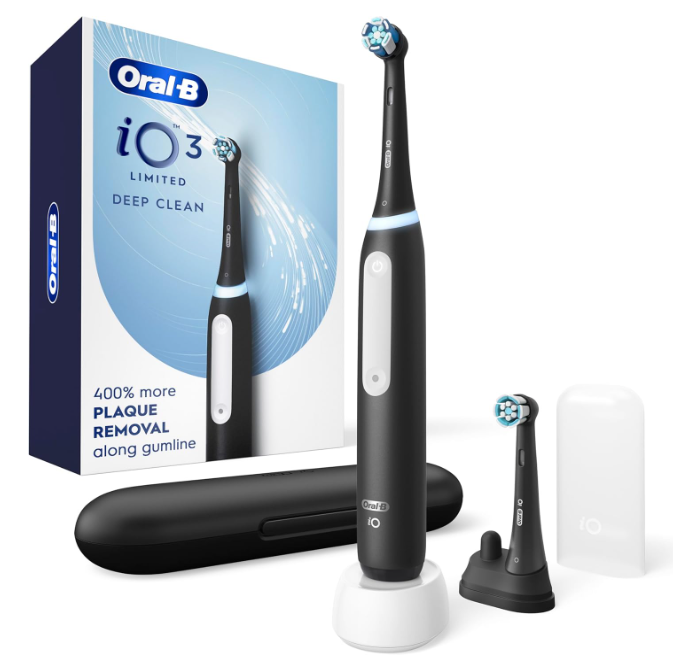
If your Oral-B iO 3 is not charging, it can feel like discovering your smartphone has died right before an important call. One day your toothbrush works perfectly, and the next it seems completely unresponsive. Fortunately, most charging problems with the Oral-B iO 3 are relatively simple to diagnose and fix.
In this comprehensive guide, we’ll explore the most common reasons why an Oral-B iO 3 may stop charging, how to troubleshoot the problem, when to replace accessories, and when it’s time to contact customer support.
Understanding How the Oral-B iO 3 Charging System Works
Before we jump into troubleshooting, it helps to understand how the charging system functions.
The Oral-B iO 3 uses magnetic induction charging rather than traditional plug-in charging. Electricity transfers wirelessly from the charger base to the toothbrush handle through electromagnetic energy.
This design provides several advantages:
- Better water resistance
- Fewer exposed charging contacts
- Improved safety
- Simplified daily charging
However, because the charging process is wireless, even small alignment or power issues can prevent proper charging.
Signs Your Oral-B iO 3 Is Not Charging
Sometimes the issue is obvious. Other times the toothbrush appears to charge but never gains battery power.
Common symptoms include:
- No charging light appears
- Battery remains empty after hours on the charger
- Flashing warning lights
- Toothbrush won’t turn on
- Battery drains unusually fast
- Charging indicator behaves inconsistently
Recognizing the exact symptom often helps narrow down the cause much faster.
Common Reasons Why an Oral-B iO 3 Won’t Charge
Power Supply Problems
The simplest explanation is often the correct one.
If the charging base isn’t receiving power, the toothbrush cannot charge.
Check:
- Wall outlet functionality
- Power strip operation
- Loose electrical connections
- Damaged cables
Try plugging another device into the same outlet to verify power is available.
Improper Charger Placement
The Oral-B iO 3 relies on precise positioning.
Even a slight misalignment may interrupt charging.
Make sure:
- The handle sits fully on the charging base
- The charger is on a flat surface
- Nothing obstructs contact between the handle and charger
Think of it like parking a car in a garage. If you’re not centered, things don’t work as intended.
Checking the Charging Indicator Light
What Should the Light Do?
When functioning normally:
- Place the handle on the charger.
- A charging light should briefly illuminate.
- Charging continues automatically.
If no light appears, additional troubleshooting is required.
When No Light Appears
A missing charging light may indicate:
- Dead outlet
- Faulty charger
- Internal battery problem
- Charging circuit issue
Testing each possibility methodically is the best approach.
Cleaning the Charger and Handle
Why Dirt Matters
Many users overlook one surprisingly common cause.
Over time, toothpaste residue, water spots, mineral deposits, and bathroom dust accumulate around the charger and handle.
These contaminants can interfere with efficient charging.
How to Clean the Charging Base
Follow these steps:
- Unplug the charger.
- Wipe it with a slightly damp cloth.
- Remove residue carefully.
- Dry completely before reconnecting.
Avoid harsh chemicals or abrasive cleaning products.
Cleaning the Toothbrush Handle
Pay special attention to:
- Bottom charging area
- Handle base
- Crevices around seals
A clean surface promotes better charging performance.
Testing a Different Electrical Outlet
A Quick Diagnostic Step
Sometimes the charger isn’t the problem at all.
Move the charger to another outlet in a different room.
If charging resumes, the original outlet or power strip may be defective.
This simple test can save considerable time and frustration.
Inspecting the Charger for Damage
Visible Signs of Wear
Examine the charging base carefully.
Look for:
- Cracks
- Burn marks
- Frayed cable sections
- Bent components
- Water damage
Physical damage often explains charging failures.
Can a Damaged Charger Still Partially Work?
Surprisingly, yes.
Some chargers deliver inconsistent power, resulting in intermittent charging.
The toothbrush may charge one day and fail the next.
This inconsistency often points directly to charger deterioration.
Understanding Battery Behavior
Battery Age Matters
Like all rechargeable batteries, the Oral-B iO 3 battery gradually loses capacity over time.
After years of regular use, battery performance naturally declines.
Signs include:
- Short runtime
- Frequent charging
- Failure to hold charge
- Slow charging behavior
How Long Does an Oral-B iO 3 Battery Last?
Under normal conditions, the battery can provide several years of reliable service.
Actual lifespan depends on:
- Charging habits
- Usage frequency
- Storage conditions
- Environmental temperature
A well-maintained battery generally lasts much longer than one exposed to extreme conditions.
Allowing the Battery to Recover
Deep Discharge Situations
If the toothbrush has remained unused for months, the battery may become deeply discharged.
In such cases:
- Place it on the charger.
- Leave it connected for several hours.
- Avoid repeatedly removing it.
Patience is important because recovery may take longer than expected.
How Long Should You Charge It?
For diagnostic purposes:
- Leave it charging for at least 12 hours.
- Check for indicator activity periodically.
A completely depleted battery sometimes requires extended charging before showing signs of life.
Temperature-Related Charging Issues
Hot Environments
High temperatures can affect battery performance.
Avoid charging:
- Near radiators
- In direct sunlight
- Inside hot vehicles
Heat acts like an invisible enemy, gradually reducing battery efficiency.
Cold Conditions
Extremely cold environments can also interfere with charging.
For best results:
- Charge indoors
- Maintain room temperature conditions
Moderate temperatures promote optimal battery health.
Performing a Basic Reset
Can a Reset Fix Charging Problems?
Occasionally, software or electronics become temporarily unresponsive.
A reset may restore normal operation.
Although procedures can vary, attempting a restart can help eliminate temporary glitches before pursuing more complex solutions.
Identifying Battery Failure
Warning Signs of a Failing Battery
A failing battery often exhibits predictable symptoms:
- Charges briefly
- Loses power quickly
- Stops charging completely
- Requires frequent recharging
When these symptoms appear consistently, battery degradation becomes a likely explanation.
When Battery Replacement Is Necessary
Unlike replaceable AA batteries, the Oral-B iO 3 uses an integrated rechargeable battery.
Battery replacement usually requires professional servicing or complete handle replacement.
Using the Correct Charger
Not All Oral-B Chargers Are Identical
Many users assume every Oral-B charger is interchangeable.
While some compatibility exists within product families, using the original charger is always safest.
An incompatible charger may result in:
- Slow charging
- Charging errors
- Complete charging failure
Checking for Water Damage
Can Water Affect Charging?
Although designed for bathroom use, excessive moisture exposure can eventually create internal issues.
Potential warning signs include:
- Unusual lights
- Random shutdowns
- Charging failures
- Corrosion
Water and electronics remain uneasy neighbors, even in waterproof devices.
Inspecting for Moisture Problems
Look for:
- Condensation
- Rust-colored marks
- Persistent moisture
If water damage is suspected, professional evaluation may be required.
When the Charging Light Flashes Unexpectedly
Understanding Flashing Indicators
Flashing lights can indicate:
- Low battery
- Charging process
- System warning
- Hardware fault
The specific pattern often provides clues about the underlying issue.
Troubleshooting Checklist
Step-by-Step Summary
Before assuming the toothbrush is defective, complete this checklist:
- Verify outlet power
- Test another outlet
- Clean charger and handle
- Check charger alignment
- Inspect for damage
- Allow extended charging time
- Try a reset
- Monitor battery performance
- Check for moisture exposure
This systematic approach solves many charging problems without requiring replacement parts.
Preventing Future Charging Problems
Best Charging Habits
Good habits help extend battery life.
Recommended practices include:
- Keep charger clean
- Store in moderate temperatures
- Avoid unnecessary impacts
- Use original accessories
- Charge regularly
These small actions often make a significant difference over the years.
Bathroom Storage Tips
Many bathrooms experience constant humidity.
Consider:
- Ventilating the room
- Keeping the charger dry
- Avoiding standing water around the base
A little prevention can save considerable troubleshooting later.
When to Contact Oral-B Support
Situations That Require Professional Assistance
Contact support if:
- The charger works with another handle but not yours
- The toothbrush remains completely unresponsive
- Physical damage is present
- Battery performance suddenly collapses
- Warranty coverage may apply
Professional diagnosis can identify issues that are impossible to see externally.
Is It Better to Repair or Replace?
Evaluating the Cost
If the toothbrush is relatively new, warranty service may be the best option.
For older units:
- Repair costs may exceed replacement value
- New models may offer improved battery technology
- Warranty coverage may no longer apply
Balancing cost against age helps determine the smartest path forward.
Final Thoughts on Oral-B iO 3 Not Charging
An Oral-B iO 3 that is not charging doesn’t automatically mean the toothbrush is dead. In many cases, the issue stems from something surprisingly simple: a faulty outlet, charger misalignment, accumulated residue, or a deeply discharged battery.
The key is to troubleshoot methodically rather than jumping straight to replacement. Start with the basics, test each possibility one by one, and give the battery sufficient time to recover if it has been unused for an extended period.
With a little patience and the right approach, many charging problems can be resolved at home. And if the battery or charging hardware has genuinely reached the end of its lifespan, you’ll at least know you’ve exhausted every practical solution before investing in a replacement.
Frequently Asked Questions
1. Why is my Oral-B iO 3 not charging even though the charger is plugged in?
The most common causes include outlet issues, charger damage, improper alignment, dirt buildup, or a failing battery.
2. How long should I leave a completely dead Oral-B iO 3 on the charger?
Leave it charging for at least 12 hours if the battery may be deeply discharged.
3. Can I use a different Oral-B charger with my iO 3?
Using the original charger is recommended because compatibility can vary between Oral-B product lines.
4. How do I know if the battery is failing?
Rapid battery drain, short runtimes, and difficulty maintaining a charge are common warning signs.
5. Should I replace my Oral-B iO 3 if it won’t charge?
Not immediately. First test the charger, outlet, cleanliness, alignment, and charging duration before considering replacement.