
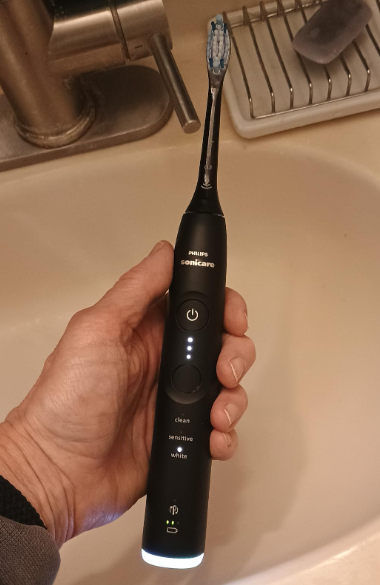
A Sonicare toothbrush can feel nearly indestructible—right up until the morning it refuses to turn on, starts making an angry rattling sound, or sends the brush head wobbling like a loose wheel on a shopping cart.
When a Sonicare toothbrush broke, it does not always mean the entire unit is permanently dead. Sometimes the problem comes from a dirty charging base, a worn brush head, trapped toothpaste, a depleted battery, or a temporary electronic fault. Other times, the internal motor, drive shaft, seal, or rechargeable battery has genuinely reached the end of its useful life.
Before we throw the handle away or order a replacement, it makes sense to slow down and identify what actually happened. A few minutes of careful troubleshooting can reveal whether we are dealing with a minor inconvenience, a repairable problem, or a toothbrush that should be retired.
In this guide, we will walk through the most common Sonicare failures, what causes them, which fixes are safe to attempt, and when replacement becomes the smarter option.
How Do We Know Whether a Sonicare Toothbrush Is Really Broken?
A toothbrush that behaves strangely is not necessarily broken. Philips Sonicare handles use lights, vibrations, charging indicators, pressure alerts, and mode notifications. Some normal features can initially look like faults.
For example, a handle may:
- Pause briefly during brushing because of the QuadPacer timer.
- Shut off after two minutes because the SmartTimer has finished.
- Vibrate differently when excessive pressure is applied.
- Flash a light because the battery is low.
- Produce a short sequence of vibrations when placed on a charger.
- Refuse to start normally if the battery has been completely depleted.
We should call the toothbrush genuinely broken when it consistently fails to perform its main function despite being cleaned, charged, reset, and tested with a compatible brush head.
Common Signs That a Sonicare Toothbrush Has Broken
The most obvious warning signs include:
- The toothbrush will not turn on at all.
- It will not hold a charge.
- It turns on and immediately stops.
- The handle becomes unusually hot.
- The metal shaft is loose, bent, or displaced.
- The brush head rattles violently.
- The motor runs, but the shaft barely moves.
- Water appears to have entered the handle.
- The power button is stuck or unresponsive.
- The casing is cracked.
- The toothbrush activates by itself.
- It produces grinding, clicking, or scraping noises.
One symptom alone does not always tell the full story. A toothbrush that will not start might have a charging problem, while one that sounds broken may simply have dried toothpaste underneath the brush head.
First Step: Stop Using the Toothbrush If It Looks Unsafe
Electric toothbrushes combine a rechargeable battery, electronic components, moisture, and high-speed movement. That combination is generally safe inside an intact handle. It becomes less predictable when the casing or internal seals are damaged.
We should stop using the toothbrush immediately if we notice:
- A swollen, cracked, or separating handle.
- Burning smells.
- Smoke or unusual heat.
- Battery leakage.
- Rust around the shaft.
- Water visible inside the handle.
- Exposed wiring or internal components.
- A charger with damaged insulation.
- Sparks or intermittent electrical contact.
A damaged rechargeable battery is not something we should experiment with in the bathroom. No troubleshooting step is worth risking a burn, electrical fault, or battery incident.
Why Did My Sonicare Toothbrush Break?
Sonicare toothbrushes work hard. The internal motor creates thousands of brush movements while the handle is repeatedly exposed to water, toothpaste residue, bathroom humidity, drops, pressure, and charging cycles.
The most common causes of failure include normal battery aging, impact damage, moisture intrusion, residue buildup, worn internal components, incorrect charging accessories, and excessive pressure during brushing.
Normal Wear and Battery Aging
Rechargeable batteries gradually lose capacity. At first, we may notice that the toothbrush needs charging more often. Later, it may run for only a few brushing sessions. Eventually, it may refuse to start unless it remains on the charger—or it may not start at all.
Battery degradation tends to happen slowly rather than overnight. A sudden failure is more likely to involve an electronic fault, impact, moisture, or a failed charging connection.
Toothpaste and Mineral Buildup
Toothpaste, saliva, and water collect around the base of the brush head. Over time, that mixture dries into a chalky ring around the metal shaft.
This residue can:
- Prevent the brush head from sitting correctly.
- Increase rattling and vibration.
- Trap moisture.
- Place extra strain on the drive system.
- Make the shaft appear damaged when it is merely dirty.
Hard-water minerals can create similar deposits on the handle and charger.
Dropping the Toothbrush
A Sonicare handle may survive several drops without visible damage. However, a hard impact can misalign the drive shaft, crack an internal support, damage the circuit board, or weaken the waterproof seal.
The handle might continue working after the fall but later develop noise, weak vibration, or water damage. In that sense, a drop can act like a tiny earthquake inside the toothbrush: everything looks normal from the outside while the internal structure has shifted.
Water Entering the Handle
Sonicare handles are designed for use in wet environments, but they are not invincible. Worn seals, cracks, impact damage, or improper disassembly can allow water inside.
Moisture intrusion may cause:
- Intermittent operation.
- Random activation.
- Charging failure.
- Corrosion.
- A stuck button.
- Unusual heat.
- Complete electronic failure.
Once water reaches the circuit board, the toothbrush may behave unpredictably.
Sonicare Toothbrush Will Not Turn On
A toothbrush that will not power on is one of the most common complaints. Fortunately, it is also one of the easiest problems to diagnose.
Charge It for a Full Day
Place the handle on its original or confirmed-compatible charger and leave it there for approximately 24 hours. A deeply discharged battery may not respond immediately.
During this test:
- Plug the charger directly into a working wall outlet.
- Remove any extension cord or questionable adapter.
- Place the handle firmly on the charging base.
- Check for a light, vibration, beep, or charging symbol.
- Leave it undisturbed overnight.
Even if no indicator appears immediately, allow sufficient charging time before declaring the battery dead.
Test the Electrical Outlet
The toothbrush may be innocent while the outlet is the real culprit. Bathroom outlets can trip because of built-in ground-fault protection.
Test the charger in another outlet. We can also test the original outlet with a different low-power device.
If the charger uses a travel case, glass charger, USB cable, or detachable adapter, inspect every connection point.
Clean the Charger and Handle Base
Dust, water residue, and dried toothpaste can interfere with proper positioning. Unplug the charger, wipe it with a slightly damp cloth, and dry it completely.
Clean the bottom of the toothbrush handle as well. Avoid soaking the charger or inserting objects into electrical components.
Try a Basic Reset
Some Sonicare models may recover from a temporary software or control fault after a reset-like charging cycle.
A practical general method is:
- Remove the handle from the charger.
- Press and hold the power button for several seconds.
- Release the button.
- Place the handle back on the charger.
- Allow it to charge before testing again.
The exact behavior varies by model. A reset will not revive a failed battery or damaged motor, but it may clear a temporary electronic state.
Sonicare Toothbrush Charges but Does Not Work
A charging light does not prove that the battery, motor, and control system are healthy. It only indicates that the handle recognizes some form of charging activity.
If the toothbrush appears to charge but will not run, we may be dealing with:
- A battery that accepts voltage but cannot provide enough power.
- A failed power button.
- A damaged circuit board.
- A jammed drive mechanism.
- Moisture-related corrosion.
- An internal connection failure.
Remove the Brush Head and Test the Handle
Take off the brush head and briefly turn on the handle.
If the shaft moves normally without the brush head, the head may be damaged, clogged, incompatible, or installed incorrectly.
If the shaft does not move, moves weakly, or makes a grinding sound, the problem is probably inside the handle.
Do Not Run It for Long Without a Brush Head
A brief test is generally enough. There is no benefit in letting the handle vibrate for an extended period without the brush head attached.
Sonicare Toothbrush Turns On but Stops Immediately
When a Sonicare starts and then shuts off after a second or two, the battery is a leading suspect. The battery may display a charge but collapse under load as soon as the motor begins drawing power.
Other possible causes include:
- A failing circuit board.
- Internal moisture.
- A damaged button.
- A jammed drive assembly.
- A battery protection circuit activating.
- An incompatible or obstructed brush head.
Start by charging the toothbrush fully, removing the head, cleaning the shaft, and testing again. If the problem continues, internal repair or replacement will likely be necessary.
Sonicare Toothbrush Is Making a Loud Noise
Sonicare toothbrushes are not silent. They normally produce a steady, high-frequency buzzing sound. The problem begins when that smooth sound becomes a clatter, knock, scrape, or metallic rattle.
Check the Brush Head First
A worn brush head can loosen around the shaft and amplify vibration. Replace it with a compatible, undamaged head.
Make sure the head is pushed down securely. A small functional gap may remain between the brush head and handle on many models, so the head does not necessarily need to sit perfectly flush.
Clean Around the Drive Shaft
Remove the brush head and rinse the metal shaft under lukewarm water. Wipe the surrounding area with a soft cloth.
For stubborn residue, use a soft toothbrush or cotton swab around the outside of the shaft. Do not force liquid or tools into the opening around the mechanism.
Look for a Bent or Loose Shaft
Viewed from the front, the shaft should appear reasonably straight and stable. A shaft that leans dramatically, rotates loosely, sinks into the handle, or shifts from side to side may indicate internal damage.
A broken internal mount can make the handle sound like a jar full of coins. This is not usually a surface-cleaning problem.
Sonicare Toothbrush Vibrates Weakly
Weak vibration can leave our teeth feeling as though we brushed with an electric toothbrush running on a whisper.
Possible explanations include:
- Low battery power.
- A worn brush head.
- A sensitive or low-intensity mode.
- Residue around the shaft.
- Excessive brushing pressure.
- A weakening motor.
- Internal mechanical damage.
- Battery degradation.
Check the Selected Mode and Intensity
Some Sonicare models offer modes such as Clean, White, Gum Care, Sensitive, or Deep Clean. They may also include multiple intensity levels.
A low-intensity setting can feel dramatically weaker than maximum power. Before assuming the motor has failed, cycle through the available modes and intensity settings.
Avoid Pressing Too Hard
Sonicare brushes are designed to let the bristles and sonic motion do the work. Heavy pressure can reduce effective movement, trigger a pressure alert, and place additional strain on the brush head and drive system.
Guide the brush gently instead of scrubbing as though we are trying to remove paint from a wall.
Sonicare Brush Head Is Loose or Keeps Falling Off
A brush head that repeatedly loosens may be worn, cracked, counterfeit, incompatible, or clogged with residue.
Try the following:
- Remove and inspect the brush head.
- Check for cracks around its lower opening.
- Clean the inside of the head and the handle shaft.
- Install a new compatible replacement.
- Test whether the new head sits securely.
If several new brush heads remain loose, the handle shaft may be worn or damaged.
A Small Gap May Be Normal
Many users assume the head must touch the handle completely. On numerous Sonicare designs, a narrow gap is intentional because the brush head needs room to move.
A gap is not automatically evidence that the Sonicare toothbrush broke. Excessive wobbling, detachment, or loud knocking is more concerning.
The Metal Shaft Broke or Became Loose
A damaged drive shaft is a serious mechanical problem. This component transfers the motor’s movement to the brush head. If it bends, breaks, sinks, or becomes unstable, cleaning performance will suffer.
Can We Push the Shaft Back Into Place?
We should not force the shaft into the handle. Doing so may damage the seal, internal drive system, or alignment further.
Temporary online fixes involving pliers, glue, wedges, or aggressive bending may make the toothbrush appear usable, but they can create hygiene and safety problems. A badly repaired shaft may also send the brush head flying during use.
When a Shaft Problem Means Replacement
Replacement is usually the better choice when:
- The shaft is visibly cracked or broken.
- It moves freely in every direction.
- The handle leaks around the shaft.
- The motor runs but the shaft barely moves.
- The brush head cannot remain attached.
- The toothbrush makes a severe mechanical knocking sound.
If the unit remains under warranty, contact the manufacturer before attempting to open or modify it.
The Sonicare Power Button Broke
A stuck, cracked, sunken, or unresponsive button can make a healthy toothbrush seem completely dead.
To diagnose the button:
- Press it from slightly different angles.
- Check whether toothpaste residue surrounds the edges.
- Wipe the area with a damp cloth.
- Do not pour liquid directly around the button.
- Observe whether the charging display still responds.
If the handle charges but pressing the button produces no response, the switch or its internal connection may have failed.
Why We Should Avoid Cutting Open the Button
The outer button helps protect the internal electronics. Cutting, puncturing, or peeling it can destroy the water resistance of the handle.
Once the seal is compromised, even a successful button repair may be short-lived.
Sonicare Toothbrush Broke After Being Dropped
After a fall, inspect the toothbrush before using it again.
Look closely for:
- Hairline cracks.
- Separation in the casing.
- A tilted shaft.
- New rattling noises.
- A loose brush head.
- Heat during charging.
- Water under the display.
- A power button that feels different.
Test it briefly without the brush head. If the handle sounds normal and the shaft remains stable, attach a fresh head and test again.
However, a drop followed by unusual heat, cracking, or water intrusion should end the troubleshooting process. Replace the handle or arrange professional support.
Sonicare Toothbrush Broke After Getting Wet
Getting splashed during normal brushing is different from being submerged for a long time, washed in a dishwasher, or left in standing water.
If the toothbrush behaves strangely after heavy water exposure:
- Remove it from the charger.
- Turn it off if possible.
- Dry the exterior.
- Do not charge it while moisture may be inside.
- Keep it in a dry, ventilated area.
- Stop using it if it heats up or activates randomly.
Does Rice Fix a Wet Sonicare Toothbrush?
Rice is not a reliable repair method. It may absorb a small amount of surrounding moisture, but it cannot reverse corrosion, restore damaged seals, or safely remove water trapped deep inside the handle.
Airflow and time are more sensible than burying the handle in food. Even then, a toothbrush that has taken on water may no longer be safe for regular bathroom use.
Can We Repair a Broken Sonicare Toothbrush at Home?
Technically, some skilled users replace batteries, seals, switches, or internal drive components. Practically, home repair is not ideal for everyone.
Opening the handle may:
- Void the warranty.
- Damage the waterproof seal.
- Expose the rechargeable battery.
- Crack the casing.
- Create an unhygienic interior.
- Make future water intrusion more likely.
- Require soldering and specialty tools.
Simple Repairs We Can Safely Try
Reasonable external troubleshooting includes:
- Cleaning the handle and shaft.
- Replacing the brush head.
- Testing another outlet.
- Using a compatible charger.
- Charging for a full day.
- Cycling modes and intensity settings.
- Performing a model-appropriate reset.
- Inspecting for visible damage.
Repairs Best Left to Professionals
Internal battery replacement, switch repair, soldering, casing removal, seal replacement, and drive-shaft repair require greater care.
A toothbrush may work after being opened but no longer remain properly water-resistant. That is a major concern because we use it with wet hands, near sinks, and inside the mouth.
Should We Repair or Replace the Broken Sonicare?
The answer depends on the toothbrush’s age, original price, warranty status, physical condition, and type of failure.
Repair May Make Sense When
- The toothbrush is relatively new.
- It is a premium model.
- The failure is clearly limited to the battery or switch.
- Replacement parts are available.
- A qualified repair service is accessible.
- The casing and shaft remain intact.
- The cost is substantially lower than replacement.
Replacement Is Usually Better When
- The handle is cracked or leaking.
- The shaft is severely damaged.
- The battery is swollen.
- The toothbrush overheats.
- Several internal systems are failing.
- The unit is old and heavily worn.
- Repair costs approach the price of a new handle.
- Water resistance cannot be restored confidently.
We should not let sunk-cost thinking trap us. A toothbrush is a hygiene device, not a vintage radio. Sometimes the cleanest solution—literally and financially—is replacement.
Check the Sonicare Warranty Before Opening the Handle
Before attempting an internal repair, find the model number, purchase date, receipt, and serial information.
Warranty coverage may depend on:
- The country of purchase.
- The specific model.
- The original purchase date.
- Whether the product came from an authorized seller.
- The nature of the defect.
- Whether the handle was opened or modified.
Opening the toothbrush can complicate or eliminate warranty eligibility. Contacting customer support first is therefore the safest route for a relatively new unit.
How to Describe the Problem to Customer Support
A clear description saves time. Instead of saying only, “My toothbrush broke,” explain exactly what it does.
A useful support message might include:
- The complete model name.
- Approximate purchase date.
- Whether the charging light appears.
- How long it was charged.
- Whether the shaft moves without the brush head.
- Any noise, heat, smell, or leakage.
- Whether the unit was dropped.
- Whether another brush head was tested.
- Whether the charger was tested in another outlet.
Photos or a short video may help demonstrate a loose shaft, strange sound, or flashing indicator.
How Long Should a Sonicare Toothbrush Last?
There is no single lifespan for every Sonicare handle. Usage frequency, charging habits, storage conditions, impact, moisture exposure, model design, and battery condition all affect longevity.
A toothbrush used twice daily and handled carefully may last for years. Another may fail earlier because of a manufacturing defect, accidental drop, battery problem, or damaged seal.
Instead of focusing only on age, watch for performance trends:
- Shorter battery life.
- Increasing noise.
- Weak vibration.
- Intermittent power.
- Loose shaft movement.
- Charging irregularities.
- Heat during operation.
Gradual decline usually points to wear. A sudden dramatic failure often suggests a specific fault.
How to Prevent Another Sonicare Toothbrush From Breaking
We cannot prevent every electronic failure, but better habits can reduce unnecessary wear.
Rinse the Brush Head After Every Use
Remove toothpaste foam and debris before it hardens. Rinse the brush head thoroughly and wipe the handle shaft.
Remove the Brush Head Regularly
Taking off the head allows the connection area to dry. It also prevents residue from turning into a cement-like ring around the shaft.
Do Not Store the Handle in Standing Water
A wet cup or puddle around the sink keeps the lower handle damp. Store the toothbrush upright in a ventilated area.
Use Gentle Brushing Pressure
Let the motor and bristles work. Excessive force does not clean twice as well; it simply turns brushing into a wrestling match.
Protect It During Travel
Use a travel case or padded compartment. Do not toss the toothbrush loose into a bag where the shaft can be struck or bent.
Use the Correct Charger
A physically similar charger is not always electrically appropriate. Use the charger designed for the model or one explicitly confirmed as compatible.
Keep the Charger Dry and Clean
Unplug it before cleaning. Wipe away dust, moisture, and residue, then allow it to dry fully.
What to Do With a Completely Broken Sonicare Toothbrush
A Sonicare handle contains electronics and a rechargeable battery. It should not automatically go into ordinary household trash.
Look for:
- Local electronic-waste collection programs.
- Battery recycling facilities.
- Retailer take-back services.
- Municipal recycling events.
- Manufacturer recycling guidance.
Before recycling, remove the detachable brush head and dispose of it according to local rules. Do not puncture, crush, burn, or dismantle a damaged battery.
Quick Sonicare Troubleshooting Checklist
Before replacing the toothbrush, run through this sequence:
- Inspect the handle for cracks, swelling, heat, or leakage.
- Stop immediately if there is a safety concern.
- Test the wall outlet.
- Clean and dry the charger.
- Charge the handle for up to 24 hours.
- Remove the brush head.
- Clean around the shaft.
- Test the handle briefly without the head.
- Install a new compatible brush head.
- Check modes and intensity levels.
- Try a basic reset.
- Review warranty eligibility.
- Contact support if the problem remains.
- Recycle the handle responsibly if it cannot be repaired.
This process helps us avoid replacing a toothbrush because of a dirty connection while also preventing us from continuing to use a genuinely unsafe device.
Conclusion: A Broken Sonicare Is Not Always a Lost Cause
When a Sonicare toothbrush broke, our first reaction may be frustration. Electric toothbrushes become part of our daily routine, so a sudden failure can feel like the bathroom equivalent of a car refusing to start.
Fortunately, many apparent failures have simple causes. A fully depleted battery, clogged shaft, worn brush head, faulty outlet, or low-intensity setting can imitate a major defect. Cleaning, charging, inspecting, and testing the handle step by step may bring it back to life.
However, we should know when to stop. Cracks, overheating, water intrusion, battery swelling, burning smells, and severe shaft damage are not invitations for creative experimentation. They are signs that warranty support, professional repair, or replacement is the safer path.
The goal is not merely to make the toothbrush vibrate again. We want a device that works reliably, remains hygienic, and can be used around water with confidence.
Frequently Asked Questions
1. Why did my Sonicare toothbrush suddenly stop working?
A sudden failure may be caused by a depleted battery, charging problem, power-button fault, water intrusion, damaged circuit board, or internal mechanical failure. Test another outlet, clean the charger, remove the brush head, and charge the handle for up to 24 hours before concluding that it is permanently broken.
2. Can a Sonicare toothbrush battery be replaced?
The battery can technically be replaced in some models, but the process usually requires opening the sealed handle, working around electronic components, and sometimes soldering. Opening the unit can damage its water resistance and void its warranty. Professional repair or handle replacement may be safer.
3. Why is my Sonicare toothbrush making a rattling noise?
Rattling commonly comes from a worn or loose brush head, dried toothpaste around the shaft, a bent drive shaft, or a damaged internal mount. Start by cleaning the shaft and testing a new compatible brush head. Persistent knocking may indicate internal damage.
4. Is it safe to use a cracked Sonicare toothbrush?
No. A cracked handle may allow water to reach the battery and electronics. Stop using and charging the toothbrush, especially if it becomes warm, smells unusual, activates randomly, or shows signs of moisture inside.
5. Should I leave my Sonicare toothbrush on the charger all the time?
Many Sonicare models are designed for regular placement on their compatible charging base. However, we should keep the charger dry, clean, undamaged, and connected according to the manufacturer’s instructions. If the handle becomes unusually warm or the battery behaves abnormally, unplug it and stop using it.