
If you have just bought an Oral-B iO Series 3 and are staring at the handle wondering how to switch from one brushing setting to another, you are definitely asking the right question. The toothbrush looks wonderfully simple, but that simplicity can make the controls slightly confusing at first.
Fortunately, learning Oral B iO Series 3 how to change modes is easy once we understand what the buttons do.
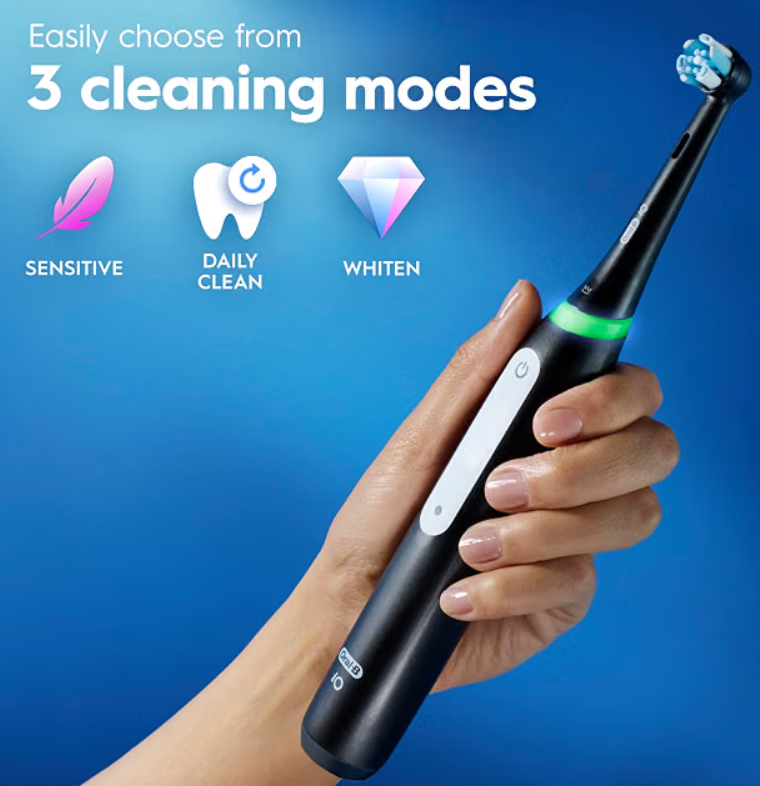
The iO Series 3 gives us three cleaning modes: Daily Clean, Sensitive, and Whitening. Rather than burying these options inside a touchscreen or complicated menu, Oral-B keeps things fairly straightforward. We turn the toothbrush on and use the mode control to cycle through the available settings.
In this guide, we’ll explain exactly how to change modes, what each mode actually does, how to identify the setting we’re using, and what to try when the toothbrush doesn’t appear to change modes.
Let’s make that little button feel much less mysterious.
Quick Answer: How Do You Change Modes on Oral-B iO Series 3?
Changing modes on the Oral-B iO Series 3 takes only a few seconds.
The basic process is:
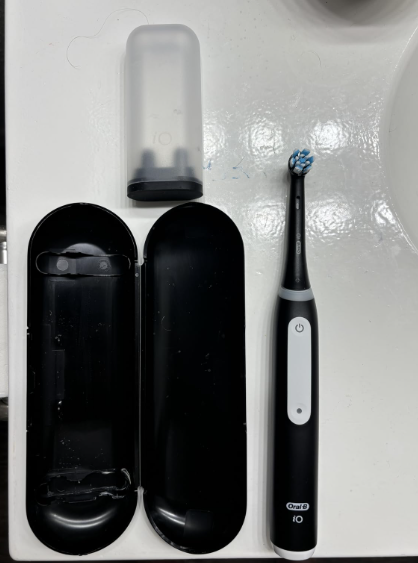
- Place the brush head on the toothbrush.
- Press the power button to switch the toothbrush on.
- Use the mode-selection button/control to move through the available brushing modes.
- Continue pressing it until you reach the mode you want.
- Brush normally.
- Press the power button when you’re finished.
The three available modes on the iO Series 3 are Daily Clean, Sensitive, and Whitening.
One detail worth remembering is that the iO Series 3 doesn’t have the large interactive color display found on some more expensive members of the Oral-B iO family. That means identifying and selecting modes feels more minimalist.
Once we’ve used the toothbrush several times, however, changing modes becomes almost automatic—rather like adjusting the volume on a familiar pair of headphones.
Understanding the Oral-B iO Series 3 Controls
Before changing anything, it helps to understand the toothbrush handle.
At first glance there isn’t much going on. That’s intentional. Oral-B designed the iO Series 3 as one of the simpler members of the iO family.
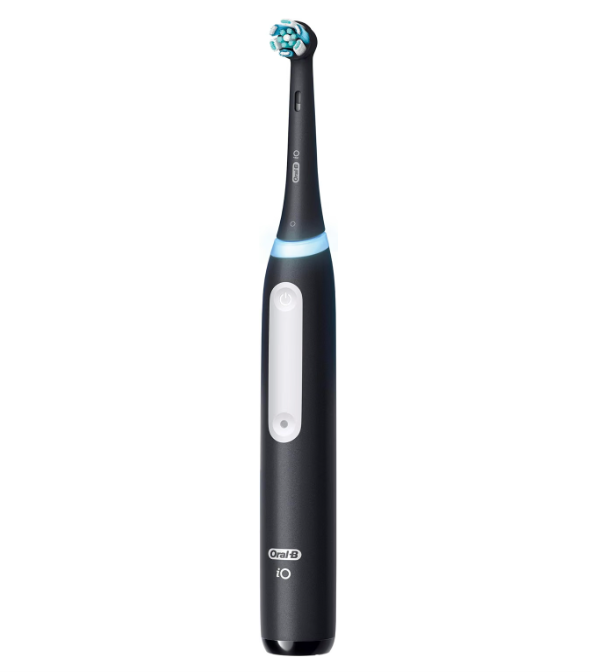
The Power Button
The main button turns the toothbrush on and off.
Press it once and the motor starts. Press it again when we want to stop brushing.
The toothbrush also incorporates a two-minute brushing timer, so we don’t need to stare at a clock while cleaning our teeth.
The Mode Selection Control
The other important control is responsible for changing brushing modes.
While the toothbrush is operating, pressing the mode selector cycles through the available settings.
Think of it like changing radio stations. We aren’t entering a settings menu. Each press simply takes us to another available brushing program.
The Smart Pressure Sensor
Around the upper section of the handle sits another useful feature: the visible pressure indicator.
It isn’t a mode selector.
Instead, it provides feedback about how much pressure we’re applying while brushing. That’s an important distinction because new owners sometimes assume the changing lights indicate different cleaning modes.
They’re primarily there to help us manage brushing pressure.
What Modes Does the Oral-B iO Series 3 Have?
The Oral-B iO Series 3 offers three cleaning modes:
- Daily Clean
- Sensitive
- Whitening
That’s fewer than the flagship iO toothbrushes, but in everyday life these three settings cover most brushing situations nicely.
Instead of presenting seven modes that we may rarely touch, the Series 3 feels more like a well-packed carry-on bag: just the essentials, without unnecessary clutter.
Let’s examine them individually.
Daily Clean Mode
What Is Daily Clean?
Daily Clean is the standard everyday brushing setting.
For most people, this will probably become the default choice for morning and evening brushing.
The mode is designed for routine plaque removal and general oral hygiene. In practical terms, it provides the balanced iO brushing experience most users expect when buying the toothbrush.
When Should We Use Daily Clean?
Daily Clean makes sense when:
- Our teeth and gums aren’t particularly sensitive.
- We’re performing normal twice-daily brushing.
- We want a balanced combination of cleaning power and comfort.
- We don’t specifically need the gentler Sensitive mode.
If we aren’t sure which setting to choose, Daily Clean is generally the most logical starting point.
Is Daily Clean Too Strong?
It shouldn’t feel aggressive when we’re using the toothbrush properly.
Remember that electric toothbrushes do most of the work themselves. We don’t need to scrub our teeth as if we’re sanding a wooden table.
Guide the round brush head slowly around each tooth and allow the motor to handle the cleaning movement.
If Daily Clean still feels uncomfortable, switch to Sensitive.
Sensitive Mode
Sensitive mode is the gentler option on the Oral-B iO Series 3.
It uses a lower-intensity brushing experience intended to clean while being kinder to sensitive teeth and gums.
Who Should Try Sensitive Mode?
We might prefer Sensitive mode if:
- Our gums feel tender.
- Our teeth are sensitive to pressure.
- We’re moving from a manual toothbrush to an electric toothbrush.
- Daily Clean feels stronger than expected.
- We simply prefer a softer brushing sensation.
There is no prize for choosing the strongest-feeling setting.
Brushing effectively is about consistency and technique, not seeing how much vibration our gums can tolerate.
Can Sensitive Mode Be Used Every Day?
Yes. Sensitive isn’t merely an emergency setting.
If it gives us a comfortable brushing experience and allows us to brush thoroughly, it can become our regular mode.
What matters most is covering every tooth carefully, brushing for an appropriate amount of time, and avoiding excessive pressure.
Whitening Mode
Whitening sounds dramatic, but we should understand what the term means in an electric toothbrush.
The mode is intended to help polish away surface stains using changing brushing intensities. It does not chemically bleach teeth.
Imagine polishing a slightly dull surface rather than repainting it entirely. That’s closer to what we’re trying to accomplish.
When Is Whitening Mode Useful?
Whitening mode may appeal to people concerned about staining associated with things such as:
- Coffee
- Tea
- Certain foods
- Everyday surface discoloration
It can be incorporated into a brushing routine when we want extra polishing action.
Does Whitening Mode Actually Whiten Teeth?
We need realistic expectations.
A toothbrush can help remove external stains and maintain a cleaner-looking tooth surface, but it cannot necessarily change the natural internal color of our teeth.
Professional whitening and peroxide-based whitening products work differently.
So Whitening mode is best viewed as a surface-polishing mode, not a miniature dental bleaching machine.
Oral B iO Series 3 How to Change Modes Step by Step
Now let’s walk through the process slowly.
Step 1: Prepare the Toothbrush
Attach the compatible iO brush head securely to the handle.
Apply toothpaste to the bristles and place the brush head in your mouth before starting the motor.
Why?
Because switching on a wet electric toothbrush while it’s still outside our mouth can turn the bathroom mirror into modern art.
Step 2: Press the Power Button
Press the on/off button.
The toothbrush will begin operating.
Don’t worry if the initial brushing sensation isn’t the one you want. We can change the mode immediately.
Step 3: Press the Mode Selection Button
With the toothbrush running, press the mode selector.
Each press cycles to another available setting.
The sequence moves through the Series 3’s three modes:
Daily Clean → Sensitive → Whitening
Continue pressing until you arrive at your preferred mode.
Step 4: Notice the Difference in Brushing Pattern
Because the iO Series 3 lacks the elaborate display found on more expensive models, learning the modes partly involves becoming familiar with the motor’s behavior.
After using the toothbrush for a while, differences become easier to recognize.
Daily Clean feels like the standard balanced program.
Sensitive feels gentler.
Whitening has a different polishing rhythm.
Step 5: Start Brushing Normally
Once you’ve selected your mode, guide the toothbrush slowly around your mouth.
We shouldn’t perform vigorous manual brushing strokes.
Move gradually from tooth to tooth, allowing the round iO head to clean each surface.
Step 6: Let the Timer Guide You
The iO Series 3 includes a built-in two-minute timer.
This is one of those features that sounds minor until we realize how quickly people tend to rush brushing.
Two minutes can feel surprisingly long when we’re actually paying attention.
Use the timer as a pacing tool rather than racing through the mouth.
Step 7: Turn the Toothbrush Off
When brushing is complete, press the power button.
Rinse the brush head thoroughly and allow it to dry.
And that’s it.
Changing modes really is that simple.
How Do I Know Which Mode My Oral-B iO 3 Is In?
This is one of the most common sources of confusion.
Higher-end Oral-B iO models may provide richer visual information through their displays. The Series 3 is deliberately simpler.
As a result, we often rely on the control sequence and differences in brushing intensity to recognize the selected program.
The easiest strategy is to deliberately cycle through all three settings when first learning the toothbrush.
Listen to the motor.
Feel the difference.
After several brushing sessions, identifying Sensitive versus Daily Clean becomes much easier.
It’s similar to driving a new car. During the first trip we’re consciously thinking about every switch. A few weeks later, our fingers find everything without asking permission from our brain.
Why Won’t My Oral-B iO Series 3 Change Modes?
If pressing the mode button doesn’t appear to change anything, don’t immediately assume the toothbrush is defective.
Several simple explanations are possible.
You’re Pressing the Wrong Button
This sounds obvious, but the minimalist handle can cause confusion when we’re unfamiliar with the toothbrush.
The power control starts or stops brushing. The mode selector changes the cleaning program.
Make sure you’re using the correct control.
The Difference Between Modes Is Subtle
Sensitive versus Daily Clean may not feel night-and-day different when the brush isn’t touching our teeth.
Try switching modes while brushing.
We can often notice the difference much more clearly when the brush head is making contact with our teeth.
The Toothbrush Battery Is Very Low
If the toothbrush is behaving strangely and hasn’t been charged recently, put it on its compatible charger.
A low battery can cause us to mistake general power issues for mode-selection problems.
Allow the toothbrush to charge and test it again.
The Button Isn’t Responding
Clean around the button area and ensure toothpaste residue or dried moisture hasn’t accumulated excessively around the handle.
Don’t poke sharp objects into the toothbrush or attempt to pry the buttons apart.
If the control consistently fails to respond after normal charging and cleaning, contact Oral-B support or the retailer—especially if the toothbrush is still covered by warranty.
Why Does the Light Ring Change Color While I’m Brushing?
Here’s another common misunderstanding.
The changing light isn’t necessarily telling us that we’ve switched modes.
The iO Series 3 includes a visible pressure sensor designed to help indicate whether we’re applying appropriate brushing pressure.
That matters because one of the classic mistakes people make after switching from a manual toothbrush is continuing to push and scrub.
With the iO, we should think guide rather than scrub.
The toothbrush provides the movement. Our job is positioning.
Do You Have to Change Modes Before Brushing?
No.
You don’t need a lengthy pre-brushing setup ritual.
We can start the toothbrush and then switch to the cleaning program we want.
For many owners, mode changing eventually becomes something they rarely think about because they settle on one preferred setting.
Perhaps Daily Clean works every day.
Perhaps Sensitive feels better.
Perhaps we occasionally choose Whitening.
The mode system is there for flexibility, not to make brushing complicated.
Which Oral-B iO 3 Mode Should We Use Every Day?
For general everyday brushing, Daily Clean is the obvious default.
But that doesn’t mean everybody must use it.
If Sensitive feels better and allows us to brush comfortably and thoroughly, using Sensitive regularly is perfectly reasonable.
Choosing between modes should be based on comfort and brushing needs rather than assuming more intensity automatically means more cleaning.
A Simple Routine
One straightforward approach could look like this:
Morning: Daily Clean
Evening: Daily Clean or Sensitive
Occasional surface polishing: Whitening
We don’t need to constantly rotate between all three programs just because they’re available.
Sometimes simplicity wins.
Can We Change Modes While Brushing?
Yes.
That’s one of the easiest ways to compare the modes.
Start brushing in Daily Clean and press the mode button. We should notice the motor behavior change as we move through the available settings.
This can also be useful if one part of the mouth feels more sensitive.
However, constantly jumping between settings during every brushing session isn’t necessary.
Pick the mode that allows comfortable, consistent cleaning and concentrate on technique.
What Is the Best Mode for Sensitive Gums?
Sensitive mode is the natural choice when our gums feel delicate or when standard brushing intensity seems uncomfortable.
But the mode is only one part of the equation.
Pressure matters enormously.
Using a gentle mode while pushing the brush head aggressively against the gums defeats the purpose.
Think of brushing pressure like holding a pen. We need enough contact to control it, not enough force to crush it.
Let the pressure feedback help us develop a lighter touch.
What Is the Best Mode for Plaque Removal?
Daily Clean is designed as the routine cleaning and plaque-removal mode.
Still, technique matters more than simply choosing a mode and hoping technology handles everything.
We need to:
- Brush all tooth surfaces.
- Spend enough time in each area.
- Avoid rushing.
- Guide the brush along the gumline carefully.
- Use appropriate pressure.
- Replace worn brush heads.
A powerful toothbrush can’t clean a tooth we never actually touch.
Does the Oral-B iO Series 3 Remember the Last Mode?
Behavior can vary depending on the exact model version, region, and how the brush is operated, so the safest approach is not to build our entire routine around assumed mode memory.
Instead, pay attention when starting the toothbrush and select the setting you want when needed.
Fortunately, with only three choices, changing modes takes a moment.
That simplicity is actually one of the Series 3’s strengths.
Oral-B iO Series 3 vs More Expensive iO Models
The Series 3 is intentionally streamlined.
Moving higher through the Oral-B iO range can bring additional brushing modes, displays, connectivity features, and accessories depending on the model.
The iO Series 3 sticks to three core modes.
Is Three Modes Enough?
For most people?
Probably.
Daily Clean handles everyday brushing.
Sensitive provides a gentler experience.
Whitening targets surface polishing.
That’s a solid trio.
A toothbrush with seven modes may sound considerably more sophisticated, but extra modes only matter if we’ll actually use them.
The Series 3 is like a kitchen with three excellent knives instead of a drawer containing twenty gadgets we forget we own.
Do Different Modes Affect the Pressure Sensor?
The selected brushing mode and pressure sensor serve different purposes.
The mode determines the brushing behavior or intensity pattern.
The pressure sensor helps us control how firmly we press.
We shouldn’t interpret a more powerful-feeling mode as permission to use more pressure.
Whatever mode we choose, the brush head should be guided gently.
How Often Should We Switch Between Modes?
There is no required schedule.
We can use one setting for months if it suits us.
Changing modes is useful when our needs change.
For example, we might normally use Daily Clean but switch to Sensitive when our gums feel tender.
Alternatively, someone interested in managing surface staining might occasionally incorporate Whitening.
Don’t create complexity simply because the toothbrush provides options.
The best mode is the one that encourages us to brush properly and consistently.
Common Mistakes When Changing Oral-B iO Series 3 Modes
Even such a simple toothbrush can produce a few surprisingly common mistakes.
Mistake 1: Confusing Pressure Lights With Mode Indicators
The visible pressure sensor reacts to brushing pressure.
Don’t assume every change in light behavior means the cleaning mode has changed.
Mistake 2: Pressing Too Many Times
Because the toothbrush only has three modes, rapidly pressing the selector can take us straight past the option we wanted.
Slow down.
Press once, notice the change, and press again only if necessary.
Mistake 3: Expecting a Large Screen
The iO Series 3 doesn’t provide the elaborate interactive display associated with premium iO models.
Its interface is much simpler.
That’s not a malfunction.
Mistake 4: Scrubbing Manually
Choosing Sensitive mode won’t help much if we’re aggressively moving the brush back and forth.
Guide the toothbrush instead.
Mistake 5: Assuming Whitening Means Bleaching
Whitening mode primarily targets surface polishing.
It shouldn’t be confused with professional or chemical tooth whitening.
How to Get Better Results From Every iO Series 3 Mode
Whichever mode we choose, brushing technique determines how much value we get from the toothbrush.
Move Tooth by Tooth
Instead of rushing across an entire row, move deliberately along the teeth.
Let the round brush head surround and clean individual surfaces.
Pay Attention to the Gumline
Plaque likes areas where teeth and gums meet.
Guide the head gently along this border without pressing excessively.
Use the Two-Minute Timer
We often overestimate how long we’re brushing.
Let the built-in timer keep us honest.
Don’t Apply Excessive Pressure
One of the advantages of the iO Series 3 is its visible pressure guidance.
Use it.
Electric brushing shouldn’t feel like scrubbing grout.
Give the Toothbrush Time to Feel Natural
The first few sessions can feel strange if we’ve spent years using a manual toothbrush.
That’s normal.
The combination of oscillation, rotation, and micro-vibrations produces a different sensation.
After a week or two, the technique usually becomes much more intuitive.
How to Clean the Oral-B iO Series 3 After Changing Modes and Brushing
The brushing mode doesn’t change how we maintain the toothbrush.
After brushing:
- Turn the handle off.
- Rinse the brush head under running water.
- Remove excess water.
- Wipe the handle when necessary.
- Store the brush where it can dry properly.
Avoid allowing thick layers of toothpaste residue to build up around the neck of the handle or controls.
A little routine maintenance keeps the toothbrush looking better and helps prevent grime from accumulating around moving or sealed areas.
How Long Does It Take to Learn the Mode Controls?
Usually only a few brushing sessions.
At first we might consciously think:
“Power button… mode button… which setting am I on?”
Soon the process becomes muscle memory.
And that’s arguably how a good toothbrush should work.
We shouldn’t need a technical manual beside the bathroom sink every morning.
The technology should eventually disappear into the routine.
Is the Oral-B iO Series 3 Easy to Use?
Yes, and its limited number of modes is actually part of the appeal.
Some people love screens, apps, real-time coaching, and endless customization.
Others simply want a high-quality electric toothbrush that turns on, cleans effectively, warns them about pressure, and offers a few useful choices.
The Series 3 leans toward the second group.
We get meaningful customization without turning brushing our teeth into cockpit management.
Oral B iO Series 3 Mode Cheat Sheet
If we want the whole guide compressed into a few seconds, remember this:
Daily Clean: everyday cleaning and plaque removal.
Sensitive: gentler brushing for sensitive teeth or gums.
Whitening: polishing action intended to help remove surface stains.
To change modes: switch on the toothbrush and use the mode selector to cycle through the three options.
That’s really the entire system.
Everything else is simply learning which setting feels best for us.
When Should We Contact Oral-B Support?
Mode switching should be straightforward.
Consider contacting Oral-B or your retailer if:
- The mode button never responds.
- The toothbrush repeatedly shuts itself off unexpectedly.
- The handle won’t power on despite being charged.
- The motor behaves abnormally.
- The controls appear physically damaged.
- The toothbrush is new and hasn’t functioned correctly from the beginning.
Avoid opening the handle yourself.
Electric toothbrushes are sealed devices designed to operate around water, and opening one can compromise that protection and potentially affect warranty coverage.
Final Thoughts: Changing Oral-B iO Series 3 Modes Is Simple
Learning Oral B iO Series 3 how to change modes sounds like something that should require a manual, but in reality it becomes effortless once we know the controls.
Switch the toothbrush on, use the mode selector, and cycle through Daily Clean, Sensitive, and Whitening until we’ve reached the setting we want.
Daily Clean is the natural all-purpose choice. Sensitive offers a gentler experience when our teeth or gums need it. Whitening provides a polishing pattern aimed at surface stains.
More importantly, we shouldn’t obsess over finding some magical “best” mode.
Good brushing still comes down to the fundamentals: enough time, complete coverage, gentle pressure, regular brush-head replacement, and consistency.
The iO Series 3 simply makes those fundamentals easier.
Once we’ve found the mode we enjoy, we can stop thinking about buttons and concentrate on what matters—cleaning our teeth properly.
Frequently Asked Questions
1. How do I change the mode on my Oral-B iO Series 3?
Turn the toothbrush on using the power button, then press the mode-selection control to cycle through the available brushing programs. The iO Series 3 provides Daily Clean, Sensitive, and Whitening modes.
2. How many modes does the Oral-B iO Series 3 have?
The Oral-B iO Series 3 has three brushing modes: Daily Clean, Sensitive, and Whitening. Higher iO models may provide additional options, but the Series 3 focuses on these three core settings.
3. Which mode is best on the Oral-B iO Series 3?
Daily Clean is the best general-purpose option for routine brushing. Sensitive can be preferable if our teeth or gums feel tender, while Whitening is designed to help polish away surface stains. The ideal mode depends mainly on comfort and our individual brushing needs.
4. Why can’t I tell when my Oral-B iO Series 3 changes modes?
The Series 3 has a relatively simple interface compared with premium iO models, so the differences can initially seem subtle. Try changing modes while the brush is actually against your teeth. Sensitive should feel gentler, while Whitening uses a noticeably different brushing pattern.
5. Can I use Sensitive mode on the Oral-B iO Series 3 every day?
Yes. Sensitive mode can be used as a regular brushing setting if we prefer its gentler feel. Effective brushing depends on thorough coverage, sufficient brushing time, and appropriate pressure—not simply selecting the strongest mode.