
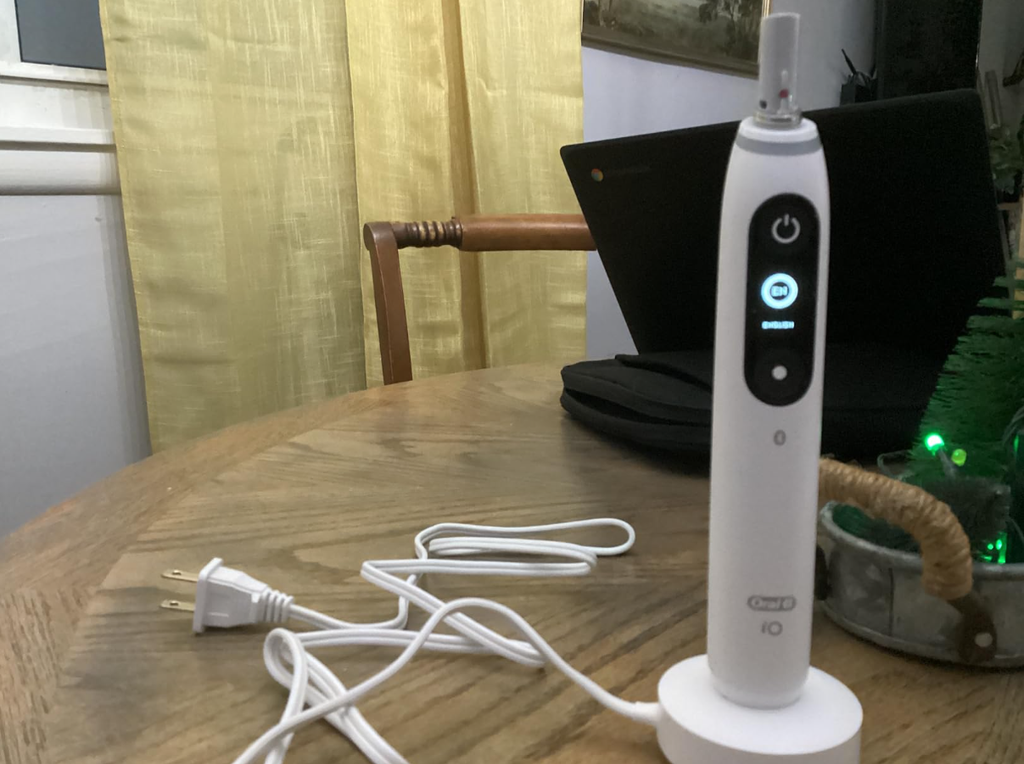
The Oral-B iO7 is a premium electric toothbrush designed to deliver an advanced cleaning experience with smart pressure sensing, multiple brushing modes, and a rechargeable lithium-ion battery. However, even a high-end toothbrush can develop battery problems over time.
If your Oral-B iO7 is not holding charge, you might notice that the battery drains unusually quickly, the toothbrush shuts down unexpectedly, or it needs to be placed on the charger after just one or two brushing sessions.
These problems can be frustrating, especially when your toothbrush appears to charge normally but runs out of power much sooner than expected.
Fortunately, a battery that drains quickly does not always mean the toothbrush needs replacing. Sometimes, the issue comes from improper charging, a faulty charging base, environmental conditions, or a temporary electronic problem.
In this guide, we’ll explain why your Oral-B iO7 may not hold a charge, how to troubleshoot the most common problems, and how to determine whether the battery has reached the end of its useful life.
How Long Should the Oral-B iO7 Battery Last?
Before troubleshooting, it helps to understand what normal battery performance looks like.
The Oral-B iO Series 7 features a rechargeable lithium-ion battery and a magnetic charging system. Unlike some older Oral-B toothbrushes that need many hours to recharge, the iO7 typically reaches a full charge in approximately 3 hours.
Under ordinary conditions, users can generally expect around one to two weeks of use from a fully charged battery, depending on individual brushing habits.
Oral-B describes many iO models as capable of lasting up to approximately two weeks when brushing twice daily for two minutes.
However, actual battery life depends on several factors:
- How often you brush your teeth.
- How long each brushing session lasts.
- Which cleaning mode you select.
- How frequently you use connected features.
- Battery age and overall condition.
- Charging habits and storage temperature.
Oral-B iO7 Battery Life at a Glance
| Feature | Typical performance |
|---|---|
| Battery type | Rechargeable lithium-ion |
| Charging system | Magnetic charging base |
| Full charging time | Approximately 3 hours |
| Battery runtime | Around 1–2 weeks, depending on use |
| Recommended brushing | Twice daily, 2 minutes each |
| Battery replacement | Not designed for user replacement |
If your toothbrush previously lasted more than a week but now runs out of power after only a day, that is a significant change worth investigating.
On the other hand, needing to recharge somewhat more frequently than the advertised maximum does not automatically indicate a defective battery.
Why Is My Oral-B iO7 Not Holding Charge?
Several different problems can cause an Oral-B iO7 battery to lose power unusually quickly.
Understanding the possible causes makes it easier to identify the appropriate solution.
1. The Battery Is Starting to Wear Out
One of the most common explanations for reduced battery runtime is natural battery degradation.
Like other rechargeable electronic devices, the Oral-B iO7 uses a lithium-ion battery that gradually loses capacity as it ages.
Every battery has a limited number of charging cycles. Over time, chemical changes inside the battery reduce the amount of energy it can store.
You might notice the following symptoms:
- The toothbrush requires charging more frequently than before.
- The battery indicator drops rapidly after a full charge.
- The handle switches off unexpectedly.
- Charging seems normal, but runtime remains very short.
- Battery performance has deteriorated progressively over several months.
For example, a toothbrush that initially lasted ten days between charges might eventually provide only four or five days of use.
Some capacity loss is normal as a battery ages. However, a dramatic reduction in runtime, particularly on a relatively new toothbrush, may indicate a fault rather than ordinary wear.
2. The Toothbrush Is Not Charging Completely
Sometimes the problem is not the battery itself.
Your Oral-B iO7 might appear to be charging without actually receiving a complete charge.
The iO7 is designed to charge in approximately three hours when using its compatible magnetic charging base.
If charging is interrupted or the handle is not correctly positioned, the toothbrush may never reach full capacity.
Possible explanations include:
- The handle is incorrectly positioned on the charger.
- The charging base is damaged.
- The electrical socket is not supplying power consistently.
- The toothbrush is removed before charging finishes.
- The charger or handle has a connection-related problem.
A partially charged toothbrush will naturally run out of battery sooner than expected.
3. The Magnetic Charging Base Is Faulty
The Oral-B iO7 uses a dedicated magnetic charging system.
Although this design is convenient, charging problems can occur if the base develops an electrical fault or stops transferring power correctly.
A faulty charging base might cause:
- Charging that starts and stops unexpectedly.
- No charging indication on the toothbrush.
- A battery that never reaches full capacity.
- A toothbrush that only charges intermittently.
If you have access to another compatible, properly functioning Oral-B iO charger, testing it can help identify whether the problem is with the charging base or the toothbrush handle.
Importantly, not every Oral-B charger is interchangeable. Traditional chargers designed for older Oral-B models may not work with the iO7.
4. Dirt or Moisture Around the Charging Area
Bathroom environments expose toothbrushes to water, toothpaste residue, and humidity.
Over time, moisture and debris can accumulate around the bottom of the handle and the charging base.
Although magnetic charging does not rely on exposed metal charging contacts, keeping the charging surfaces clean and dry helps maintain proper placement and prevents avoidable problems.
Residue may also make the toothbrush sit incorrectly on its charger.
We recommend inspecting the base and cleaning both surfaces according to the manufacturer’s care instructions.
5. A Temporary Electronic or Software Problem
The Oral-B iO7 contains electronic components that control its display, charging behavior, and battery monitoring.
Occasionally, an electronic malfunction may cause unusual behavior.
For example, the battery indicator might appear inconsistent with the toothbrush’s actual runtime.
A temporary issue may produce symptoms such as:
- The display reporting an unexpectedly low battery level.
- Charging status behaving inconsistently.
- The toothbrush failing to respond normally.
- Unexpected shutdowns despite an apparently adequate charge.
However, a genuine loss of battery capacity cannot be repaired through software settings.
If the toothbrush continues to run for only a few minutes after a complete charge, the underlying problem is more likely to involve the battery or internal electronics.
6. Exposure to Extreme Temperatures
Rechargeable lithium-ion batteries perform best within moderate temperatures.
Exposing your Oral-B iO7 to excessive heat can accelerate battery degradation.
Very cold conditions may temporarily reduce available battery performance.
Possible situations include:
- Leaving the toothbrush inside a hot vehicle.
- Storing it next to a radiator.
- Keeping it in direct sunlight.
- Charging it in an unusually hot environment.
For normal battery maintenance, store the toothbrush at room temperature whenever possible.
If the handle becomes abnormally hot, stop using and charging it and contact Oral-B support.
How to Fix an Oral-B iO7 That Is Not Holding Charge
Now that we’ve explored the possible causes, let’s go through the troubleshooting steps.
We recommend following these methods in order, starting with the simplest checks.
Step 1: Give Your Oral-B iO7 a Full Charge
The first step is to make sure the toothbrush is receiving a complete charge.
- Connect the original or a compatible Oral-B iO magnetic charger to a working power outlet.
- Place the toothbrush upright on the charging base.
- Check whether the charging indicator responds.
- Leave the toothbrush charging for approximately three hours.
- Confirm that charging has completed before removing it.
- Test the toothbrush during your regular brushing sessions.
The iO7’s indicator should respond when the handle is correctly positioned. Once fully charged, the charging light stops its normal charging animation.
Important: If the battery is completely depleted, the toothbrush may not immediately display a charging indication. Allow it some time on the charger before assuming it is defective.
If the battery life improves after a proper full charge, the problem may simply have been incomplete charging.
Step 2: Test the Electrical Outlet
A surprisingly common charging problem is an electrical outlet that is not providing power.
Some bathroom sockets are connected to switches or protective electrical devices.
To eliminate this possibility:
- Disconnect the charger.
- Test the socket using another suitable appliance.
- Try a different electrical outlet.
- Reconnect the toothbrush charger.
- Observe whether charging starts normally.
If the toothbrush begins charging after changing sockets, the original outlet may have been responsible.
Step 3: Clean the Toothbrush and Charging Base
Cleaning is another simple troubleshooting step worth trying.
First, unplug the charging base.
Then:
- Remove the toothbrush from its charger.
- Inspect the underside of the handle.
- Wipe away visible toothpaste residue or dirt.
- Clean the charging base with a lightly damp cloth.
- Allow both parts to dry thoroughly.
- Reconnect the charger and test the toothbrush again.
Avoid immersing the charging base in water or using aggressive cleaning chemicals.
It is also important not to scrape, force open, or modify the toothbrush handle.
The goal is simply to remove residue that might interfere with correct positioning or normal charging.
Step 4: Check Whether the Charging Base Is Working
If the toothbrush still has battery problems, test the charger itself.
Look for visible damage to the charging cable, plug, or base.
If you notice damaged insulation, exposed wiring, or signs of overheating, stop using that charger.
If another compatible Oral-B iO magnetic charging base is available, you can try charging the handle with it.
How to interpret the results
- Works normally with another charger: The original charging base may be defective.
- Fails with both chargers: The problem may involve the toothbrush battery or internal charging circuitry.
- Charges successfully but drains immediately: Battery capacity or internal electronics may be responsible.
- Only charges intermittently: Check the handle’s positioning and the condition of the charger.
Do not use an incompatible charging base simply because it belongs to another Oral-B toothbrush.
Step 5: Measure the Actual Battery Runtime
One of the best ways to diagnose the problem is to track battery performance rather than relying entirely on the battery indicator.
Start with a complete three-hour charge.
Then use the toothbrush normally, keeping your brushing routine reasonably consistent.
For example:
| Day | Morning | Evening | Result |
|---|---|---|---|
| 1 | 2 minutes | 2 minutes | Observe battery status |
| 2 | 2 minutes | 2 minutes | Check for unusual changes |
| 3 | 2 minutes | 2 minutes | Record remaining charge |
| 4–7 | 2 minutes | 2 minutes | Monitor runtime |
| 8–14 | Continue if possible | Continue if possible | Record when charging becomes necessary |
This test helps distinguish between an unusual battery indicator and a battery that genuinely cannot provide adequate runtime.
If the toothbrush consistently stops working after only two or three brushing sessions, even following a verified full charge, something is likely wrong.
Step 6: Check for Persistent Electronic Problems
If your Oral-B iO7 still behaves abnormally, inspect the settings and confirm that the buttons and display are responding as expected.
If you use the Oral-B app, you can also check whether any applicable firmware update or device guidance is available.
However, firmware updates should not be treated as a guaranteed solution for battery problems.
We would also avoid performing undocumented button combinations or attempting unofficial battery resets.
If the device repeatedly shuts down, shows inconsistent battery information, or fails to charge despite the previous checks, professional support is the safer option.
Oral-B iO7 Battery Draining Fast After Charging
A particularly frustrating situation occurs when the toothbrush appears fully charged but loses power shortly afterward.
There is an important difference between a toothbrush that cannot charge and one that cannot retain energy.
When the Battery Drops Quickly from Full to Empty
Suppose your Oral-B iO7 appears fully charged after three hours.
You remove it from the base, brush your teeth for two minutes, and notice that the battery level has dropped dramatically.
This could indicate:
- Reduced battery capacity.
- Incorrect battery-level reporting.
- An internal electrical fault.
- Charging that was not actually completed.
Start by confirming the toothbrush has been properly charged using a functioning charger.
If the same behavior continues consistently, contact Oral-B support.
When the Toothbrush Dies After One Use
A toothbrush that repeatedly stops working after a single two-minute brushing session is not delivering normal battery performance.
This is especially concerning if the handle previously operated for many days between charges.
Although external charging problems should be ruled out first, persistent short runtime can be a strong indication of an internal battery or electronic defect.
Oral-B iO7 Charging Light Not Working
The charging indicator can provide useful diagnostic information.
When correctly positioned on its magnetic charger, the iO7 should normally show a charging response.
During charging, the light ring displays a charging animation.
After charging is completed, the light indication may stop. This means that an unlit indicator does not necessarily mean the toothbrush is failing to charge.
If no indicator appears, consider the following possibilities:
- The battery is completely depleted.
- The charger is not receiving electricity.
- The handle is incorrectly positioned.
- The charging base is defective.
- The toothbrush has an internal fault.
If the battery has been completely exhausted, leave the handle on the charger for at least 30 minutes before checking again.
Then allow a complete charge of approximately three hours.
If the toothbrush remains completely unresponsive, further testing or professional service may be necessary.
Can You Replace the Oral-B iO7 Battery?
One of the most common questions among owners experiencing battery problems is whether the internal battery can be replaced.
The Oral-B iO7 has an integrated rechargeable battery inside its sealed handle.
Oral-B does not provide a standard user-replaceable battery for this toothbrush.
The waterproof construction and internal electronics make battery replacement more complicated than changing batteries in a conventional device.
Is DIY Battery Replacement a Good Idea?
Generally, we would not recommend attempting to open the handle yourself.
Potential problems include:
- Damaging internal components.
- Compromising the water-resistant seal.
- Creating an electrical or battery safety hazard.
- Losing warranty coverage.
- Preventing the toothbrush from operating correctly afterward.
Lithium-ion batteries can also be dangerous if punctured, crushed, short-circuited, or improperly handled.
A safer approach is to contact an authorized service provider and ask about repair or replacement options.
When Should You Replace the Entire Toothbrush?
Replacing the toothbrush may become reasonable when:
- The battery consistently lasts only a few minutes.
- The toothbrush no longer charges with a known-working charger.
- The handle has suffered significant physical damage.
- The product is outside warranty.
- The cost of authorized repair is close to the cost of replacement.
However, if the toothbrush is relatively new, checking warranty coverage should always come before purchasing another device.
Does the Oral-B iO7 Have Battery Problems?
Some owners report reduced battery life or charging difficulties with rechargeable electric toothbrushes, including the Oral-B iO range.
However, individual reports do not establish that every iO7 has an inherent battery defect.
Battery performance is affected by product age, usage patterns, charging conditions, and potential manufacturing faults.
A useful distinction is whether the problem appeared suddenly or gradually.
Gradual Battery Deterioration
If the toothbrush has been used regularly for several years and its runtime has slowly declined, natural battery aging may be the explanation.
Sudden Battery Failure
If a relatively new toothbrush suddenly stops holding charge, it is more important to investigate a possible hardware fault.
In that situation, warranty service may be appropriate.
Battery Problems Immediately After Purchase
A brand-new iO7 should not require charging after every brushing session.
If it does, complete the charging checks described earlier.
If the problem persists, contact the retailer or manufacturer rather than continuing to use a potentially defective product.
How to Make Your Oral-B iO7 Battery Last Longer
Although rechargeable batteries naturally age, good charging and storage habits can help preserve performance.
1. Avoid Excessive Heat
Heat is one of the factors that can accelerate lithium-ion battery degradation.
Store your toothbrush in a cool, dry location away from direct sunlight and heaters.
2. Use a Compatible Charger
Always use the supplied charging base or a replacement confirmed as compatible with your particular Oral-B iO7.
An unsuitable charger may fail to charge the toothbrush correctly.
3. Avoid Repeatedly Running the Battery Completely Flat
Lithium-ion batteries do not require regular full discharge cycles.
It is generally better to recharge the toothbrush when necessary rather than deliberately running it until it shuts down.
4. Keep the Handle Clean and Dry
After brushing, rinse the appropriate parts according to the user manual and remove excess moisture.
Periodically clean the charging base and the bottom of the handle.
5. Monitor Changes in Runtime
Pay attention if your toothbrush starts requiring more frequent charging.
Tracking a noticeable decline early can help you determine whether the issue is related to normal aging or a developing fault.
6. Store It Properly During Long Periods of Non-Use
If you will not be using the toothbrush for an extended period, follow the storage and charging instructions in the product manual.
Avoid leaving the device in extreme temperatures or storing it for prolonged periods with a completely depleted battery.
Should You Leave the Oral-B iO7 on the Charger All the Time?
Many owners wonder whether leaving the toothbrush permanently connected to its charging base will damage the battery.
The Oral-B iO charging system is designed to prevent battery overcharging.
This means that keeping the handle on its appropriate charger does not continuously force energy into an already full battery.
For ordinary daily use, leaving the toothbrush on its charging base is generally acceptable.
Nevertheless, rechargeable batteries naturally deteriorate over time, and excessive heat remains undesirable.
You do not need to leave the toothbrush connected constantly if its battery already provides adequate runtime.
Charging it whenever necessary is a reasonable approach.
Oral-B iO7 Battery Problems: Quick Troubleshooting Table
| Problem | Possible cause | Recommended action |
|---|---|---|
| Battery drains after one use | Battery or electronics fault | Fully charge and test runtime |
| Toothbrush does not charge | Outlet or charging base issue | Test another outlet and compatible charger |
| Battery lasts only a few days | Aging battery or usage pattern | Monitor runtime after a full charge |
| No charging light | Empty battery, charger issue, or fault | Charge for 30 minutes and recheck |
| Charging stops intermittently | Positioning or charger problem | Clean, dry, and reposition the handle |
| Toothbrush turns off unexpectedly | Low battery or electronic fault | Fully charge and monitor |
| Battery indicator seems inaccurate | Battery monitoring or internal issue | Compare the indicator with actual runtime |
| Toothbrush will not turn on | Depleted battery or hardware failure | Attempt a full charge and seek service if needed |
When Should You Contact Oral-B Customer Support?
Not every charging problem can be solved at home.
You should consider contacting Oral-B customer support when:
- The toothbrush no longer charges despite using a working compatible charger.
- The battery drains after just a few minutes.
- The handle repeatedly switches off unexpectedly.
- Battery performance deteriorates suddenly.
- The toothbrush becomes unusually hot.
- The charging base appears damaged.
- The product is still covered by warranty.
When contacting support, have the toothbrush model information and proof of purchase available.
Explain the troubleshooting steps you have already completed.
This can help the support team determine whether repair, replacement, or additional diagnostics are appropriate.
Warranty periods and service conditions vary depending on the country, retailer, and product.
Frequently Asked Questions About Oral-B iO7 Battery Problems
1. Why is my Oral-B iO7 battery draining so fast?
Your Oral-B iO7 battery may drain quickly because of battery aging, incomplete charging, a defective charging base, intensive usage, or an internal electronic problem.
Start by charging the toothbrush for approximately three hours and checking its actual runtime. If it still runs out of power after only a few brushing sessions, professional service may be necessary.
2. How long should an Oral-B iO7 hold its charge?
An Oral-B iO7 can generally provide around one to two weeks of use under ordinary brushing conditions, although actual runtime varies.
Brushing twice daily for two minutes is a useful reference point. More frequent use, longer sessions, battery age, and operating conditions can reduce the time between charges.
3. Why does my Oral-B iO7 say it is fully charged but die quickly?
If the toothbrush indicates a full battery but shuts down shortly afterward, the problem may involve degraded battery capacity, inaccurate battery reporting, or an internal electrical fault.
Confirm that the charger is functioning correctly and perform a full charging test. If the toothbrush repeatedly dies after a few minutes, contact Oral-B support.
4. Can I replace the battery in my Oral-B iO7?
The Oral-B iO7 battery is integrated into the sealed toothbrush handle and is not designed for user replacement.
Opening the handle yourself can damage its water-resistant construction and create safety risks. Contact an authorized service provider to determine whether repair or replacement is available.
5. How do I know if my Oral-B iO7 battery is bad?
Common warning signs include dramatically reduced runtime, unexpected shutdowns, a battery level that drops unusually quickly, and failure to retain charge after a complete charging session.
If these symptoms persist after testing the outlet, charger, and charging process, the battery or internal electronics may be defective.
Conclusion: What to Do If Your Oral-B iO7 Is Not Holding Charge
If your Oral-B iO7 is not holding charge, the problem does not necessarily mean you need to buy a new toothbrush.
We recommend starting with the basics: verify the power outlet, inspect the charging base, clean the handle, and allow approximately three hours for a complete charge.
Next, measure how long the toothbrush actually operates before needing another charge.
If battery life improves, the issue may have been related to incomplete charging or an external charging problem.
However, if the toothbrush repeatedly dies after one or two brushing sessions despite charging correctly, an internal battery or electronic fault becomes more likely.
Because the iO7 battery is not designed for user replacement, authorized service is generally the safest option when basic troubleshooting fails.
With proper maintenance, sensible charging habits, and early attention to unusual symptoms, you can help keep your Oral-B iO7 operating reliably for as long as possible.