
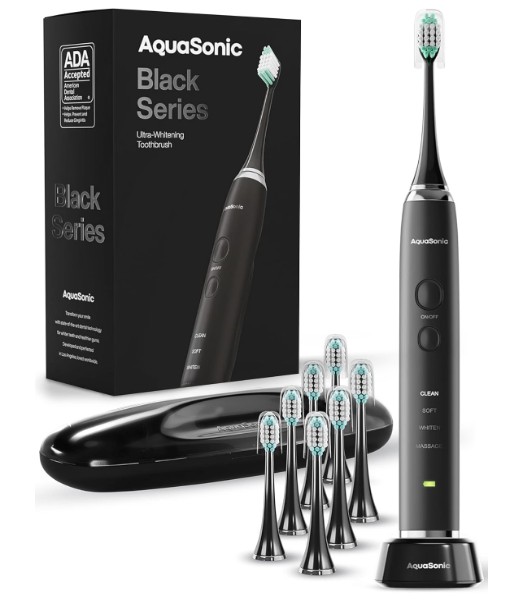
The AquaSonic Black Series Ultra Whitening Toothbrush is a powerful electric toothbrush designed to make daily brushing easier, more effective, and more comfortable. With its 40,000 vibrations per minute, four brushing modes, smart timer, and wireless charging system, it offers several features that can help us improve our oral hygiene routine.
However, if we’ve just purchased this toothbrush or are switching from a traditional manual brush, we might have questions about how to operate it correctly. How do we turn it on? Which brushing mode should we select? How long should we brush? And how exactly does the whitening function work?
Fortunately, learning how to use the AquaSonic Black Series Ultra Whitening Toothbrush is straightforward. Once we understand its controls and brushing technique, we can easily incorporate it into our morning and nighttime routines.
In this guide, we’ll explain everything from setting up the toothbrush for the first time to choosing the right mode, charging the battery, maintaining the brush heads, and solving common problems.
What Is the AquaSonic Black Series Ultra Whitening Toothbrush?
The AquaSonic Black Series Ultra Whitening Toothbrush is a rechargeable sonic electric toothbrush designed to remove plaque, support gum health, and help reduce everyday surface stains on our teeth.
Unlike a manual toothbrush, which relies entirely on our hand movements, the AquaSonic uses rapid sonic vibrations to assist with cleaning.
Its motor produces approximately 40,000 vibrations per minute, allowing the bristles to move rapidly while we gently guide the brush along our teeth.
Main Features
| Feature | AquaSonic Black Series |
|---|---|
| Toothbrush type | Sonic electric toothbrush |
| Motor speed | 40,000 vibrations per minute |
| Brushing modes | Clean, Soft, Whiten, Massage |
| Smart timer | 2 minutes |
| Brushing reminders | Every 30 seconds |
| Charging | Wireless charging base |
| Battery life | Up to 4 weeks |
| Waterproof rating | IPX7 |
| Brush heads | 8 included in the standard package |
| Travel case | Included |
| Pressure sensor | No dedicated pressure sensor |
The toothbrush also carries the American Dental Association (ADA) Seal of Acceptance for its plaque-removal and gingivitis-related benefits when used as directed.
Although the Black Series has several advanced features, we don’t need any special experience to operate it.
How to Use AquaSonic Black Series Ultra Whitening Toothbrush for the First Time
Before brushing, we should correctly assemble and prepare the toothbrush.
Following these initial steps helps ensure that the device operates properly and that we achieve a comfortable cleaning experience.
Step 1: Unbox the AquaSonic Toothbrush
Start by removing the toothbrush and accessories from the packaging.
The standard Black Series package generally contains:
- One AquaSonic Black Series toothbrush handle.
- Eight replacement brush heads.
- One wireless charging base.
- One travel case.
- A user manual and warranty information.
Check the contents against the packaging, as bundles can vary.
Make sure the toothbrush handle, brush heads, and charging base appear clean and undamaged before using them.
Step 2: Charge the Toothbrush Before Using It
Although the toothbrush may arrive with some battery power, we recommend charging it before the first use.
To charge the AquaSonic Black Series:
- Place the wireless charging base on a stable, dry surface.
- Connect the charging base to a suitable electrical power source.
- Position the toothbrush handle upright on the charging base.
- Check for the charging indicator.
- Allow the toothbrush to charge according to the instructions supplied with your model.
A fully charged AquaSonic Black Series can provide up to four weeks of battery life under typical conditions involving two brushing sessions of two minutes per day.
Actual battery performance depends on usage habits, charging conditions, and battery age.
Step 3: Attach the Brush Head
Once the toothbrush is ready, select one of the included brush heads.
Align the opening at the bottom of the brush head with the metal drive shaft at the top of the handle.
Gently push the brush head into position until it is secure.
Avoid forcing or twisting the connection excessively.
The brush head should remain firmly attached while the toothbrush operates.
If the head feels loose, remove it and carefully reinstall it.
Step 4: Wet the Bristles and Apply Toothpaste
Before turning on the toothbrush, lightly wet the bristles with water.
Next, apply a pea-sized amount of fluoride toothpaste.
We don’t need to cover the entire brush head with toothpaste. Using too much can create unnecessary foam and increase splashing.
For adults, a pea-sized amount is generally sufficient.
Step 5: Position the Toothbrush in Your Mouth
This is particularly important when using an electric toothbrush for the first time.
Instead of turning it on while holding it away from our mouth, we should place the brush head against our teeth first.
Position the bristles near the gumline at approximately a 45-degree angle.
Then close our lips gently around the brush head to minimize splashing.
We’re now ready to begin brushing.
How to Turn On the AquaSonic Black Series Toothbrush
The standard AquaSonic Black Series has simple controls located on the front of its handle.
The main power button turns the toothbrush on and off, while the mode-selection button allows us to change the brushing setting.
To start brushing:
- Place the brush head against our teeth.
- Press the ON/OFF button.
- The toothbrush will begin vibrating.
- Select the desired brushing mode using the mode button.
- Gently guide the brush across our teeth.
The illuminated mode indicator helps us identify the selected setting.
To stop brushing manually, press the power button.
The toothbrush also incorporates a smart brushing timer to help us complete an appropriate brushing session.
AquaSonic Black Series Brushing Modes Explained
One of the most useful features of the AquaSonic Black Series is its selection of four brushing modes.
Each mode changes how the toothbrush vibrates to accommodate different oral care preferences.
Understanding these settings helps us choose the most appropriate option rather than simply using the strongest sensation available.
1. Clean Mode: Best for Everyday Brushing
Clean Mode is the standard brushing setting.
It is designed to remove everyday plaque and help us maintain good oral hygiene.
We can use this mode for our regular morning and evening brushing sessions.
Best for:
- Everyday teeth cleaning.
- Removing plaque from tooth surfaces.
- Maintaining a consistent brushing routine.
- Users already comfortable with sonic vibrations.
For most people, Clean Mode is a practical default setting.
2. Soft Mode: Best for Sensitive Teeth and Gums
Soft Mode provides a gentler brushing experience.
It is especially helpful when transitioning from a manual toothbrush to a sonic toothbrush.
Some people initially find sonic vibrations unusually strong. Selecting Soft Mode can make the adjustment easier.
Best for:
- Sensitive teeth.
- Sensitive gums.
- First-time electric toothbrush users.
- People who prefer less intense brushing.
If the vibrations feel uncomfortable during the first few days, we can begin with Soft Mode and gradually transition to Clean Mode if desired.
We should also remember that brushing gently is important regardless of the setting.
3. Whiten Mode: Best for Surface Stains
Whiten Mode is designed to help remove everyday surface stains from our teeth.
These stains may develop from coffee, tea, certain foods, and other habits.
The whitening setting uses a different vibration pattern to support surface cleaning and polishing.
However, there’s an important distinction.
Whiten Mode does not chemically bleach our teeth or change their natural internal color.
Instead, it aims to remove external discoloration that may make our teeth appear darker.
For this reason, we should maintain realistic expectations.
Regular use with proper technique may help our teeth look cleaner and brighter, but significant color changes generally require other dental whitening methods.
4. Massage Mode: Best for Gentle Gum Stimulation
Massage Mode uses pulsing vibrations intended to gently stimulate the gum area.
It provides a different brushing sensation from the regular cleaning modes.
This setting may be useful for people who enjoy a gum-focused brushing experience.
However, we should not press the toothbrush firmly against our gums or concentrate excessively on one spot.
Massage Mode is not a treatment for gum disease and should not replace normal plaque removal along the gumline.
Which AquaSonic Brushing Mode Should We Use?
| Brushing mode | Main purpose | Recommended situation |
|---|---|---|
| Clean | Daily plaque removal | Regular brushing |
| Soft | Gentler vibration | Sensitive teeth or beginners |
| Whiten | Surface-stain removal | Cosmetic stain control |
| Massage | Gum-focused vibration | Gentle gum stimulation |
We don’t need to use all four modes during every brushing session.
Choosing one appropriate mode and brushing thoroughly for two minutes is generally sufficient.

How to Brush Your Teeth Correctly With the AquaSonic Black Series
Using the correct brushing technique is just as important as selecting the appropriate mode.
Because the toothbrush produces rapid sonic vibrations, we shouldn’t scrub aggressively as we might with a manual toothbrush.
Instead, we should allow the motor to provide the brushing action while we control the position of the bristles.
Step 1: Hold the Brush at a 45-Degree Angle
Position the brush head at approximately 45 degrees toward the gumline.
This helps the bristles contact the area where our teeth meet our gums.
Plaque frequently collects around this region, making careful cleaning particularly important.
Use light pressure rather than pushing the brush firmly against the teeth.
Step 2: Move Slowly From Tooth to Tooth
Guide the toothbrush gradually across our teeth.
Instead of making large, rapid horizontal movements, pause briefly on each tooth and allow the sonic vibrations to do the cleaning.
Cover the outside, inside, and chewing surfaces.
For the inside surfaces of the front teeth, we may find it easier to tilt the brush vertically.
Step 3: Divide the Mouth Into Four Sections
To ensure even cleaning, divide our mouth into four quadrants:
- Upper right teeth.
- Upper left teeth.
- Lower left teeth.
- Lower right teeth.
Spend approximately 30 seconds brushing each quadrant.
This approach helps prevent us from spending too much time on our front teeth while neglecting the molars.
Step 4: Follow the Smart Timer
The AquaSonic Black Series includes a built-in smart timer.
During brushing, the toothbrush provides a brief vibration or pacing signal approximately every 30 seconds.
This reminds us to move to another section of our mouth.
A complete brushing session should last two minutes.
Understanding the Two-Minute Brushing Timer
| Brushing time | Area to clean |
|---|---|
| 0–30 seconds | Upper right quadrant |
| 30–60 seconds | Upper left quadrant |
| 60–90 seconds | Lower left quadrant |
| 90–120 seconds | Lower right quadrant |
When the two-minute session finishes, we can stop brushing.
If the toothbrush stops automatically, there is no need to restart it unless we missed important surfaces.
Step 5: Rinse Your Mouth and Clean the Toothbrush
After brushing, turn the toothbrush off and remove it from our mouth.
Spit out excess toothpaste.
For the benefits of fluoride, it’s generally better to avoid immediately rinsing our mouth with large amounts of water.
Then rinse the toothbrush head thoroughly under running water to remove toothpaste residue.
Store it upright in a clean, ventilated location.
How to Use the AquaSonic Black Series Whitening Mode
Whiten Mode is one of the main attractions of this toothbrush, but it works best when we use it correctly.
First, select Whiten Mode using the mode-selection button.
Next, position the brush head along the gumline and gently move across the tooth surfaces.
Pay attention to areas where external stains commonly accumulate, including the outer surfaces of the front teeth.
However, avoid pressing harder or repeatedly brushing one area in an attempt to remove stains faster.
The vibrations are designed to assist with cleaning without aggressive scrubbing.
Can We Use Whiten Mode Every Day?
The toothbrush provides Whiten Mode as an available brushing setting, and its suitability for regular use depends on our comfort, oral health, and brushing technique.
We should not interpret the whitening label as a reason to brush more frequently or longer than recommended.
If we experience sensitivity or irritation, switching to Soft Mode and consulting a dental professional may be appropriate.
How Long Does Whitening Take?
There is no guaranteed timeline for visible whitening results.
The outcome depends on several factors, including:
- The type and severity of existing stains.
- Our coffee and tea consumption.
- Tobacco exposure.
- Toothpaste selection.
- Brushing consistency.
- Our natural tooth color.
Surface stains may become less noticeable with consistent cleaning, but internal discoloration cannot be removed simply by selecting a special brushing mode.
How to Charge the AquaSonic Black Series Toothbrush
Charging the AquaSonic Black Series is convenient because it uses a wireless charging base rather than requiring a charging cable to be plugged directly into the toothbrush handle.
Charging Instructions
Follow these steps:
- Make sure the toothbrush is turned off.
- Place the charging base on a flat, dry surface.
- Connect the base to a compatible power supply.
- Place the toothbrush handle correctly onto the charging base.
- Confirm that the charging indicator responds normally.
- Allow sufficient time for the battery to recharge.
The charging base should be kept away from standing water, even though the toothbrush handle itself is waterproof.
How Long Does the Battery Last?
AquaSonic advertises up to four weeks of use on a full charge.
This estimate assumes brushing twice per day for two minutes per session.
If we brush for longer periods or use the device more frequently, the battery may require charging sooner.
Can We Leave the AquaSonic Toothbrush on Its Charger?
The toothbrush is designed for rechargeable operation, and the charging base provides a convenient storage location.
Nevertheless, we should follow the manufacturer’s charging instructions and avoid exposing the charging equipment to excessive moisture or heat.
For longer periods without use, storing the toothbrush clean and dry is sensible.
How to Clean the AquaSonic Black Series Toothbrush
Cleaning the toothbrush regularly helps prevent toothpaste buildup and keeps the handle and brush head hygienic.
Although the Black Series has an IPX7 waterproof rating, the charging base should not be submerged in water.
Daily Cleaning
After each brushing session:
- Turn the toothbrush off.
- Rinse the bristles thoroughly.
- Remove visible toothpaste residue.
- Wipe the toothbrush handle with a clean, damp cloth.
- Allow the brush head to air-dry.
Avoid storing a wet toothbrush immediately inside a tightly closed travel case.
Weekly Cleaning
Once a week, we can perform a more thorough cleaning.
Remove the brush head carefully and inspect the connection area for dried toothpaste.
Clean the accessible surfaces with water and a soft cloth, avoiding excessive force around the drive shaft.
Allow everything to dry before reassembling the toothbrush.
Never attempt to open the sealed handle or expose its internal electrical components.
How to Replace AquaSonic Black Series Brush Heads
Brush heads gradually wear out with regular use.
Even when the bristles appear relatively clean, their cleaning effectiveness can decrease as they bend or deteriorate.
AquaSonic recommends replacing brush heads approximately every three to four months.
For many users, changing them every three months is a sensible routine.
Brush Head Replacement Instructions
- Turn off the toothbrush.
- Hold the handle firmly.
- Pull the existing brush head straight off.
- Inspect and clean the connection area.
- Align a compatible replacement head with the shaft.
- Push it into place gently until secure.
Replace the brush head sooner if the bristles become noticeably frayed or damaged.
The standard package includes eight brush heads, providing a convenient supply of replacements.
Common AquaSonic Black Series Problems and Solutions
Even though the toothbrush is easy to operate, we may occasionally encounter minor problems.
Here are some common situations and practical troubleshooting steps.
AquaSonic Toothbrush Won’t Turn On
If the toothbrush does not respond when pressing the power button, the battery may be discharged.
Start by placing it on the wireless charging base.
Confirm that the charging base is connected to power and that the handle is positioned correctly.
If the toothbrush still doesn’t respond after an appropriate charging period, contact AquaSonic customer support.
Avoid attempting to open or repair the sealed battery compartment ourselves.
AquaSonic Toothbrush Is Not Charging
If the battery doesn’t appear to charge:
- Check that the power connection is secure.
- Ensure the toothbrush is correctly seated on the base.
- Inspect the charging equipment for visible damage.
- Clean and dry the outside of the handle and charging area.
- Try an appropriate working power outlet.
Charging-indicator behavior can vary, so consult the instructions for the specific unit rather than relying solely on an assumed light color.
The Toothbrush Vibrates Too Strongly
Sonic toothbrushes can initially feel more intense than manual toothbrushes.
If the vibrations are uncomfortable, try Soft Mode.
We can also reduce pressure and concentrate on gently guiding the brush instead of pushing it against our teeth.
If discomfort continues, stop using the toothbrush and seek dental advice.
The Toothbrush Stops While Brushing
First, check whether the normal two-minute brushing cycle has finished.
If the brush stops unexpectedly before the session ends, excessive pressure may be contributing. AquaSonic support describes an overload-related shutoff, although the standard Black Series does not have a dedicated pressure sensor.
Reduce brushing pressure and check the battery charge.
If unexpected shutdowns continue, contact the manufacturer.
The Brush Head Feels Loose
A loose brush head may result from incorrect installation or a worn attachment.
Remove the brush head and carefully reinstall it.
If the connection remains unstable, try another compatible brush head.
Don’t continue brushing with a visibly damaged attachment.
Common Mistakes to Avoid When Using the AquaSonic Toothbrush
While the AquaSonic Black Series can simplify our dental care routine, incorrect use may reduce its benefits.
Brushing Too Hard
Applying excessive pressure doesn’t necessarily make our teeth cleaner.
In fact, aggressive brushing can irritate gums and contribute to tooth wear.
Use gentle contact and allow the sonic movement to do the work.
Moving the Toothbrush Too Quickly
If we rapidly move the brush across our teeth, we may miss important surfaces.
Slow, controlled movements provide better coverage.
Ignoring the Gumline
Plaque often collects near the gums.
We should therefore spend adequate time cleaning the gumline without pressing aggressively against the tissue.
Brushing for Less Than Two Minutes
The built-in timer makes it easier to maintain the recommended brushing duration.
We should aim for two complete minutes twice daily.
Forgetting to Replace the Brush Head
A worn brush head may clean less effectively.
Regular replacement helps preserve comfortable, consistent brushing.
Assuming Whitening Mode Replaces Dental Whitening
Whiten Mode helps with surface stains but cannot replace professional whitening for deeper tooth discoloration.
Tips for Getting the Best Results From Your AquaSonic Black Series
If we want to make the most of this toothbrush, consistency matters more than using the most intense setting.
We recommend developing a simple routine that includes brushing twice daily with fluoride toothpaste.
Choose a brushing mode that feels comfortable, cover all tooth surfaces, and pay attention to the built-in timer.
We should also clean between our teeth once daily using dental floss or another appropriate interdental cleaning tool.
Remember that electric toothbrushes cannot completely replace flossing, regular dental examinations, or professional cleanings.
For people who experience persistent bleeding gums, tooth sensitivity, or discomfort, professional dental evaluation is important.
Is the AquaSonic Black Series Suitable for Beginners?
Yes. The AquaSonic Black Series can be a practical choice for someone who has never used a sonic electric toothbrush.
The controls are straightforward, the Soft Mode provides a gentler option, and the timer helps build consistent brushing habits.
However, there may be an adjustment period.
During the first few sessions, we might notice a tickling sensation or feel that the vibrations are unusually strong.
This sensation often becomes more familiar as we adjust to sonic brushing.
Our recommendation is to begin with Soft Mode, maintain light pressure, and focus on careful coverage rather than brushing aggressively.
Once we feel comfortable, we can experiment with the other modes according to our preferences.
Frequently Asked Questions About the AquaSonic Black Series Ultra Whitening Toothbrush
1. How Do You Turn On the AquaSonic Black Series Ultra Whitening Toothbrush?
To turn on the AquaSonic Black Series, attach a brush head, apply toothpaste, position the bristles against your teeth, and press the ON/OFF button on the handle. The toothbrush will begin vibrating. Use the separate mode-selection button to choose between Clean, Soft, Whiten, and Massage.
2. What Is the Best Mode to Use on the AquaSonic Black Series Toothbrush?
Clean Mode is a practical choice for everyday brushing. Soft Mode is better suited to users who prefer a gentler sensation, while Whiten Mode is intended to assist with surface-stain removal. Massage Mode provides gum-focused vibrations. The best setting is the one that allows comfortable, thorough brushing without excessive pressure.
3. How Long Should You Brush With the AquaSonic Black Series?
We should brush for approximately two minutes, twice daily. The AquaSonic Black Series includes a smart timer with reminders every 30 seconds, helping us distribute brushing time evenly across the four quadrants of our mouth.
4. How Often Should You Charge the AquaSonic Black Series Toothbrush?
The AquaSonic Black Series can last up to four weeks on a full charge when used for two minutes twice a day. However, battery life varies depending on usage patterns and battery condition. Recharge the toothbrush when needed using its supplied wireless charging base.
5. Can You Use the AquaSonic Black Series Ultra Whitening Toothbrush Every Day?
Yes. The AquaSonic Black Series is designed for regular daily brushing. We can use it twice a day with fluoride toothpaste, choosing a mode that feels comfortable. To minimize irritation, avoid excessive pressure and replace brush heads regularly. If brushing causes persistent discomfort or sensitivity, consult a dental professional.
Conclusion: How to Use the AquaSonic Black Series Ultra Whitening Toothbrush Properly
Learning how to use the AquaSonic Black Series Ultra Whitening Toothbrush is simple once we understand the basic controls, brushing modes, and correct technique.
The process involves charging the toothbrush, attaching a suitable brush head, applying a small amount of toothpaste, choosing a brushing mode, and gently guiding the bristles across our teeth for two minutes.
The built-in 30-second pacing reminders help us clean each section of our mouth evenly, while the four brushing settings allow us to customize the experience according to our needs.
Clean Mode is suitable for regular brushing, Soft Mode offers a gentler experience, Whiten Mode focuses on surface stains, and Massage Mode provides gum-focused vibrations.
We should also remember that proper brushing technique matters more than the intensity of the vibrations.
By using gentle pressure, replacing the brush head regularly, and maintaining a consistent oral hygiene routine, we can take full advantage of the AquaSonic Black Series and support healthier teeth and gums over time.