
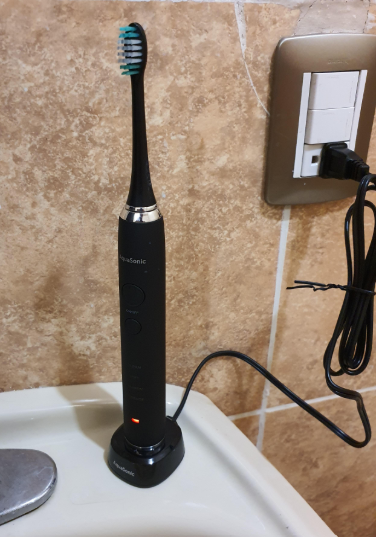
The AquaSonic Black Series Ultra Whitening Toothbrush is a popular rechargeable electric toothbrush, offering powerful sonic cleaning, four brushing modes, and convenient wireless charging. However, if you’ve just purchased one, you might be wondering how to charge it correctly, how long charging takes, and how to tell when the battery is full.
Fortunately, charging the AquaSonic Black Series is straightforward. Unlike electric toothbrushes that require a charging cable connected directly to the handle, this model uses an included wireless charging base.
In this guide, we’ll explain everything you need to know about charging your AquaSonic Black Series Ultra Whitening Toothbrush, including first-time charging, battery indicators, charging problems, and practical tips for maintaining battery performance.
How to Charge the AquaSonic Black Series Ultra Whitening Toothbrush
To charge the AquaSonic Black Series Ultra Whitening Toothbrush, connect its wireless charging base to a suitable electrical outlet and place the toothbrush handle upright on the base.
Here’s the complete procedure.
Step 1: Locate the Wireless Charging Base
When you open the AquaSonic Black Series package, you’ll find several accessories, including the electric toothbrush handle, replacement brush heads, a travel case, and a wireless charging base.
The charging base is a small stand designed to hold the toothbrush upright while transferring power to the internal rechargeable battery.
You don’t need to open the toothbrush or remove its battery.
Step 2: Connect the Charger to a Power Outlet
Place the wireless charging base on a flat, stable surface away from standing water.
Connect its power cord to a compatible electrical outlet.
Before proceeding, make sure the outlet works properly and the charging base is positioned securely.
We recommend keeping the charging connection away from sinks, puddles, and other sources of moisture.
Step 3: Place the Toothbrush on the Charging Base
Turn off the toothbrush and position the handle vertically on the charging stand.
Make sure the bottom of the toothbrush sits correctly on the base.
The wireless charging system transfers electricity to the rechargeable battery without requiring you to insert a cable into the handle.
Step 4: Check the Charging Indicator
Once the toothbrush is positioned correctly, look for the charging indicator on the handle.
The charging light should illuminate while charging is in progress and normally turn off automatically once the battery reaches full charge.
If the indicator doesn’t respond, check that the charging base is connected to power and that the handle is correctly seated.
Step 5: Allow the Battery to Charge Fully
If you’re charging the toothbrush for the first time, it’s best to let it reach a full charge before beginning regular use.
Charging time may vary depending on the model revision and remaining battery level. Follow the instructions supplied with your specific toothbrush rather than assuming all AquaSonic models have identical charging times.
Once charging is complete, remove the toothbrush from the stand and begin using it normally.

How Long Does the AquaSonic Black Series Take to Charge?
One of the most common questions about the AquaSonic Black Series Ultra Whitening Toothbrush is how many hours it needs to reach a full battery.
AquaSonic advertises fast wireless charging, but its current Black Series product information does not provide a precise, universally applicable charging duration.
Some online descriptions mention approximately four hours, while instructions for other AquaSonic toothbrush models specify considerably longer charging periods. These figures should not automatically be applied to the standard Black Series.
First-Time Charging
When using your AquaSonic toothbrush for the first time, we recommend following these steps:
- Unpack the toothbrush and its original charging base.
- Connect the charger to a suitable electrical outlet.
- Position the toothbrush upright on the charging stand.
- Allow the battery to charge until the charging indicator signals completion.
- Remove the toothbrush and begin your regular brushing routine.
If the toothbrush has been stored for several months without use, its battery may require additional charging before the motor operates normally.
How Often Should You Charge It?
The AquaSonic Black Series is designed to offer up to four weeks of brushing from a full battery under the manufacturer’s standard usage conditions: two brushing sessions per day, each lasting two minutes. AquaSonic Black Series+1
However, actual battery performance can vary depending on how often you brush, session duration, battery age, and other usage conditions.
For most users, charging the toothbrush approximately once every few weeks should be sufficient.
How to Know When Your AquaSonic Toothbrush Is Fully Charged
Understanding the charging light is useful because the AquaSonic Black Series does not feature the detailed battery percentage display available on some premium electric toothbrushes.
Charging Light Is On
When you place the toothbrush on the powered charging stand, the charging indicator should illuminate.
This normally means the charger has detected the toothbrush and charging is taking place.
Charging Light Turns Off
According to AquaSonic’s support guidance, the charging indicator should turn off automatically after the battery reaches full charge. Gen2Brands
Therefore, a charging light that turns off after a normal charging session does not necessarily indicate a problem.
Charging Light Keeps Blinking
If your AquaSonic toothbrush’s charging indicator continuously blinks or behaves differently from normal, you should investigate further.
Possible explanations include an unusual charging state, poor placement on the base, or a malfunction.
Because indicator behavior may differ across AquaSonic models, we recommend checking the manual before interpreting a particular blinking pattern.
Charging Light Does Not Turn On
If the charging light never illuminates, check whether the charging base is receiving power.
Also make sure the toothbrush is properly aligned and that its charging area is clean.
If the toothbrush still works and has recently been fully charged, the absence of a light might simply indicate that charging is complete. Otherwise, additional troubleshooting may be necessary.
AquaSonic Black Series Not Charging: Common Problems and Solutions
Sometimes, the AquaSonic Black Series toothbrush might stop charging correctly, even when placed on its original charging stand.
Fortunately, several common issues can be investigated without opening or dismantling the toothbrush.
1. Check the Electrical Outlet
The first thing we’d recommend is testing the electrical outlet.
Unplug the charging base and connect another small electrical device to verify that the outlet is functional.
If the outlet doesn’t provide power, try a different one.
Avoid using damaged electrical sockets or adapters.
2. Check the Charging Base
Inspect the charging base for visible damage, loose connections, or accumulated residue.
The toothbrush should sit securely on the stand without requiring excessive force.
If the charger appears cracked, has exposed wiring, or shows signs of overheating, stop using it.
3. Clean the Bottom of the Toothbrush
Toothpaste residue, water deposits, and other debris can accumulate around the bottom of an electric toothbrush.
Over time, this buildup may interfere with proper placement on the charging stand.
To clean the toothbrush:
- Remove the toothbrush from the charger.
- Disconnect the charging base from the electrical outlet.
- Wipe the bottom of the handle with a slightly damp, soft cloth.
- Clean visible residue from the charging stand without immersing it in water.
- Allow both surfaces to dry before reconnecting the charger.
We recommend inspecting the charging area regularly, particularly when the toothbrush is stored near a sink.
4. Allow Additional Charging Time
If the toothbrush battery has become completely depleted, it might not immediately respond when placed on the charging base.
Leave the toothbrush on its charger for the period recommended in the manual.
Then remove it and press the power button.
If it still does not operate, the problem could involve the charger, internal battery, or electronic components.
5. Check for Battery Deterioration
The AquaSonic Black Series uses a rechargeable lithium-ion battery.
Like other rechargeable batteries, it gradually loses capacity as it ages.
A deteriorating battery may cause symptoms such as:
- Significantly shorter brushing time between charges.
- Unexpected shutdowns during brushing.
- Reduced operating time despite completing a charge.
- Failure to operate after an apparently normal charging session.
If your toothbrush has experienced a sudden and substantial reduction in battery performance, contact AquaSonic customer support.
Avoid opening the sealed handle or attempting to replace the internal battery without manufacturer-approved instructions.
Can You Charge the AquaSonic Black Series Without Its Original Charger?
The standard AquaSonic Black Series Ultra Whitening Toothbrush is designed to charge through its dedicated wireless charging base.
It does not use a conventional USB-C connection directly on the toothbrush handle.
If you lose the original charger, your best option is to obtain a compatible replacement designed for the Black Series.
AquaSonic offers replacement charging accessories and identifies the Black Series among its supported models.
Can You Use a Phone Charger?
A standard smartphone charging cable cannot be connected directly to the original Black Series toothbrush handle.
The toothbrush needs its compatible charging stand to transfer power to the battery.
Even if a different charger looks similar, that doesn’t guarantee compatibility.
Can You Use Another Electric Toothbrush Charger?
We wouldn’t recommend using an unrelated electric toothbrush charger unless its compatibility has been confirmed.
Charging bases may differ in shape, electrical specifications, and charging technology.
Using an incompatible charger could prevent charging or damage the equipment.
How to Extend the AquaSonic Black Series Battery Life
Proper charging habits can help preserve the performance of your rechargeable toothbrush.
Although lithium-ion batteries naturally age, a few sensible precautions can reduce unnecessary wear.
Avoid Excessive Heat
Rechargeable lithium-ion batteries don’t perform well when repeatedly exposed to high temperatures.
We recommend keeping your toothbrush away from direct sunlight, heaters, and other excessive heat sources.
A cool, dry bathroom storage area is generally preferable.
Don’t Leave the Battery Completely Empty for Months
If you plan to stop using the toothbrush for an extended period, avoid storing it with a completely depleted battery.
Recharge it periodically according to the manufacturer’s storage recommendations.
This can help prevent the battery from becoming deeply discharged.
Keep the Charging Area Clean
A clean charging stand is easier to use and maintain.
After brushing, rinse the toothbrush handle as directed in the manual and wipe away any residue around the charging area.
Keep the electrical charging base dry and clean.
Avoid Unnecessary Charging
Because the AquaSonic Black Series can operate for several weeks on a full charge, you generally don’t need to recharge it after every brushing session.
Charging as needed also reduces unnecessary time spent on the stand.
However, don’t deliberately exhaust the battery before every recharge. Lithium-ion batteries do not require routine full discharge cycles.
Is It Safe to Leave the AquaSonic Black Series Charging Overnight?
Charging the AquaSonic Black Series overnight can be convenient, particularly when the battery is running low.
The charging indicator is designed to turn off after the battery becomes fully charged.
However, this doesn’t mean we should automatically assume that leaving any electric toothbrush plugged in indefinitely is the best practice.
We recommend following the manufacturer’s charging instructions, using the compatible charger, and avoiding damaged electrical equipment.
If you notice excessive heat, unusual odors, deformation, or other unexpected behavior, disconnect the charger and stop using it.
Can You Charge the AquaSonic Black Series While Traveling?
Yes. You can recharge your AquaSonic Black Series while traveling, provided you have its compatible charging base and an appropriate power outlet.
However, one advantage of this toothbrush is its extended battery life.
For short vacations or business trips, you may not need to bring the charger at all.
Traveling for One Week
A fully charged Black Series should generally provide enough power for a week of normal brushing.
You can pack the toothbrush in its included protective travel case and leave the charging base at home.
Traveling for Two Weeks
For a two-week trip, a full battery should normally be sufficient under standard usage conditions.
However, if the toothbrush is several years old or has reduced battery capacity, consider bringing the charger.
Traveling for Four Weeks
If you plan to travel for approximately a month, we recommend packing the compatible charging base.
Although the advertised battery life reaches four weeks, actual performance may vary.
Also, if you’re traveling internationally, check the voltage and frequency specifications printed on the charging adapter before plugging it into a different electrical system.
AquaSonic Black Series Charging Specifications
Here’s a useful summary of the principal charging and battery characteristics.
| Feature | AquaSonic Black Series |
|---|---|
| Charging system | Wireless charging base |
| Battery type | Rechargeable lithium-ion |
| Battery life | Up to 4 weeks |
| Charging indicator | Yes |
| Charging completion | Indicator turns off |
| Charging cable directly into handle | No |
| Full charging time | Refer to model-specific manual |
| Travel case | Included |
| Brushing modes | 4 |
| Motor performance | Up to 40,000 vibrations per minute |
The four operating modes are Clean, Soft, Whiten, and Massage.
While these settings provide different brushing experiences, the main charging procedure remains the same regardless of which mode you normally use.
AquaSonic Black Series vs. Other Electric Toothbrushes: Charging Differences
One important distinction between the AquaSonic Black Series and other electric toothbrushes is its charging arrangement.
Some electric toothbrushes use USB cables connected directly to the handle, while others use induction-style charging stands.
AquaSonic’s Black Series relies on a dedicated wireless charging base, which offers certain practical advantages.
Advantages of Wireless Charging
Wireless charging eliminates the need for an exposed charging port on the toothbrush handle.
This can make everyday cleaning simpler, while allowing the toothbrush to sit upright on a dedicated stand.
It is particularly convenient for bathroom countertops.
Disadvantages of Wireless Charging
The main disadvantage is charger dependence.
If you lose or damage the charging base, you cannot simply plug a universal USB-C cable into the handle.
You need a compatible replacement charger.
This is worth considering if you frequently travel or prefer devices that use standardized charging connections.
When Should You Replace Your AquaSonic Black Series Toothbrush?
A rechargeable electric toothbrush doesn’t necessarily need to be replaced simply because its battery capacity gradually decreases.
However, significant battery deterioration can eventually make it impractical to use.
You might consider requesting service or replacing the toothbrush if it stops working despite receiving power, repeatedly fails to charge, or lasts only a few brushing sessions after a full charge.
Before making that decision, verify that the charging base is functioning properly.
If the toothbrush is still covered by its manufacturer’s warranty, contacting customer support is generally preferable to attempting an internal repair.
Frequently Asked Questions About AquaSonic Black Series Charging
1. How do I charge my AquaSonic Black Series Ultra Whitening Toothbrush?
Connect the compatible wireless charging base to a working electrical outlet and place the toothbrush handle upright on the stand. The charging indicator should illuminate while the battery charges and turn off when charging is complete.
2. How long should I charge my AquaSonic toothbrush for the first time?
Charge the toothbrush fully before its first use. Because published charging times vary across AquaSonic products, consult the instructions for your exact Black Series version instead of relying on charging times listed for other models.
3. Why is my AquaSonic Black Series charging light not working?
The charging base may be unplugged, the handle may not be positioned correctly, or the battery might already be fully charged. Test the outlet and check the charger. If the indicator remains unresponsive and the toothbrush will not operate, contact the manufacturer.
4. How do I know if my AquaSonic Black Series is fully charged?
The charging light normally turns off automatically once the battery is fully charged. If the indicator stays illuminated, continuously blinks, or behaves abnormally, check the instructions for your exact model and consult AquaSonic support if necessary.
5. How long does the AquaSonic Black Series battery last on a full charge?
AquaSonic advertises up to four weeks of battery life, based on brushing twice daily for two minutes per session. Actual duration depends on usage habits, battery condition, and other factors. Older toothbrushes may require charging more frequently.
Conclusion: Charging Your AquaSonic Black Series the Right Way
Learning how to charge the AquaSonic Black Series Ultra Whitening Toothbrush is simple once you understand its wireless charging system.
All you need to do is connect the compatible charging base to a power outlet, position the toothbrush correctly, and allow the internal battery to recharge.
The charging indicator helps you determine when charging is taking place and when the battery is full.
With a claimed battery life of up to four weeks, the AquaSonic Black Series is a convenient option for anyone who prefers not to recharge an electric toothbrush every few days.
Our recommendation is to fully charge the toothbrush before first use, keep the charging base clean and dry, and recharge it whenever necessary rather than leaving it connected continuously.
With these simple habits, you can maintain reliable charging performance and enjoy your AquaSonic Black Series as part of your everyday oral care routine.