
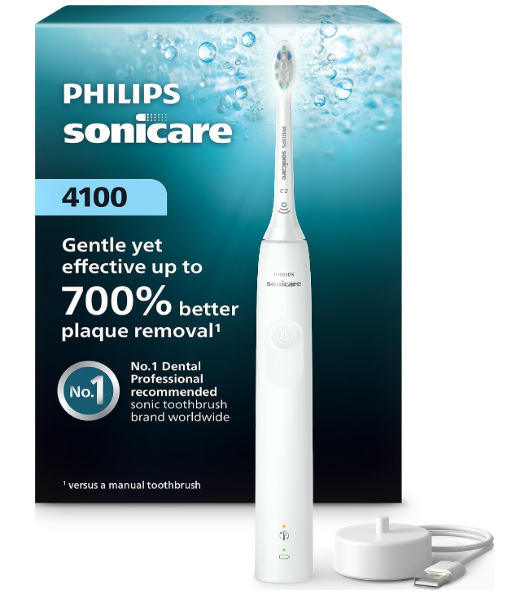
How the Sonicare 4100 pressure sensor works
The Philips Sonicare 4100 has a built-in pressure sensor that detects when you press the brush too firmly against your teeth or gums. When it senses excessive pressure, the handle changes its vibration to alert you. Depending on the specific 4100 model, you may also hear a pulsing sound or see the brush head replacement reminder light flash.
When you ease up, the alert stops and the toothbrush returns to its usual brushing action. The sensor is designed to remind you to use a lighter touch. You still guide the brush around your mouth, but you do not need to scrub or press hard.


What happens when you press too hard?
The 4100 monitors the pressure you apply while brushing. If the pressure becomes too high, you may notice one or more of these signals:
- The handle’s vibration changes or feels more pronounced.
- The toothbrush makes a pulsing sound.
- The brush head replacement reminder light flashes amber on models with that alert.
The exact feedback can vary by product version. If you do not see a flashing light, that alone does not mean the pressure sensor is not working. Pay attention to changes in vibration or sound as well.
Once you reduce the pressure, the signal should stop. You can then continue brushing with a gentle touch.
Does the pressure sensor stop the toothbrush?
The pressure sensor is primarily a feedback feature. It warns you when you are pressing too hard, and the toothbrush may change its vibration or intensity to prompt you to ease off. It does not normally switch the brush off every time you press too hard.
If the vibration seems weaker while brushing, check whether you are applying too much pressure. Relax your grip and let the bristles make light contact with your teeth.
Why does the Sonicare 4100 have a pressure sensor?
Brushing forcefully can irritate your gums and make brushing uncomfortable. A pressure alert can help you notice when you are pushing too hard, especially if you are new to an electric toothbrush or tend to brush with a firm hand.
The sensor is a reminder, not a diagnosis or a substitute for dental advice. If your gums are frequently sore or bleeding, talk with a dental professional about your brushing technique and oral health.
How much pressure should you use?
Use only enough pressure to keep the brush head lightly against your teeth. Sonicare’s powered brush head does the brushing for you, so you do not need to scrub back and forth or push firmly into the gumline.
A helpful approach is to hold the handle loosely and move the brush head slowly from tooth to tooth. Pause briefly on each surface, then guide it along the gumline and around the back teeth. If the pressure alert activates, lighten your touch.
Is the pressure sensor on by default?
On Sonicare 4100 models with pressure feedback, the feature is typically enabled when the toothbrush is new. If the toothbrush never gives an alert, the setting may have been turned off, or your specific model may use a different type of signal.
The 4100 name covers more than one product version, so check the user manual for your model number before changing feature settings. The model number is usually printed on the handle or packaging.
How to turn the pressure sensor on or off
Some Sonicare models let you enable or disable pressure feedback using the power button while the handle is on its charger. The button sequence and confirmation signals can differ by model.
Before trying a button sequence, check the manual for your exact 4100 model. A sequence intended for one version may not apply to another. If the manual confirms that your model uses the charger-and-button method, follow its timing and listen for the confirmation beeps or look for the indicator lights.
How to test whether the sensor is responding
You can check the sensor during normal brushing:
- Turn on the toothbrush and brush gently as usual.
- Briefly increase pressure enough to trigger the alert.
- Notice whether the vibration changes, a pulsing sound occurs, or an indicator flashes.
- Ease off and check whether the alert stops.
Do not press hard against your teeth or gums just to test the sensor. A light, brief test is enough. The purpose is to notice the feedback, not to find the maximum pressure the brush can tolerate.
What if my Sonicare 4100 pressure sensor does not work?
If you think the pressure sensor is not responding, try these steps:
Check the model and its feedback signals
The alert may be a change in vibration or a sound rather than a visible light. Check the manual for your model number to confirm which signals it uses.
Check whether the feature is enabled
Some models allow pressure feedback to be turned off. Review the manual’s instructions for checking or changing the setting.
Charge the toothbrush briefly
If the toothbrush behaves unusually or gives an alert without pressure, place it on the charger for at least 10 seconds, then try brushing again. A low or unstable charge may affect how the handle behaves.
Clean and inspect the brush head
Rinse the brush head after use and check that it is seated securely on the handle. A loose or worn brush head can affect how brushing feels, although it does not necessarily mean the pressure sensor itself has failed.
Contact Philips if the problem continues
If the sensor still gives no feedback after you check the setting and charge the handle, or if it alerts constantly during gentle brushing, consult Philips support or the product’s warranty information.
Why does the pressure alert activate when I am brushing gently?
The sensor can react when the brush presses more firmly against a tooth than you realize. This may happen when you reach the back teeth, brush along the gumline, or grip the handle tightly.
Try loosening your grip and moving the brush head more slowly. If the alert continues even when the bristles barely touch your teeth, charge the handle briefly and check the manual for your model’s troubleshooting steps.
Does the sensor tell me the exact pressure?
No. The Sonicare 4100 does not show a numerical pressure reading or a live pressure scale. It gives feedback when you press too hard, so you can ease up. Think of it as a simple reminder rather than a precise measuring tool.
Does the pressure sensor replace the 2-minute timer?
No. The pressure sensor and brushing timer have different jobs. The sensor alerts you when you press too hard, while the SmarTimer helps you brush for the recommended two minutes. The QuadPacer gives periodic cues to move to another area of your mouth.
Use a gentle touch while following the timer’s prompts to cover all areas evenly.
Is the pressure sensor safe to rely on?
It is useful feedback, but it cannot guarantee that your brushing technique is ideal or that you will never irritate your gums. Keep the brush moving, use light pressure, replace the brush head when needed, and follow advice from your dentist or hygienist.
If brushing causes ongoing discomfort, do not keep pressing through it. Ask a dental professional to check your technique and help identify the cause.
Conclusion
The Philips Sonicare 4100 pressure sensor detects when you apply excessive force and alerts you through a change in vibration, a pulsing sound, or—in some versions—a flashing light. When the alert occurs, ease your grip and let the brush do the work. Feedback can vary between 4100 model versions, so use the instructions for your exact model if you need to check or change the sensor setting.
Frequently Asked Questions
How does the Philips Sonicare 4100 know I am pressing too hard?
Its built-in pressure sensor measures the pressure applied during brushing. When that pressure is excessive, the handle changes its vibration and may provide an additional sound or light alert, depending on the model.
What does it mean when my Sonicare 4100 pulses?
A pulsing vibration or sound is a pressure warning. Reduce the force you are applying and continue with a lighter touch.
Should the Sonicare 4100 pressure sensor light flash?
Some versions use a flashing indicator, while others rely on vibration or sound feedback. Check your model’s manual to learn which signals apply to your handle.
Can I turn off the Sonicare 4100 pressure sensor?
Some versions let you change the pressure feedback setting. The steps can vary, so check the manual for your exact model before trying to switch it on or off.
Why does the pressure alert keep coming on?
You may be pressing harder than you realize, especially around the gumline or back teeth. Loosen your grip and guide the brush slowly. If it alerts during very light contact, charge the handle briefly and consult the troubleshooting instructions for your model.