
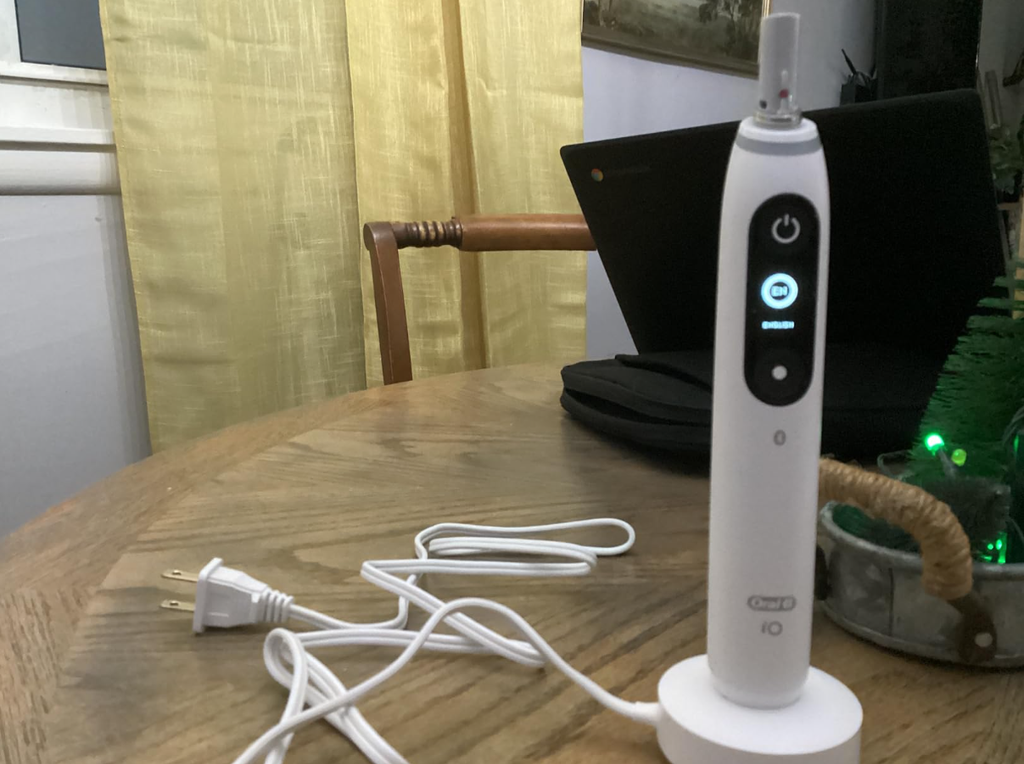
The Oral-B iO7 is a premium electric toothbrush designed to provide a comfortable, effective brushing experience. With its interactive display, multiple cleaning modes, magnetic charging technology, and smart pressure sensor, it offers several features that make everyday oral care easier.
However, even an advanced electric toothbrush can occasionally develop problems. One particularly frustrating issue is when the Oral-B iO7 power button stops working, leaving you unable to start brushing or switch the toothbrush on and off.
You might press the power button and get absolutely no response. Alternatively, the display might illuminate normally, but the toothbrush refuses to start vibrating. Some users may also notice that the button feels unusually stiff, becomes difficult to press, or works only intermittently.
Fortunately, a faulty power button does not necessarily mean your toothbrush needs replacing.
In this troubleshooting guide, we’ll explore the possible reasons why your Oral-B iO7 power button isn’t working, explain how to identify the problem, and walk through practical solutions you can try at home.
Why Is My Oral-B iO7 Power Button Not Working?
Several different problems can make the power button appear unresponsive.
Sometimes the issue is as simple as a discharged battery or an interrupted charging connection. In other situations, toothpaste residue, moisture, an electronic malfunction, or a damaged internal switch may be responsible.
The key is identifying whether the problem involves the power button itself or another component of the toothbrush.
Common Causes of an Unresponsive Oral-B iO7 Power Button
| Possible cause | Common symptoms | Suggested solution |
|---|---|---|
| Completely discharged battery | No lights, display, or vibration | Charge for approximately 3 hours |
| Charging connection problem | Toothbrush does not respond after charging | Check the charger and outlet |
| Toothpaste residue around button | Button feels sticky or difficult to press | Clean the button area |
| Temporary electronic malfunction | Display works, but controls behave strangely | Try restarting or resetting |
| Moisture-related damage | Intermittent operation or unexpected shutdowns | Stop using if damage is suspected |
| Damaged power switch | Button feels loose, jammed, or unresponsive | Contact Oral-B support |
| Internal battery failure | Toothbrush stops working despite proper charging | Seek professional service |
We recommend beginning with the simplest checks before assuming there is a mechanical fault.
1. Check Whether Your Oral-B iO7 Battery Is Completely Discharged
A depleted battery is one of the first things to investigate when the Oral-B iO7 won’t turn on.
Unlike some basic electric toothbrushes, the iO7 features an interactive display and electronic controls that require sufficient battery power to operate.
When the battery becomes completely discharged, pressing the power button may produce no visible response.
How to Fix a Completely Discharged Battery
Place your Oral-B iO7 on its compatible magnetic charging stand.
Make sure the charger is properly connected to a working electrical outlet and that the handle is positioned correctly.
If the battery has been completely drained, the display might not illuminate immediately.
According to the toothbrush’s operating guidance, a fully depleted battery may require at least 30 minutes of charging before normal operation becomes possible.
For a complete charge, the Oral-B iO7 typically requires approximately 3 hours.
After charging:
- Remove the toothbrush from the charging stand.
- Check whether the display illuminates.
- Press the power button normally.
- Observe whether the motor starts vibrating.
- If the toothbrush responds, allow it to reach a full charge before regular use.
If your toothbrush starts working again, the problem was probably related to insufficient battery power rather than a defective button.
2. Make Sure the Oral-B iO7 Charger Is Working
If your toothbrush remains completely unresponsive after charging, the charger could be responsible.
The Oral-B iO7 uses a magnetic charging system designed to recharge the internal battery.
However, charging can be interrupted by an electrical connection problem, a damaged charging accessory, or incorrect positioning.
How to Check the Charging System
Start by verifying that the electrical outlet works.
You can do this by connecting another small electrical device to the same outlet.
Next, inspect the charging cable and charging stand for visible damage.
Make sure the toothbrush sits correctly on the charger and check for charging indications on the display or handle.
If you have access to another charger confirmed to be compatible with your exact Oral-B iO model, you can use it to help identify whether the original charger is faulty.
Avoid using chargers intended for incompatible Oral-B toothbrush models.
What If the Oral-B iO7 Shows No Charging Light?
A missing charging indicator does not always mean the toothbrush is permanently damaged.
A deeply discharged battery can take several minutes to respond.
However, if the toothbrush remains completely inactive after a proper charging attempt using a known working charger, the problem may involve its internal battery or electronic circuitry.
At that point, professional troubleshooting becomes the safest option.
3. Clean Around the Oral-B iO7 Power Button
Toothpaste residue is another possible reason why the Oral-B iO7 power button becomes difficult to operate.
During regular brushing, toothpaste, saliva, and water can collect around the toothbrush handle.
Over time, dried residue may make the button feel sticky or interfere with its movement.
How to Clean the Power Button Safely
First, remove the toothbrush from its charging stand and disconnect the charger from the electrical outlet.
Wipe the exterior of the toothbrush handle using a soft, slightly damp cloth.
Pay particular attention to the edges surrounding the power button.
If you notice dried toothpaste, gently remove it without applying excessive pressure.
Finally, dry the button area with a clean cloth.
Important: Do not insert needles, blades, metal objects, or other tools into the button opening. Avoid chemical solvents and do not soak the toothbrush in cleaning solutions.
The goal is to clean the exterior without damaging the button seal or allowing additional moisture inside the handle.
Once the toothbrush is dry, press the power button again to check whether its response has improved.
4. Check Whether the Power Button Is Physically Stuck
Sometimes the problem is mechanical rather than electronic.
The Oral-B iO7 power button may feel different from normal if the surrounding material has deteriorated or the internal switch has been damaged.
A stuck button can prevent the toothbrush from recognizing a press correctly.
Signs of a Mechanical Power Button Problem
You may notice that the button:
- Feels unusually stiff when pressed.
- Remains depressed instead of returning to its normal position.
- Requires excessive force to operate.
- Feels loose or unstable.
- Responds only when pressed at a particular angle.
- No longer has its normal tactile feedback.
These symptoms can suggest a physical button problem, although they do not confirm which internal component has failed.
Can You Fix a Stuck Oral-B iO7 Button?
If dried toothpaste is responsible, gentle exterior cleaning may help restore normal movement.
However, a damaged internal switch usually requires professional attention.
We don’t recommend opening the toothbrush handle or attempting to repair the internal button mechanism yourself.
Disassembling the handle can compromise its water-resistant construction, damage electronic components, and affect warranty coverage.
5. Try Restarting Your Oral-B iO7
A temporary electronic malfunction can sometimes make the power button appear unresponsive.
The Oral-B iO7 contains electronic controls that manage its display, brushing modes, pressure sensor, and motor.
If the electronics stop responding correctly, the toothbrush may behave unexpectedly even though the battery still has power.
How to Try a Basic Restart
If the toothbrush is unresponsive, try this simple procedure:
- Place the toothbrush on its compatible charger.
- Allow it to charge for at least 30 minutes.
- Remove it from the charger.
- Press the power button normally.
- Check whether the display and motor respond.
This procedure may help if the problem was caused by a discharged battery or an inactive handle, although it is not a guaranteed electronic reset.
If the toothbrush continues behaving strangely but the display and buttons still work, a factory reset may be worth trying.
6. How to Reset the Oral-B iO7
Resetting the toothbrush can be useful when its settings or electronic controls behave unexpectedly.
The Oral-B iO7 includes a factory reset function accessible through its interactive display.
Oral-B iO7 Factory Reset Instructions
When the display and buttons are still responsive:
- Wake up the toothbrush display.
- Use the mode button to navigate through the available options.
- Find and select Settings using the power button.
- Navigate to Factory Reset.
- Press the power button to confirm the reset.
- Follow any additional instructions shown on the screen.
The factory reset restores the toothbrush’s original settings, so you may need to configure personal preferences again.
Can You Reset the Oral-B iO7 Without Using the Power Button?
This is where troubleshooting becomes more complicated.
The iO7’s documented factory reset procedure requires the power button to confirm selections.
If the power button is completely nonfunctional, you may be unable to perform the reset through the display.
You may find online suggestions recommending holding the power button for 10 seconds. However, that procedure is commonly associated with other Oral-B toothbrush models and should not be treated as a guaranteed reset method for the iO7.
If the button cannot register presses at all, a factory reset may not solve the underlying problem.
7. Oral-B iO7 Display Works but Power Button Doesn’t
One particularly confusing situation occurs when the toothbrush display works normally, but the power button does not activate brushing.
For example, you might see the battery percentage, cleaning mode selection, or other information on the screen, yet pressing the power button does nothing.
This can suggest that the toothbrush is receiving electrical power but is having difficulty registering button commands or activating the motor.
What Should You Check?
Begin by pressing the separate mode button.
If the mode button changes the displayed options while the power button does not respond, the problem may be isolated to the power button or its associated circuitry.
If both buttons are unresponsive, the issue could involve the toothbrush’s electronic controls.
Also check whether the handle displays unusual warnings or behaves differently after being removed from the charger.
A factory reset may help when the power button still works intermittently. If it never registers a press, professional service may be necessary.
8. Oral-B iO7 Power Button Works Sometimes but Not Always
Intermittent power button operation can be particularly frustrating because the toothbrush may appear to fix itself temporarily.
For instance, your Oral-B iO7 might start normally in the morning but refuse to turn on later in the day.
Several factors could explain this behavior.
Possible Reasons for Intermittent Operation
A partially discharged battery might provide inconsistent performance if it is no longer charging properly.
External residue may interfere with the button’s normal movement.
A worn internal switch could register some presses but ignore others.
Previous exposure to moisture or physical damage could also affect the electronics.
What Can You Do?
Start by fully charging the toothbrush and observing whether the problem continues.
Next, clean and dry the exterior around the power button.
If the problem continues despite a full battery and clean button, pay attention to whether the display remains operational.
A power button that becomes progressively less reliable may require repair or replacement.
9. Could Water Damage Cause the Oral-B iO7 Power Button to Stop Working?
The Oral-B iO7 is designed for use in a bathroom environment and can tolerate the normal moisture associated with toothbrushing.
However, its protective seals can potentially become compromised through physical damage, deterioration, or improper handling.
If moisture reaches sensitive internal components, electrical faults may develop.
Symptoms That May Suggest Moisture Damage
Potential warning signs include unexpected shutdowns, a display that flickers, unusual button behavior, visible corrosion, or charging problems.
These symptoms can also have other causes, so they do not establish that moisture is definitely responsible.
What to Do If You Suspect Water Damage
Stop using the toothbrush if you suspect water has entered the handle.
Disconnect the charger and allow the outside of the toothbrush to dry.
Do not attempt to speed up the process using a hair dryer, radiator, or direct heat.
Avoid opening the handle to dry its internal components.
If internal moisture damage is suspected, contact Oral-B customer support or an authorized service center before charging or using the toothbrush again.
10. Check Whether the Toothbrush Has Been Dropped
Accidental drops can damage an electric toothbrush even when its outer casing appears intact.
The Oral-B iO7 contains internal electronic components, a motor assembly, and physical controls.
A significant impact could potentially damage the power switch or interfere with internal electrical connections.
If the power button stopped working immediately after the toothbrush fell onto a hard surface, physical damage becomes a stronger possibility.
Check the exterior for cracks, deformation, or unusual button movement.
If you notice damage, avoid attempting a home repair.
Oral-B also recommends replacing a brush head after the handle has been dropped, even when the brush head shows no obvious damage.
11. What If the Oral-B iO7 Power Button Won’t Turn the Toothbrush Off?
Sometimes the power button works when starting the toothbrush but does not respond properly when you try to stop brushing.
This is different from a toothbrush that refuses to turn on.
If the motor continues running after you press the power button, the issue may involve the physical switch or electronic controls.
First, press the button normally again.
Avoid repeatedly forcing it or striking the handle.
The Oral-B iO7 also includes an automatic operating limit that stops the motor after approximately five minutes of continuous operation.
However, this automatic shutdown should not be used as a substitute for a properly functioning power button.
If the button repeatedly fails to stop the motor, the toothbrush should be inspected.
12. Oral-B iO7 Power Button Not Working After Charging
If you have already charged your toothbrush for approximately three hours but the power button remains unresponsive, there are two main possibilities to investigate.
The first is that the toothbrush never received sufficient electrical power.
The second is that the problem lies somewhere inside the handle.
How to Identify the Difference
If the screen remains completely dark and no charging indication appears, check the outlet, charging stand, and charging connection.
If the display shows a normal battery level but the toothbrush cannot be started, the fault is less likely to be caused by a completely discharged battery.
If the display works and the mode button responds, but the power button never works, a button-related fault becomes more plausible.
This information can be useful when contacting Oral-B support because it helps describe the exact symptoms.
13. Does the Oral-B App Help Fix an Unresponsive Power Button?
The Oral-B iO7 supports Bluetooth connectivity and can communicate with the Oral-B smartphone application.
The app provides brushing information and personalization features.
However, it is important to understand its limitations.
The application is not a guaranteed solution for a physically damaged power button.
Updating the app or restoring a Bluetooth connection may help with connectivity-related problems, but those actions do not repair a broken internal switch.
If your toothbrush has an operating display and the buttons still respond intermittently, checking its settings may be worthwhile.
If the power button is completely nonfunctional, focus on charging, physical condition, and professional support rather than expecting the app to repair the problem.
14. Can You Replace the Oral-B iO7 Power Button?
Technically, a defective switch may be one of the reasons an Oral-B iO7 stops responding.
However, replacing that component is not the same as changing a brush head or cleaning the exterior.
The switch is part of the toothbrush’s internal electronic assembly.
Accessing it generally requires opening the handle, which can damage the seals and compromise its protection against moisture.
The manufacturer does not recommend users opening or modifying the toothbrush.
For that reason, professional service or a manufacturer-approved replacement is the safer approach.
If your toothbrush is still covered by its warranty, contact Oral-B before attempting any repair.
15. Is the Oral-B iO7 Power Button Covered Under Warranty?
A defective power button may qualify for warranty service when the problem results from a manufacturing defect.
However, eligibility depends on several factors, including the country of purchase, the applicable warranty period, and the cause of the malfunction.
Damage resulting from accidental drops, improper use, unauthorized modifications, or other excluded circumstances may not be covered.
How to Request Warranty Assistance
Locate your proof of purchase and check the warranty information provided with the toothbrush.
Then contact Oral-B customer support and describe the issue clearly.
For example, explain whether the toothbrush charges normally, whether the display works, and whether the power button responds intermittently or not at all.
The manufacturer may offer troubleshooting assistance, inspection, repair, or replacement depending on your circumstances.
16. When Should You Replace Your Oral-B iO7?
Not every power button problem requires replacing the entire toothbrush.
If the issue is caused by a discharged battery, external residue, or a temporary operating problem, you may be able to restore normal functionality without purchasing anything.
However, replacement becomes more reasonable when the toothbrush has significant physical damage, a confirmed internal electronic fault, or a repair cost that approaches the price of a new model.
Signs That Replacement May Be Necessary
| Symptom | Recommended action |
|---|---|
| Toothbrush works after charging | Continue using and monitor battery performance |
| Button improves after cleaning | Monitor for recurring stickiness |
| Display works but power button never responds | Request professional inspection |
| Toothbrush has visible cracks or seal damage | Stop using and contact service |
| Battery repeatedly fails despite proper charging | Investigate battery or charging faults |
| Repair is unavailable or uneconomical | Consider replacing the handle or toothbrush |
Before purchasing a replacement, check whether warranty coverage or an authorized repair option is available.
17. How to Prevent Future Oral-B iO7 Power Button Problems
Although not every electrical or mechanical failure can be prevented, good maintenance habits may help reduce avoidable problems.
Keep the Handle Clean
After brushing, remove excess toothpaste residue from the exterior of the handle.
Pay attention to the area surrounding the power button.
Avoid letting large amounts of toothpaste accumulate around the controls.
Dry the Toothbrush After Use
Wipe away excess moisture with a soft cloth and store the toothbrush in a suitable location.
Avoid leaving it sitting in pooled water.
Avoid Pressing the Button Too Hard
The power button should respond to normal finger pressure.
Repeatedly forcing the button can potentially worsen a mechanical problem.
If the button becomes difficult to operate, investigate the cause rather than applying more force.
Use the Correct Charger
Always use charging accessories approved for your particular Oral-B iO model.
An incompatible or damaged charger may result in charging problems.
Protect the Toothbrush From Impacts
Store the toothbrush somewhere stable and avoid dropping it onto hard bathroom surfaces.
When traveling, use a protective travel case to reduce the risk of accidental damage.
18. Oral-B iO7 Power Button Troubleshooting: Quick Diagnosis
If you’re still unsure what’s wrong, this quick diagnosis can help narrow down the possibilities.
| What happens? | Most useful next step |
|---|---|
| Nothing happens when pressing the button | Fully charge the toothbrush |
| No charging indication appears | Check the charging system |
| Screen works but motor won’t start | Check button response and consider service |
| Button feels sticky | Gently clean around the button |
| Button is loose or permanently depressed | Seek professional repair |
| Toothbrush works only occasionally | Check charging and physical button condition |
| Toothbrush stopped working after a fall | Inspect for damage and contact support |
| Toothbrush behaves strangely but controls still work | Consider a factory reset |
The most useful distinction is whether the toothbrush has power but cannot recognize button presses, or whether it is completely unresponsive because of a possible charging or battery problem.
Frequently Asked Questions
1. Why Is My Oral-B iO7 Power Button Not Responding?
The power button may stop responding because of a discharged battery, charging problem, dried toothpaste residue, temporary electronic malfunction, or damaged internal switch.
Start by charging the toothbrush for approximately three hours. If the display works but the power button remains unresponsive, the issue could involve the button mechanism or its electronic circuitry.
2. How Do I Turn On My Oral-B iO7 If the Power Button Doesn’t Work?
The Oral-B iO7 normally requires the power button to start brushing.
If the button is not working, first place the toothbrush on its compatible charger and allow it to recharge. Clean the button area and try again.
There is no guaranteed alternative method for bypassing a completely defective physical power switch. If the button remains unresponsive, contact Oral-B support.
3. How Do I Reset My Oral-B iO7 When the Power Button Is Not Working?
When the toothbrush controls are functional, you can perform a factory reset through the interactive display by navigating to Settings and selecting Factory Reset.
However, the documented procedure requires the power button to confirm the selection.
If the power button cannot register presses, you may be unable to complete a factory reset through the display.
4. Why Does My Oral-B iO7 Light Up but Not Start Brushing?
If your Oral-B iO7 display illuminates but the motor does not start, the toothbrush is receiving at least some electrical power.
The problem might involve the power button, electronic controls, battery performance, or motor.
Try a full charge and check whether the mode button responds.
If the power button remains unresponsive despite a normal battery indication, professional inspection may be necessary.
5. Is It Worth Repairing an Oral-B iO7 With a Broken Power Button?
Repair may be worthwhile if the toothbrush is relatively new, still under warranty, or eligible for affordable authorized service.
However, opening the handle yourself can damage its seals and internal components.
If the repair cost is high or an approved repair is unavailable, replacing the toothbrush may be the more practical option.
Conclusion: What to Do When Your Oral-B iO7 Power Button Stops Working
An Oral-B iO7 power button not working can be frustrating, especially when your toothbrush appears to be in otherwise good condition.
Fortunately, the problem is not always caused by a broken button.
A completely discharged battery, faulty charging connection, residue around the controls, or temporary electronic malfunction can sometimes explain why the toothbrush refuses to respond.
We recommend starting with a full charge, checking the charging stand, and gently cleaning the exterior of the power button.
If the display and controls remain operational, a factory reset may also help resolve certain software-related problems.
However, if the power button feels physically damaged, remains stuck, or never responds despite proper charging, the issue may require professional attention.
The bottom line: Before replacing your Oral-B iO7, rule out charging and cleaning issues. If the power button itself has failed, contacting Oral-B support is the safest way to explore repair or replacement options.