
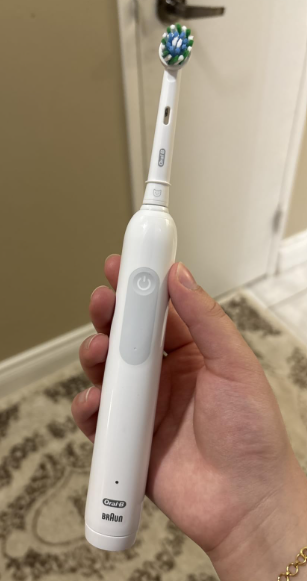
The Oral-B Pro 1000 is a popular rechargeable electric toothbrush, but its charging indicators can sometimes be confusing. Unlike more advanced electric toothbrushes with digital displays or battery percentage indicators, the Pro 1000 uses a simple LED light to communicate its charging status.
If you’ve recently purchased this toothbrush, you might be wondering: How do you know when the Oral-B Pro 1000 is fully charged?
The answer is straightforward. On most Oral-B Pro 1000 models, the green charging light flashes while the battery is charging and stops flashing when the battery reaches a full charge. Some versions briefly display a solid green light for approximately five seconds before the indicator switches off completely.
However, charging time, battery performance, and indicator behavior can vary depending on the specific version of the toothbrush.
In this guide, we’ll explain how to recognize a fully charged Oral-B Pro 1000, understand its indicator lights, determine how long charging should take, and troubleshoot common charging problems.
How Do You Know When the Oral-B Pro 1000 Is Fully Charged?
The easiest way to determine whether your Oral-B Pro 1000 is fully charged is to observe the green LED indicator on the toothbrush handle.
When you place the toothbrush on its charging base, the green indicator should begin flashing if the battery needs charging.
As the toothbrush continues charging, the light flashes periodically.
When the battery reaches its maximum charge, the green light stops flashing and turns off.
On some versions, the green indicator remains continuously illuminated for approximately five seconds immediately before switching off.
Here’s what the different charging signals generally mean:
| Charging indicator | Meaning |
|---|---|
| Flashing green light | Battery is charging |
| Solid green light briefly | Charging cycle is finishing on certain versions |
| Green light turns off after flashing | Battery is fully charged |
| Flashing red battery indicator | Battery is running low |
| No light immediately after a completely drained battery | Battery may need several minutes to recover |
| No light after a normal charging cycle | May indicate a full charge, but check for charging problems if the brush does not work |
An important detail is that the charging light does not necessarily remain illuminated when the battery is full.
This sometimes causes users to believe their toothbrush has stopped charging unexpectedly.
In reality, the indicator switching off after a normal charging cycle is usually exactly what should happen.


How Long Does the Oral-B Pro 1000 Take to Fully Charge?
The charging time depends on the version of the Oral-B Pro 1000 you own.
Older versions commonly require approximately 17 to 22 hours to complete a full charging cycle, particularly when the battery has been almost completely discharged.
Some newer Pro-series versions use different batteries and charging systems, allowing a full charge in approximately 12 to 15 hours.
Because the Pro 1000 name has been used across different regional releases and product generations, the instruction manual for your particular handle is the most reliable way to determine the expected charging time.
Oral-B Pro 1000 Charging Time Comparison
| Battery condition | Expected charging behavior |
|---|---|
| Completely empty | May require a full charging cycle |
| Partially discharged | Usually charges faster than an empty battery |
| Almost fully charged | May finish charging relatively quickly |
| Fully charged | Green light stops flashing |
| Deeply discharged | Charging light may take 10–30 minutes to appear |
For example, if you own an older Oral-B Pro 1000 that requires around 22 hours to recharge, placing it on the charger overnight for eight hours might not be enough to restore a completely empty battery.
This does not necessarily mean anything is wrong with the toothbrush.
It simply means that its charging system works more slowly than modern electric toothbrushes with fast-charging technology.
Does the Oral-B Pro 1000 Charge Faster When the Battery Isn’t Empty?
Yes.
If your toothbrush still has a considerable amount of battery power remaining, it generally requires less charging time than a completely discharged toothbrush.
For example, if you’ve been brushing for only a few days since its last full charge, the battery may need only a partial recharge.
However, because the Oral-B Pro 1000 does not display an exact battery percentage, it’s difficult to calculate precisely how much charging time remains.
Watching the green indicator is a more reliable approach than guessing from the number of hours spent on the charger.
Understanding the Oral-B Pro 1000 Charging Lights
The Oral-B Pro 1000 uses a relatively simple indicator system.
Nevertheless, understanding the difference between the green and red lights can help you avoid unnecessary charging problems.
Flashing Green Light: The Toothbrush Is Charging
When the green LED flashes while the toothbrush is sitting on its charging base, the battery is receiving power.
This is normal behavior.
The light may flash repeatedly throughout the charging process, especially when the battery is significantly discharged.
You don’t need to press the power button or perform any additional steps.
Simply allow the toothbrush to remain on its charging base until the indicator stops flashing.
Green Light Turns Off: Charging Is Complete
This is the most important signal.
When the charging process finishes, the green light typically switches off.
Depending on the model, it may briefly remain solid before going dark.
A charging light that turns off after previously flashing is generally the clearest indication that your Oral-B Pro 1000 has reached a full charge.
However, remember that an unlit indicator by itself does not prove that charging was successful.
If the toothbrush was completely discharged and never displayed a charging light, you should verify that the charger is functioning.
Flashing Red Light: Battery Is Running Low
A red indicator near the lower part of the handle usually means the battery is approaching depletion.
This light may flash after you switch the toothbrush off or during operation, depending on the model.
When you notice the red low-battery warning, it’s a good idea to recharge the toothbrush.
A red battery warning is different from any pressure-related indicator found on certain Oral-B models.
The position of the light helps identify its purpose.
No Light While Charging: Is That Normal?
Sometimes, yes.
There are two common situations where the charging indicator may remain off.
The first occurs when the battery is already fully charged.
The second can happen when the battery has been deeply discharged.
In the second situation, the toothbrush may require approximately 10 to 30 minutes on the charger before the green light appears.
If the indicator remains off after that period and the toothbrush doesn’t operate, you may have a charging problem.
How to Charge the Oral-B Pro 1000 Correctly
Charging the Oral-B Pro 1000 is simple, but following the correct procedure helps ensure that the battery receives power consistently.
Step 1: Connect the Charging Base
Place the original charging base on a stable, dry surface near an electrical outlet.
Connect the charger to a compatible power supply according to the voltage specifications printed on the charging unit.
Avoid using damaged cables, unsuitable power adapters, or incompatible charging accessories.
Step 2: Position the Toothbrush on the Charger
Make sure the toothbrush is switched off.
Place the handle upright on the charging base.
The bottom of the toothbrush should sit securely on the charging post.
The Oral-B Pro 1000 uses inductive charging, meaning the charging connection does not rely on exposed metal electrical contacts between the handle and base.
Step 3: Check the Green Indicator
After placing the toothbrush on the charger, look for the green charging light.
If the battery is partially discharged, the indicator should normally begin flashing.
If the battery is completely empty, it may take several minutes before the light responds.
Step 4: Allow the Charging Cycle to Finish
Leave the toothbrush on its charging base for the recommended charging period.
Avoid assuming that the battery is full simply because the toothbrush can turn on.
An electric toothbrush may begin operating before the battery reaches maximum capacity.
Step 5: Confirm That the Green Light Stops Flashing
Check the indicator after the recommended charging period.
Once the light stops flashing after a normal charging cycle, your Oral-B Pro 1000 should be ready for use.
Remove it from the charger and switch it on briefly to confirm that the motor is operating normally.
Does the Oral-B Pro 1000 Have a Full Battery Indicator?
Yes, but it is relatively basic compared with newer electric toothbrushes.
The Oral-B Pro 1000 generally includes a charging indicator and a low-battery warning light.
However, it does not provide an exact numerical battery percentage.
This means you cannot directly determine whether the battery is at 40%, 70%, or 90% capacity.
Instead, you rely on its charging signals.
What the Oral-B Pro 1000 Does Not Display
Most Pro 1000 versions do not offer:
- A digital battery percentage display.
- A detailed multi-bar battery gauge.
- An estimated time remaining until full charge.
- Smartphone-based battery monitoring.
- A continuously illuminated full-charge indicator.
These limitations aren’t necessarily disadvantages.
The Pro 1000 is designed primarily to provide effective daily brushing with straightforward controls rather than advanced electronic features.
For most users, the flashing green indicator and red low-battery warning provide enough information for everyday use.
How Long Does the Oral-B Pro 1000 Battery Last When Fully Charged?
Battery runtime depends on the specific version, the age of the battery, and your brushing habits.
Many older Oral-B Pro 1000 models were designed to provide approximately seven days of regular use on a full charge.
This estimate assumes brushing twice daily for two minutes per session.
Newer variants may offer longer runtime, so it is worth checking the specifications of your particular handle.
Factors That Affect Battery Life
Several factors can influence how long the battery lasts between charges.
Brushing frequency: If you brush three times daily instead of twice, the battery will naturally discharge faster.
Brushing duration: Brushing for longer than two minutes increases energy consumption.
Battery age: Rechargeable batteries gradually lose capacity as they age.
Charging habits: Leaving a toothbrush unused and completely discharged for extended periods may negatively affect battery performance.
Operating conditions: Very high or low temperatures can affect charging efficiency and battery performance.
If your toothbrush previously lasted around a week but now needs charging every day or two, battery deterioration may be a possible explanation.
Oral-B Pro 1000 Green Light Not Flashing While Charging
If your Oral-B Pro 1000 doesn’t display a green charging light, don’t immediately assume the battery is defective.
There are several possible explanations.
1. The Battery Is Completely Discharged
A deeply discharged battery may not immediately activate the green charging indicator.
Place the toothbrush on the charger and leave it undisturbed for at least 30 minutes.
If the light eventually begins flashing, charging has started.
2. The Battery Is Already Fully Charged
If the toothbrush was recently charged, the green indicator may remain off because the battery is already full.
Remove the handle from the charger and test it.
If it operates normally and provides its expected runtime, there may be nothing wrong.
3. The Charger Isn’t Receiving Power
An electrical outlet problem can prevent the toothbrush from charging.
Try connecting the charger to another compatible outlet.
You can also test the original outlet with another appliance.
Some bathroom outlets are controlled by wall switches or protective circuits, so make sure the outlet is active.
4. The Toothbrush Isn’t Positioned Correctly
Although the Oral-B Pro 1000 uses inductive charging, the handle still needs to sit properly on the charging post.
Remove the toothbrush and reposition it carefully.
Check that the bottom of the handle isn’t obstructed by accumulated toothpaste residue or dirt.
5. The Charger Is Damaged
Charging bases can eventually malfunction.
Inspect the charger for visible damage, particularly around the cable and plug.
If the cable is damaged, stop using the charger.
A compatible replacement charging base may solve the problem.
6. The Internal Battery Is Worn Out
If the toothbrush is several years old and no longer accepts or maintains a charge, its internal rechargeable battery may have deteriorated.
A worn battery can cause symptoms such as reduced runtime, unexpected shutdowns, or failure to charge normally.
In that situation, contacting Oral-B support or considering a replacement toothbrush may be more practical than attempting to open the sealed handle.
Why Does My Oral-B Pro 1000 Stop Flashing Before It Is Fully Charged?
If the green light stops flashing sooner than expected, there are several possibilities.
First, the battery might not have been completely discharged when you placed the toothbrush on the charger.
In that case, it doesn’t need a full charging cycle.
Second, your particular Pro 1000 version might have a shorter charging time than an older model.
Third, an interrupted power supply or faulty charging indicator could explain the behavior.
To determine whether the battery is functioning correctly, observe how long the toothbrush operates after charging.
If it delivers its normal battery runtime, the indicator is probably behaving as intended.
If it repeatedly stops working after only a few brushing sessions, further troubleshooting may be necessary.
Can You Leave the Oral-B Pro 1000 on the Charger Overnight?
Yes.
The Oral-B Pro 1000 is designed to be used with its rechargeable charging base, and it is generally safe to leave the toothbrush charging overnight when using the correct, undamaged equipment.
The charging system is designed to prevent normal overcharging.
In fact, certain Oral-B manuals indicate that the handle can remain on the charging unit between uses.
However, there is an important distinction between safely leaving the toothbrush on the charger and needing to keep it charging continuously.
Once the battery is full, it is not necessary to leave the charger connected solely to maintain the charge.
Unplugging the charger when it isn’t needed can reduce unnecessary electricity consumption.
Should You Charge the Oral-B Pro 1000 Every Night?
Not necessarily.
If your toothbrush provides around seven days of battery life, charging it every night isn’t required.
You can simply recharge it when the battery gets low.
Some people prefer keeping their toothbrush on the charging stand for convenience.
Others prefer recharging it periodically.
Both approaches can work, provided that the charging equipment is functioning correctly and the manufacturer’s instructions are followed.
How to Maintain Your Oral-B Pro 1000 Battery
Taking care of the rechargeable battery can help maintain consistent performance throughout the toothbrush’s lifespan.
Avoid Leaving the Battery Empty for Long Periods
If you won’t be using the toothbrush for several weeks, avoid storing it with a completely depleted battery.
Recharge it before extended storage and check its condition periodically.
Keep the Charging Base Clean
Toothpaste residue and moisture can accumulate around the charging stand.
Unplug the charger before cleaning it, and wipe it using a soft, slightly damp cloth.
Do not immerse the charging base in water.
Allow it to dry before reconnecting it.
Avoid Extreme Temperatures
Rechargeable batteries perform best under normal indoor conditions.
Avoid storing or charging your toothbrush near heaters, in direct sunlight, or in extremely cold locations.
Use the Correct Charger
Use the original Oral-B charging base or a replacement specifically compatible with your handle.
Not every Oral-B charger is suitable for every toothbrush model, particularly across different product generations.
Monitor Changes in Battery Performance
Pay attention to how frequently your toothbrush needs recharging.
A noticeable decline in runtime can indicate battery aging or a charging issue.
If the battery no longer holds a useful charge after basic troubleshooting, consider contacting the manufacturer.
Oral-B Pro 1000 Charging Problems: Quick Troubleshooting Table
The following table summarizes some common problems and their possible solutions.
| Problem | Possible cause | Recommended solution |
|---|---|---|
| Green light keeps flashing | Charging is still in progress | Continue charging |
| Green light turns off after charging | Battery is fully charged | Normal behavior |
| No charging light immediately | Battery deeply discharged | Wait up to 30 minutes |
| Red light flashes | Low battery | Recharge the toothbrush |
| No light and toothbrush won’t start | Charger, outlet, or battery issue | Check the power supply and charger |
| Toothbrush dies quickly | Aging battery or incomplete charging | Complete a full charge and monitor runtime |
| Charging takes many hours | Normal charging characteristics | Check your model’s specified charging time |
| Toothbrush doesn’t charge on one base | Possible charger malfunction | Test with a known-compatible charger |
Remember that a single charging indicator doesn’t tell the whole story.
The most reliable way to assess charging performance is to consider both the LED behavior and the toothbrush’s actual battery runtime.
Oral-B Pro 1000 vs Other Oral-B Models: Charging Indicators
One reason people become confused about the Pro 1000 is that different Oral-B toothbrushes use different charging displays.
For example, the Pro 1000 has relatively simple LED indicators, while several premium Oral-B models provide more detailed battery information.
| Feature | Oral-B Pro 1000 | Selected higher-end Oral-B models |
|---|---|---|
| Charging indicator | Yes | Yes |
| Low-battery warning | Yes | Yes |
| Digital battery display | No | Available on certain models |
| Multiple battery-level indicators | Generally no | Available on certain models |
| Charging status | Simple LED signals | Varies by model |
| Charging time | Depends on version | Depends on model |
It’s also important not to apply the charging instructions for an Oral-B iO toothbrush directly to the Pro 1000.
The battery technology, charging speed, and indicator behavior can differ substantially.
Frequently Asked Questions
1. Does the Oral-B Pro 1000 Light Stay Green When Fully Charged?
No. On most Oral-B Pro 1000 versions, the green charging indicator stops flashing when the battery is fully charged.
Some versions briefly illuminate the green light continuously for approximately five seconds before it turns off.
Therefore, a continuously illuminated green light is not normally the permanent full-charge signal.
2. How Many Hours Does It Take to Fully Charge an Oral-B Pro 1000?
Charging time depends on the version.
Older Oral-B Pro 1000 toothbrushes may require approximately 17 to 22 hours for a complete charge, while certain newer variants can charge faster.
Consult the instructions for your specific handle to determine the correct charging period.
3. Why Is My Oral-B Pro 1000 Not Showing a Charging Light?
The battery may already be full, or it may be completely discharged and require additional time before the indicator activates.
Other possibilities include a faulty electrical outlet, incorrect positioning on the charger, or damaged charging equipment.
If the toothbrush does not respond after a reasonable charging period, inspect the charger and power supply.
4. Can I Use My Oral-B Pro 1000 Before It Is Fully Charged?
Yes. You can generally use the Oral-B Pro 1000 before the battery reaches a full charge, provided it has enough power to operate.
However, the toothbrush may run out of power sooner than expected.
Completing the initial charging cycle and periodically allowing the battery to recharge fully helps ensure dependable performance.
5. How Do I Know If My Oral-B Pro 1000 Battery Is Bad?
Common signs of a deteriorating battery include significantly reduced brushing time, frequent recharging, unexpected shutdowns, and failure to hold a charge despite using a functioning charger.
Before assuming the battery needs replacement, verify that the charger works and allow the toothbrush to complete the recommended charging cycle.
If the problem continues, contact Oral-B support for further assistance.
Conclusion: How to Tell When Your Oral-B Pro 1000 Is Fully Charged
Knowing when your Oral-B Pro 1000 is fully charged is easier once you understand its LED indicator system.
The main thing to remember is that a flashing green light means the toothbrush is charging, while the light switching off after a normal charging cycle generally means the battery is fully charged.
Some versions briefly display a steady green light before turning off.
Charging can take many hours, especially with older Pro 1000 models, so don’t assume that an overnight charge always restores a completely empty battery.
If the charging light doesn’t appear immediately, allow the toothbrush some time on the charger before troubleshooting.
By following the proper charging procedure, keeping the charging base clean, and monitoring battery runtime, you can maintain reliable performance from your Oral-B Pro 1000 and avoid many common charging problems.