
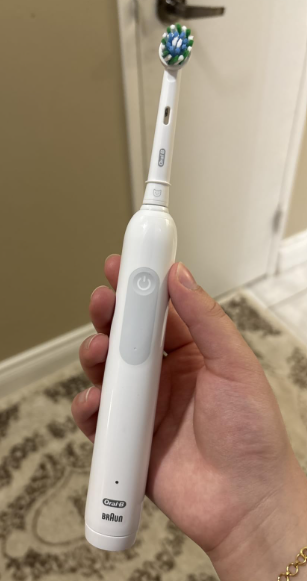
The Oral-B Pro 1000 is a popular rechargeable electric toothbrush, and one of its most useful features is the built-in brushing timer. However, if you’re using this toothbrush for the first time, you might wonder how to activate the timer, what the short vibrations mean, and whether the toothbrush automatically stops after two minutes.
Fortunately, using the Oral-B Pro 1000 timer is incredibly simple because it activates automatically when you turn on the toothbrush. There’s no separate timer button to press and no complicated setup process.
The timer is designed to help us brush for the dentist-recommended two minutes while spending approximately 30 seconds cleaning each section of our mouth.
In this guide, we’ll explain exactly how the Oral-B Pro 1000 timer works, how to use its 30-second alerts, what happens after two minutes, and how to troubleshoot the timer if it isn’t working correctly.
Does the Oral-B Pro 1000 Have a Timer?
Yes. The Oral-B Pro 1000 includes a built-in two-minute brushing timer that helps users maintain a consistent oral hygiene routine.
The timer has two main functions:
- 30-second interval alerts: The toothbrush briefly changes its vibration pattern every 30 seconds to remind us to move to another section of the mouth.
- Two-minute completion alert: After two minutes, the toothbrush produces a longer intermittent signal indicating that we’ve reached the recommended brushing duration.
These features are integrated into the toothbrush handle, so there’s no need to download an app or purchase an additional device.
Unlike some more expensive Oral-B electric toothbrushes, the Pro 1000 doesn’t rely on a digital display to show the remaining brushing time.
Instead, it communicates through changes in the brush’s movement and sound.
Oral-B Pro 1000 Timer Features at a Glance
| Feature | Oral-B Pro 1000 |
|---|---|
| Built-in timer | Yes |
| Timer duration | 2 minutes |
| Interval reminders | Every 30 seconds |
| Automatic activation | Yes |
| Separate timer button | No |
| Digital countdown display | No |
| Automatic shutoff after 2 minutes | No |
| Smartphone app required | No |
| Timer pause memory | Approximately 30 seconds on applicable models |
The exact signaling pattern can vary slightly between product versions, but the basic two-minute timer and 30-second reminders work similarly across common Pro 1000 models.


How to Use the Oral-B Pro 1000 Timer: Step-by-Step
Getting started with the timer takes only a few seconds.
Follow these steps to use it correctly.
Step 1: Charge Your Oral-B Pro 1000
Before your first brushing session, make sure the toothbrush has enough battery power.
Place the handle on its charging station and allow it to charge according to the instructions for your specific model.
A sufficiently charged toothbrush ensures that the motor and timer operate consistently throughout your brushing session.
If the battery is nearly empty, the toothbrush may stop before you’ve completed the recommended two minutes.
Step 2: Apply Toothpaste and Position the Brush
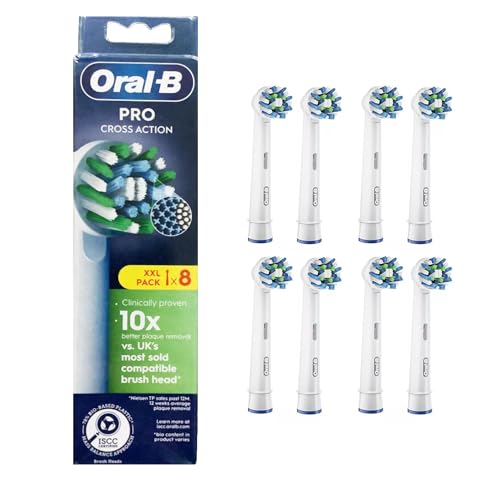
Attach a compatible Oral-B brush head and apply a pea-sized amount of fluoride toothpaste.
Place the brush head against your teeth before switching on the toothbrush.
This helps prevent toothpaste from splattering when the motor starts.
For most Oral-B oscillating-rotating brush heads, we recommend positioning the bristles gently against the tooth surface, near the gumline.
There’s no need to scrub aggressively because the electric brush provides the cleaning movement.
Step 3: Press the Power Button
Press the power button once to start brushing.
The Oral-B Pro 1000 timer begins automatically when the toothbrush starts operating.
You don’t need to activate a special mode, hold the button down, or configure the timer manually.
From this moment, the toothbrush starts counting your brushing time internally.
Step 4: Brush the First Quadrant for 30 Seconds
Begin brushing one section of your mouth.
For example, you can start with the upper-right teeth.
Move the brush head slowly from tooth to tooth, allowing it to clean the outer, inner, and chewing surfaces.
After approximately 30 seconds, you’ll notice a brief interruption or change in the toothbrush’s normal vibration pattern.
This signal means it’s time to move to the next quadrant.
Step 5: Follow the 30-Second Timer Alerts
Continue brushing each quadrant until you have cleaned all four sections of your mouth.
Here’s a simple brushing schedule:
| Brushing Time | Area to Clean | Timer Signal |
|---|---|---|
| 0–30 seconds | Upper-right teeth | Short alert at 30 seconds |
| 30–60 seconds | Upper-left teeth | Short alert at 60 seconds |
| 60–90 seconds | Lower-left teeth | Short alert at 90 seconds |
| 90–120 seconds | Lower-right teeth | Longer completion alert at 120 seconds |
You can choose a different brushing order if you prefer.
The important thing is to spend roughly the same amount of time on each quadrant.
Step 6: Finish Brushing After Two Minutes
After approximately two minutes, the Oral-B Pro 1000 produces a longer stuttering signal.
This indicates that you’ve reached the recommended brushing duration.
However, the Oral-B Pro 1000 generally does not turn itself off automatically after two minutes.
The toothbrush continues operating until you press the power button to switch it off.
This allows you to continue brushing if you need additional time to clean a particular area.
How Does the Oral-B Pro 1000 30-Second Timer Work?
The 30-second reminder is one of the most helpful features of the Oral-B Pro 1000.
It’s often called a quadrant timer or QuadPacer-style timer because it encourages us to divide brushing into four equal sections.
Our mouths can be divided into four quadrants:
- Upper-right teeth.
- Upper-left teeth.
- Lower-right teeth.
- Lower-left teeth.
By spending 30 seconds on each quadrant, we reach a total brushing time of two minutes.
What Does the 30-Second Vibration Mean?
When the Pro 1000 reaches a 30-second interval, you’ll feel a brief change in its vibration or brushing rhythm.
You may also hear a short stuttering sound.
This is normal.
It doesn’t indicate a battery problem, motor malfunction, or damaged brush head.
The vibration change is simply a reminder to move to another section of your mouth.
Many first-time electric toothbrush users mistakenly believe that these brief interruptions indicate a problem with the toothbrush.
In reality, they’re part of its normal timer operation.
Does the Timer Stop the Brush Every 30 Seconds?
No. The 30-second alerts are brief signals rather than a complete shutdown.
The motor momentarily changes its normal rhythm and then continues brushing.
You don’t need to press the power button again after each notification.
Simply move the brush head to the next section and continue brushing.
How to Set the Oral-B Pro 1000 Timer to Two Minutes
One of the most common questions is whether we need to manually set the timer to two minutes.
The answer is no.
The standard Oral-B Pro 1000 comes with its brushing timer already programmed.
The two-minute duration is built into the toothbrush’s normal operation.
To use it:
- Place the brush head against your teeth.
- Press the power button.
- Brush normally while following the 30-second reminders.
- Continue until the two-minute completion alert.
- Press the power button to turn the toothbrush off.
There’s no additional timer configuration required.
Can You Change the Timer Duration?
The standard Oral-B Pro 1000 doesn’t offer a user-adjustable timer duration.
You cannot normally reprogram the built-in timer to run for three or four minutes.
However, you can continue brushing after the two-minute alert if necessary.
For example, people with braces or other dental appliances may need additional cleaning time, depending on their dentist’s recommendations.
The timer is intended as a guide rather than a strict brushing limit.
Does the Oral-B Pro 1000 Automatically Stop After Two Minutes?
No. On standard Oral-B Pro 1000 models, the two-minute timer is a notification system rather than an automatic shutoff mechanism.
After two minutes, the toothbrush signals that the recommended brushing time has been reached.
The motor continues operating until you manually switch it off.
This design offers several advantages.
First, it allows users to finish cleaning areas that may require extra attention.
Second, it avoids interrupting brushing unexpectedly.
Finally, it provides flexibility for people following specific dental care routines.
If your Oral-B Pro 1000 continues vibrating after two minutes, this is normal behavior and doesn’t mean the timer is broken.
How to Pause the Oral-B Pro 1000 Timer
Sometimes we need to stop brushing temporarily.
For example, we might want to spit out excess toothpaste or adjust the brush head.
On Pro 1000 versions with timer memory, turning off the toothbrush briefly doesn’t necessarily reset the elapsed brushing time.
What Happens When You Pause for Less Than 30 Seconds?
Many Oral-B Pro 1000 models remember the elapsed brushing time for approximately 30 seconds after being switched off.
Suppose you’ve brushed for one minute and need to pause.
If you turn the toothbrush back on within approximately 30 seconds, it can resume counting from the previously accumulated brushing time.
This means you won’t necessarily have to restart the full two-minute cycle.
What Happens If You Pause for More Than 30 Seconds?
On models with this function, a pause longer than approximately 30 seconds resets the timer.
When you switch the toothbrush back on, it starts a new brushing cycle.
This can be helpful if you want to start a completely new session.
Keep in mind that specific timer-memory behavior should be checked against the manual for your Pro 1000 version.
How to Reset the Oral-B Pro 1000 Timer
You don’t normally need to reset the Oral-B Pro 1000 timer manually.
The timer automatically prepares for a new brushing session after the previous session has ended and the reset conditions have been met.
For models with the standard 30-second pause-memory function, you can restart the timing cycle by following these steps:
- Turn off the toothbrush using the power button.
- Leave it switched off for longer than 30 seconds.
- Press the power button to start brushing again.
- The timer should begin a new two-minute cycle.
There is no dedicated timer-reset button on the standard Pro 1000.
If you want to brush for another full two minutes, allowing the timer to reset before restarting is the simplest approach.
Oral-B Pro 1000 Timer Not Working: Causes and Solutions
Although the Pro 1000 timer is relatively simple, some users experience issues with its interval reminders or completion signal.
Fortunately, many apparent timer problems can be explained without assuming the toothbrush is defective.
1. You Cannot Feel the 30-Second Alerts
The most common complaint is that the toothbrush doesn’t seem to provide an obvious signal every 30 seconds.
The Pro 1000 uses subtle changes in motor rhythm rather than loud alarms.
Try the following:
- Turn the toothbrush on and listen carefully.
- Pay attention to changes in vibration.
- Use an external stopwatch to identify when 30 seconds have passed.
- Check whether the signal becomes noticeable at the next interval.
The notification can be easier to recognize when you’re deliberately listening for it.
2. The Toothbrush Doesn’t Stop After Two Minutes
This isn’t a timer malfunction.
The Pro 1000 is designed to alert you when two minutes have passed, but it normally keeps running.
Simply press the power button when you’ve finished brushing.
3. The Timer Seems to Restart Unexpectedly
This can happen if you turn the toothbrush off for longer than the timer-memory period.
On many models, pauses exceeding approximately 30 seconds reset the accumulated brushing time.
If you frequently stop while brushing, try keeping those pauses brief.
You can also use an external timer to track your total brushing time.
4. The Toothbrush Stops Before Two Minutes
If the toothbrush switches off unexpectedly during brushing, the problem may be related to its battery or internal electronics rather than the timer itself.
Try these troubleshooting steps:
- Recharge the toothbrush fully.
- Make sure the charger is connected properly.
- Check whether the toothbrush operates consistently after charging.
- Inspect the power button for obvious damage.
- Contact Oral-B support if the problem continues.
An electric toothbrush that repeatedly stops without user input may need inspection or replacement.
5. The Timer Alerts Are Different From What You Expected
Different generations and regional versions of the Oral-B Pro 1000 may have slightly different signaling patterns.
Some users describe the alert as a pause, while others notice a change in vibration or a stuttering sound.
Check the model number printed on your toothbrush handle and consult the corresponding instructions if you’re unsure about its timer behavior.
Oral-B Pro 1000 Timer vs. Pressure Sensor: What’s the Difference?
Another important detail is understanding the difference between the built-in timer and pressure sensor.
These functions serve different purposes.
The timer helps us brush for the recommended duration.
The pressure sensor helps prevent excessive brushing pressure.
| Feature | Timer | Pressure Sensor |
|---|---|---|
| Main purpose | Track brushing time | Limit excessive brushing pressure |
| Activation | Automatically during brushing | When excessive force is detected |
| Main signal | Brief changes in motor rhythm | Change in brushing action |
| Recommended response | Move to the next quadrant | Reduce pressure |
| Operates after 2 minutes? | Gives completion alert | Continues monitoring pressure |
On many Pro 1000 models, the pressure sensor reduces or stops the pulsating action when you press too hard, while other brush movements continue.
This can sometimes be confused with the timer notifications.
If the toothbrush changes its normal movement before a 30-second interval, consider whether you’re applying too much pressure.
Tips for Getting the Most Out of the Oral-B Pro 1000 Timer
The built-in timer is useful, but good brushing technique is equally important.
Here are some practical recommendations.
Use the Full Two Minutes
The American Dental Association recommends brushing twice daily for two minutes using fluoride toothpaste.
The Pro 1000 timer makes it easier to follow this routine consistently.
Avoid stopping after only one or two quadrant alerts.
Brush Every Tooth Surface
Spending 30 seconds in each quadrant doesn’t mean we should focus exclusively on the front surfaces of our teeth.
Make sure to clean:
- Outer tooth surfaces.
- Inner tooth surfaces.
- Chewing surfaces.
- Areas near the gumline.
Move the toothbrush slowly from tooth to tooth, giving each surface enough attention.
Avoid Applying Excessive Pressure
Electric toothbrushes work best when we allow the brush head to perform its intended movement.
Pressing too hard doesn’t necessarily improve plaque removal and can contribute to gum irritation or tooth wear.
Use gentle pressure and allow the brush head to do the work.
Don’t Rush Between Quadrants
When you feel the 30-second notification, move smoothly to the next section.
There’s no need to interrupt your brushing routine completely.
The timer is intended to maintain an even cleaning pattern.
Replace the Brush Head Regularly
Oral-B generally recommends replacing brush heads approximately every three months, or sooner if the bristles become frayed.
A worn brush head may be less effective at cleaning, even when you’re following the timer correctly.
Is the Oral-B Pro 1000 Timer Accurate?
The built-in timer is designed to provide consistent brushing intervals for everyday use.
However, it shouldn’t be considered a precision stopwatch.
The toothbrush measures elapsed brushing time internally and communicates that time through short motor signals.
For typical oral hygiene purposes, this is sufficient.
If you need to verify its behavior, you can turn on the toothbrush and compare its interval signals with a smartphone stopwatch.
You should generally notice reminders at approximately 30-second intervals and the completion alert near the two-minute mark.
Minor perceived differences can occur because the signals themselves are brief and because starting and stopping the toothbrush affects the timing cycle.
Is the Oral-B Pro 1000 Timer Useful for Beginners?
Absolutely.
One challenge with manual toothbrushes is that we often underestimate how long we’ve been brushing.
Without a timer, it’s easy to spend too much time on the front teeth and neglect the harder-to-reach areas.
The Oral-B Pro 1000 helps address this by providing regular reminders to switch sections.
For beginners, we recommend using the quadrant method from the first day.
After a few weeks, following the 30-second reminders can become a natural part of your brushing routine.
The timer is particularly helpful for people transitioning from manual toothbrushes to electric models.
However, it’s important to remember that timing alone doesn’t guarantee effective brushing.
Proper technique, gentle pressure, and consistent cleaning are still essential.
Frequently Asked Questions About the Oral-B Pro 1000 Timer
1. How do I activate the timer on my Oral-B Pro 1000?
The timer activates automatically when you press the power button and start brushing. You don’t need to configure any settings or activate a separate timer mode. Simply brush normally and follow the interval reminders.
2. Why does my Oral-B Pro 1000 pause every 30 seconds?
The brief pauses or changes in vibration are normal timer notifications. They remind you to move to another quadrant of your mouth so that you spend approximately 30 seconds cleaning each section.
3. Does the Oral-B Pro 1000 turn off automatically after two minutes?
No. Standard Oral-B Pro 1000 models continue operating after the two-minute completion signal. You must press the power button to switch the toothbrush off manually.
4. Can I reset the Oral-B Pro 1000 timer?
Yes. On models with the standard pause-memory function, switching the toothbrush off for longer than approximately 30 seconds resets the timer. When you turn it back on, a new brushing cycle begins. You don’t need a special reset button.
5. What should I do if my Oral-B Pro 1000 timer isn’t working?
First, make sure the toothbrush is sufficiently charged. Then run it while using a stopwatch to check whether its vibration pattern changes at approximately 30-second intervals. If the expected signals are consistently absent, consult your model’s manual or contact Oral-B support.
Conclusion: How to Use the Oral-B Pro 1000 Timer Properly
The Oral-B Pro 1000 timer is one of the toothbrush’s most practical features, helping us maintain an effective and consistent brushing routine without needing an external stopwatch.
The best part is that the timer works automatically as soon as we turn on the toothbrush.
Every 30 seconds, the Pro 1000 provides a short notification reminding us to switch to another quadrant of our mouth. After two minutes, it produces a longer completion signal indicating that we’ve reached the recommended brushing duration.
Remember that the toothbrush doesn’t normally switch itself off after two minutes, so you’ll need to press the power button when you’re finished.
By following the timer alerts, cleaning all four quadrants, and using gentle brushing pressure, we can make better use of the Oral-B Pro 1000 and develop healthier brushing habits.
Whether you’re new to electric toothbrushes or simply trying to understand the Pro 1000’s timer notifications, this straightforward feature makes it easier to brush for the right amount of time every day.