
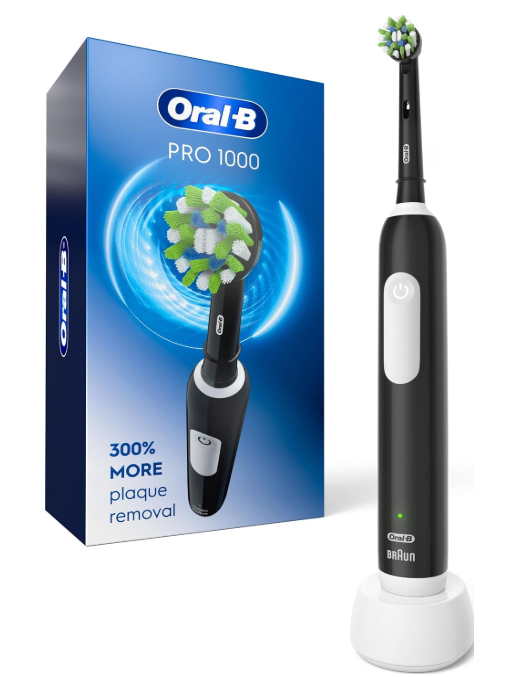
If you own an Oral-B Pro 1000 electric toothbrush, you might be wondering what type of battery it uses, how long that battery should last, and whether you can replace it when it stops holding a charge.
The Oral-B Pro 1000 battery type is generally nickel-metal hydride (NiMH), particularly in the classic North American version of this popular electric toothbrush. However, battery specifications can vary depending on the model revision, manufacturing period, and market.
Unlike battery-operated toothbrushes that require disposable AA or AAA batteries, the Oral-B Pro 1000 features an integrated rechargeable battery designed to power the toothbrush through repeated brushing sessions.
In this guide, we’ll explain everything you need to know about the Oral-B Pro 1000 battery, including its chemistry, charging requirements, expected lifespan, replacement possibilities, and common problems.
What Battery Type Does the Oral-B Pro 1000 Use?
The traditional Oral-B Pro 1000 uses a rechargeable nickel-metal hydride (NiMH) battery.
NiMH batteries have been widely used in electric toothbrushes because they provide dependable performance, are relatively inexpensive, and can withstand repeated charging cycles.
This type of battery is especially common in affordable Oral-B models designed for everyday use.
However, it is important to understand that not every product carrying the Pro 1000 name necessarily has identical internal components.
Some later or market-specific versions have been associated with lithium-ion battery configurations.
Oral-B Pro 1000 Battery Specifications
The following table summarizes the most important battery characteristics of the traditional Pro 1000.
| Specification | Oral-B Pro 1000 |
|---|---|
| Battery type | Nickel-metal hydride (NiMH) in classic versions |
| Battery design | Built-in rechargeable |
| Nominal cell voltage | 1.2V for NiMH cells |
| Charging method | Inductive charging stand |
| Full charging time | Up to 22 hours on older versions; some newer versions charge faster |
| Battery runtime | Approximately 7–10 days, depending on version and usage |
| Replaceable by user | Not officially |
| Disposable batteries required | No |
| USB charging | No, on standard models |
These specifications are general guidelines. Always check the documentation associated with your particular toothbrush.
Does the Oral-B Pro 1000 Have a Lithium-Ion Battery?
Most traditional Oral-B Pro 1000 toothbrushes sold in the United States are associated with NiMH batteries rather than lithium-ion technology.
However, certain model revisions and regional versions may differ.
For example, replacement battery suppliers identify lithium-ion configurations in some later Pro 1000 Type 3756 units.
Lithium-ion batteries are increasingly common in modern electric toothbrushes because they can provide longer runtimes and improved energy density.
NiMH vs Lithium-Ion Batteries
Understanding the differences between these technologies can help explain why some Oral-B toothbrushes perform differently.
| Feature | NiMH Battery | Lithium-Ion Battery |
|---|---|---|
| Nominal cell voltage | 1.2V | Approximately 3.6–3.7V |
| Energy density | Moderate | Higher |
| Weight | Generally heavier for comparable energy | Generally lighter |
| Self-discharge | Typically higher | Typically lower |
| Charging requirements | Chemistry-specific | Chemistry-specific |
| Common application | Traditional Pro toothbrushes | Many newer rechargeable toothbrushes |
A lithium-ion battery is not automatically compatible with a toothbrush designed for NiMH technology.
The charging circuit, voltage requirements, and internal electrical design must match the original battery system.
Never replace a NiMH battery with a lithium-ion cell simply because the new battery fits inside the toothbrush.
How Can You Identify Your Oral-B Pro 1000 Battery Type?
Because the Pro 1000 has been manufactured in multiple versions, the safest way to identify its battery is to check its model information.
Step 1: Find the Handle Type Number
Look at the bottom of your toothbrush handle.
You should find a small identification number, often labeled as the handle type.
This number is more useful for battery identification than the marketing name alone.
Step 2: Check the Product Manual
Find the manual corresponding to your exact toothbrush version.
Older Oral-B Pro 1000 documentation frequently describes charging characteristics consistent with NiMH technology.
Some newer product configurations may have different battery specifications.
Step 3: Check the Manufacturing Version
A toothbrush’s manufacturing period can help narrow down its possible battery chemistry.
However, the purchase date is not necessarily the manufacturing date.
For that reason, we recommend checking the complete model identification before considering any replacement battery.
Step 4: Contact Oral-B Support
If the information is unclear, Oral-B customer service can help identify the appropriate specifications.
This is particularly important when you are trying to diagnose a defective battery or determine whether your toothbrush qualifies for warranty service.
How Long Does the Oral-B Pro 1000 Battery Last?
The Oral-B Pro 1000 generally provides approximately 7 to 10 days of brushing on a full charge, although this depends on the version.
Oral-B documentation for traditional models indicates up to seven days of regular use.
Independent testing of some versions has demonstrated runtimes of approximately ten days.
These estimates assume that we brush our teeth:
- Twice per day.
- For approximately two minutes per session.
- Without excessively long additional brushing sessions.
- Using a battery that remains in good condition.
Battery Life Based on Daily Brushing
| Daily brushing routine | Approximate runtime |
|---|---|
| 2 minutes once daily | 14–20 days |
| 2 minutes twice daily | 7–10 days |
| 2 minutes three times daily | 4–7 days |
| 3 minutes twice daily | 4–7 days |
These are rough estimates based on brushing duration rather than guaranteed battery runtimes.
Actual performance varies according to battery condition, operating mode, and toothbrush version.
Why Does Battery Life Decrease Over Time?
Rechargeable batteries gradually lose their ability to store energy.
This process is known as battery degradation.
With continued use, you may notice that your Oral-B Pro 1000 needs charging more frequently.
Several factors can accelerate battery degradation:
- Repeated exposure to high temperatures.
- Natural aging of the battery.
- Heavy daily usage.
- Storage for extended periods with a depleted battery.
- Internal electronic problems.
- Physical damage or moisture entering the handle.
Some reduction in battery capacity is normal after several years.
However, a toothbrush that suddenly stops working after one brushing session may have a battery or charging problem.


How Long Does the Oral-B Pro 1000 Take to Charge?
The charging time depends on the exact version of your toothbrush.
Older Oral-B Pro 1000 models can require up to 22 hours for a complete charge.
Some newer versions have shorter charging times, around 12 hours.
The difference is important because users sometimes assume that every Pro 1000 should charge in the same amount of time.
The appropriate charging duration is the one specified in the manual for your particular handle.
How to Charge the Oral-B Pro 1000
Charging the toothbrush is straightforward.
- Connect the original Oral-B charging stand to a compatible electrical outlet.
- Place the toothbrush handle upright on the charging base.
- Check whether the charging indicator activates, if your version has one.
- Leave the toothbrush charging for the time recommended in its manual.
- Remove the toothbrush when you need to use it.
The toothbrush uses inductive charging, which transfers energy through the charging stand without exposed metal charging contacts on the bottom of the handle.
This design makes the device convenient for bathroom use.
Can You Leave the Oral-B Pro 1000 on the Charger Overnight?
Yes, the Oral-B Pro 1000 is designed for regular charging using its compatible charging stand.
Leaving the toothbrush charging overnight is generally acceptable when following the manufacturer’s instructions.
Modern charging systems are designed to manage battery charging, although keeping any rechargeable device exposed to excessive heat should be avoided.
We recommend keeping the charger on a clean, dry surface and following the charging guidance for your specific model.
Can You Replace the Oral-B Pro 1000 Battery?
One of the most common questions about the Oral-B Pro 1000 is whether the internal rechargeable battery can be replaced.
The answer depends on whether we are talking about an officially supported repair or a technical modification.
Oral-B does not design the Pro 1000 battery to be routinely replaced by consumers.
The internal battery is enclosed inside the toothbrush handle rather than placed in an accessible battery compartment.
However, specialist repairers and experienced electronics technicians may be able to replace the battery in certain versions.
Why Is Battery Replacement Difficult?
Unlike a conventional battery-powered toothbrush, the Oral-B Pro 1000 has a sealed internal assembly.
Replacing its rechargeable battery may involve:
- Opening the toothbrush handle.
- Removing internal components.
- Identifying the original battery configuration.
- Working with electrical connections.
- Installing a compatible rechargeable cell.
- Reassembling the waterproof housing.
Some versions also have batteries with soldered connections.
Opening the handle incorrectly can damage the electronics, compromise its water resistance, or create a battery safety hazard.
For these reasons, we would not recommend attempting battery replacement without appropriate electronics repair experience.
What Battery Is Needed to Replace an Oral-B Pro 1000 Battery?
There is no single replacement battery specification that can safely be recommended for every Oral-B Pro 1000.
The correct replacement depends on the handle’s internal design.
Older NiMH Models
Traditional NiMH configurations require a rechargeable cell with matching:
- Battery chemistry.
- Nominal voltage.
- Physical dimensions.
- Electrical connections.
- Terminal configuration.
Some repair guides refer to cylindrical NiMH cells for older Oral-B handles.
However, identifying a battery solely by its approximate dimensions is not sufficient to establish compatibility.
Certain Lithium-Ion Versions
Some later Type 3756 configurations have been associated with cylindrical lithium-ion cells, including 14430-size replacements.
These cells have different voltage requirements from NiMH batteries.
A lithium-ion replacement must only be considered when the toothbrush was originally designed for that chemistry.
Should You Replace the Battery or Buy a New Toothbrush?
For many users, replacing the entire toothbrush is the simpler solution.
This is particularly true if:
- The toothbrush is several years old.
- The handle has visible damage.
- Water has entered the device.
- Professional repair would cost almost as much as a replacement.
- The original battery specifications cannot be confidently identified.
If the toothbrush is still under warranty, contacting Oral-B before attempting any repair is usually the best option.
Oral-B Pro 1000 Battery Not Holding Charge: Common Causes
A declining battery is not always the only explanation for poor charging performance.
Sometimes the problem comes from the charger, electrical outlet, or connection between the toothbrush and charging stand.
Here are the most common situations.
1. The Battery Has Deteriorated
A battery that has experienced extensive use may gradually lose capacity.
Possible symptoms include:
- The toothbrush running for only a few minutes.
- Needing to recharge every day.
- The motor stopping unexpectedly.
- Battery runtime becoming much shorter than before.
If the battery is worn out, charging it longer will not restore its original capacity.
2. The Charging Stand Is Not Working
A defective charger can prevent the battery from receiving power.
Before assuming the battery is damaged, verify that the charger is functioning correctly.
Try connecting it to a different compatible outlet.
Avoid testing it with an incompatible power supply.
3. The Toothbrush Has Not Charged Long Enough
Some Pro 1000 models require considerably more time to recharge than newer electric toothbrushes.
If you have an older version that requires up to 22 hours, leaving it on the charger for only a few hours may not provide a complete charge.
Always use your model’s specified charging time.
4. The Battery Is Deeply Discharged
If the toothbrush has not been used for a long time, its battery may be deeply discharged.
In some cases, the charging light may not activate immediately.
Allow the handle to remain on the appropriate charger for at least 30 minutes before checking again, then continue charging according to the manual.
If the toothbrush remains unresponsive after a complete charging cycle, professional diagnosis may be necessary.
5. Internal Electronics Are Damaged
A malfunctioning charging circuit or internal electronic component can cause symptoms similar to battery failure.
Water damage, impact damage, and electronic faults may prevent the battery from charging correctly.
If the handle becomes unusually hot, leaks, swells, or produces an abnormal smell, stop charging and using it.
How to Fix an Oral-B Pro 1000 That Is Not Charging
Before replacing your toothbrush, we recommend a few basic troubleshooting checks.
Check the Power Outlet
Plug another suitable electrical device into the outlet to confirm that it works.
If the outlet is functioning correctly, continue to the next step.
Inspect the Charging Base
Look for signs of visible damage, moisture, or debris.
Unplug the charger before cleaning it.
Use a soft cloth to clean the exterior and allow everything to dry completely before reconnecting it.
Position the Toothbrush Correctly
Make sure the handle is seated properly on the charging base.
An incorrectly positioned toothbrush may not charge as expected.
Allow a Complete Charging Cycle
Charge the toothbrush for the duration specified in its manual.
If the battery is deeply discharged, do not assume the device is defective simply because it fails to start immediately.
Contact Oral-B Customer Support
If none of these checks resolves the problem, contact Oral-B for warranty or repair guidance.
Opening the toothbrush yourself may create additional problems and could affect warranty coverage.
What Do the Oral-B Pro 1000 Battery Lights Mean?
The Oral-B Pro 1000 has charging indicators that help users understand when its battery needs attention.
The exact indicator behavior depends on the version.
Green Flashing Light
On many traditional models, a flashing green light indicates that the toothbrush is charging.
The indicator may stop flashing when charging is complete.
Red Flashing Light
A red battery indicator near the bottom of the handle usually means the remaining battery charge is low.
You should place the toothbrush on its charger soon.
No Charging Light
No light does not always mean the toothbrush is defective.
Possible explanations include:
- The battery is already fully charged.
- The battery is deeply discharged.
- The toothbrush is not correctly positioned.
- The charging stand is not receiving power.
- There is a charging or battery fault.
Consult your manual because indicator behavior can vary between versions.
How to Extend the Oral-B Pro 1000 Battery Lifespan
Although battery degradation cannot be completely prevented, good charging and storage habits may help maintain performance.
Avoid Excessive Heat
High temperatures accelerate battery aging.
Do not leave the toothbrush in direct sunlight or near heaters.
A normal indoor environment is generally preferable.
Use the Correct Charger
Use the charger supplied with your toothbrush or a manufacturer-approved compatible replacement.
Not all charging stands have identical electrical specifications.
Keep the Charging Area Clean
Toothpaste residue and water deposits can accumulate around the bottom of the handle.
Clean these areas regularly to maintain good hygiene and prevent unnecessary buildup.
Avoid Extended Storage With a Dead Battery
If you plan to stop using the toothbrush for several months, follow the storage recommendations in its manual.
Leaving a rechargeable battery completely depleted for a long period can contribute to deterioration.
Do Not Attempt Unnecessary Battery Modifications
Replacing the original battery with a different chemistry or voltage can damage the toothbrush.
Any internal battery repair should be performed with properly matched components and suitable technical expertise.
Oral-B Pro 1000 vs Other Oral-B Models: Battery Comparison
If battery runtime is a major consideration, it may be worth comparing the Pro 1000 with other Oral-B toothbrushes.
| Model | Typical battery technology | Battery characteristics |
|---|---|---|
| Oral-B Pro 1000 | Usually NiMH in classic versions | Approximately 7–10 days |
| Oral-B Pro 500 | NiMH in traditional versions | Shorter runtime on many versions |
| Oral-B Smart 1500 | Lithium-ion in commonly sold versions | Often longer runtime than Pro 1000 |
| Oral-B iO Series 2 | Lithium-ion | Longer runtime in many tests |
| Oral-B iO Series 3 | Rechargeable lithium-ion | Model-dependent runtime |
These comparisons are general and should not be interpreted as universal specifications for every market.
Is a Lithium-Ion Oral-B Toothbrush Better?
Lithium-ion technology offers several advantages, particularly when battery runtime and charging convenience are priorities.
However, battery chemistry is not the only factor that determines toothbrush quality.
We should also consider:
- Cleaning performance.
- Brush head compatibility.
- Replacement brush head costs.
- Pressure sensor functionality.
- Available brushing modes.
- Overall purchase price.
The Pro 1000 remains an appealing option for users who prioritize straightforward cleaning performance and affordability over maximum battery endurance.
Is the Oral-B Pro 1000 Battery Good Enough for Travel?
For occasional travel, the Oral-B Pro 1000 generally offers sufficient battery performance.
If you charge it fully before leaving home, you may be able to use it throughout a week-long trip without bringing the charging stand.
However, the exact runtime depends on the battery’s condition and the model you own.
For longer trips, carrying the compatible charger is a sensible precaution.
Also, check the charger voltage before using it internationally.
Some North American Oral-B charging stands are designed for approximately 110–130V rather than universal worldwide voltage.
A simple plug adapter does not convert voltage.
If your charger is not rated for the destination country’s electrical supply, you will need an appropriate voltage solution or compatible charger.
Frequently Asked Questions About the Oral-B Pro 1000 Battery
1. Is the Oral-B Pro 1000 Battery NiMH or Lithium-Ion?
The classic Oral-B Pro 1000 commonly uses a rechargeable nickel-metal hydride (NiMH) battery, especially in traditional North American versions.
Some later or region-specific versions may use lithium-ion technology. Check the exact handle type and product documentation to identify your battery.
2. Can I Replace the Oral-B Pro 1000 Battery Myself?
Oral-B does not officially support routine consumer battery replacement in the Pro 1000.
Although some specialist technicians can replace the internal battery, the process may require opening the sealed handle and working with electrical connections.
Professional service or replacing the toothbrush is generally safer.
3. How Many Years Does an Oral-B Pro 1000 Battery Last?
There is no guaranteed lifespan for every Oral-B Pro 1000 battery.
Many rechargeable toothbrush batteries remain usable for several years, but their lifespan depends on charging habits, usage, temperature, manufacturing quality, and natural aging.
A noticeable reduction in runtime is often one of the first signs of deterioration.
4. Why Does My Oral-B Pro 1000 Battery Die So Quickly?
A weak battery, incomplete charging, a faulty charging stand, or an internal electrical problem may cause unexpectedly short runtime.
Start by checking the charger and completing the recommended charging cycle.
If the toothbrush continues to stop after only a few minutes, the battery may have deteriorated.
5. Does the Oral-B Pro 1000 Use AA or AAA Batteries?
No. The rechargeable Oral-B Pro 1000 uses an integrated battery rather than ordinary replaceable AA or AAA batteries.
Its battery is charged through the compatible charging stand.
It should not be confused with Oral-B toothbrush models specifically designed for disposable batteries.
Conclusion: What Battery Type Is in the Oral-B Pro 1000?
The Oral-B Pro 1000 typically uses a rechargeable NiMH battery, particularly in its traditional North American configuration.
This battery provides dependable everyday performance, with approximately seven to ten days of brushing between charges, depending on the toothbrush version and usage.
Older models may need up to 22 hours to charge fully, while some newer configurations charge more quickly.
Although the built-in battery is not officially user-replaceable, professional repair may be possible for certain versions.
Before purchasing a replacement cell or attempting a repair, always identify the exact toothbrush handle type and confirm the original battery chemistry.
Ultimately, if your Oral-B Pro 1000 still delivers satisfactory brushing performance and maintains a reasonable charge, there is no need to worry about its battery technology. Proper charging, cleaning, and storage habits can help you continue using it reliably for years.