
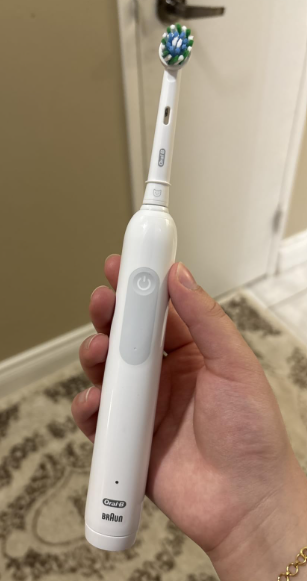
The Oral-B Pro 1000 is a popular rechargeable electric toothbrush known for its straightforward design, powerful cleaning action, and affordable price. However, like any electronic device, it can occasionally develop problems that prevent it from working properly.
If your Oral-B Pro 1000 is not working, you might notice that it won’t turn on, refuses to charge, stops unexpectedly during brushing, or makes unusual noises.
The good news is that not every problem means your toothbrush is permanently broken. Sometimes, the solution is as simple as charging the battery, cleaning accumulated toothpaste residue, or checking the charging base.
In this troubleshooting guide, we’ll explore the most common reasons why an Oral-B Pro 1000 stops working, explain how to diagnose the issue, and walk through practical solutions before you consider replacing it.
Why Is My Oral-B Pro 1000 Not Working?
Several issues can cause an Oral-B Pro 1000 toothbrush to stop functioning.
The most common causes include:
- Dead battery: The rechargeable battery may be completely discharged.
- Charging problems: The charger, electrical outlet, or charging circuit might not be functioning correctly.
- Faulty power button: Wear, damage, or an internal electrical fault can prevent the toothbrush from switching on.
- Battery deterioration: An aging battery may no longer hold enough energy to operate the motor.
- Toothpaste buildup: Residue around the brush head connection can interfere with movement.
- Internal motor problems: Mechanical wear can affect the brushing mechanism.
- Water damage: Moisture entering the handle through damaged seals can affect electronic components.
- Physical damage: Dropping the toothbrush can damage its internal parts.
Before assuming that the motor or battery has failed, it’s worth performing a few basic troubleshooting steps.


How to Fix an Oral-B Pro 1000 That Is Not Working
If your toothbrush has stopped responding, we recommend following these troubleshooting steps in order.
1. Charge the Toothbrush Completely
A discharged battery is one of the first things to check when your Oral-B Pro 1000 won’t turn on.
Unlike a manual toothbrush, an electric model depends entirely on its rechargeable battery to power the motor.
If the battery has been depleted, pressing the power button may produce no response.
What to do:
- Connect the original charging base to a working electrical outlet.
- Position the toothbrush upright on the charging base.
- Check whether the charging indicator begins flashing.
- Leave the toothbrush charging for the full period recommended in its user manual.
- Remove it from the charger and press the power button.
Depending on the exact handle and charger combination, charging may take approximately 12 to 24 hours.
If the battery is completely discharged, the charging indicator may take up to 15 minutes to begin flashing.
Important: Avoid concluding that the toothbrush is defective after only a few minutes on the charger.
2. Check the Electrical Outlet
Sometimes the problem isn’t the toothbrush itself but the outlet supplying power.
This can happen with bathroom outlets controlled by a wall switch or protected by a GFCI circuit.
To test the outlet:
- Unplug the toothbrush charger.
- Connect another small electrical device to the same outlet.
- Confirm that the outlet provides power.
- Check whether a GFCI outlet has tripped.
- Try another suitable outlet if necessary.
If another device doesn’t work either, the outlet may be the source of the problem.
Make sure you use an outlet compatible with your charger’s voltage rating.
3. Inspect the Oral-B Pro 1000 Charger
The Oral-B Pro 1000 uses an inductive charging system, meaning the toothbrush transfers energy from the charging base without exposed electrical contacts on the handle.
However, the charging base can still malfunction.
Inspect the charger for:
- Frayed or damaged wiring.
- Cracks in the charging base.
- Signs of overheating.
- A loose electrical connection.
- Excessive dirt or toothpaste accumulation.
If the charger appears physically damaged, stop using it.
You can also test the toothbrush with another charger that is confirmed to be compatible with your specific Oral-B handle.
If it charges normally with the replacement charger, the original charging base is likely defective.
4. Clean the Toothbrush Handle and Charging Base
Toothpaste residue and moisture can accumulate around the bottom of the handle and charging station.
Although the charging mechanism doesn’t rely on exposed metal charging contacts, buildup can prevent the handle from sitting correctly on its base.
Follow these steps:
- Unplug the charger from the electrical outlet.
- Remove the toothbrush from the charging base.
- Wipe the bottom of the handle with a damp cloth.
- Clean accumulated residue from the charging base.
- Dry both components thoroughly.
- Reconnect the charger and position the toothbrush correctly.
Never immerse the charging base in water or clean it while connected to electricity.
It’s also a good idea to keep the charger away from metal surfaces that could interfere with inductive charging.
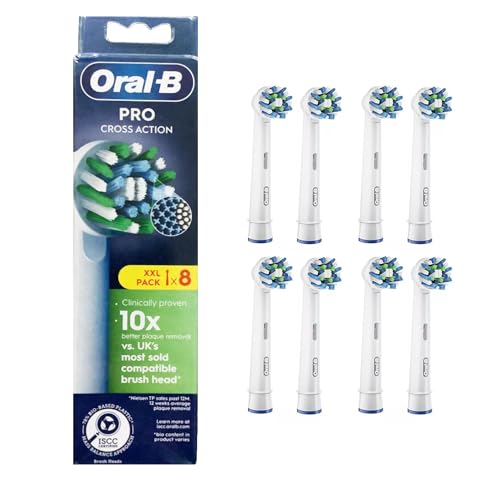
5. Remove and Inspect the Brush Head
If your Oral-B Pro 1000 makes noise but the brush head doesn’t move properly, the problem may involve the brush head rather than the motor.
Over time, dried toothpaste and debris can accumulate around the metal drive shaft.
To investigate:
- Turn off the toothbrush.
- Remove the replaceable brush head.
- Rinse the brush head connection and upper handle area under warm running water.
- Carefully remove visible toothpaste residue.
- Inspect the metal drive shaft for obvious damage.
- Briefly switch on the handle without the brush head attached.
If the shaft moves normally without the brush head, the attachment could be obstructed or damaged.
Try installing a new compatible Oral-B brush head.
Do not pull, twist, or force the metal drive shaft.
Oral-B Pro 1000 Not Turning On
One of the most frustrating situations occurs when the Oral-B Pro 1000 won’t turn on at all.
You press the power button, but nothing happens.
Completely Discharged Battery
The most likely starting point is a battery that has run out of charge.
This can happen if you haven’t used your toothbrush for several weeks or months.
Place it on the charger and allow sufficient time for the battery to recover.
If the toothbrush begins operating after charging, there may be nothing wrong with the device.
Power Button Not Responding
If your toothbrush is fully charged but doesn’t respond when you press the power button, the switch or internal electronics may be faulty.
You can check whether the button:
- Feels unusually loose.
- Has become difficult to press.
- Appears physically damaged.
- Responds only intermittently.
Gently clean the exterior around the button with a damp cloth.
Avoid inserting sharp objects around the button or applying excessive pressure.
If the switch remains unresponsive, professional service may be necessary.
Internal Electronic Failure
A toothbrush that has suffered a hard impact or moisture intrusion may develop internal electrical problems.
Possible signs include:
- No response despite a confirmed working charger.
- Intermittent operation.
- Unusual overheating.
- Erratic motor behavior.
- Visible cracks in the handle.
Internal faults generally cannot be corrected through routine cleaning or charging.
If your toothbrush is still covered by its warranty, contact Oral-B before attempting to open it.
Oral-B Pro 1000 Not Charging
Another common issue is an Oral-B Pro 1000 that appears to work normally until its battery becomes depleted, after which it refuses to recharge.
Several factors can explain this behavior.
Charging Indicator Not Flashing
On Oral-B Pro 1000 models equipped with a charging indicator, the light normally flashes during charging.
If the light doesn’t activate immediately, don’t assume the charger is broken.
A deeply discharged battery may need several minutes before the indicator responds.
Try leaving the toothbrush on the charger for at least 15 to 30 minutes before checking again.
If there is still no indicator activity, verify the outlet and charger.
Incorrect Charger
Not every Oral-B charging accessory is compatible with every toothbrush.
Although some charging stands look almost identical, their electrical specifications and compatibility may differ.
Check the model or type number printed on the toothbrush and charger.
Use an original or manufacturer-approved compatible charging base whenever possible.
Battery No Longer Accepts a Charge
Rechargeable batteries gradually lose their ability to store energy.
After several years of use, your Oral-B Pro 1000 may struggle to charge or maintain a useful runtime.
Typical symptoms include:
- The toothbrush works only briefly after charging.
- The battery runs out much faster than before.
- Charging takes place, but the motor won’t start.
- Battery performance becomes increasingly inconsistent.
If you have already ruled out the outlet and charger, a deteriorated internal battery becomes a stronger possibility.
Oral-B Pro 1000 Stops Working During Brushing
Does your Oral-B Pro 1000 start normally but stop after a few seconds or minutes?
This behavior can have several explanations.
Low Battery
A battery with insufficient charge may power the toothbrush momentarily before the motor stops.
Aging batteries can also produce enough power initially but fail when the motor requires additional energy.
Fully charging the toothbrush is the best first test.
If the problem repeatedly returns after a complete charge, the battery may be deteriorating.
Excessive Pressure While Brushing
The Oral-B Pro 1000 includes a pressure-control feature on common versions.
When you apply excessive pressure, the toothbrush can reduce or stop its pulsating action to help protect your gums.
This change can sometimes feel like the toothbrush has lost power.
However, normal pressure-sensor operation is different from the motor shutting off completely.
Try brushing with less pressure and allowing the brush head to perform the cleaning movement.
If the motor completely stops even with no pressure applied, investigate other causes.
Brush Head Obstruction
Dried toothpaste or a damaged brush head can interfere with normal movement.
Remove the brush head and check whether the drive mechanism operates smoothly.
If the handle functions normally without the attachment, replace the brush head and thoroughly clean the connection.
Motor or Circuit Problems
If your toothbrush switches off randomly despite having a charged battery, the internal motor or electronic circuit may be malfunctioning.
Repeated unexpected shutdowns can indicate an electrical or mechanical defect.
At that point, professional repair or replacement may be more practical than continued home troubleshooting.
Oral-B Pro 1000 Not Spinning or Vibrating Properly
Some users notice that their toothbrush still turns on but the brush head barely moves.
This doesn’t necessarily mean the entire device has stopped working.
Check the Brush Head Connection
The Oral-B Pro 1000 uses an oscillating-rotating cleaning action.
If the brush head is damaged, worn, or improperly fitted, it may not follow the normal movement of the drive mechanism.
Remove the brush head and inspect its connection.
If the attachment is worn out, replacing it may solve the problem.
Clean the Metal Shaft
Toothpaste deposits can accumulate around the drive shaft.
Regular cleaning helps prevent buildup that could interfere with brush head movement.
Use warm water and a soft cloth to remove accessible residue.
Avoid forcing the shaft or using abrasive tools.
Check for Mechanical Damage
If the motor makes abnormal grinding, rattling, or clicking noises, the internal mechanism may be damaged.
Possible causes include worn mechanical components or damage after dropping the toothbrush.
If cleaning and brush head replacement don’t help, the handle may require service.
Oral-B Pro 1000 Blinking Red and Not Working
A red light on the Oral-B Pro 1000 can indicate a low battery, particularly when it appears near the bottom of the handle.
If you notice a flashing or illuminated red indicator, check its position and the behavior of your toothbrush.
A low-battery warning means the device needs charging soon.
However, certain Oral-B models also use red indicators for brushing pressure.
These lights serve different purposes, so it’s important to identify the indicator correctly.
If the battery warning appears:
- Place the toothbrush on its charging base.
- Allow it to charge completely.
- Remove it from the charger.
- Check whether it operates normally.
If the low-battery warning returns almost immediately, the internal battery may not be retaining its charge.
Can You Reset an Oral-B Pro 1000 That Is Not Working?
Some owners look for an Oral-B Pro 1000 reset procedure when their toothbrush becomes unresponsive.
However, the standard Oral-B Pro 1000 does not offer a documented factory-reset procedure comparable to the reset functions available on some advanced electronic toothbrushes.
Holding the power button for an extended period isn’t a guaranteed solution.
Instead, we recommend:
- Checking the charger and electrical outlet.
- Charging the toothbrush for the recommended period.
- Removing and cleaning the brush head.
- Testing the power button after removing the toothbrush from the charger.
- Contacting customer support if the device remains unresponsive.
These steps are more reliable than relying on unverified button combinations.
Oral-B Pro 1000 Troubleshooting Chart
The following table summarizes common problems and the most appropriate solutions.
| Problem | Possible Cause | Recommended Solution |
|---|---|---|
| Won’t turn on | Dead battery | Fully charge the toothbrush |
| Not charging | Faulty outlet or charger | Test the outlet and compatible charger |
| Charging light not flashing | Deeply discharged battery | Allow additional charging time |
| Stops after a few seconds | Weak battery | Charge fully and monitor performance |
| Brush head not moving | Worn or obstructed brush head | Clean or replace the attachment |
| Motor sounds unusual | Mechanical damage | Stop using it and request service |
| Power button doesn’t work | Faulty switch or electronics | Contact Oral-B support |
| Battery drains quickly | Aging rechargeable battery | Consider authorized repair or replacement |
| Pulsations slow under pressure | Pressure-control feature | Reduce brushing pressure |
This chart can help you identify where to begin before spending money on replacement parts.
How Long Does an Oral-B Pro 1000 Battery Last?
Battery runtime depends on the specific version, age of the device, brushing frequency, and condition of the rechargeable battery.
Oral-B rechargeable toothbrushes can provide several days of use between charges, although the exact runtime varies by model.
For the most accurate estimate, check the user manual supplied with your Pro 1000.
If your toothbrush previously lasted several days but now runs out after one or two brushing sessions, battery deterioration is a reasonable possibility.
Signs Your Oral-B Pro 1000 Battery Is Failing
Common warning signs include:
- Noticeably shorter brushing time between charges.
- The toothbrush turning off unexpectedly.
- Difficulty starting the motor after charging.
- An increasingly frequent low-battery warning.
- Unreliable operation despite proper charging.
These symptoms can suggest a failing battery, but they can also result from an inadequate charge or a defective charger.
It’s important to rule out simpler problems first.
Can You Replace the Oral-B Pro 1000 Battery?
The Oral-B Pro 1000 contains an internal rechargeable battery.
Unlike a toothbrush powered by removable AA batteries, its battery isn’t intended for routine replacement by the user.
Although specialized third-party repair procedures exist for some rechargeable toothbrushes, opening the handle can damage seals, compromise water resistance, and create electrical or battery-related risks.
It may also affect warranty coverage.
For most owners, we recommend using an authorized repair service rather than attempting a battery replacement at home.
If your toothbrush is several years old and repair costs approach the price of a new model, replacing the entire toothbrush may be the more economical option.
How to Prevent Oral-B Pro 1000 Problems
Preventive maintenance can help keep your toothbrush operating properly.
Clean the Brush Head Regularly
After brushing, rinse the brush head thoroughly to remove toothpaste and debris.
Periodically remove the head to clean the upper handle and drive-shaft area.
This helps reduce buildup around moving components.
Keep the Charging Base Clean and Dry
Wipe the charger regularly and prevent water from accumulating around it.
Always unplug the base before cleaning.
Avoid keeping the charger directly beside areas where it could be splashed or immersed.
Avoid Dropping the Toothbrush
Even a toothbrush designed for everyday bathroom use can suffer internal damage after falling onto a hard surface.
Store it upright in a secure location.
Use Compatible Accessories
Use brush heads and charging accessories compatible with your specific Oral-B Pro 1000.
Improper accessories can create fitment or charging problems.
Charge According to the Manufacturer’s Instructions
Follow the charging recommendations for your specific model.
Avoid storing the toothbrush in extreme temperatures, and don’t continue using a charger that shows signs of damage.
When Should You Replace Your Oral-B Pro 1000?
Not every malfunction requires replacing the entire toothbrush.
However, replacement becomes worth considering when:
- The internal battery no longer holds a useful charge.
- The motor makes persistent grinding noises.
- The handle has visible damage or water intrusion.
- The power button remains unresponsive after troubleshooting.
- An authorized repair costs nearly as much as a new toothbrush.
Before buying another toothbrush, check whether your Oral-B Pro 1000 is still covered by the manufacturer’s warranty.
Oral-B commonly provides a two-year limited warranty, although coverage and terms may vary by market and product.
If your device qualifies, you may be able to obtain a repair or replacement without purchasing a new toothbrush.
Frequently Asked Questions About Oral-B Pro 1000 Not Working
1. Why Is My Oral-B Pro 1000 Not Turning On Even After Charging?
If your Oral-B Pro 1000 doesn’t turn on after a complete charge, the problem could involve the charging base, rechargeable battery, power button, or internal electronics.
First, confirm that the electrical outlet and charger work correctly.
If the toothbrush remains completely unresponsive, contact Oral-B support or an authorized repair center.
2. Why Is My Oral-B Pro 1000 Charging Light Not Blinking?
A completely discharged battery may take up to approximately 15 minutes before the charging indicator begins flashing.
The light may also stop flashing when charging is complete.
If the toothbrush doesn’t charge or operate after the recommended charging period, inspect the outlet, charger, and handle.
3. Can I Reset My Oral-B Pro 1000?
The standard Oral-B Pro 1000 does not have a documented user-operated factory-reset feature.
If it stops responding, check the power supply, complete a full charge, clean the toothbrush, and test it again.
If these steps don’t work, professional assistance may be necessary.
4. Why Does My Oral-B Pro 1000 Stop After a Few Seconds?
A toothbrush that stops after a few seconds may have a weak battery, an internal electrical fault, or a mechanical issue.
Charge it fully and test the handle without the brush head attached.
If the motor continues to shut down unexpectedly, the battery or internal components may need professional attention.
5. Is It Worth Repairing an Oral-B Pro 1000 That Stopped Working?
It depends on the toothbrush’s age, the problem, and whether warranty coverage is available.
Simple issues involving cleaning, charging, or brush head replacement are often worth addressing.
However, if the internal battery or motor has failed outside the warranty period, purchasing a replacement toothbrush may be more cost-effective.
Conclusion: What to Do When Your Oral-B Pro 1000 Is Not Working
If your Oral-B Pro 1000 is not working, there’s no need to assume immediately that the toothbrush has reached the end of its life.
Many common problems are associated with a discharged battery, charging issues, dirt buildup, or a worn brush head.
We recommend starting with the simplest solutions: check the electrical outlet, allow the toothbrush to charge fully, inspect the charging base, and clean the brush head connection.
If the toothbrush still doesn’t turn on, charge properly, or operate consistently, the problem may involve its internal battery, power button, or motor.
In that situation, checking the warranty and contacting an authorized service provider is usually the safest option.
With regular cleaning, proper charging, and careful handling, you can reduce the chances of unexpected problems and help your Oral-B Pro 1000 continue delivering reliable daily brushing performance.