
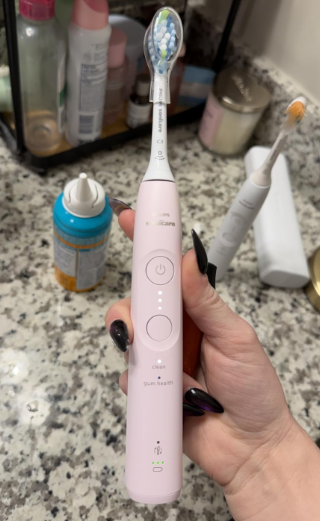
Learning how to use the Philips Sonicare 5950 correctly can make a significant difference in your daily brushing routine. Although this rechargeable electric toothbrush is designed to be easy to operate, understanding its brushing modes, intensity settings, pressure sensor, and built-in timer will help you get the most out of it.
The Philips Sonicare 5950 is part of the newer Sonicare 5000 Series and features advanced sonic technology, two brushing modes, three intensity levels, and intelligent brushing guidance. Unlike a traditional manual toothbrush, it relies on high-frequency bristle movements to clean your teeth effectively without requiring aggressive scrubbing.
If you’re using a Philips Sonicare toothbrush for the first time, the vibrations may initially feel unfamiliar. However, once you understand the correct technique, brushing becomes surprisingly straightforward.
In this complete guide, we’ll explain how to set up, operate, charge, clean, and maintain the Philips Sonicare 5950, including common mistakes to avoid and practical advice for beginners.
What Is the Philips Sonicare 5950?
The Philips Sonicare 5950 is a rechargeable sonic electric toothbrush designed to improve plaque removal while supporting healthier gums.
It uses Philips’ Next-Generation Sonicare Technology, which delivers up to 62,000 bristle movements per minute. Its motor is designed to maintain consistent cleaning performance, including when brushing difficult-to-reach areas.
The toothbrush also includes features that help users develop healthier brushing habits.
| Feature | Philips Sonicare 5950 |
|---|---|
| Cleaning technology | Next-Generation Sonicare |
| Brushing modes | Clean and Gum Health |
| Intensity settings | Low, Medium, High |
| Pressure sensor | Yes |
| Built-in timer | Yes |
| BrushPacer | Yes, six brushing sections |
| BrushSync technology | Yes |
| Battery life | Up to 21 days |
| Charging | USB charging stand |
| Compatible brush heads | Philips Sonicare click-on heads |
These features make the Sonicare 5950 suitable for people transitioning from manual brushing and experienced electric toothbrush users who want more control over their cleaning routine.
How to Set Up the Philips Sonicare 5950 for the First Time
Before using your toothbrush, we recommend spending a few minutes preparing the device properly.
Step 1: Unbox Your Philips Sonicare 5950
Remove the toothbrush handle and accessories from the packaging.
Depending on the specific package, the Sonicare 5950 may include two C3 Premium Plaque Control brush heads, a USB charging stand, and a protective travel case.
Check that everything is in good condition before using the toothbrush.
The handle should have a power button, a mode/intensity button, and indicator lights that display its operating settings.
Step 2: Attach the Brush Head
Installing the brush head is simple.
Hold the toothbrush handle upright and align the brush head with the metal shaft.
Make sure the bristles face the same direction as the front of the handle.
Gently push the brush head down until it is securely attached.
You may notice a small gap between the bottom of the brush head and the handle. This is normal and allows the brush head to vibrate correctly.
Avoid forcing the brush head into place or twisting it unnecessarily.
Step 3: Charge the Toothbrush
Before your first brushing session, it’s a good idea to charge your Sonicare 5950.
Connect the USB charging stand to a compatible power adapter and place the toothbrush handle on the charger.
The battery indicator will show that charging has started.
A complete charge can take up to 24 hours, although the toothbrush can be used before the battery is completely full.
The Sonicare 5950 is designed to provide up to 21 days of operation on a full charge, based on regular twice-daily brushing.
How to Use the Philips Sonicare 5950 Step by Step
Once your toothbrush is assembled and charged, you’re ready to begin brushing.
The most important thing to remember is that a sonic toothbrush requires a different technique from a manual toothbrush.
Instead of scrubbing vigorously, you should guide the brush slowly while allowing the sonic movements to do most of the cleaning.
Follow these steps:
- Wet the brush head. Place the bristles under running water briefly before adding toothpaste.
- Apply toothpaste. Use a pea-sized amount of fluoride toothpaste for adults.
- Position the toothbrush. Place the bristles against your teeth at approximately a 45-degree angle toward the gumline.
- Turn on the toothbrush. Press the power button once to start the brushing cycle.
- Move the brush slowly. Guide the bristles across your teeth using small, gentle back-and-forth movements.
- Follow the brushing timer. Move to the next section of your mouth when the BrushPacer signals.
- Clean every tooth surface. Pay attention to the outer, inner, and chewing surfaces.
- Finish the brushing cycle. Allow the toothbrush to switch off automatically when the selected program ends.
- Rinse the brush head. Remove toothpaste residue and allow the toothbrush to dry.
A common beginner mistake is treating the Sonicare 5950 like a manual toothbrush.
You do not need to scrub aggressively or apply excessive pressure. The high-frequency sonic action is designed to clean effectively with gentle contact.
Philips Sonicare 5950 Brushing Modes Explained
One of the most useful features of the Philips Sonicare 5950 is the ability to choose between two brushing modes.
Each mode is designed for a different cleaning goal.
Clean Mode
Clean mode is the standard setting for everyday brushing.
It focuses on removing plaque from the surfaces of your teeth and along the gumline.
The brushing cycle lasts approximately 2 minutes.
We recommend starting with Clean mode if you’re using the Sonicare 5950 for the first time.
It provides a straightforward daily routine and is suitable for twice-daily brushing.
Gum Health Mode
Gum Health mode is designed to combine regular plaque removal with additional attention to the gumline.
Unlike Clean mode, this program includes an extended brushing phase.
The complete Gum Health cycle lasts approximately 3 minutes and 20 seconds.
It begins with a standard two-minute cleaning routine and then adds 80 seconds focused on selected gumline areas.
This mode can be especially useful for people who want to spend additional time caring for their gums.
However, longer brushing does not mean that you should press harder.
Gentle brushing remains essential.
Clean Mode vs Gum Health Mode
| Feature | Clean Mode | Gum Health Mode |
|---|---|---|
| Main purpose | Daily plaque removal | Plaque removal and gum care |
| Duration | 2 minutes | 3 minutes 20 seconds |
| Brushing guidance | Six sections | Six sections plus extra gumline care |
| Recommended intensity | High, if comfortable | High, if comfortable |
| Best for | Everyday brushing | Additional gumline attention |
Both modes use the same sonic cleaning technology, but Gum Health mode dedicates more time to the gumline.
How to Change Modes on the Philips Sonicare 5950
Changing the brushing mode is easy once you understand the toothbrush controls.
To select a different brushing mode, press the mode/intensity button while the toothbrush is switched off.
The mode indicator will show your selection.
You can choose between Clean and Gum Health.
After selecting your preferred mode, press the power button to begin brushing.
An important detail is that the same button also controls intensity, but its function depends on whether the toothbrush is running.
When the toothbrush is off, the button changes the brushing mode.
When the toothbrush is on, the button adjusts the intensity.
Understanding this distinction prevents confusion when customizing your brushing experience.
How to Adjust the Philips Sonicare 5950 Intensity Settings
The Sonicare 5950 provides three intensity levels, allowing you to adjust the strength of the brushing sensation.
Low Intensity
Low intensity produces the gentlest brushing sensation.
We recommend trying this setting when transitioning from a manual toothbrush or when higher settings feel uncomfortable.
It may also be preferable when your gums are temporarily sensitive.
Medium Intensity
Medium intensity offers a balance between cleaning strength and comfort.
For many users, it provides a comfortable starting point before moving to a stronger setting.
High Intensity
High intensity delivers the strongest available brushing sensation.
Philips recommends high intensity for optimal cleaning performance, provided it is comfortable for the user.
However, greater intensity should never be confused with greater brushing pressure.
You should still guide the brush gently across your teeth.
How to Change the Intensity
Turn on your toothbrush and press the mode/intensity button to cycle through the available settings.
The indicator lights show the selected intensity.
| Indicator Lights | Intensity |
|---|---|
| One light | Low |
| Two lights | Medium |
| Three lights | High |
For beginners, we suggest starting on low intensity for the first several days and increasing it gradually as you become comfortable with the vibrations.
How Does the Philips Sonicare 5950 Timer Work?
The Sonicare 5950 includes two useful timing features: BrushPacer and SmarTimer.
Together, they help you brush for an appropriate amount of time while cleaning your mouth evenly.
Understanding the BrushPacer
The BrushPacer divides your mouth into six brushing sections.
During a standard two-minute cleaning cycle, each section receives approximately 20 seconds.
The toothbrush briefly changes or pauses its vibration to indicate when it’s time to move to another section.
Instead of concentrating on just the front teeth, this system encourages balanced brushing across the mouth.
We recommend following the six-section pattern and paying attention to both your upper and lower teeth.
Understanding the SmarTimer
The SmarTimer automatically ends the selected brushing program.
In Clean mode, the standard cycle lasts two minutes.
In Gum Health mode, the additional gumline phase extends the total session to three minutes and 20 seconds.
You don’t need to watch a clock while brushing.
If you press the power button during a session, the toothbrush pauses. Restarting within approximately 30 seconds allows you to resume the timer; longer interruptions reset it.
How to Use the Philips Sonicare 5950 Pressure Sensor
The built-in pressure sensor is one of the most important features of the Sonicare 5950.
Brushing too hard can contribute to gum irritation and unnecessary wear on your teeth and brush head.
The pressure sensor detects excessive force and alerts you through changes in the toothbrush’s vibration and sound.
What Happens When You Brush Too Hard?
If you apply excessive pressure, the toothbrush provides noticeable feedback.
When this happens, slightly reduce the force you’re applying.
The warning should stop once your brushing pressure returns to an appropriate level.
Remember that the Sonicare 5950 uses vibration feedback rather than the illuminated pressure ring found on certain higher-series Sonicare models.
How Much Pressure Should You Apply?
You should apply only enough pressure to keep the bristles in gentle contact with your teeth and gumline.
The bristles may flex slightly, but they should not be flattened against the teeth.
If your hand becomes tense while brushing, try relaxing your grip.
One of the biggest advantages of sonic brushing is that effective cleaning doesn’t require aggressive movement.
How to Activate EasyStart on the Philips Sonicare 5950
If you’re new to sonic toothbrushes, you may find the initial vibrations surprisingly powerful.
The Philips Sonicare 5950 includes an EasyStart feature designed to make the transition more comfortable.
When activated, EasyStart gradually increases the brushing power over the first 14 brushing sessions.
According to the operating instructions for this Sonicare generation, EasyStart is deactivated by default.
Activating EasyStart
Place the toothbrush handle on its plugged-in charging stand.
Press and hold the power button for approximately three seconds, releasing it after the first beep.
Two green flashes and rising confirmation tones indicate that the feature has been activated.
Repeating the process toggles the setting off.
EasyStart can be useful if you want to become accustomed to sonic vibrations gradually rather than immediately using full power.
What Is BrushSync on the Philips Sonicare 5950?
BrushSync is an intelligent feature that allows compatible Philips Sonicare brush heads to communicate with the toothbrush handle.
Certain brush heads contain a small microchip that identifies the brush head and supports automatic settings.
Automatic Mode and Intensity Pairing
When you attach a compatible BrushSync-enabled head, the handle can automatically select a suitable brushing mode and intensity.
This reduces the need to adjust the toothbrush manually each time.
You can still change the settings according to your preferences.
Brush Head Replacement Reminder
BrushSync also helps track brush head usage and wear.
The toothbrush can alert you when it’s time to replace a compatible smart brush head.
As a general guideline, we recommend replacing brush heads approximately every three months, or sooner if the bristles become visibly worn or damaged.
Worn bristles can reduce cleaning effectiveness and may feel uncomfortable against your gums.
How to Charge the Philips Sonicare 5950 Correctly
The rechargeable battery is designed to support several weeks of regular brushing.
To charge the device, connect the supplied USB charging stand to a suitable power source and place the toothbrush handle upright on the stand.
The battery indicator will illuminate to show the charging process.
Understanding the Battery Indicator
The toothbrush uses indicator lights to communicate battery status.
| Battery Indicator | Meaning |
|---|---|
| Three solid green lights | Full battery when off the charger |
| Two solid green lights | Partially charged |
| One solid green light | Medium-low battery |
| Flashing amber with warning beeps | Low battery |
| Flashing green while charging | Charging in progress |
When charging is complete, the green indicator briefly remains illuminated before switching off.
How Long Does the Battery Last?
The Philips Sonicare 5950 offers up to 21 days of battery life under typical conditions.
This estimate is based on two standard two-minute brushing sessions per day.
Actual battery life may vary depending on the selected mode, brushing duration, battery age, and usage habits.
For example, frequent use of the extended Gum Health program may reduce the number of days between charges.
How to Clean the Philips Sonicare 5950 After Use
Proper maintenance helps keep the toothbrush hygienic and functioning correctly.
Fortunately, cleaning the Sonicare 5950 requires very little effort.
Cleaning the Brush Head
After brushing, rinse the bristles thoroughly under running water.
Remove any toothpaste residue and allow the brush head to air-dry.
At least once a week, remove the brush head from the handle and rinse its connection area with warm water.
This helps prevent toothpaste deposits from building up around the attachment point.
Cleaning the Toothbrush Handle
Rinse away toothpaste residue from the metal shaft area and buttons.
Wipe the handle with a damp cloth and dry it with a soft towel.
Avoid hitting the handle against the sink or using sharp objects to clean around its seals.
Never place the toothbrush handle in a dishwasher.
Cleaning the Charging Stand
Unplug the charging stand before cleaning.
Wipe it with a slightly damp cloth to remove dust, toothpaste residue, or water marks.
Dry the charger thoroughly before reconnecting it.
Keeping the charging area clean and dry helps prevent unnecessary problems.
Common Philips Sonicare 5950 Problems and Solutions
Although the Sonicare 5950 is straightforward to operate, beginners sometimes encounter minor difficulties.
Philips Sonicare 5950 Won’t Turn On
If your toothbrush doesn’t start when you press the power button, the battery may be depleted.
Place the handle on its charger and confirm that the charging indicator responds.
Check that the USB cable is connected to a working power source.
If the toothbrush still doesn’t respond after charging, inspect the charger and contact Philips support if necessary.
Philips Sonicare 5950 Feels Too Powerful
Strong vibrations are normal when switching from a manual toothbrush.
Try selecting low intensity and use gentle brushing pressure.
You can also activate EasyStart to allow the toothbrush to increase its power gradually.
After a week or two, many users become more comfortable with the sensation.
Philips Sonicare 5950 Keeps Changing Vibration
If the toothbrush changes its sound or vibration while you’re brushing, check whether you’re applying excessive pressure.
The pressure sensor may be warning you to reduce the force.
Brief changes in vibration can also be normal BrushPacer signals indicating that it’s time to move to the next brushing section.
Philips Sonicare 5950 Won’t Change Modes
Make sure the toothbrush is switched off before pressing the mode/intensity button.
If the toothbrush is running, the button adjusts intensity instead of changing the brushing mode.
This is a common source of confusion for first-time users.
Common Mistakes to Avoid When Using the Philips Sonicare 5950
Using an electric toothbrush correctly requires more than simply turning it on.
One of the most common mistakes is applying too much pressure. The Sonicare 5950 is designed to perform the cleaning action for you, so aggressive scrubbing is unnecessary.
Another mistake is moving the toothbrush too quickly. If you rush across your teeth, certain areas may not receive enough attention.
We also recommend avoiding the habit of brushing only the visible surfaces of your front teeth.
Your back molars, inner tooth surfaces, and gumline require just as much attention.
Finally, don’t assume that brushing harder or longer automatically produces better results.
Consistent technique, suitable brushing pressure, and proper oral hygiene habits are more important.
How Often Should You Use the Philips Sonicare 5950?
For most adults, we recommend using the Sonicare 5950 twice a day with fluoride toothpaste.
A standard two-minute brushing session in Clean mode is suitable for everyday oral hygiene.
You may also choose Gum Health mode when you want additional attention along the gumline.
However, brushing should be complemented by daily flossing or another appropriate method of cleaning between your teeth.
An electric toothbrush cannot reach every interdental space effectively.
Regular dental examinations and professional cleanings also remain important for maintaining long-term oral health.
Is the Philips Sonicare 5950 Good for Beginners?
Yes, the Philips Sonicare 5950 is a practical option for people who are new to electric toothbrushes.
Its three intensity settings let users begin gently, while the pressure sensor helps identify overly aggressive brushing.
The built-in timer simplifies the process of brushing for the recommended duration.
BrushSync technology adds convenience by supporting compatible brush head recognition and replacement reminders.
The main adjustment is learning to move the toothbrush slowly instead of scrubbing manually.
Once you develop this habit, the Sonicare 5950 becomes easy to incorporate into a daily routine.
Frequently Asked Questions About Using the Philips Sonicare 5950
1. How do I turn on my Philips Sonicare 5950?
To turn on the Philips Sonicare 5950, attach the brush head, position the bristles against your teeth, and press the power button once. The toothbrush will begin the selected brushing program. Pressing the button during a session pauses brushing.
2. How do I switch between Clean and Gum Health modes on the Sonicare 5950?
Make sure the toothbrush is switched off, then press the mode/intensity button to select your preferred brushing mode. The indicator will show the selected program. Press the power button to start brushing.
3. How long should I brush with the Philips Sonicare 5950?
In Clean mode, the brushing cycle lasts two minutes. In Gum Health mode, the complete program lasts approximately three minutes and 20 seconds because it includes additional gumline brushing time.
4. Can I use the Philips Sonicare 5950 if I have sensitive gums?
Yes, but you should begin with a gentle intensity setting and avoid excessive pressure. The toothbrush includes pressure feedback to help you recognize when you’re brushing too hard. If your gums are persistently painful, swollen, or bleeding, consult a dental professional.
5. How do I know when my Philips Sonicare 5950 needs charging?
The toothbrush uses battery indicator lights to display its remaining charge. A flashing amber indicator accompanied by warning beeps indicates that the battery is running low. Place the handle on its charging stand to recharge it. A full charge can take up to 24 hours.
Conclusion: How to Get the Best Results From Your Philips Sonicare 5950
Understanding how to use the Philips Sonicare 5950 is the key to getting a comfortable and effective brushing experience.
The most important technique is to guide the toothbrush gently rather than scrubbing aggressively. Position the bristles toward the gumline, follow the BrushPacer signals, and allow the sonic movements to clean your teeth.
We recommend starting with Clean mode and a comfortable intensity setting before experimenting with Gum Health mode.
The pressure sensor, BrushSync technology, and automatic timer make the brushing process easier while helping you develop consistent habits.
With proper charging, regular brush head replacement, and daily maintenance, the Philips Sonicare 5950 can become a dependable part of your oral hygiene routine.
Ultimately, the best way to use the Philips Sonicare 5950 is consistently, gently, and with the correct brushing technique. When combined with flossing and regular dental care, it can help you maintain cleaner teeth and healthier gums over time.