
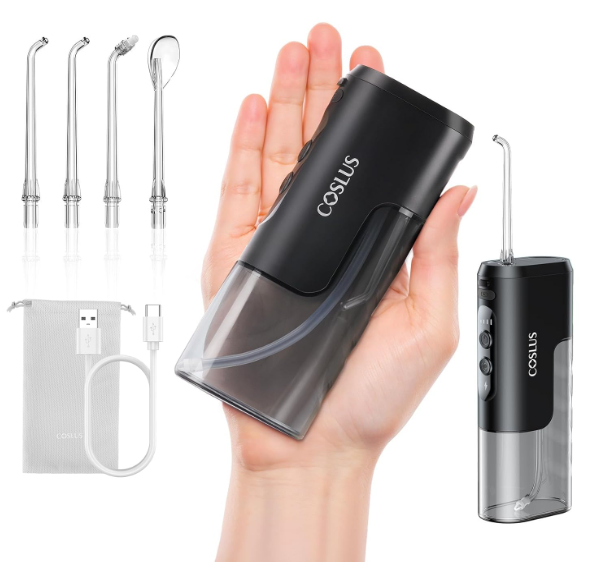
A water flosser is like a pressure washer for your teeth—small, powerful, and incredibly effective when it works. But what happens when your Coslus water flosser suddenly refuses to charge? One day it’s blasting away plaque and food debris, and the next it’s sitting on your bathroom counter like a lifeless brick.
If you’re dealing with a Coslus water flosser not charging, don’t panic. In many cases, the problem is easier to fix than you might think. Whether the device won’t turn on, shows no charging indicator, or stops holding a charge altogether, we’ll walk through every possible cause and solution.
This comprehensive guide explores the most common charging issues, step-by-step troubleshooting methods, maintenance tips, and when it’s time to replace your device.
Why Is My Coslus Water Flosser Not Charging?
Before diving into solutions, let’s understand the problem.
A charging failure can occur because of:
- Damaged charging cable
- Faulty USB adapter
- Dirty charging port
- Moisture buildup
- Battery degradation
- Internal circuit malfunction
- Power source issues
- Manufacturing defects
Think of the charging system as a chain. If one link breaks, the entire process stops working.
Understanding How a Coslus Water Flosser Charges
Most Coslus water flossers use:
- USB charging technology
- Rechargeable lithium-ion batteries
- Waterproof sealed construction
- LED charging indicators
Unlike traditional electric toothbrushes with charging docks, many Coslus models rely on direct USB charging.
This design offers convenience but also introduces potential charging-port issues over time.
Signs Your Coslus Water Flosser Has Charging Problems
No Charging Light Appears
One of the most obvious warning signs is the absence of an LED indicator when plugged in.
Possible causes include:
- Dead outlet
- Damaged cable
- Faulty battery
- Internal electronics issue
Device Charges Extremely Slowly
A healthy water flosser typically charges within several hours.
If charging takes significantly longer:
- Adapter output may be insufficient
- Cable could be deteriorating
- Battery health may be declining
The Battery Drains Immediately
If your flosser works only for a few minutes after charging, the battery may no longer hold sufficient capacity.
This usually points to battery wear rather than charging failure.
Intermittent Charging Connection
Does the charging light flicker on and off?
That often indicates:
- Loose connection
- Dirty charging contacts
- Damaged USB port
Check the Power Source First
Test Another Outlet
Sometimes the simplest answer is the correct one.
Plug the adapter into another outlet and observe whether charging begins.
Many people assume the flosser is defective when the actual problem is the power source.
Try Another USB Adapter
Not all USB adapters provide the same output.
Switch to another adapter and verify compatibility.
Avoid:
- Damaged chargers
- Cheap aftermarket adapters
- High-voltage fast chargers not recommended by the manufacturer
Inspect the Charging Cable Carefully
Look for Physical Damage
Examine the cable for:
- Frayed sections
- Bent connectors
- Exposed wiring
- Cracks in insulation
Even minor damage can prevent proper charging.
Use an Alternative Compatible Cable
If your model supports removable USB cables, test another compatible cable.
A defective cable is among the most common charging failures.
How to Clean the Charging Port
Why Charging Ports Get Dirty
Bathrooms are humid environments.
Over time:
- Toothpaste residue
- Dust
- Water minerals
- Soap particles
can accumulate inside charging areas.
Safe Cleaning Method
Follow these steps:
- Turn off the device.
- Disconnect all power sources.
- Use a dry microfiber cloth.
- Remove visible debris carefully.
- Allow the area to dry completely.
Avoid inserting metal objects into the charging port.
Water Damage Can Affect Charging
Waterproof Does Not Mean Invincible
Many users assume waterproof means indestructible.
In reality:
- Waterproof seals can wear out.
- Charging covers can loosen.
- Repeated exposure can compromise protection.
Even small amounts of moisture may interfere with charging.
How to Dry the Device Properly
If water intrusion is suspected:
- Leave the device off.
- Open charging-port covers.
- Store in a dry location.
- Wait 24–48 hours before charging.
Patience often saves the device.
Understanding Battery Degradation
Lithium-Ion Batteries Wear Over Time
Every rechargeable battery ages.
Factors accelerating battery decline include:
- Frequent full discharges
- Excessive heat
- Overcharging
- Long-term storage without use
Eventually, capacity drops below usable levels.
Average Battery Lifespan
Most rechargeable water flossers provide:
- Hundreds of charging cycles
- Several years of normal use
Heavy daily usage may shorten lifespan.
Resetting Your Coslus Water Flosser
Can a Reset Fix Charging Issues?
Sometimes software or internal control systems become unresponsive.
A reset can restore normal operation.
General Reset Procedure
While procedures vary by model:
- Disconnect charging cable.
- Hold the power button for 10–20 seconds.
- Release and wait.
- Reconnect charger.
If charging resumes, the issue may have been temporary.
Common User Mistakes That Prevent Charging
Using the Wrong Charger
Many devices look compatible but provide different electrical outputs.
Using an incompatible charger may:
- Prevent charging
- Cause slow charging
- Damage internal components
Ignoring Moisture Near the Charging Port
Water and electricity are not good companions.
Even tiny droplets can disrupt charging performance.
Charging in Hot Environments
Heat is the silent enemy of batteries.
Avoid charging:
- Near heaters
- In direct sunlight
- Inside hot vehicles
Cool environments promote battery health.
How Long Should a Coslus Water Flosser Charge?
Charging times vary by model.
Generally:
| Condition | Expected Result |
|---|---|
| Low battery | Several hours |
| Near empty battery | Longer charge time |
| Healthy battery | Consistent charging |
| Aging battery | Unpredictable charging |
If charging never completes, further troubleshooting is required.
LED Charging Indicator Problems
Indicator Light Never Turns On
Possible explanations include:
- Dead battery
- Damaged charger
- Internal circuit fault
Indicator Light Stays On Forever
A continuously illuminated charging light may indicate:
- Charging-controller malfunction
- Battery calibration issue
Indicator Light Flashes Unexpectedly
Flashing LEDs often signal:
- Low battery
- Charging interruption
- Internal protection mode
Consult the specific user manual for indicator meanings.
When the Battery Is Completely Dead
Deep Discharge Situation
Lithium-ion batteries sometimes enter protection mode after prolonged discharge.
Symptoms include:
- No lights
- No response
- No apparent charging activity
Recovery Attempt
Try leaving the device connected to power longer than usual.
Some batteries require time before the charging system activates.
Internal Hardware Failures
Charging Port Damage
Frequent plugging and unplugging can wear charging ports.
Signs include:
- Loose connector
- Inconsistent charging
- Visible physical damage
Battery Connection Failure
Inside the unit, battery connections may loosen due to:
- Impact
- Manufacturing defects
- Age-related wear
These repairs typically require professional assistance.
Should You Open the Device Yourself?
Risks of DIY Repairs
Opening a sealed water flosser can:
- Void warranties
- Damage waterproof seals
- Create safety risks
For most users, internal repairs are not recommended.
When DIY Makes Sense
Basic maintenance is fine:
- Cleaning
- Cable replacement
- Charger testing
Internal electrical repairs are best left to professionals.
Checking Warranty Coverage
Review Your Purchase Information
Before replacing the device, verify:
- Purchase date
- Warranty period
- Retailer return policy
You may qualify for repair or replacement.
Information to Prepare
Customer support may request:
- Model number
- Order confirmation
- Photos or videos
- Description of the issue
Keeping these details ready speeds up the process.
How to Contact Coslus Support
If troubleshooting fails:
- Gather proof of purchase.
- Document the issue.
- Contact customer service.
- Follow diagnostic instructions.
Support teams often identify solutions that users overlook.
Preventing Future Charging Problems
Keep the Charging Area Dry
Always:
- Wipe the device after use
- Close protective covers
- Store in a ventilated location
Avoid Full Battery Depletion
Recharge before the battery reaches critically low levels.
This practice helps maximize battery longevity.
Use Original Accessories
Original charging equipment provides:
- Proper voltage
- Correct current
- Improved reliability
Third-party accessories sometimes create unnecessary complications.
Perform Routine Maintenance
A monthly inspection can prevent larger issues.
Check:
- Charging port
- Cable condition
- Battery performance
- Water seals
Small preventive actions often extend device life significantly.
When Replacement Is the Better Option
Sometimes repairs cost more time and effort than replacement.
Consider replacing the unit when:
- Battery no longer holds a charge
- Internal electronics fail
- Repair costs approach replacement cost
- Device is several years old
Technology evolves, and newer models often offer improved battery efficiency and performance.
Final Thoughts
A Coslus water flosser not charging can feel frustrating, especially when oral hygiene routines depend on it. Fortunately, most charging issues stem from simple causes such as faulty cables, dirty charging ports, incompatible adapters, or moisture exposure.
By systematically checking the power source, inspecting the cable, cleaning the charging area, and understanding battery behavior, we can often restore normal operation without replacing the device. If troubleshooting fails, warranty support or replacement may be the most practical path forward.
Think of your water flosser like a trusted toothbrush partner. With proper care, regular maintenance, and mindful charging habits, it can continue delivering powerful cleaning performance for years.
Frequently Asked Questions
1. Why is my Coslus water flosser not showing a charging light?
The most common causes include a faulty cable, defective adapter, dirty charging port, dead battery, or internal hardware failure.
2. How do I know if my Coslus battery is dead?
If the device won’t turn on, won’t charge, and shows no LED activity after testing multiple chargers, the battery may have failed.
3. Can water damage stop my Coslus water flosser from charging?
Yes. Even waterproof devices can experience charging issues if moisture enters the charging area or internal electronics.
4. How long should I charge a Coslus water flosser?
Most models require several hours for a full charge, though exact times vary by model and battery condition.
5. Should I replace my Coslus water flosser if it won’t charge?
Not immediately. First test the charger, cable, outlet, and charging port. If none resolve the issue and the battery is old, replacement may be the most cost-effective solution.