
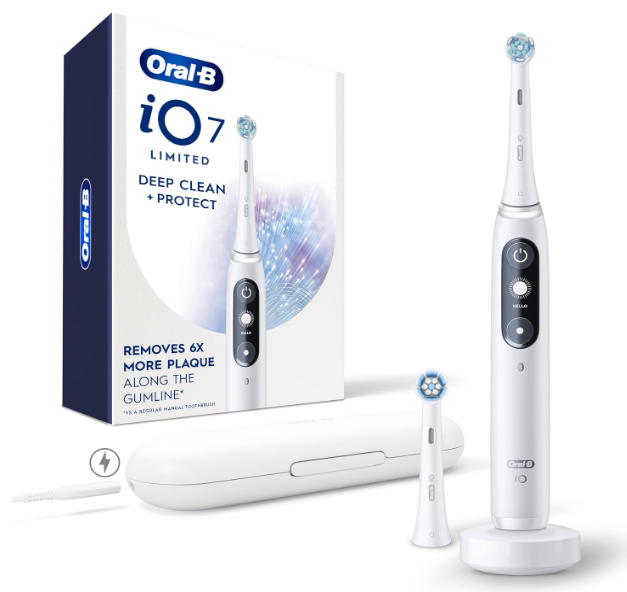
The Oral-B iO7 is an advanced electric toothbrush designed to make brushing smarter, more comfortable, and more effective. One of its most useful features is the illuminated Smart Pressure Sensor, which changes color depending on how you brush.
However, if your toothbrush suddenly starts flashing blue, glowing red, or displaying an orange light, you might wonder whether something is wrong.
The good news is that most Oral-B iO7 lights are completely normal. They provide information about brushing pressure, Bluetooth connectivity, battery status, and the toothbrush’s operating condition.
In this guide, we’ll explain the meaning of every Oral-B iO7 light, what the different display symbols indicate, and how to troubleshoot unusual flashing patterns.
Oral-B iO7 Lights Meaning: Quick Reference Chart
Before exploring each light individually, here’s a quick overview of the colors you may encounter on your Oral-B iO7.
| Light color | Meaning | What to do |
|---|---|---|
| 🟢 Green | Correct brushing pressure | Keep brushing normally |
| 🔴 Red | Excessive brushing pressure | Reduce pressure |
| ⚪ White | Insufficient pressure or normal operating light | Apply slightly more pressure if brushing |
| 🔵 Blue | Bluetooth pairing activity | Connect using the Oral-B app |
| 🟠 Orange | Operating error or warning | Check the toothbrush display |
| 🔴 Red when not brushing | May indicate low battery | Check battery status and recharge |
| ⚪ Charging indicator | Battery is charging | Leave the toothbrush on its charger |
An important detail is that the same color can mean different things depending on when it appears.
For example, a red light during brushing generally indicates excessive pressure, while a red low-battery indication when the toothbrush is not in use signals that the battery needs attention.
Understanding the Oral-B iO7 Smart Light Ring
The Oral-B iO7 has a circular illuminated ring near the upper part of the handle. This is part of its Smart Pressure Sensor system.
Unlike basic electric toothbrushes that simply warn when you’re brushing too hard, the iO7 can distinguish between three pressure levels:
- Too little pressure.
- The recommended brushing pressure.
- Excessive pressure.
This makes the light ring more than a decorative feature. It acts as a real-time brushing assistant.
When used correctly, these visual signals can help us maintain more consistent brushing habits without pressing too firmly against the teeth and gums.
Why the pressure sensor matters
Brushing harder does not necessarily clean your teeth better.
Excessive pressure, particularly when combined with aggressive brushing habits, may contribute to gum irritation and tooth wear.
The Oral-B iO7 addresses this issue by providing visual feedback and reducing brush head movement under excessive pressure in selected cleaning modes.
The goal is simple: allow the powered brush head to do the cleaning while we guide it gently along the teeth.
Oral-B iO7 Green Light Meaning
A green light is generally the most reassuring color you can see while using your Oral-B iO7.
It indicates that you’re applying the recommended amount of brushing pressure.
What happens when the green light appears?
When the toothbrush detects appropriate pressure, the illuminated ring turns green.
This means you’re pressing firmly enough for the brush head to maintain effective contact with the teeth without applying excessive force.
You should continue brushing normally, moving slowly from tooth to tooth.
Is the green light supposed to stay on?
Not necessarily.
The light might alternate between green and white as you move around your mouth.
This happens because brushing pressure naturally changes depending on the position of the brush head.
For example, reaching the back molars may involve a different hand position than cleaning the front teeth.
An occasional change in color is normal.
Our recommendation: Aim to see the green light regularly, but don’t force it to remain green throughout the entire brushing session.
Oral-B iO7 Red Light Meaning
The red light is one of the most important warning signals on the Oral-B iO7.
During brushing, it usually means you’re pressing too hard against your teeth or gums.
Why does the Oral-B iO7 turn red?
The Smart Pressure Sensor detects when the pressure exceeds the recommended level.
When this happens, the light ring turns red to warn you.
Depending on the cleaning mode, the toothbrush may also reduce its brush head movement to limit excessive brushing force.
How to fix the red light while brushing
If the light turns red:
- Reduce the force you’re applying to the toothbrush.
- Hold the handle comfortably without gripping it too tightly.
- Allow the oscillating brush head to clean your teeth.
- Move slowly from one tooth to another.
- Watch for the light to change from red to green.
You shouldn’t need to scrub vigorously when using an electric toothbrush.
What if the red light stays on?
If your Oral-B iO7 remains red even when you’re barely touching your teeth, there may be a problem with the pressure detection system.
Try removing the brush head and rinsing the connection area to eliminate toothpaste residue or debris.
After cleaning, dry the handle and test the toothbrush again.
If the red light continues appearing without pressure, the sensor may require professional inspection.
Can a red light also mean low battery?
Yes.
The iO7 can use red illumination as a low-battery warning outside its normal pressure-feedback function.
To distinguish between the two situations, check whether you’re actively brushing and whether the display shows a battery warning.
If the battery is nearly empty, place the toothbrush on its charger.
Oral-B iO7 White Light Meaning
A white light on the Oral-B iO7 is generally associated with normal operation or insufficient brushing pressure.
During brushing, white usually indicates that you’re not applying quite enough pressure for the sensor to register the recommended level.
What should you do when the light is white?
Try increasing the pressure very slightly.
The goal is to reach the green indication without forcing the brush head against your teeth.
It’s important to distinguish between applying appropriate pressure and pressing aggressively.
If the light changes to green, you’ve reached the recommended pressure range.
Can you change the white light to another color?
Yes. The Oral-B iO7 supports customization of its normal operating light through its available settings and compatible Oral-B app features.
Depending on the configured options, the default white ring can be replaced with another color.
For example, you might prefer purple, blue, or another available customization option.
However, the dedicated green and red pressure indications retain their specific meanings.
This means a personalized ring color doesn’t eliminate the toothbrush’s pressure-sensing functionality.
Oral-B iO7 Blue Light Meaning
A blue light on your Oral-B iO7 is associated with Bluetooth pairing.
The toothbrush supports wireless connectivity, allowing it to communicate with the Oral-B app on a compatible smartphone.
When the blue light appears during pairing, it normally indicates that the toothbrush is attempting to establish a wireless connection.
Why is my Oral-B iO7 flashing blue?
A flashing blue light typically appears when Bluetooth pairing is active.
Common situations include:
- Connecting the toothbrush to the Oral-B app for the first time.
- Reconnecting after changing smartphones.
- Pairing the toothbrush again after removing a previous connection.
- Initiating Bluetooth setup through the toothbrush settings.
A temporary flashing blue light is therefore not usually a mechanical fault.
How to stop the flashing blue light
If your Oral-B iO7 keeps flashing blue and won’t connect, try the following:
- Make sure Bluetooth is enabled on your smartphone.
- Open the Oral-B app.
- Wake up the toothbrush by pressing its power button.
- Follow the app’s instructions to connect the toothbrush.
- Keep the toothbrush close to the smartphone during pairing.
- Restart the app or phone if the connection fails.
If the toothbrush was previously paired with another device, you may need to remove the old connection before pairing again.
Does flashing blue mean the toothbrush needs charging?
No.
Blue illumination is primarily associated with Bluetooth connectivity rather than low battery.
If you’re concerned about the battery, check the battery symbol on the toothbrush display.
Oral-B iO7 Orange Light Meaning
An orange light can be more concerning because it is associated with an error indication.
On the Oral-B iO7, the orange Smart Pressure Sensor light generally tells us that the toothbrush has detected an operating issue.
The most important thing is to read any message appearing on the interactive display.
Why is my Oral-B iO7 flashing orange?
An orange warning may be associated with an operating condition that needs attention.
Some error messages can relate to charging or using the toothbrush outside its recommended operating temperature limits.
However, the color alone doesn’t identify the exact fault.
Unlike the green and red pressure indicators, an orange warning should be interpreted alongside the screen message.
How to fix an orange light on the Oral-B iO7
Start with these steps:
- Stop using the toothbrush temporarily.
- Check the interactive display for an error message.
- Remove the toothbrush from the charger if the warning occurred while charging.
- Allow the handle to return to normal room temperature if it feels unusually hot or cold.
- Inspect the charger and handle for visible damage.
- Try turning the toothbrush on again.
If the warning repeatedly returns, contact Oral-B support rather than attempting to open or repair the sealed handle.
Does orange mean the brush head needs replacing?
Not necessarily.
This is a common source of confusion because some Oral-B iO models use a yellow or orange-looking indicator near the mode button to signal brush head replacement.
The iO7 has an interactive display that can show a dedicated brush head replacement reminder.
Therefore, an orange light on the iO7’s main Smart Pressure Sensor ring should not automatically be interpreted as a brush head replacement signal.
Oral-B iO7 Charging Lights Explained
Charging indicators are another important part of understanding your toothbrush.
The Oral-B iO7 uses a rechargeable battery and, in typical iO7 magnetic-charger configurations, takes approximately three hours to reach a full charge.
What does the flashing charging indicator mean?
When you place your toothbrush on the charger, the handle can display a charging indication and battery status information.
This lets you know that the charger is supplying power.
A charging animation or changing battery indicator is normal while charging is in progress.
How do you know when the Oral-B iO7 is fully charged?
Once charging is complete, the battery indicator shows that the battery is full.
The indicator may remain illuminated briefly and then switch off automatically.
On compatible iO7 versions, the charging indicator can remain lit for approximately ten seconds before turning off.
A light switching off after charging does not necessarily mean that charging has stopped unexpectedly.
What if the charging light doesn’t appear?
If you place your Oral-B iO7 on the charger and nothing happens, check the following:
- Make sure the charger is connected to a working electrical outlet.
- Confirm the toothbrush is properly positioned on the charging base.
- Inspect the charger for moisture, dirt, or visible damage.
- Allow time for a deeply discharged battery to respond.
- Try another suitable outlet.
If the toothbrush still doesn’t respond after an appropriate charging attempt, there may be a problem with the battery, charger, or internal electronics.
Oral-B iO7 Display Symbols and Their Meanings
Apart from its colored light ring, the Oral-B iO7 has an interactive display that communicates additional information.
Understanding these symbols can make it much easier to identify whether your toothbrush is operating normally.
| Display symbol or indication | Meaning |
|---|---|
| Battery icon | Remaining battery charge |
| Bluetooth symbol | Wireless connectivity settings |
| Timer | Current brushing duration |
| Smiley face | Feedback following a brushing session |
| Brush head reminder | Brush head replacement may be needed |
| Cleaning mode icon | Currently selected brushing program |
| Settings icon | Access to customization and device settings |
| Error message | A condition requiring attention |
Battery status symbol
The battery symbol provides information about the remaining charge.
It may appear after brushing, during charging, or when the battery is running low.
If the battery indication is low, recharge the toothbrush before it becomes completely discharged.
Smiley face symbol
The iO7 can display a smiley face as part of its post-brushing feedback.
This is designed to give you a quick visual assessment of the brushing session.
However, a smiley face should not be treated as a dental health diagnosis.
It’s simply part of the toothbrush’s feedback system.
Brush head replacement symbol
The brush head reminder indicates that it may be time to install a replacement head.
Oral-B generally recommends changing brush heads approximately every three months, or sooner when the bristles become visibly worn or splayed.
This reminder is especially useful because worn brush heads may not clean as effectively.
Timer symbol
The timer displays how long you’ve been brushing.
The iO7 supports a two-minute brushing routine, with pacing feedback to help distribute brushing time.
Most adults are advised to brush for two minutes twice daily using fluoride toothpaste.
Oral-B iO7 Flashing Lights: What Is Normal and What Isn’t?
Flashing lights aren’t automatically a warning.
The important question is when the light flashes and whether the toothbrush continues operating normally.
Normal flashing or changing lights
These commonly include:
- Blue light during Bluetooth pairing.
- Charging activity while the battery is replenishing.
- Changes between white, green, and red during brushing.
- Temporary light activity when activating the toothbrush.
These are generally expected behaviors.
Flashing lights that deserve attention
Other patterns may require troubleshooting.
For example, an orange error indicator accompanied by a warning message should be investigated.
Similarly, a red pressure warning that remains illuminated without brushing pressure may indicate residue buildup or a sensor issue.
A toothbrush that repeatedly switches off, fails to charge, or displays persistent error messages should also be checked.
How to Change the Oral-B iO7 Light Ring Color
One of the iO7’s convenient personalization features is the ability to change its normal light ring color.
This can be useful if you prefer a particular color or want to distinguish between settings and users.
Changing the color through the toothbrush settings
Depending on the software and configuration, you can adjust the ring color through the handle’s settings menu.
The general process is:
- Wake up the toothbrush display.
- Use the mode button to navigate to Settings.
- Open the light ring color option.
- Select your preferred available color.
- Confirm the selection.
Changing the color using the Oral-B app
You may also be able to customize the light ring through the compatible Oral-B app.
Make sure the toothbrush is connected via Bluetooth, then look for the device personalization or light ring settings.
Remember that changing the standard light color does not change the meaning of the green and red pressure alerts.
Why Is My Oral-B iO7 Light Not Working?
Sometimes the issue isn’t an unexpected color but the complete absence of light.
If your Oral-B iO7 display or pressure ring stops illuminating, several factors could be responsible.
1. The battery is completely discharged
A deeply discharged battery may prevent the display and light ring from functioning normally.
Place the toothbrush on its compatible charger and allow it to charge.
For a full charge, the iO7 typically needs approximately three hours.
2. The toothbrush isn’t charging correctly
Check that the charging base is connected and that the toothbrush is seated correctly.
A damaged power cable or faulty outlet can interrupt charging.
3. The toothbrush needs to wake up
The display may switch off when the toothbrush is inactive to conserve energy.
Try pressing the power button to wake the device.
If it remains unresponsive, place it on the charger.
4. Moisture or residue is affecting operation
Although the Oral-B iO7 is designed for normal bathroom use, toothpaste buildup and residue around the brush head connection can interfere with proper operation.
Cleaning the handle regularly can help prevent such problems.
5. There may be an internal fault
If the toothbrush has been charged correctly but the lights and display remain completely inactive, an internal component may have failed.
In that situation, contacting authorized support is preferable to attempting a DIY electrical repair.
Oral-B iO7 Light Ring Not Changing Color
Another problem users sometimes encounter is a light ring that doesn’t respond to changes in brushing pressure.
For example, the ring might remain white even when you press harder, or it might stay red throughout the session.
Check whether you’re using the correct brushing mode
Some functions and operating modes affect pressure feedback.
For example, certain iO models deactivate Smart Pressure Sensor feedback during Tongue Clean mode, and some app-guided features may temporarily alter how the ring responds.
Check the selected cleaning mode before assuming the sensor is faulty.
Remove toothpaste buildup
Residue around the brush head connection may affect the pressure sensor.
Remove the brush head, rinse the accessible connection area, and allow excess water to drain.
Avoid using sharp objects or attempting to dismantle the sensor.
Restart the toothbrush
Turn off the device and try using it again.
If the problem continues, check the available settings and consider performing a factory reset according to the instructions for your specific iO7 version.
Keep in mind that a factory reset may remove customized settings and require Bluetooth pairing again.
How to Use the Oral-B iO7 Lights for Better Brushing
Once you understand what the different colors mean, you can use them to develop a more consistent daily routine.
Start with gentle pressure
Place the brush head against your teeth before switching on the toothbrush.
Begin gently and watch the Smart Pressure Sensor.
If the light remains white, increase the contact pressure slightly.
When it turns green, you’ve reached the recommended range.
Avoid excessive force
If the light becomes red, reduce pressure immediately.
You don’t need to press hard to clean effectively.
Instead, guide the brush head along the tooth surfaces and gumline.
Use the two-minute timer
Divide your mouth into four sections and spend approximately 30 seconds brushing each section.
The timer and pacing feedback can help you maintain a balanced routine.
Monitor your battery
Check the battery indicator periodically rather than waiting for the toothbrush to stop working.
This is particularly useful before traveling.
Replace worn brush heads
A worn brush head can reduce cleaning performance, regardless of how accurately you’re following the pressure indicators.
Inspect the bristles regularly and replace the head when necessary.
Common Oral-B iO7 Light Problems and Quick Solutions
| Problem | Possible cause | Recommended solution |
|---|---|---|
| Red light during brushing | Excessive pressure | Brush more gently |
| Red light when not brushing | Low battery | Recharge and check battery icon |
| White light while brushing | Insufficient pressure | Increase contact pressure slightly |
| Green light keeps disappearing | Pressure varies while brushing | Maintain a gentle, consistent technique |
| Flashing blue light | Bluetooth pairing | Complete pairing in the app |
| Blue light won’t stop during pairing | Connection problem | Restart pairing and check phone Bluetooth |
| Orange warning light | Operating error | Read the display message |
| No charging indication | Charging or power issue | Check charger and outlet |
| No display or ring illumination | Low battery or internal fault | Charge fully and test again |
| Brush head reminder | Replacement interval reached | Install a new compatible brush head |
How to Prevent Oral-B iO7 Light and Sensor Problems
Proper maintenance can help keep the toothbrush’s electronic features working correctly.
A few simple habits make a difference.
Clean the toothbrush after every use
Remove the brush head and rinse both the head and the accessible handle connection area.
This helps eliminate toothpaste and saliva residue.
Allow the components to dry appropriately before storing them.
Keep the charger clean
Wipe the charging base periodically according to the manufacturer’s care instructions.
Always disconnect it from power before cleaning.
Avoid immersing the charger or power components in water.
Avoid extreme temperatures
Recharge and store the toothbrush within its recommended temperature range.
Extremely hot or cold conditions can affect rechargeable battery performance and may trigger operating warnings.
Use compatible accessories
Choose brush heads designed specifically for the Oral-B iO system.
Standard Oral-B replacement heads are not interchangeable with the iO brush head attachment system.
Compatible accessories help maintain proper mechanical operation and cleaning performance.
Frequently Asked Questions About Oral-B iO7 Lights
1. What does a flashing blue light mean on the Oral-B iO7?
A flashing blue light usually indicates Bluetooth pairing activity. The toothbrush is attempting to connect to a compatible smartphone through the Oral-B app. If the light continues flashing without connecting, check your phone’s Bluetooth settings and restart the pairing process.
2. Why does my Oral-B iO7 flash red when I brush?
A red light during brushing means the Smart Pressure Sensor has detected excessive pressure. Reduce the force you’re applying until the light changes to green. If a red warning appears outside brushing, check whether the battery is low.
3. What does the orange light on my Oral-B iO7 mean?
An orange light on the iO7 Smart Pressure Sensor ring generally indicates an operating error or warning. Check the interactive display for further information. Don’t automatically assume it means the brush head needs replacing, because the iO7 also has a separate brush head replacement reminder.
4. Why is my Oral-B iO7 light white instead of green?
A white light during brushing generally means you’re applying less pressure than the toothbrush’s recommended range. Increase the pressure slightly until the ring changes to green. If you’ve customized the normal light ring color, another selected color may appear instead of white.
5. How do I know when my Oral-B iO7 is fully charged?
The Oral-B iO7 displays battery status through its charging indicators and interactive display. A full charge typically takes approximately three hours with the appropriate magnetic charger. Once charging is complete, the indicator may remain illuminated briefly before switching off automatically.
Conclusion: Understanding Your Oral-B iO7 Lights
Understanding the Oral-B iO7 lights meaning makes it much easier to use your electric toothbrush correctly and recognize potential problems.
The most important colors to remember are green, red, and white. These represent the recommended brushing pressure, excessive pressure, and insufficient pressure respectively.
Blue is associated with Bluetooth pairing, while orange generally signals an operating warning that should be checked on the display.
Battery indicators, brush head replacement reminders, and brushing feedback symbols provide additional information to help maintain your toothbrush.
Ultimately, we don’t need to worry every time the Oral-B iO7 changes color. Most of its lights are designed to guide us toward more effective brushing.
The best habit is to aim for a green pressure indicator, respond to genuine warning messages, and keep the toothbrush clean and properly charged.