
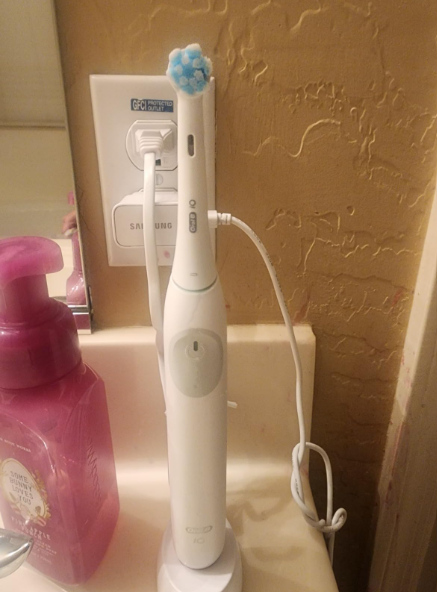
Let’s be honest—there’s nothing more frustrating than grabbing your toothbrush in the morning, pressing the button, and being greeted by a blinking red light instead of a fresh, minty clean.
We’ve all been there. That tiny red signal feels like your toothbrush is trying to tell you something… but what exactly?
In this guide, we’ll break it all down in plain English. No jargon. No confusion. Just real answers about the Oral-B iO Series 2 blinking red light, why it happens, and how you can fix it without losing your cool.
What Does the Blinking Red Light Mean on Oral-B iO Series 2?
Let’s start with the obvious question: Is your toothbrush broken?
Not necessarily.
The blinking red light is your toothbrush’s way of waving a little red flag. It’s not random—it’s actually communicating something important.
The Most Common Meanings
- Low battery
- Charging issue
- Internal fault or error
- Temperature warning (rare but possible)
Think of it like your phone battery warning—but with a bit more attitude.
Low Battery Warning: The Most Common Culprit
Why It Happens
In most cases, a blinking red light simply means your toothbrush is running out of juice.
And let’s be real—this is the most common reason. If you haven’t charged your brush in a few days, this is probably your answer.
What It Looks Like
- Red light blinking slowly
- Reduced vibration power
- Brush may turn off quickly
How to Fix It
- Place the brush on the charger
- Let it charge for at least 12–16 hours
- Avoid removing it too early
Simple fix, right? But what if it still blinks red?
Let’s keep going.
Charging Problems: When It Won’t Power Up Properly
Now things get a bit more interesting.
If your Oral-B iO Series 2 keeps blinking red even while charging, the issue might not be the battery—it could be the charging system.
Possible Causes
- Dirty charging contacts
- Faulty charger base
- Misaligned brush placement
- Power outlet issues
Quick Fix Checklist
- Clean the metal contacts with a dry cloth
- Try a different outlet
- Ensure the brush is properly seated
- Test another compatible charger if possible
Sometimes, it’s not the brush—it’s the “bed” it sleeps on.
Internal Error or Fault Warning
When the Red Light Means Trouble
If the blinking red light persists even after charging, your toothbrush might be signaling an internal issue.
This is less common—but it happens.
Signs of an Internal Fault
- Continuous red blinking
- No response when pressing the power button
- Unusual vibrations or noises
What You Can Do
- Reset the toothbrush (we’ll explain how below)
- Fully discharge and recharge the battery
- Contact support if the issue continues
At this point, your toothbrush isn’t just tired—it’s asking for help.
How to Reset Your Oral-B iO Series 2
Think of this like restarting your phone when it freezes.
Step-by-Step Reset
- Hold the power button for 10–15 seconds
- Release and wait a few seconds
- Try turning it on again
What This Does
- Clears minor glitches
- Resets internal electronics
- Fixes temporary errors
Sometimes, a simple reset works like magic.
Battery Health: The Silent Problem
Why Batteries Degrade Over Time
Even high-quality batteries don’t last forever.
If you’ve been using your toothbrush for a long time, the battery might not hold a charge properly anymore.
Warning Signs
- Charges quickly but drains fast
- Red light appears frequently
- Reduced brushing power
Your Options
- Replace the toothbrush (most common solution)
- Check warranty coverage
It’s like an old phone battery—it still works, just not like it used to.
Overheating Issues: A Rare but Real Cause
Yes, Your Toothbrush Can Overheat
This doesn’t happen often, but it’s worth mentioning.
If the device gets too warm, it may flash red as a safety precaution.
What to Do
- Let it cool down for 30 minutes
- Avoid charging in hot environments
- Keep it away from direct sunlight
Your toothbrush isn’t dramatic—it’s just protecting itself.
Water or Moisture Problems
Can Water Cause the Red Light?
Ironically, yes—even though it’s designed for the bathroom.
If water seeps into sensitive areas, it can trigger warning signals.
Signs of Moisture Issues
- Random blinking red light
- Inconsistent performance
- Charging problems
Fix It
- Dry the handle thoroughly
- Avoid submerging it completely
- Store it upright
Water is your friend—until it isn’t.
Charger Compatibility Issues
Not All Chargers Are Equal
Using the wrong charger can confuse your toothbrush.
Common Mistakes
- Using an older Oral-B charger
- Using third-party chargers
- Mixing models
Solution
- Use the original charger whenever possible
- Double-check compatibility
Your toothbrush is picky—and for good reason.
How Long Should It Take to Fully Charge?
Let’s clear this up.
Typical Charging Time
- Around 12–16 hours for a full charge
Battery Life Expectation
- Up to 10–14 days with normal use
If you’re charging overnight and still seeing red… something’s off.
Preventing the Blinking Red Light in the Future
Now that we’ve solved the problem, let’s make sure it doesn’t come back.
Smart Habits to Follow
- Charge regularly (don’t wait until it dies)
- Clean charging contacts weekly
- Avoid extreme temperatures
- Use original accessories
A little care goes a long way.
When Should You Replace Your Toothbrush?
Let’s be real—not every problem has a fix.
Time to Replace If:
- Battery no longer holds charge
- Red light persists after all fixes
- Device is over 2–3 years old
Sometimes, the best fix is a fresh start.
Is the Blinking Red Light Dangerous?
Short answer: No.
It’s just a warning—not a hazard.
Your toothbrush isn’t going to explode or shock you. It’s simply asking for attention.
Quick Troubleshooting Summary
If you’re in a hurry, here’s your cheat sheet:
Do This First
- Charge fully
- Check charger and outlet
- Clean contacts
Then Try
- Reset the device
- Let it cool down
- Dry it completely
Last Resort
- Replace or contact support
Final Thoughts: Don’t Ignore the Red Light
The blinking red light on your Oral-B iO Series 2 is like a quiet alarm—it’s easy to ignore, but it’s trying to help you.
Whether it’s a simple battery issue or something deeper, the good news is that most problems are easy to fix.
So next time you see that red blink, don’t panic.
Just follow the steps, stay calm, and get back to brushing like nothing happened.
FAQs About Oral-B iO Series 2 Blinking Red Light
1. Why is my Oral-B iO Series 2 blinking red even after charging?
This usually indicates a charging issue, battery degradation, or an internal fault. Try resetting the device and checking the charger.
2. How do I know if the battery is dead?
If it doesn’t hold a charge, drains quickly, or always shows a red light, the battery may be worn out.
3. Can I fix the battery myself?
Not easily. These toothbrushes aren’t designed for user battery replacement, so replacement is usually the best option.
4. Is it safe to use while blinking red?
Yes, but performance may be reduced. It’s better to charge it before use.
5. How often should I charge my toothbrush?
Every 7–10 days, depending on usage, to maintain optimal battery health.