
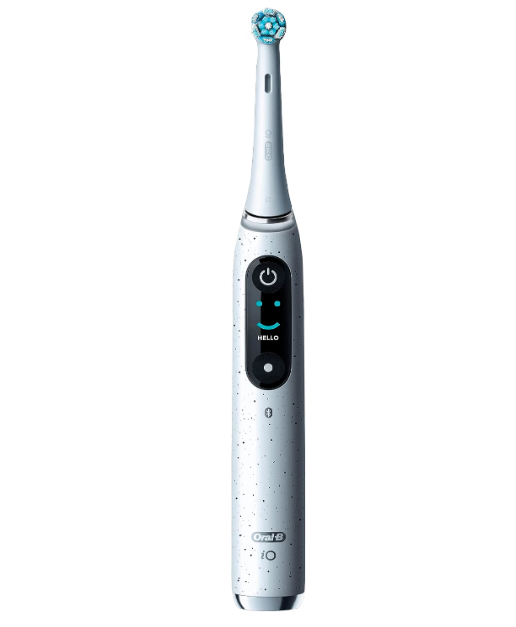
Packing an electric toothbrush sounds ridiculously simple. Put it in the case, drop it into the suitcase, and move on, right? Usually, yes. But anyone who has opened a bag to discover a toothbrush buzzing away like an angry bee knows why Oral B iO travel mode has become such a commonly searched feature.
The idea behind a travel lock or travel mode is simple: prevent the toothbrush from switching on accidentally while it is packed. That can protect battery life, prevent unnecessary noise, and save us from arriving at our destination with a nearly empty toothbrush.
There is one catch, though. Not every Oral-B iO toothbrush handles travel locking in exactly the same way. Some iO models have more sophisticated displays and menus, while simpler models have fewer controls. Oral-B has even confirmed that the iO Series 2 does not have a dedicated travel lock.
So instead of pretending there is one magical button combination that works for every Oral-B iO ever produced, let’s look at how Oral B iO travel mode works, how to determine whether your toothbrush supports it, how to pack your brush safely, and what to do when travel lock appears to be missing.
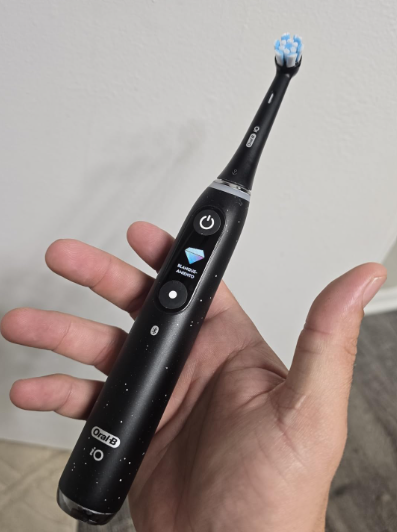
What Is Oral B iO Travel Mode?
When people talk about Oral B iO travel mode, they usually mean a travel lock, sometimes called a transport lock.
Its purpose is straightforward: it stops accidental button presses from starting the toothbrush while it is inside your luggage.
Think about what happens in a packed suitcase. Shoes, chargers, clothing, toiletry bottles, and other objects are pressed together. If something pushes against the toothbrush’s power button, the handle can potentially start running.
Without protection, that accidental activation can:
- consume battery power;
- create noise inside your suitcase;
- make the brush vibrate against other belongings;
- leave the toothbrush partially discharged when you arrive.
Travel lock essentially acts like putting a key on the ignition.
Is Travel Mode a Brushing Mode?
No.
This distinction causes plenty of confusion.
Oral-B iO toothbrushes may offer cleaning settings such as Daily Clean, Sensitive, Super Sensitive, Intense Clean, Gum Care, or Whitening depending on the model. Travel mode is different.
It does not alter how the toothbrush cleans your teeth.
It simply relates to transporting or locking the handle.
In other words:
Cleaning modes = how the toothbrush brushes.
Travel lock = how the toothbrush behaves while packed.
Travel Mode vs Airplane Mode
We also shouldn’t confuse travel mode with the airplane mode found on smartphones.
An electric toothbrush doesn’t generally need to enter some special flight setting before boarding an airplane. The practical concern is preventing accidental activation and transporting the battery-powered device correctly.
Travel lock is therefore mainly a convenience feature rather than an aviation setting.
Do All Oral-B iO Toothbrushes Have Travel Mode?
No, and this is arguably the most important point in this entire guide.
The Oral-B iO family includes multiple generations and Series numbers, and features vary substantially between models.
For example, Oral-B has directly stated in a product Q&A that the iO Series 2 does not have a travel lock. Oral-B notes that the model instead stops automatically after a limited period if it is accidentally activated.
That means instructions claiming that every iO can be travel-locked with exactly the same button sequence should be treated cautiously.
Why Instructions Differ Between iO Models
The differences make sense when we look at the range.
Some iO handles have:
- full interactive displays;
- separate power and mode controls;
- advanced on-handle settings;
- Bluetooth connectivity;
- premium charging accessories.
Other models use a much simpler interface.
As a result, an instruction that makes perfect sense on a premium iO model may be impossible to follow on an entry-level version because the interface simply isn’t there.
The Model Number Matters More Than the Name
Even knowing that we own an “Oral-B iO” isn’t always enough.
Oral-B’s service website recommends identifying products through the four-digit type number printed on the device. That number can then be used to locate the appropriate manual and compatible parts.
This is the safest approach whenever our toothbrush behaves differently from instructions found online.
How to Activate Oral B iO Travel Mode
If your specific Oral-B iO includes an on-handle travel-lock option, the setting is generally accessed through the toothbrush interface rather than by blindly experimenting with long button presses.
On models with an interactive screen, wake the handle and check its settings/menu for a lock or travel-related option. Select that function and confirm it using the controls provided on the handle.
Because the exact menu structure varies by model and software implementation, the toothbrush’s own display and official manual should take priority over a generic internet shortcut.
Basic Travel-Lock Procedure
For compatible models, the process typically follows this general logic:
- Wake the toothbrush without beginning a normal brushing session.
- Navigate through the available settings using the handle controls.
- Look for the travel-lock or lock symbol/function.
- Select the function.
- Confirm that the toothbrush indicates it has been locked.
- Test the power button briefly before packing the brush.
The last step is worth doing.
A five-second test at home is much better than discovering after a six-hour flight that the toothbrush spent half the journey vibrating inside your luggage.
How Do We Know the Lock Is Active?
Models equipped with displays may show some form of lock confirmation or lock-related indication.
The exact appearance can vary, so we shouldn’t rely on a specific icon described for another iO model.
Instead, try briefly pressing the normal activation control after locking it.
If travel lock is working, the toothbrush should not begin a normal brushing session in the usual way.
How to Turn Off Oral B iO Travel Mode
Unlocking should be just as straightforward as locking, although again the exact procedure depends on the iO model.
If the handle provides a travel-lock function through its display, wake the interface and follow the displayed instructions to disable the lock.
On some electronic products, holding a control temporarily unlocks them. On others, the lock is disabled from a menu.
Rather than repeatedly holding random button combinations, follow the prompts shown by your specific toothbrush.
Why Random Long Button Presses Aren’t a Great Idea
This is where many troubleshooting adventures begin.
Someone reads that holding a button for three, five, or ten seconds worked on a different toothbrush, tries the same thing, and suddenly their own handle behaves strangely.
Long button presses can sometimes trigger secondary functions, resets, shutdown behavior, or other actions.
So our rule is simple:
Use the documented travel-lock control for your exact model rather than experimenting with undocumented button combinations.
What If My Oral-B iO Does Not Have Travel Mode?
This isn’t necessarily a major problem.
The absence of a travel lock does not make an Oral-B iO unsuitable for travel. It simply means we need to depend more heavily on the physical travel case and sensible packing.
The iO Series 2, for example, has been specifically identified by Oral-B as lacking a travel lock.
Use a Rigid Travel Case
A hard toothbrush case is our first line of defense.
It protects the toothbrush against pressure from neighboring items while making it harder for random objects to press directly against the power button.
Several Oral-B iO packages include travel cases, although accessories vary by model and bundle. Oral-B’s iO Series 5 product listing, for example, includes a hard travel case in the package described on its U.S. site.
Pack the Handle So Nothing Presses the Button
Even inside a case, don’t cram the toothbrush into an overcrowded toiletry bag if the case itself can be compressed.
Give it a little room.
A suitcase packed like a brick isn’t doing our electronics any favors.
Oral B iO Travel Case Explained
The phrase “Oral B iO travel mode” also gets mixed up with another feature: the travel case.
These are separate things.
A travel lock is software or electronic protection against accidental activation.
A travel case is physical protection around the toothbrush.
Some iO configurations use basic cases, while premium configurations may be available with more sophisticated charging-related accessories.
Oral-B’s service listings show both regular travel cases and charging travel cases among accessories for selected iO models such as the iO7, iO8, iO9, and iO10.
Regular Travel Case
A normal hard travel case essentially serves as a shell.
Its job is to:
- keep the handle protected;
- isolate the toothbrush from other toiletries;
- reduce accidental button pressure;
- make packing cleaner and more organized.
Simple? Absolutely.
Useful? Very much so.
Charging Travel Case
A charging travel case adds another layer of convenience because compatible setups can allow us to manage charging while away from our normal bathroom setup.
However, not every iO comes with one.
Oral-B even provides dedicated support information for iO charging travel cases, which is another sign that we should distinguish the charging case from the toothbrush’s travel-lock functionality itself.
Should We Remove the Brush Head While Traveling?
Usually, separating the brush head from the handle is a smart packing habit when the case is designed to accommodate both pieces appropriately.
There are several advantages.
First, the toothbrush is easier to pack neatly.
Second, it reduces the possibility of bending damp bristles against the inside of a bag.
Third, removing the head makes it easier to dry both components.
Moisture is far more annoying than most people expect. Put a soaking-wet toothbrush into a sealed container for hours and the case can become a tiny sauna.
Dry It Before Packing
After brushing on departure morning:
- rinse the brush head thoroughly;
- shake away excess water;
- wipe the handle;
- allow the parts to air-dry when possible;
- place them into the travel case shortly before leaving.
We don’t need laboratory-level dryness. We simply want to avoid sealing everything inside while dripping wet.
Can an Oral-B iO Turn On Inside a Suitcase?
Yes, accidental activation is possible if the power control is pressed while the toothbrush is packed and the model does not have an active travel lock.
That is precisely why travel-lock functions and rigid travel cases are useful.
Imagine our suitcase rolling through an airport baggage system. It gets tilted, stacked, squeezed, bumped, and occasionally treated with the tenderness of a football.
A conveniently placed power button can become surprisingly inconvenient.
Will Accidental Activation Drain the Battery?
It can consume battery power, although the exact effect depends on how long the toothbrush operates and how its automatic behavior works.
Oral-B states that the iO Series 2, which lacks a travel lock, stops after five minutes if accidentally switched on.
That’s helpful, but repeatedly activating the brush could still waste charge.
For frequent travelers, preventing activation is better than relying on automatic shutdown.
Oral B iO Travel Mode Not Working
Suppose your toothbrush supposedly has a locking option but it still activates normally.
Don’t immediately assume the brush is defective.
Start with the simplest explanations.
Check Whether Your Model Actually Supports It
This should be step one.
Search for the four-digit type number on your handle and use Oral-B’s official service/manual system. Oral-B specifically provides a manual finder based on that product type number.
That avoids the classic mistake of following iO9 instructions on an iO2—or vice versa.
Confirm the Lock Was Actually Activated
Sometimes we’ve merely reached the travel-lock setting without confirming it.
If the display provides a confirmation step, complete it before leaving the menu.
Then test the handle.
Charge the Toothbrush
A very low battery can sometimes make electronic devices behave unexpectedly or make display feedback difficult to interpret.
If the handle seems completely unresponsive, charging it before continuing troubleshooting is sensible.
Consult the Manual Before Resetting
Resetting should not be our first reflex.
If ordinary menu navigation fails, check the official manual before attempting button combinations or resets.
That way we avoid turning a simple lock problem into a “why did my toothbrush suddenly reset?” problem.
Oral B iO Stuck in Travel Mode
The opposite problem can happen too: we arrive at the hotel, press the button, and nothing happens.
Before declaring the toothbrush dead, remember the most obvious possibility.
It might still be locked.
Try the documented unlocking procedure for your model.
If the display gives instructions, follow them.
If the handle appears completely dead, place it on its proper charger and verify that charging feedback appears.
Travel Lock vs Empty Battery
The symptoms can look similar:
Travel lock: the toothbrush intentionally refuses normal activation.
Empty battery: the toothbrush lacks enough power to operate.
Checking the charge indicator is therefore useful.
If the handle displays battery information but won’t start normally, a lock becomes more plausible.
If absolutely nothing appears after repeated normal attempts, charging should be our next move.
Can We Travel Without the Oral-B iO Charger?
Absolutely—provided the toothbrush has enough battery for the length of the trip.
For a short weekend, many users may not need to carry a charger at all.
That simplifies packing considerably.
The better approach is to charge the toothbrush fully before leaving rather than packing every bathroom cable we own “just in case.”
Oral-B describes the lithium-ion battery in models such as the iO Series 5 as suitable for travel and includes a low-charge indicator to show when recharging is needed.
When Bringing the Charger Makes Sense
Pack the charger when:
- the trip is relatively long;
- several people are sharing compatible equipment;
- the toothbrush isn’t fully charged before departure;
- you don’t want to think about battery conservation;
- you’re already carrying the appropriate charging accessories.
For a two-night trip, hauling every accessory may feel like bringing a generator to charge a smartwatch.
For two weeks abroad, the charger becomes much more reasonable.
Traveling Internationally With an Oral-B iO
International travel raises a different question: electrical compatibility.
Do not assume every toothbrush charger accepts every voltage simply because modern phone chargers often do.
Read the electrical specifications printed on the actual charger supplied with your toothbrush.
If its rated input covers the electrical supply at your destination, you may only need a physical plug adapter.
If it doesn’t, a plug adapter alone won’t solve the voltage difference.
Adapter vs Voltage Converter
These are not the same product.
A plug adapter changes the physical plug shape.
A voltage converter changes electrical voltage.
We should always check the charger’s input specification before connecting it abroad.
Can We Take an Oral-B iO on an Airplane?
Traveling with a rechargeable electric toothbrush is common, but airline and aviation-security requirements can differ depending on jurisdiction, itinerary, and battery-related rules.
The safest approach is to check the current guidance from the airline and relevant aviation-security authority if you’re unsure.
From a purely practical toothbrush perspective, the travel lock—or a rigid case when no lock exists—helps prevent unwanted activation during transport.
Carry-On or Checked Luggage?
A toothbrush is much easier to access in hand luggage, particularly after a long flight or during an overnight connection.
Keeping it accessible also means we’re less likely to end up without basic toiletries if checked luggage is delayed.
Whatever bag we choose, protect the power button and keep the handle secure.
Best Way to Pack an Oral-B iO
We can reduce most travel headaches with a simple routine.
Before leaving:
- Charge the toothbrush sufficiently for the trip.
- Rinse and dry the handle and brush head.
- Activate travel lock if your model provides it.
- Test that the brush doesn’t start normally after locking.
- Place it inside a rigid travel case.
- Keep wet toothpaste or toiletries separated.
- Bring the charger only when necessary.
- Check voltage compatibility for international trips.
That’s it.
Travel mode is useful, but good packing matters just as much.
Is Oral B iO Travel Mode Worth Using?
If our toothbrush provides the feature, yes.
There is virtually no downside to locking the handle before packing it.
It takes seconds and removes one small travel annoyance.
Travel locks are the toothbrush equivalent of locking a laptop screen before putting it away: most of the time nothing would have happened anyway, but the protection costs us almost nothing.
Frequent Travelers Benefit Most
For someone who travels once every two years, travel mode is a nice extra.
For someone who spends half the month in airports, hotels, trains, and rental cars, it becomes surprisingly valuable.
Tiny conveniences matter when repeated often.
The Travel Case Still Matters
Even with electronic locking enabled, we should use a case.
Travel mode doesn’t protect:
- the handle from impacts;
- the brush head from dirt;
- the device from spilled toiletries;
- the toothbrush from being crushed.
Electronic protection and physical protection work together.
Oral B iO Travel Mode: Common Mistakes to Avoid
Most problems aren’t complicated technical failures. They’re misunderstandings.
We see the same ones repeatedly:
- Assuming every Oral-B iO has the same travel-lock system.
- Following instructions written for a different Series number.
- Confusing brushing modes with travel mode.
- Confusing the charging travel case with travel lock.
- Packing the toothbrush wet.
- Using random long button presses hoping something will happen.
- Forgetting to test the lock before packing.
- Assuming a foreign plug adapter automatically solves voltage compatibility.
The fix is usually simple: identify the exact model first.
How to Find the Correct Oral-B iO Manual
This may be the most useful troubleshooting tip we can give.
Instead of searching only for “Oral B iO travel mode,” find the four-digit type number printed on your specific toothbrush.
Oral-B’s official service site allows users to search for manuals using that four-digit number.
That matters because the iO family covers many versions.
Your toothbrush’s manual outranks a YouTube tutorial, forum post, or guide written for a different model—including this one whenever a model-specific instruction differs.
Final Thoughts on Oral B iO Travel Mode
Oral B iO travel mode is a simple concept with one slightly messy reality: not every iO model supports it in the same way.
If your Oral-B iO provides a dedicated travel lock, activate it before placing the toothbrush in your luggage and confirm that the handle is actually locked.
If your model doesn’t include one, don’t panic. Oral-B has explicitly confirmed that models such as the iO Series 2 can lack a dedicated travel lock. A rigid travel case, careful button protection, and sensible packing still make the toothbrush perfectly manageable on the road.
The biggest mistake we can make is assuming that instructions for one iO automatically apply to another.
Find the model number. Check the proper manual. Lock it if the feature exists. Dry it. Pack it securely.
Then forget about the toothbrush and enjoy the trip.
Frequently Asked Questions
1. Does Oral-B iO have a travel mode?
Some Oral-B iO models and configurations provide travel-lock functionality, but it is not universal across the entire iO range. Oral-B has specifically confirmed that the iO Series 2 does not have a travel lock. Check the manual for your exact model before following generic instructions.
2. How do I put my Oral-B iO into travel mode?
If your model includes travel lock, use the lock/travel option provided through its handle interface and follow the on-screen or manual instructions. Procedures vary by model, so avoid assuming that a button combination for another iO Series will work on yours.
3. Why won’t my Oral-B iO turn on after traveling?
First check whether travel lock is still enabled. If it isn’t, place the toothbrush on its charger and check the battery indicator. If the problem continues, consult the manual for the four-digit type number printed on the handle.
4. Does Oral-B iO Series 2 have a travel lock?
No. Oral-B has stated that the iO Series 2 does not have a dedicated travel lock. According to Oral-B, it will stop after five minutes if accidentally activated, helping limit battery drain.
5. Should I use a travel case even when travel mode is activated?
Yes. Travel mode can help prevent accidental activation, but it does not physically protect the toothbrush. A rigid case helps protect the handle and brush head from impacts, pressure, contamination, and other items inside your luggage.