
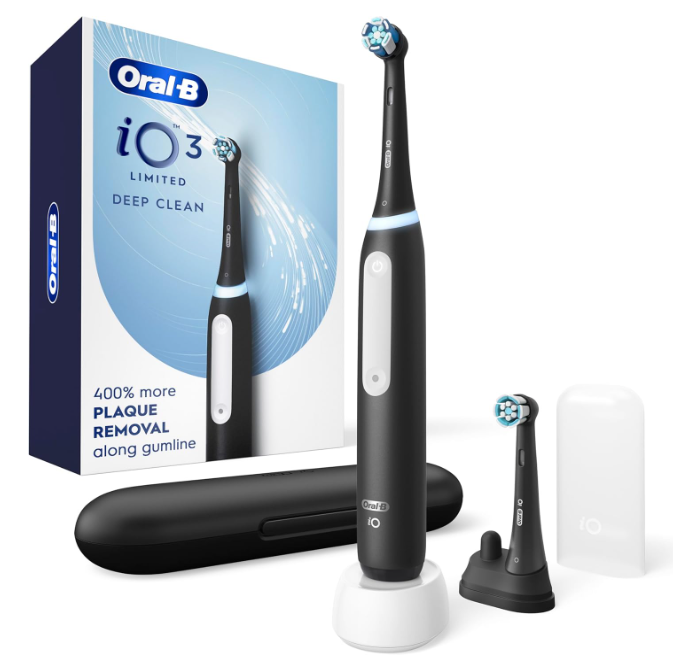
Understanding Why Your Oral-B iO Vibrates 3 Times
If your Oral-B iO toothbrush vibrates 3 times, you’re not alone. Many users notice these brief vibration patterns and immediately wonder whether something is wrong with their toothbrush. The good news is that, in most cases, three vibrations are not a sign of a fault. Instead, they are part of the smart feedback system built into Oral-B iO toothbrushes.
Think of your Oral-B iO as a silent coach standing beside your bathroom mirror. Rather than speaking, it communicates through lights, sounds, and vibrations. Those three quick vibrations are often messages designed to improve your brushing habits and help maintain better oral hygiene.
Understanding these signals can help you get the most out of your toothbrush while avoiding unnecessary concerns.
What Does It Mean When an Oral-B iO Vibrates 3 Times?
The meaning depends on the exact moment the vibrations occur.
Common reasons include:
- Brushing time notifications
- Quadrant change reminders
- Completion of a brushing session
- Smart pressure sensor alerts
- Mode changes
- System notifications
The timing of the vibration pattern is usually the biggest clue.
The Most Common Cause: Brushing Timer Notifications
How the Built-In Timer Works
Most Oral-B iO models include a professional timer designed to encourage dentists’ recommended brushing duration of two minutes.
During a normal session, the toothbrush provides periodic feedback to help you divide your mouth into four equal sections.
Quadrant Reminders
Every 30 seconds, the toothbrush may provide a brief signal indicating that it’s time to move to another section of your mouth.
These notifications help ensure you brush:
- Upper right
- Upper left
- Lower right
- Lower left
This system prevents overbrushing some areas while neglecting others.
Three Vibrations at the End of Brushing
A Signal That You’ve Reached Two Minutes
Many users notice three vibrations right at the end of their brushing session.
This is often the toothbrush’s way of saying:
“Great job. You’ve completed the recommended brushing time.”
Rather than being an error, it’s actually positive feedback.
Why This Feature Matters
Without a timer, most people brush for less than one minute.
The end-of-session notification helps create consistency and improves oral hygiene over time.
Pressure Sensor Notifications
Brushing Too Hard
One of the most advanced features of the Oral-B iO range is the pressure monitoring system.
When excessive force is applied, the toothbrush may provide vibration feedback along with color changes in the Smart Pressure Sensor.
Why Excessive Pressure Is Harmful
Brushing harder does not mean brushing better.
Over time, excessive pressure can contribute to:
- Gum recession
- Tooth sensitivity
- Enamel wear
- Irritated gum tissue
The Oral-B iO is designed to encourage gentle yet effective brushing.
Mode Change Confirmations
Switching Between Cleaning Modes
Depending on your model, your Oral-B iO may include several brushing modes such as:
- Daily Clean
- Sensitive
- Whitening
- Gum Care
- Intense Clean
When switching between modes, vibration patterns may be used as confirmation.
Why Oral-B Uses Vibrations
Vibration feedback is simple, fast, and easy to understand without looking at a screen.
It’s like receiving a tap on the shoulder instead of reading a lengthy message.
Could Three Vibrations Indicate a Problem?
Usually Not
In most situations, three vibrations are completely normal.
However, if the vibrations occur repeatedly without explanation, additional troubleshooting may be useful.
Potential causes include:
- Software glitches
- Battery issues
- Moisture around controls
- Firmware communication errors
Fortunately, these situations are relatively uncommon.
How to Troubleshoot Unexpected Vibrations
Step 1: Restart the Toothbrush
Turn the toothbrush off.
Wait approximately 10 seconds.
Turn it back on and test it again.
A simple restart often resolves temporary glitches.
Step 2: Charge the Battery Fully
A low battery can sometimes create unusual behavior.
Place the toothbrush on its charger and allow it to reach a full charge before testing.
Step 3: Clean the Handle
Residue can accumulate around buttons and sensors.
Gently clean the handle using:
- A damp cloth
- Warm water
- Mild soap if necessary
Avoid harsh chemicals.
Step 4: Check the Brush Head
A poorly attached brush head can occasionally trigger unexpected feedback.
Remove the brush head.
Reattach it securely.
Test the toothbrush again.
Differences Between Oral-B iO Models
Not Every Model Behaves Identically
The Oral-B iO series includes multiple versions, including:
- Oral-B iO3
- Oral-B iO4
- Oral-B iO5
- Oral-B iO6
- Oral-B iO7
- Oral-B iO8
- Oral-B iO9
- Oral-B iO10
Each model may use slightly different vibration patterns and notification systems.
Premium Models Offer More Feedback
Higher-end models often combine:
- Display messages
- Color indicators
- Smartphone app integration
- Enhanced vibration notifications
As a result, the meaning of a vibration pattern can vary slightly between models.
How Smart Features Improve Brushing Habits
Building Better Routines
The vibration notifications are not random.
They’re designed to create healthier brushing habits by helping users:
- Brush longer
- Brush more evenly
- Reduce excessive pressure
- Improve consistency
The Psychology Behind Feedback
Small signals can significantly influence behavior.
Just as a fitness tracker encourages more steps, an Oral-B iO encourages more effective brushing.
When Should You Contact Support?
Signs of a Genuine Issue
Consider contacting support if:
- Vibrations occur constantly
- The toothbrush turns off unexpectedly
- Charging problems develop
- Error lights appear
- Performance noticeably decreases
These symptoms may indicate a hardware issue requiring professional assistance.
Tips for Getting the Most From Your Oral-B iO
Follow Recommended Brushing Techniques
For the best results:
- Hold the brush gently
- Let the brush do the work
- Move slowly from tooth to tooth
- Follow quadrant reminders
- Brush for the full two minutes
Replace Brush Heads Regularly
Worn brush heads reduce cleaning effectiveness.
Most users should replace brush heads every three months.
Final Thoughts
When an Oral-B iO vibrates 3 times, it is usually doing exactly what it was designed to do. In many cases, the vibrations are linked to brushing timers, quadrant reminders, session completion alerts, or smart brushing feedback. Rather than indicating a malfunction, these signals often serve as helpful guidance to improve your daily oral care routine.
The next time your toothbrush vibrates three times, think of it as a friendly nudge rather than a warning. Understanding these signals allows you to use your Oral-B iO with confidence and get the full benefit of its advanced technology.
Frequently Asked Questions
1. Why does my Oral-B iO vibrate 3 times after brushing?
Most commonly, it indicates that you have completed the recommended two-minute brushing session.
2. Is three vibrations a sign of a low battery?
Usually not. Low battery notifications are typically accompanied by specific light indicators.
3. Can brushing too hard cause three vibrations?
In some situations, pressure-related feedback may include vibration alerts alongside pressure sensor lights.
4. Do all Oral-B iO models vibrate 3 times?
Many models use similar feedback patterns, but exact behavior can vary depending on the specific model.
5. Should I be worried if my Oral-B iO vibrates unexpectedly?
Occasional vibrations are usually normal. Persistent or unexplained vibrations combined with other issues may require troubleshooting or support.