
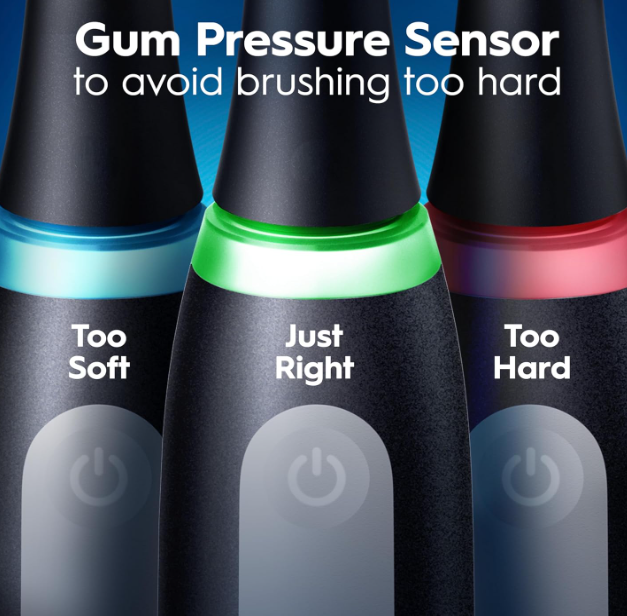
If you own an Oral-B iO3 electric toothbrush, you’ve probably noticed the colored lights that appear during charging or brushing. Among them, the green light is one of the most reassuring indicators because it usually signals that everything is working exactly as intended.
But what does the Oral-B iO3 green light actually mean? Is it related to battery status, charging, pressure control, or something else entirely?
In this comprehensive guide, we’ll explore everything you need to know about the Oral-B iO3 green light, how it works, when it appears, what it signifies, and how to troubleshoot situations when the light doesn’t behave as expected.
Understanding the Oral-B iO3 Light System
The Oral-B iO3 isn’t just another electric toothbrush. It uses a smart light system designed to communicate important information without requiring a display screen.
These lights act like traffic signals for your toothbrush:
- Green generally indicates positive status.
- Red often warns about excessive pressure.
- White and other light patterns may indicate charging activity.
- Flashing lights can communicate different operating conditions.
The green light is particularly important because it provides instant feedback while you brush and charge.
What Does the Oral-B iO3 Green Light Mean?
In most situations, the green light on the Oral-B iO3 indicates one of the following:
- Proper brushing pressure.
- Successful charging completion.
- Normal operating status.
- Positive feedback from the pressure sensor.
The exact meaning depends on when and where the light appears.
Think of the green light as your toothbrush giving you a thumbs-up.
The Green Light During Brushing
A Sign of Correct Pressure
One of the most common reasons you’ll see the green light is during brushing.
The Oral-B iO3 features a smart pressure sensor that helps prevent brushing too aggressively.
When brushing:
- Red light = Too much pressure.
- Green light = Correct pressure.
- No warning = Normal operation.
The green light confirms you’re applying the ideal amount of force against your teeth and gums.
Why Proper Pressure Matters
Many people mistakenly believe that brushing harder cleans better.
In reality, excessive pressure can:
- Wear down enamel.
- Irritate gums.
- Cause gum recession.
- Increase tooth sensitivity.
- Shorten brush head lifespan.
The green light serves as a real-time coach, helping us maintain healthier brushing habits.
The Green Light While Charging
Can the Green Light Indicate a Full Charge?
Yes, depending on the charging stage and specific model behavior.
When charging the Oral-B iO3:
- Flashing lights generally indicate charging in progress.
- A steady green light may indicate the battery is fully charged.
Once the battery reaches maximum capacity, the toothbrush often changes its light behavior to communicate charging completion.
How Long Does Charging Usually Take?
A fully depleted Oral-B iO3 battery typically requires approximately:
| Charging State | Approximate Time |
|---|---|
| Empty to 50% | 6–8 hours |
| Empty to 100% | Around 16 hours |
Actual charging times can vary depending on battery age and charger conditions.
Understanding Oral-B’s Smart Pressure Sensor
The Technology Behind the Green Light
The pressure sensor continuously monitors brushing force.
Inside the handle, sensors detect resistance and movement patterns. When you brush with optimal force, the system activates the green light.
This technology helps eliminate guesswork from daily oral care.
How Accurate Is the Pressure Sensor?
The sensor is surprisingly responsive.
Even slight increases in brushing force can trigger changes in the light indicator.
This allows users to quickly adjust technique before causing unnecessary stress to teeth and gums.
Why the Green Light Is Important for Gum Health
Healthy gums are the foundation of a healthy smile.
The Oral-B iO3 green light encourages gentler brushing habits by rewarding correct technique.
Benefits include:
- Reduced gum irritation.
- Less bleeding.
- Improved comfort.
- Better long-term gum protection.
- More effective plaque removal.
It’s like having a dental hygienist standing beside you during every brushing session.
Can the Green Light Flash?
Steady vs Flashing Green Light
The meaning may vary depending on operating mode.
A steady green light often indicates:
- Proper brushing pressure.
- Fully charged battery.
A flashing green light may indicate:
- Charging completion transition.
- Battery status notification.
- Specific startup sequence.
Always refer to your user manual for model-specific behavior.
What If the Green Light Never Appears?
Possible Causes
If you never see the green light, several factors may be responsible:
- Faulty charging base.
- Battery issues.
- Sensor malfunction.
- Excessive brushing pressure.
- Software irregularity.
- Damaged handle electronics.
Fortunately, most cases are relatively simple to diagnose.
Check Your Brushing Technique
Sometimes the toothbrush isn’t malfunctioning at all.
Users who consistently brush too hard may see red pressure warnings rather than green feedback.
Try:
- Holding the brush lightly.
- Letting the motor do the work.
- Avoiding scrubbing motions.
- Moving slowly across each tooth surface.
You may notice the green light appear more frequently.
How the Green Light Improves Brushing Habits
Instant Feedback Changes Behavior
Behavioral science shows that immediate feedback helps create lasting habits.
The green light provides:
- Real-time correction.
- Positive reinforcement.
- Improved consistency.
- Better brushing confidence.
Over time, many users naturally learn the correct pressure without consciously thinking about it.
A Built-In Brushing Coach
The Oral-B iO3 essentially acts as a personal coach.
Instead of guessing whether you’re brushing correctly, the toothbrush continuously provides guidance through its light system.
That guidance can make a meaningful difference over months and years of daily use.
Green Light vs Red Light
Understanding the Difference
The contrast between green and red is intentional.
Green Light
- Correct pressure.
- Safe brushing.
- Positive feedback.
- Gum-friendly cleaning.
Red Light
- Excessive force.
- Potential gum damage.
- Need to reduce pressure.
- Brushing adjustment required.
This simple color system is easy to understand at a glance.
Can Battery Problems Affect the Green Light?
Yes, Sometimes
A deteriorating battery may interfere with normal indicator functions.
Common symptoms include:
- Inconsistent lighting.
- Charging interruptions.
- Reduced runtime.
- Delayed indicator response.
If your Oral-B iO3 is several years old, battery wear could contribute to unusual light behavior.
How to Reset the Oral-B iO3
Basic Reset Procedure
If indicator lights behave unexpectedly:
- Remove the brush from the charger.
- Allow the battery to discharge partially.
- Recharge completely.
- Restart normal operation.
Many temporary software glitches resolve after a full charge cycle.
Common Misunderstandings About the Green Light
Myth #1: Green Means the Brush Is On
Not necessarily.
The green light usually relates to pressure sensing or charging status rather than simply indicating power.
Myth #2: Green Means Maximum Cleaning Power
Incorrect.
The green light primarily relates to proper brushing pressure and healthy brushing technique.
Myth #3: Green Means the Battery Is Always Full
Not always.
While a green light can indicate full charging status, context matters.
The meaning depends on whether you’re brushing, charging, or starting the toothbrush.
Tips for Getting the Most From the Oral-B iO3
Follow These Best Practices
To maximize performance:
- Charge fully before first use.
- Replace brush heads every three months.
- Clean the handle regularly.
- Avoid excessive brushing force.
- Store the charger in a dry location.
- Monitor indicator lights during use.
These simple habits help maintain consistent performance.
When Should You Contact Support?
Warning Signs to Watch For
Consider contacting support if:
- The green light never appears.
- The pressure sensor stops responding.
- Charging indicators fail completely.
- Battery life drops dramatically.
- Lights behave erratically after troubleshooting.
Persistent issues may indicate hardware failure requiring professional assistance.
The Future of Smart Toothbrush Feedback
The Oral-B iO series demonstrates how oral care technology continues to evolve.
Rather than simply spinning a brush head, modern electric toothbrushes now:
- Monitor pressure.
- Guide technique.
- Improve consistency.
- Promote healthier habits.
The green light may seem like a small feature, but it represents a significant step toward smarter oral hygiene.
Conclusion
The Oral-B iO3 green light is generally a positive indicator that signals proper brushing pressure, normal operation, or charging completion depending on the situation. During brushing, it acts as a helpful guide, confirming that you’re applying the ideal amount of force to protect your teeth and gums while maintaining effective cleaning.
Instead of being just a decorative feature, the green light functions as a real-time coaching tool that helps build healthier brushing habits. By understanding what the green light means and how it interacts with the toothbrush’s smart pressure sensor, we can get the most out of our Oral-B iO3 and enjoy better oral health over the long term.
FAQs
1. What does the green light on the Oral-B iO3 mean?
The green light typically indicates proper brushing pressure or, in some situations, a fully charged battery.
2. Is the green light a sign that my Oral-B iO3 is fully charged?
Yes, a steady green light may indicate charging completion depending on the operating state of the toothbrush.
3. Why does my Oral-B iO3 show a green light while brushing?
It means you’re using the correct amount of pressure and brushing safely.
4. What should I do if the green light never appears?
Check your charging system, brushing technique, battery condition, and pressure sensor functionality.
5. Does the green light improve brushing results?
Indirectly, yes. It helps you maintain proper pressure, protecting gums and improving overall brushing effectiveness.