
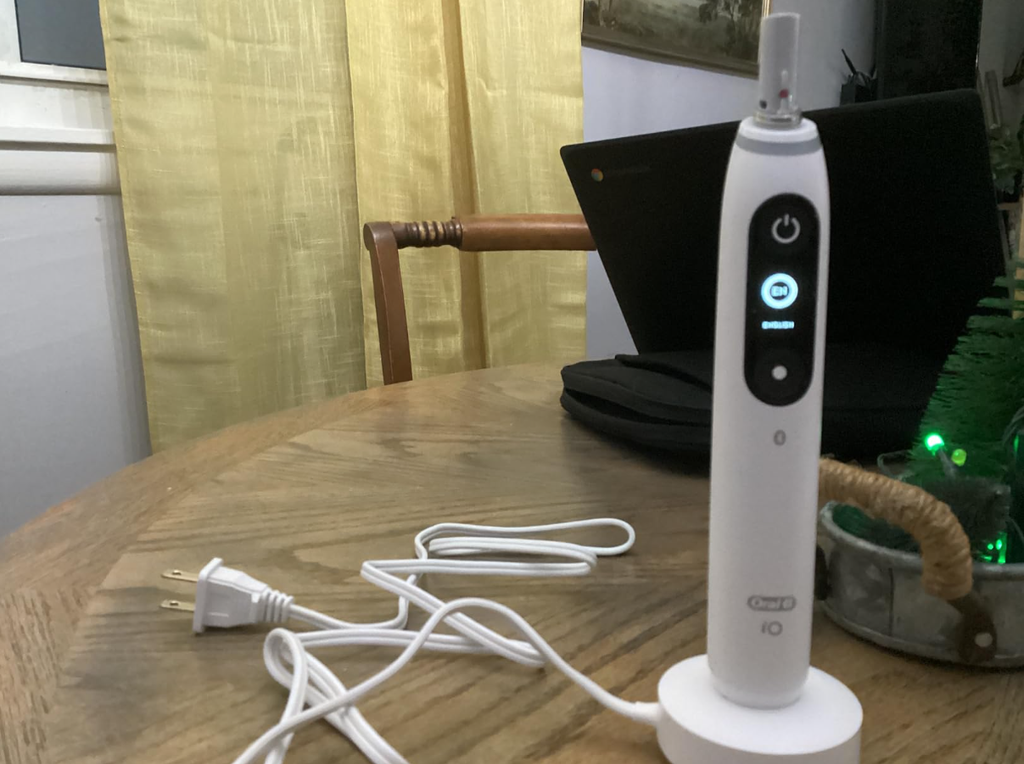
The Oral-B iO7 is a premium electric toothbrush designed to deliver an advanced cleaning experience with magnetic drive technology, multiple brushing modes, a smart pressure sensor, and Bluetooth connectivity. However, even a high-quality electric toothbrush can occasionally develop problems.
If your Oral-B iO7 is not working, you might notice that it refuses to turn on, stops vibrating, fails to charge, or displays a blank screen. Sometimes, the toothbrush seems completely dead despite being placed on its charger.
Fortunately, not every malfunction means that your toothbrush needs replacing. Many problems are related to battery charging, temporary electronic glitches, dirty components, or connectivity issues.
In this complete troubleshooting guide, we’ll explore the most common Oral-B iO7 problems, explain what causes them, and walk through practical solutions that may get your toothbrush working again.
Why Is My Oral-B iO7 Not Working?
When an Oral-B iO7 stops working, the first step is identifying which part of the toothbrush is affected.
The iO7 contains several electronic components, including a rechargeable battery, magnetic drive system, interactive display, pressure sensor, and Bluetooth module. A problem involving one component does not necessarily mean that the entire toothbrush has failed.
Here are some common symptoms and their possible causes.
| Problem | Possible cause | Recommended action |
|---|---|---|
| Toothbrush won’t turn on | Empty battery or electronic malfunction | Fully charge and attempt a reset |
| Toothbrush won’t charge | Power outlet, charger, or battery problem | Check the outlet and magnetic charger |
| Screen stays black | Discharged battery or display problem | Charge and wake the display |
| Brush head not vibrating | Brush-head obstruction or drive failure | Clean and inspect the brush head |
| Toothbrush stops unexpectedly | Battery issue or automatic shutoff | Check the battery and operating time |
| Battery drains quickly | Battery deterioration or charging problem | Complete a charging test |
| Bluetooth not connecting | App or pairing problem | Reconnect through the Oral-B app |
| Pressure sensor not working | Settings issue or sensor malfunction | Check the brushing mode and sensor |
Most troubleshooting should begin with the simplest possibilities before assuming that an internal component has failed.
1. Oral-B iO7 Not Turning On
One of the most frustrating problems occurs when you press the power button and nothing happens.
The toothbrush may have worked normally the previous evening but refuse to start the next morning.
Check Whether the Battery Is Completely Discharged
A fully depleted battery is one of the first possibilities to investigate.
When the battery is critically low, the Oral-B iO7 may stop running its motor and eventually stop displaying information.
Try these steps:
- Connect the original magnetic charger to a working electrical outlet.
- Place the toothbrush upright on the charging base.
- Allow it to charge for at least 30 minutes if the battery is completely empty.
- Look for a charging indication on the handle.
- Leave the toothbrush charging for approximately three hours to complete a normal full charging cycle.
- Remove the handle from the charger and press the power button.
A fully discharged toothbrush may not respond immediately after being placed on its charger.
If the battery was the problem, the toothbrush should eventually regain enough power to start.
Wake Up the Toothbrush
Sometimes, the toothbrush may be powered down or in a mode that makes it appear unresponsive.
Placing the iO7 on its magnetic charger can help wake it.
Afterward, remove the handle and try pressing the power button normally.
If the display activates but the motor refuses to start, the problem may involve something other than battery charging.
Check the Power Button
The power button may become difficult to operate if toothpaste residue or dried debris accumulates around the handle.
Inspect the button for visible contamination.
Clean the exterior gently with a damp cloth, then dry it thoroughly.
Avoid using sharp objects to press around the button or trying to open the handle.
If the button remains stuck or does not register presses, professional service may be necessary.
2. Oral-B iO7 Not Charging
If your Oral-B iO7 is not charging, the issue may involve the power supply, magnetic charging base, or internal battery.
The iO7 uses a magnetic charging system, and a typical full charge takes approximately three hours.
Check the Electrical Outlet
Before assuming the toothbrush is defective, test the electrical outlet.
Plug in another suitable device to confirm that electricity is available.
Bathroom outlets sometimes depend on a separate switch, particularly when they are integrated into bathroom cabinets.
If the outlet does not work, move the charger to another compatible outlet.
Inspect the Magnetic Charger
Examine the charging base for visible damage, moisture, or toothpaste residue.
Check that the toothbrush sits upright and correctly on the charger.
The charger should be placed on a stable surface where the toothbrush can remain properly positioned.
Avoid placing the charging base directly on a metal surface, as metal can interfere with some toothbrush charging systems.
Clean the Charging Base
Residue around the bottom of the toothbrush can interfere with proper positioning.
To clean it:
- Disconnect the charger from the electrical outlet.
- Remove the toothbrush.
- Wipe the charging base using a slightly damp cloth.
- Clean the exterior of the toothbrush handle.
- Allow everything to dry.
- Reconnect the charger and place the toothbrush back on it.
Never immerse the charging base or its electrical components in water.
Try Another Compatible Charger
If you have access to another genuine, compatible Oral-B iO magnetic charger, you can use it to help identify the problem.
If the toothbrush charges normally on the second charger, the original charging base may be faulty.
However, if it fails to charge on either charger, the problem may be inside the toothbrush.
Always verify charger compatibility rather than assuming that chargers from other Oral-B toothbrush ranges will work.
3. Oral-B iO7 Screen Not Working
The Oral-B iO7 features an interactive black-and-white display that shows brushing information, battery status, cleaning modes, and other notifications.
If the screen stops displaying information, the toothbrush may appear broken even when other functions are operating normally.
Why Is the Oral-B iO7 Screen Black?
Possible explanations include:
- The battery is completely discharged.
- The display has automatically switched off to conserve power.
- The toothbrush has experienced a temporary software problem.
- The display or its internal connections have failed.
How to Fix a Blank Display
Start by placing the toothbrush on its magnetic charger.
Allow it to complete a charging cycle, then remove it and press the power button.
Remember that the iO7 display normally switches off after a period of inactivity. A dark screen does not automatically indicate a malfunction.
If the toothbrush vibrates normally but the display never lights up, the issue may be isolated to the display.
A persistent display failure typically requires authorized inspection or repair.
4. How to Reset the Oral-B iO7
Resetting the toothbrush may help resolve certain software-related problems, particularly when the display is responsive but settings or functions are behaving unexpectedly.
There are different reset procedures depending on the situation.
Factory Reset Through the Display
If your Oral-B iO7 screen is working, you can access its factory reset feature.
Follow these steps:
- Wake up the toothbrush.
- Use the mode button to navigate through the available options.
- Find the Settings menu.
- Enter the menu using the power button.
- Navigate to the factory reset option.
- Select it and follow the on-screen instructions.
A factory reset returns supported device settings to their defaults and may require you to configure the toothbrush again.
It can also require reconnecting the brush to the Oral-B app.
Try a Button Reset
Oral-B also describes a button-based reset on some iO toothbrushes.
This involves holding the power button for approximately 10 seconds until the lights indicate a reset.
However, reset behaviour can vary between models and firmware versions. Consult the instructions for your exact iO7 version before relying on this procedure.
If your toothbrush is completely unresponsive, charging it should remain the first troubleshooting step.
Important: Resetting cannot repair a physically damaged motor, a failed battery, or broken internal electronics.
5. Oral-B iO7 Not Vibrating or Brush Head Not Moving
Another problem occurs when the toothbrush powers on but the brush head does not move correctly.
In some cases, the handle makes a humming noise without producing normal brushing movement.
Check the Brush Head
Remove the brush head while the toothbrush is switched off.
Inspect it for accumulated toothpaste, dried residue, or visible damage.
Rinse the brush head thoroughly under running water.
Also inspect the connection area at the top of the handle.
Clean away visible residue gently, without inserting objects into the mechanism or forcing any moving parts.
Reattach the Brush Head
Once everything is clean:
- Position the compatible brush head over the handle shaft.
- Push it into place gently.
- Make sure it is properly seated.
- Start the toothbrush and check whether normal movement returns.
A small gap between the brush head and the handle is normal on the iO system.
Do not force the head down in an attempt to eliminate this gap.
Try a Different Brush Head
An old, damaged, or incorrectly fitted brush head can affect brushing performance.
The Oral-B iO7 requires compatible Oral-B iO replacement heads.
If another genuine iO brush head works normally, replacing the original head may solve the problem.
If the handle still makes unusual noises or fails to transmit movement, a mechanical problem may be present.
Do not operate the toothbrush without an attached brush head.
6. Oral-B iO7 Suddenly Stopped Working While Brushing
Does your Oral-B iO7 switch off unexpectedly in the middle of brushing?
This behaviour can have several explanations.
Low Battery
The toothbrush may stop because the remaining battery charge is insufficient to operate the motor.
A low battery can also cause reduced motor speed.
If the toothbrush stops and displays a battery warning, place it on the charger.
Automatic Shutoff
The Oral-B iO7 is designed to stop automatically after approximately five minutes of continuous operation.
Therefore, if the toothbrush switches off after an unusually long brushing session, it may be functioning as designed.
Simply press the power button to begin another session.
However, if the toothbrush switches off after only a few seconds despite having a full battery, that is not typical behaviour.
Possible Internal Fault
If the iO7 repeatedly shuts down shortly after starting, even after a complete charge, there could be a problem with the battery, power button, or internal electronics.
In this situation, authorized technical support is preferable to attempting a home repair.
7. Oral-B iO7 Battery Not Holding a Charge
Battery problems can develop gradually as rechargeable batteries age.
You might notice that your toothbrush still charges but operates for less time than it did when new.
Signs of Battery Deterioration
Common warning signs include:
- Needing to charge the toothbrush much more frequently than before.
- The battery indicator dropping unusually quickly.
- The toothbrush shutting down after a short period.
- Charging apparently completing but providing very little runtime.
- The motor becoming weak despite recent charging.
Battery life depends on brushing frequency, session duration, cleaning mode, and battery condition.
How to Test the Battery
Charge the toothbrush fully for approximately three hours.
Then use it normally for several brushing sessions while monitoring its behaviour.
If the battery repeatedly drains after very little use, the toothbrush may have a battery-related fault.
A single shorter-than-expected charge does not necessarily confirm battery failure, so consistent behaviour matters.
Can You Replace the Oral-B iO7 Battery?
The Oral-B iO7 contains an internal rechargeable battery that is not designed for routine replacement by the user.
Opening the sealed handle may damage its water protection and create electrical safety risks.
If battery deterioration is suspected, contact Oral-B or an authorized repair provider to determine the available service or replacement options.
8. Oral-B iO7 Bluetooth Not Working
The Oral-B iO7 supports Bluetooth connectivity with the Oral-B mobile app.
This feature provides additional brushing feedback and tracking.
However, Bluetooth connectivity problems can sometimes prevent the app from recognizing the toothbrush.
Why Won’t My Oral-B iO7 Connect?
Possible causes include:
- Bluetooth is disabled on the smartphone.
- Bluetooth has been disabled in the toothbrush settings.
- The Oral-B app needs updating.
- The phone is connected to another device or previous brush configuration.
- Required phone permissions have not been granted.
- The toothbrush battery is too low.
How to Reconnect the Oral-B iO7
Try the following:
- Charge the toothbrush sufficiently.
- Enable Bluetooth on your smartphone.
- Open the Oral-B app.
- Navigate to the toothbrush or device connection section.
- Select the option to connect a toothbrush.
- Wake up the iO7 and ensure Bluetooth is enabled in its settings.
- Follow the instructions displayed in the app.
The exact app menu names may vary between software versions.
If pairing fails, restart the smartphone and repeat the process.
You can also check whether the Oral-B app requires additional permissions.
Does the Oral-B iO7 Work Without Bluetooth?
Yes.
The Oral-B iO7 can perform its standard brushing functions without being connected to a smartphone.
Bluetooth is not required to operate the motor or select normal brushing modes.
Therefore, if the toothbrush works correctly but the app cannot connect, you are dealing primarily with a connectivity issue rather than a complete toothbrush failure.
9. Oral-B iO7 Pressure Sensor Not Working
The Smart Pressure Sensor is one of the most useful features of the Oral-B iO7.
It helps users identify whether they are applying too much or too little pressure while brushing.
The light ring normally uses the following colours:
| Light colour | Meaning |
|---|---|
| Green | Recommended brushing pressure |
| Red | Excessive pressure |
| White or selected operating colour | Insufficient pressure or normal operating indication, depending on the situation |
| Blue | Bluetooth-related indication |
| Orange | Error notification; check the display |
How to Check the Pressure Sensor
Start the toothbrush normally with a brush head attached.
While brushing, observe whether the light changes when you apply different levels of gentle pressure.
Avoid pressing excessively just to trigger the red warning.
If the light does not respond as expected, check the selected brushing mode and app settings.
Certain operating features and modes can affect pressure-sensor feedback.
When the Sensor May Be Faulty
If the sensor never responds during normal operation, even after checking the settings and restarting the toothbrush, it could have an electronic fault.
Since the sensor is integrated into the handle, authorized servicing may be necessary.
10. Oral-B iO7 Making Strange Noises
The magnetic drive system in the iO7 produces a characteristic operating sound.
However, a sudden change in sound can suggest that something is wrong.
Common Causes
Unusual noises may result from:
- A loosely fitted brush head.
- Toothpaste residue around the brush-head connection.
- A damaged or worn brush head.
- Internal mechanical damage.
- A toothbrush that has been dropped.
How to Fix Unusual Vibrations or Noises
Begin by switching off the toothbrush and removing the brush head.
Clean the connection area and inspect the head for damage.
Reinstall it properly and test the toothbrush.
If the noise continues, try another compatible brush head.
A persistent grinding, rattling, or irregular mechanical sound may indicate an internal problem.
Stop using the toothbrush if it produces severe vibration, visible damage, or other signs of unsafe operation.
11. Oral-B iO7 Not Working After Getting Wet
The Oral-B iO7 is designed for ordinary bathroom use and can withstand exposure to water during normal brushing and cleaning.
However, this does not mean that every component is completely protected against all forms of water exposure.
Can Water Damage the Oral-B iO7?
Potential problems can develop if the handle has been physically damaged or its protective seals have deteriorated.
The magnetic charger is also a separate electrical accessory and should never be submerged.
What to Do After Unusual Water Exposure
If the toothbrush has been exposed to excessive water or begins malfunctioning afterward:
- Stop using it.
- Disconnect the charger from its electrical outlet if it is safe to do so.
- Wipe the handle exterior with a clean, dry cloth.
- Inspect it for visible cracks or other damage.
- Avoid connecting damaged or wet charging equipment to electricity.
- Contact support if the problem persists.
Do not open the handle or attempt to dry its internal components with a hair dryer or other heat source.
If you suspect water has entered the sealed handle, professional inspection is the safest option.
12. Oral-B iO7 Not Working After Being Dropped
Dropping an electric toothbrush can damage its internal electronics or mechanical components.
Even when the exterior looks normal, a strong impact may affect the motor, display, battery connections, or control buttons.
Signs of Impact Damage
Look for the following:
- Cracks in the handle.
- An unresponsive display.
- Unusual vibration or rattling.
- Problems attaching the brush head.
- Intermittent power loss.
- Charging failures that began immediately after the fall.
What Should You Do?
Inspect the toothbrush carefully.
If the handle is visibly damaged, stop using it.
Oral-B also recommends replacing the brush head after the toothbrush has been dropped, even if the head appears undamaged.
If normal charging and other basic troubleshooting procedures do not restore operation, contact an authorized service centre.
Oral-B iO7 Troubleshooting: Which Solution Should You Try First?
Not every problem requires the same troubleshooting process.
The following table summarizes a practical order of action.
| Symptom | First step | Next step |
|---|---|---|
| Completely dead toothbrush | Charge for three hours | Check charger and outlet |
| Screen not turning on | Wake the handle | Complete a full charge |
| Charging indicator absent | Check power supply | Test compatible charger |
| Weak motor performance | Check battery level | Inspect the brush head |
| Toothbrush stops after seconds | Recharge fully | Seek support if persistent |
| Bluetooth not connecting | Enable Bluetooth | Reconnect through app |
| Pressure sensor not responding | Check brushing mode | Inspect settings and seek support |
| Battery drains unusually fast | Perform a charging test | Request battery assessment |
| Strange mechanical noise | Clean and refit brush head | Try another genuine iO head |
We recommend following these steps in order rather than immediately assuming that the toothbrush is beyond repair.
How to Prevent Oral-B iO7 Problems
Although electronic failures cannot always be prevented, regular maintenance can reduce avoidable problems.
Clean the Toothbrush After Every Use
Rinse the brush head thoroughly and remove toothpaste residue from the handle exterior.
Periodically remove the brush head and clean the connection area.
Allow the components to dry appropriately.
Keep the Charger Clean
Clean the charging base regularly after disconnecting it from electricity.
Avoid allowing excessive toothpaste residue or moisture to accumulate.
Position the charger on a stable surface away from standing water.
Replace the Brush Head Regularly
Oral-B generally recommends replacing brush heads approximately every three months, or earlier when the bristles are worn.
A worn or damaged brush head can reduce brushing effectiveness and may contribute to unusual operating behaviour.
Avoid Dropping the Handle
The iO7 contains delicate internal components.
Store it securely in an upright position or in its protective travel case when transporting it.
Follow the Recommended Charging Instructions
Use the supplied charger or an officially compatible replacement.
A normal full charge takes about three hours.
Avoid exposing the battery to excessive heat, and follow the manufacturer’s storage recommendations.
When Should You Contact Oral-B Customer Support?
Basic troubleshooting can solve several common problems, but some faults require professional attention.
Contact Oral-B customer support if:
- The toothbrush remains completely unresponsive after a full charge.
- Charging does not work with a verified compatible charger.
- The display is permanently blank despite the motor operating.
- The toothbrush repeatedly switches off after a few seconds.
- The motor produces abnormal sounds or fails to drive the brush head.
- The handle has visible damage or suspected internal water exposure.
- The rechargeable battery no longer provides reasonable operating time.
Have the product model, purchase date, and proof of purchase available when contacting support.
Is the Oral-B iO7 Covered by Warranty?
Warranty coverage depends on the country, purchase date, and applicable warranty terms.
In many markets, Oral-B offers a two-year manufacturer’s warranty for eligible toothbrushes, although coverage and extended-warranty arrangements may vary.
If your iO7 is still covered, an authorized repair or replacement could be available for qualifying defects.
Avoid opening or modifying the toothbrush yourself, as unauthorized repairs may affect warranty coverage and safety.
Is It Worth Repairing an Oral-B iO7?
Whether repair is worthwhile depends on the age of the toothbrush, the type of fault, and the available service options.
If your iO7 is relatively new and covered by warranty, contacting the manufacturer is usually the best starting point.
For older toothbrushes, consider the likely cost of repair compared with replacement.
When Repair Makes Sense
Repair or authorized servicing may be worthwhile when:
- The toothbrush is covered by warranty.
- The problem involves an easily replaceable accessory.
- The manufacturer offers a suitable service solution.
- The main handle remains in otherwise good condition.
When Replacement Might Be Better
Replacing the toothbrush may be more practical when:
- The handle has significant physical damage.
- The internal battery has failed and service is unavailable or uneconomical.
- The magnetic drive system has suffered serious mechanical damage.
- The toothbrush has several recurring electronic faults.
- The repair cost approaches the price of a replacement.
Remember that you may only need a replacement charger or brush head rather than an entirely new toothbrush.
Frequently Asked Questions About Oral-B iO7 Not Working
1. Why is my Oral-B iO7 not turning on even after charging?
If your Oral-B iO7 does not turn on after approximately three hours on a working, compatible charger, the issue may involve the charger, internal battery, power button, or electronic circuitry.
Try another suitable power outlet, inspect the charging base, and attempt the supported reset procedure if possible.
If the handle remains unresponsive, contact Oral-B support.
2. How do I reset my Oral-B iO7 when it is not working?
If the interactive display is functioning, navigate to Settings and select the factory reset option.
Some iO models also support a button-based reset by holding the power button for approximately 10 seconds, but the procedure should be verified for your specific model.
If the toothbrush is completely dead, first charge it fully and confirm that the charger is functioning.
3. Why is my Oral-B iO7 charging but not working?
A toothbrush may display charging activity but still fail to operate if the battery cannot retain sufficient energy or another internal component is defective.
First, complete the full charging cycle.
Then remove the handle from the charger and try switching it on.
If it remains unresponsive, check for damaged buttons or other visible problems and seek authorized support.
4. Can an Oral-B iO7 battery be replaced?
The battery inside the Oral-B iO7 is not designed to be replaced by the user.
Opening the handle can damage the toothbrush, compromise its water resistance, and create safety risks.
If the battery has failed, contact Oral-B to determine whether an authorized service or replacement option is available.
5. How long should an Oral-B iO7 last before it stops working?
There is no guaranteed lifespan for every Oral-B iO7.
Its useful life depends on battery ageing, frequency of use, storage conditions, maintenance, and accidental damage.
With proper care, an electric toothbrush may provide several years of service, but individual results vary.
If the device develops a fault within its warranty period, contact the manufacturer before purchasing a replacement.
Conclusion: How to Fix an Oral-B iO7 That Is Not Working
If your Oral-B iO7 is not working, there is no need to assume immediately that the toothbrush is permanently damaged.
In many cases, the best place to start is with the battery and charging system. A completely discharged battery, an improperly positioned handle, or a faulty power outlet can make the toothbrush appear unresponsive.
We recommend charging the device for approximately three hours, checking the magnetic charger, cleaning the brush-head connection, and attempting a supported reset when appropriate.
For Bluetooth problems, reconnecting the toothbrush through the Oral-B app may restore normal functionality. If the screen, motor, or pressure sensor is malfunctioning, more targeted troubleshooting can help identify the affected component.
However, if the toothbrush continues to fail after basic checks, the problem may involve the internal battery or electronics.
In that situation, contacting Oral-B customer support is the safest approach, especially if the toothbrush is still covered by warranty.
With careful troubleshooting and regular maintenance, many common Oral-B iO7 problems can be identified without unnecessary replacement costs.