
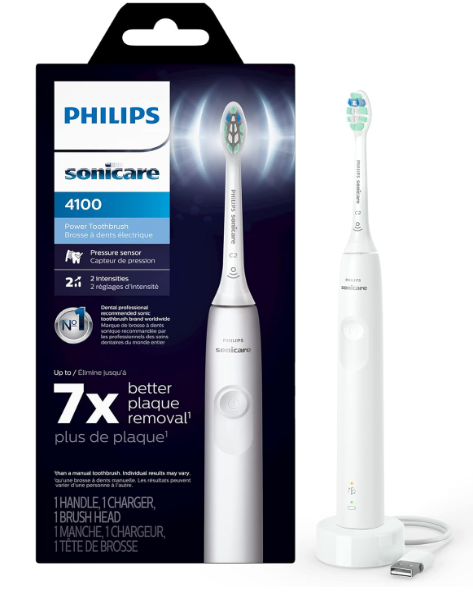
There’s something oddly frustrating about picking up our toothbrush in the morning only to realize it’s completely dead. No vibration. No blinking light. No reassuring hum. Just silence. If your Philips Sonicare 4100 is not charging, you’re not alone—and thankfully, this issue is often easier to fix than it first appears.
The good news? Most charging problems come down to a handful of common causes. Sometimes it’s the charger base. Sometimes moisture sneaks where it shouldn’t. And occasionally, the battery itself waves the white flag after years of loyal service.
In this guide, we’ll walk through every major reason why a Philips Sonicare 4100 may stop charging, how to diagnose the issue step by step, and what you can realistically do to fix it before spending money on a replacement.
Why the Philips Sonicare 4100 Stops Charging
Electric toothbrushes are surprisingly simple devices. Underneath the sleek plastic shell, there’s a rechargeable battery, a charging coil, and internal circuitry managing power flow.
When charging fails, one of these areas usually breaks down.
Here are the most common culprits:
- Faulty charging base
- Damaged power adapter
- Battery degradation
- Moisture buildup
- Dirty charging contacts
- Internal corrosion
- Power outlet problems
- Software or safety lock issues
Think of the charging system like a relay race. If one runner drops the baton, the entire process stops.
Signs Your Sonicare 4100 Is Not Charging
Before jumping into fixes, we need to identify the symptoms.
Common Warning Signs
No LED Light Appears
Normally, the toothbrush should show a flashing indicator when charging. If there’s no light at all, power may not be reaching the handle.
The Brush Vibrates Weakly
A weak vibration often means the battery has almost no remaining capacity.
Battery Dies Quickly After Charging
If the toothbrush charges but only lasts one or two uses, the battery may be deteriorating.
The Charger Feels Warm but Nothing Happens
This can indicate energy transfer failure or an internal battery issue.
Intermittent Charging
Sometimes the light flickers on and off randomly. This usually points to alignment or charger problems.
How the Philips Sonicare 4100 Charging System Works
Understanding the basics makes troubleshooting much easier.
The Philips Sonicare 4100 uses inductive charging. Instead of metal pins making direct contact, energy transfers wirelessly between coils.
It’s similar to how some smartphones charge wirelessly.
The System Includes
- Charging base
- Internal charging coil
- Rechargeable lithium-ion battery
- Power management circuitry
Because there are no exposed metal charging pins, the design is safer around water. But that also means diagnosing problems can feel less obvious.
First Things to Check Before Assuming the Toothbrush Is Broken
Sometimes the solution is embarrassingly simple.
We’ve all been there.
Check the Wall Outlet
Try plugging another device into the same outlet.
If the outlet isn’t working, the toothbrush obviously won’t charge.
Inspect the Power Cord
Look for:
- Frayed wires
- Bent connectors
- Loose fittings
- Burn marks
Even small cable damage can interrupt charging.
Reseat the Toothbrush Properly
The handle should sit straight on the charger.
A crooked position can prevent energy transfer.
Leave It Charging Longer
If the battery drained completely, the toothbrush may need:
- 12 hours
- Sometimes even 24 hours
before signs of life return.
Clean the Charger and Handle Thoroughly
One of the biggest overlooked causes is grime buildup.
Toothpaste residue, hard water minerals, and moisture can interfere with charging efficiency.
How to Clean the Charger
Step 1: Unplug the Charger
Safety first.
Step 2: Wipe With a Damp Cloth
Use warm water and mild soap.
Avoid harsh chemicals.
Step 3: Clean the Bottom of the Handle
Residue often accumulates around the base.
Step 4: Dry Everything Completely
Moisture trapped underneath can create charging inconsistencies.
A dry toothbrush charges happier—like a plant finally getting sunlight after a storm.
How Long Should the Sonicare 4100 Battery Last?
Under normal conditions, the battery should last:
- Around 2 weeks
- Based on brushing twice daily
Battery lifespan overall is usually:
- 3 to 5 years
After that, degradation becomes noticeable.
Signs of Battery Aging
- Short runtime
- Slow charging
- Overheating
- Sudden shutdowns
Rechargeable batteries are like sneakers. At first they feel unstoppable. Eventually, they lose their bounce.
What If the Charging Light Blinks But the Brush Won’t Turn On?
This situation confuses many users.
A blinking light means the charger detects the handle, but power isn’t successfully reaching usable battery levels.
Possible Causes
Battery Failure
The most common reason.
Internal Circuit Damage
A surge or moisture intrusion may damage electronics.
Firmware Safety Lock
Rare, but possible after severe battery drain.
Resetting the Philips Sonicare 4100
Sometimes electronics simply need a reset.
Simple Reset Method
- Place toothbrush on charger
- Leave it charging for 24 hours
- Press the power button for 10 seconds
- Remove from charger
- Try powering on again
This occasionally revives dormant units.
Can Water Damage Prevent Charging?
Absolutely.
Even though Sonicare toothbrushes are water resistant, they are not invincible.
Repeated exposure to:
- Hot showers
- Submersion
- Cracked seals
- Excess humidity
can slowly allow moisture inside.
Signs of Water Damage
Rust Around the Base
Corrosion is a major warning sign.
Strange Smell
Burnt or metallic odors often indicate internal damage.
Random Vibrations
Moisture can create electrical shorts.
How to Dry Out a Wet Sonicare 4100
If you suspect water intrusion:
What To Do
- Remove brush head
- Dry exterior thoroughly
- Leave upright in a dry area
- Avoid charging immediately
- Wait 24–48 hours
What NOT To Do
- Don’t microwave it
- Don’t use a hairdryer on high heat
- Don’t freeze it
Yes, people actually try these things.
Testing the Charger Base
The charger itself often fails before the toothbrush.
How To Tell If the Charger Is Bad
Try Another Compatible Sonicare Handle
If another handle charges correctly, the problem is likely your toothbrush.
Use Another Charger
Borrow a compatible Sonicare charger if possible.
Check for Heat
A completely cold charger may indicate no power flow.
Are All Sonicare Chargers Compatible?
Not always.
Some models use slightly different power specifications.
Using incompatible chargers may cause:
- Slow charging
- No charging
- Overheating
Stick with official Philips chargers whenever possible.
Battery Replacement: Is It Worth It?
Technically, yes.
Practically? It depends.
Battery Replacement Challenges
The Sonicare 4100 is not designed for easy battery swaps.
Opening it often requires:
- Prying tools
- Soldering
- Adhesive removal
For many users, replacing the entire handle becomes the simpler route.
When the Battery Is Completely Dead
Sometimes lithium-ion batteries reach a point of no return.
Common Symptoms
- No response whatsoever
- No charging light
- Charger works with other handles
- Brush suddenly died overnight
At this stage, battery chemistry may have permanently failed.
How to Extend the Life of Your Sonicare 4100 Battery
Prevention matters more than repair.
Best Practices
Avoid Constant Charging
Leaving the toothbrush permanently on the charger may accelerate battery wear over years.
Keep It Dry
Wipe the base regularly.
Use the Original Charger
Cheap third-party chargers can create unstable voltage.
Avoid Extreme Temperatures
Heat is the enemy of lithium-ion batteries.
Common User Mistakes That Cause Charging Problems
We rarely talk about the human factor—but it matters.
Mistake #1: Storing It Wet
Water pools around the base.
Mistake #2: Wrapping the Cord Tightly
This strains internal wiring.
Mistake #3: Using Cheap Adapters
Voltage inconsistencies can damage electronics.
Mistake #4: Dropping the Toothbrush
Internal components may loosen even if the exterior looks fine.
Should You Repair or Replace the Sonicare 4100?
Here’s the honest answer.
Repair Makes Sense If
- The charger alone failed
- The brush is under warranty
- The battery issue is minor
- You enjoy DIY repairs
Replacement Makes Sense If
- Battery is fully dead
- Internal corrosion exists
- The handle overheats
- Unit is older than 4–5 years
Sometimes replacing the toothbrush saves time, stress, and frustration.
Warranty Information for Philips Sonicare 4100
Many Sonicare models include:
- 2-year limited warranty
If your toothbrush stopped charging unexpectedly, contacting Philips Support may be worthwhile.
You May Need
- Proof of purchase
- Serial number
- Photos or videos of the issue
Philips occasionally replaces defective units surprisingly quickly.
How to Know If the Toothbrush Is Actually Charging
Sometimes users mistake slow charging for failure.
Typical Charging Indicators
Flashing Light
Usually means active charging.
Solid Light
Often indicates full charge.
No Light
Usually indicates:
- No power
- Alignment issue
- Dead battery
Different production batches may behave slightly differently.
Can a Power Surge Damage the Sonicare Charger?
Yes.
A sudden electrical spike can damage:
- Charging coil
- Internal circuitry
- Power adapter
Protection Tips
- Use surge protectors
- Avoid unstable outlets
- Unplug during severe storms
Electric toothbrushes may seem tiny, but they’re still sensitive electronics.
Third-Party Chargers: Smart or Risky?
Budget chargers flood online marketplaces.
Some work fine.
Others are terrible.
Potential Risks
- Inconsistent voltage
- Weak charging efficiency
- Excess heat
- Shortened battery lifespan
If you buy third-party accessories, choose reputable brands with verified reviews.
Travel Habits That Damage Sonicare Batteries
Frequent travelers sometimes unknowingly shorten battery life.
Common Travel Issues
Leaving It in Hot Cars
Heat destroys lithium-ion longevity.
Packing It Wet
Moisture gets trapped inside travel cases.
Using Weak Hotel Outlets
Inconsistent power delivery can affect charging.
A toothbrush is oddly like a passport—it survives adventures better when treated carefully.
What Users Online Often Misdiagnose
Many people instantly assume:
“The battery is dead.”
But in reality, the issue is often:
- Dirty charger
- Bad outlet
- Misalignment
- Damaged cable
Starting with simple troubleshooting saves money.
The Most Effective Troubleshooting Sequence
If we wanted the fastest path to diagnosis, we’d follow this order:
- Check outlet
- Clean charger and handle
- Reposition handle
- Try another outlet
- Leave charging 24 hours
- Test another charger
- Inspect for moisture
- Consider battery failure
Simple. Systematic. Effective.
When to Contact Philips Support
Reach out if:
- The toothbrush is under warranty
- Charger emits burning smell
- Unit overheats excessively
- Battery drains instantly
- The brush won’t respond after all troubleshooting
Official support may save you from buying unnecessary replacements.
Final Thoughts on Philips Sonicare 4100 Not Charging
A non-charging toothbrush can feel disproportionately annoying. It interrupts routines, starts mornings badly, and somehow makes us feel less organized than we actually are.
But most charging issues with the Philips Sonicare 4100 are fixable—or at least diagnosable—without professional repair.
In many cases, the solution is surprisingly small:
- Cleaning residue
- Drying moisture
- Replacing a charger
- Resetting the device
And if the battery truly has reached the end of its life, that’s not failure—it’s simply the natural aging process of rechargeable electronics.
A toothbrush may not seem glamorous, but when it works properly, it quietly supports something important: daily confidence. And that’s worth fixing.
FAQs
Why is my Philips Sonicare 4100 flashing but not charging?
This often indicates the charger detects the toothbrush, but the battery cannot properly accept power due to degradation or internal issues.
How long should I leave my Sonicare 4100 charging?
A full charge typically takes around 24 hours if the battery is fully depleted.
Can I replace the battery in a Sonicare 4100?
Yes, but it requires disassembly and soldering, making it difficult for most users.
Why does my toothbrush only work for a few minutes after charging?
This is usually a sign of battery wear and reduced battery capacity.
Is it safe to use third-party Sonicare chargers?
Some are safe, but poor-quality chargers can damage battery performance or reduce charging efficiency.